1
AVSIM Online - Flight Simulation's Number 1 Site!
FSX Realism options.
FSX Controls settings.
FSX Security Warning.
Trusted module screen.
Panel
Unlike most flight simulator aircraft developers these days that are eliminating the 2D panel in favor of just
a 3D virtual cockpit, Dodosim has included both. The 2D panel is excellent and has all of the required
sub-panels open that are needed for the proper start up and shut down procedures. The 2D panels are
also used for the highlighted procedures during the fully automatic & manually cued startup and
shutdown trainer modes. I will explain more about this later in the review.
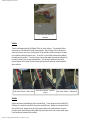
The virtual cockpit is also nice with instruments that are clear and easy to read. For the most part,
labels and other lettering on the panels are also easy to read and not blurry looking. The only two labels
on the panels that were hard for me to read were the Turbine Over-Temp Test button on the 2D panel
and the Turbine Over-Temp Test button and the NAV/GPS switch on the virtual panel. The lettering
on these labels was grey in color on top of a gray background, which for me make’s the lettering hard
to read.
On the virtual panel I like that Dodosim included the Panel/Function shortcuts instead of having the
pilot access these functions via menu. It is much easier for me to access these subpanels & functions
using the shortcut instead of via the menu. This is true for all aircraft not just the Dodosim 206.
Since I am a novice at flying helicopters, I did most of my flying during the day. In order to review
the lighting I took a short flight at dusk. When it became dark enough outside for the panel lighting
to become visible, the results are wonderful. The panel lighting is excellent.
http://www.avsim.com/pages/0810/Flight1/Dodo.html (3 of 9) [16/08/2010 5:13:11 PM]