1
STEP 4: Setting up the judgement criteria
To set up the judgement criteria whether a product is considered suitable
(OK) or not good (NG), several options are available.
2. Manual tolerance adjustment (good sample only)
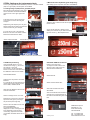
After setting up the inspection area select JUDGMENT.
1.Teaching with good (OK) and not good (NG) sample
Place the good (OK) sample in front of the
sensor and select AUTO ADJUSTMENT
from the menu on the upper right hand
side.
Press OK Teach for the good sample
several Times or teach several good
samples
Replace the good sample by the not good
sample and press NG Teach several times
or teach several not good samples.
To verify the success of the teaching,
Return to main menu and select from the
TEST field CONTINUOUS TEST.
Select Graphics+Details
Select the upper value and enter the accepted
tolerance level.
A high number ensures a stable process.
Setting a low number may be useful for detecting minor errors e.g. label displacements.
Test results of good and not good sample
To switch into normal operation return to main menu and select RUN
3. RGB value processing
Using the RGB values is recommended when using e.g. the ‚worst
OK sample‘ or the ‚best
NG sample‘ to set the thresholds.
Return to main menu and select from
the INSPECT field CALCULATION.
OPTIONAL: RGB out via ethernet
Return to the main menu.
To assign the RGB values to the
ethernet output, select from the
IN/OUT field I/O SETTING.
Select EXPRESSION
Select Ethernet
Select the first expression and select
MODIFY.
It is optional but recommended to first
rename this and the following expressions to RED, GREEN, BLUE
Select OUTPUT DATA SET
After selecting MODIFY select DATA
and COLOUR DATA.
Select the first data and select
SETTINGS.
Select R average AR for red colour.
Repeat this for the second and third
expression with green (G average
AG) and blue (B average AB)
Select COLOR DATA and Select R
average AR for red.Repeat this for
the 2nd and 3rd data with green and
blue.
Return to the calculation screen and
select JUDGEMENT.
The actual RGB values are
displayed. For each value upper and
lower thresholds can be entered
numerically. (adjustment via slider
not possible as default values are too
large)
OMRON Europe B.V.
Wegalaan 67 – 69
2132 JD Hoofddorp
The Netherlands
AFBN0049_FQ-2CLR
Tel.: +31 235681-300
Fax: +31 235681-388
www.industrial.omron.eu