1
TO CHANGE THE DISPLAY MODE
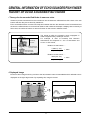
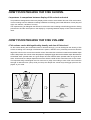
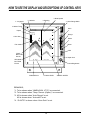
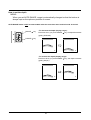
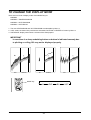
There are four kinds of display mode. Press MODE key for:
NORMAL
NORMAL + ZONE EXPANSION
NORMAL + B/L EXPANSION
NORMAL + HISTORICAL
1. The rate of EXPANSION and B/L EXPANSION are selectable by Menu 2.
2. In B/L mode, the bottom line positions are selectable, BOTTOM or CENTER of screen by Menu 2.
3. HISTORICAL display shows about 10 times of the sweep speed.
IMPORTANT
In case there is a sharp undulating bottom or bottom is indicated unevenly due
to pitching or rolling, B/L may not be displayed properly.
EXP
NORMAL
B/L
NORMAL
HST
MODE key
N
22
EXP
B/L
HST
NORMAL