1
WSP40 USER MANUAL
FEATURES
CONTENTS
•Bluetooth Speaker
•USB Charging Cord
•Suction cup
•Instruction Manual
Enjoy music wirelessly
•Switch between calls and music - you will not miss the
incoming call whie listening to music
•Answer & end a call at click of a button.
•Redial last number
•Volume Control
•Media Control (pause/play, previous track/next track)
•Connects to last connected device automatically
SAFETY INSTRUCTIONS
Read this manual carefully before putting the appliance into
operation and keep this manual for future reference.
Do not insert any metal object into the device.
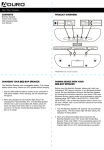
PRODUCT OVERVIEW
1 Power ON/OFF button
2 LED indicator
3 Long press: volume up; short press: next track
4 Long press: volume down; short press: previous track
5 Phone button
6 Play/Pause button
7 Built-in microphone
8 Micro USB charging port
The Aqua Sound WSP40 Bluetooth speaker comes with a built
in rechargeable battery. Before using it for the first time we
recommend you charge the battery fully.
1.Connect the USB cable to the USB port on the unit.
2.Connect the other end of the USB cable to a USB port on a PC
or an AC/DC adapter. The LED indicator turns on to indicate that
the battery is being charged. When the battery is fully charged,
the LED indicator will turn off
PAIRING
1.Turn off the speaker. Make sure the speaker is powered off
before continuing
2.Press and hold the Power ON/OFF button until the red LED
light flashes - the Bluetooth speaker is ready for pairing.
3.Turn on your Bluetooth enabled device and activate the
Bluetooth function the put it in pairing mode
4.Search for the Bluetooth device - “AQUASOUND WSP40” will
show up.
5.Pair your Bluetooth enabled device with AQUASOUND
WSP40. If a password is needed, type in “0000”. After the
speaker is paired with your device, connect it.
Tips:
Once the speaker is paired and connected to your Bluetooth
device, it automatically connects the next time as long as the
Bluetooth setting on your device is turned on.
CONTROLLING CALLS
Answer a call: Press the Phone button.
End a call: Press the Phone button.
Reject a call: Press and hold the Phone button for around 2
seconds.
Redial the last number: Press the phone button twice quickly.
CONTROLLING MUSIC
Playing Music: Once the device is connected choose nusic file
to play. You can use the speaker to FWD & RWD to the next file.
To pause simply press the play button. Press again to play.
SPECIFICATIONS
Bluetooth operating distance: 33 feet
Working time: Music time 3 hours, talk time 3 hours
Charging input power: DC 5V
Charging time: Approx 3 hours
IP grade: Px4 (Splashproof)
BATTERY: LI-PO 500MA
Note: Battery life & charging time may vary, based on usage & types
of devices used.