1
BEFORE YOU BEGIN
• Confirm that nothing is missing from your shipping carton. Refer to Carton Contents on page 7.
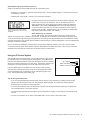
SONAFLEX
VIDEO
TUTORIALS
• Record the serial number (see rear panel) in the space provided inside the cover of this manual.
• Activate your warranty and receive firmware update notifications: www.audioauthority.com/register.
• Read this instruction manual to become familiar with the configurations and functions of this product.
Essential Setup Tasks
1. Thoroughly plan your system layout including wire runs, audio inputs and speaker locations.
2. Mount the SF-16M in an equipment rack (page 28); pull and label all audio and control cabling.
2. Connect audio sources to SF-16M inputs and speakers to amplified outputs of the SF-16M.
3.Set all outputs to an acceptible volume level for testing (all outputs are muted by default).
Note: If the SF-16M will not be used to control volume, set all outputs to -0dB (full volume).
4. Set up the SF-16M using the PC configuration software* (or with the front panel for basic setup).
5. Recommended: connect a control system via the Ethernet, RS-232 or IR ports of the SF-16M. Program your control
system using SF-16M serial commands (listed on page 29) or IR codes*.
6. Test all audio inputs at all speaker locations.
* Available for download at audioauthority.com
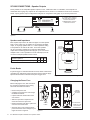
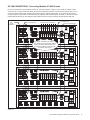
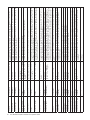
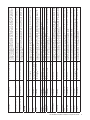
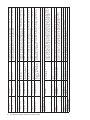
SYSTEM CONNECTION AND PLANNING WORKSHEET
Unit #: 1
2
3
4
Use this worksheet to plan and document all audio input and output connections to the SF-16M.
RCA or DB-25 Inputs:
1
L
2
R
3
L
4
R
5
L
6
R
7
L
8
R
Mono
q
Mono
q
Mono
q
Mono
q
9
L
10
R
11
L
12
R
13
L
14
R
15
L
16
R
Mono
q
Mono
q
Mono
q
Mono
q
FlexPort Inputs:
1
17
L
18
R
Mono
19
L
20
R
q
2
Mono
9
L
10
R
11
L
12
R
13
L
14
R
15
L
16
R
Mono
q
Speaker Outputs:
1
L
2
R
3
L
4
R
5
L
6
R
7
L
8
R
q
Mono
q
Mono
q
Mono
q
Mono
q
Mono
q
Mono
q
Mono
q
SF-16M Matrix Amplifier Installation and Operation Guide
9