1
Setting up
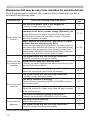
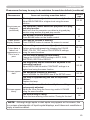
Setting up
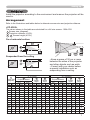
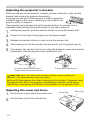
Install the projector according to the environment and manner the projector will be
used in.
Arrangement
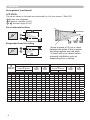
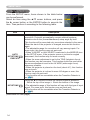
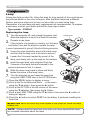
Refer to the illustrations and tables below to determine screen size and projection distance.
<CP-X205>
The values shown in the table are calculated for a full size screen: 1024×768
a Screen size (diagonal)
b Projection distance (±10%)
c1 , c2 Screen height (±10%)
On a horizontal surface
Suspended from the ceiling
• Keep a space of 30 cm or more
between the sides of the projector
and other objects such as walls.
• Consult with your dealer before
a special installation such as
suspending from a ceiling.
a
Screen size
(diagonal)
inch
m
30
40
50
60
70
80
90
100
120
150
200
250
300
0.8
1.0
1.3
1.5
1.8
2.0
2.3
2.5
3.0
3.8
5.1
6.4
7.6
4 : 3 screen
b
c1
Projection distance
Screen
height
min.
max.
m inch m inch cm inch
0.9
1.2
1.5
1.8
2.1
2.4
2.7
3.0
3.6
4.5
6.0
7.5
9.0
34 1.1
46 1.4
58 1.8
70 2.1
81 2.5
93 2.8
105 3.2
117 3.6
140 4.3
176 5.4
235 7.2
294 9.0
352 10.8
41
56
70
84
98
112
126
140
169
211
282
353
423
41
16
55
22
69
27
82
32
96
38
110 43
123 49
137 54
165 65
206 81
274 108
343 135
411 162
c2
Screen
height
cm inch
5
6
8
9
11
12
14
15
18
23
30
38
46
2
2
3
4
4
5
5
6
7
9
12
15
18
16 : 9 screen
b
c1
Projection distance
Screen
height
min.
max.
m inch m inch cm inch
1.0
1.3
1.6
1.9
2.3
2.6
2.9
3.2
3.9
4.9
6.5
8.1
9.8
38 1.1
50 1.5
63 1.9
76 2.3
89 2.7
102 3.1
115 3.5
127 3.9
153 4.7
192 5.8
256 7.8
320 9.8
384 11.7
45
61
76
91
107
122
138
153
184
230
307
384
461
39
15
51
20
64
25
77
30
90
35
103 41
116 46
129 51
154 61
193 76
257 101
322 127
386 152
c2
Screen
height
cm inch
-1
-2
-2
-2
-3
-3
-4
-4
-5
-6
-8
-10
-12
0
-1
-1
-1
-1
-1
-1
-2
-2
-2
-3
-4
-5