1
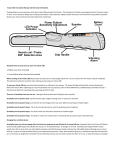
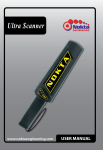
Device Introduction
360° Detection Tip
Control Unit
LED Flashlight
Power / Sensitivity (+)
Mode / Sensitivity (-)
Speaker
LED
Battery Compartment
IP Rating:
IP67 - Dust resistant and waterproof up
to 1 meter depth.
Battery Installation
Install the battery as shown in the picture paying
attention to the (-) and (+) polarity symbols. The
device will not work if the battery is not installed
correctly.
9V
Battery
After the battery is installed, attach the control unit in
the correct direction and twist to secure. To assure a
water tight seal, be sure that this cover is closed
completely.
Turning on the Device
Press the green button once. The LED will light up and
a long warning tone will be heard. Nokta Pointer is
ready for use. Be sure there are no metal objects
around at start up.
Turning off the Device
Press and hold the green button. Six (6) short warning
tones will be heard and the device will turn off.
Mode Change
Press the gray button for 3 seconds. A short warning
tone will be heard. The device will switch from the audio
mode to the vibration mode. When pressed and held
again, it will switch to the audio and vibration mode.
If pressed again, it will revert back to the audio mode. A short
warning tone will be heard with each mode change. Nokta
Pointer will start at the same setting the next time you start up
the device.
Sensitivity Increase
Sensitivity has ten (10) levels. The factory preset is
level 5. Click the green button to increase sensitivity.
The device will indicate the sensitivity change with a
short beep each time you click the green button. When
maximum sensitivity is reached, the device will produce a long
beep.
Sensitivity Decrease
Click the gray button to decrease sensitivity. The
device will produce a short beep each time. When
minimum sensitivity is reached, the device will
produce a long beep. Nokta Pointer will start at the last adjusted
sensitivity level next time it is turned on.
Lost Alarm & Auto-Shut Off
After 5 minutes of inactivity, the pinpointer will emit an audible
alarm and LED will start flashing. After 5 minutes of alarm, the
device will shut off automatically to save battery life.
Detection Tip
Nokta Pointer's detection
area is between the tip and
the hand grip. The coil
provides 360° detection. This helps you to locate targets quickly
and easily in the hole. If you hold the device horizontally, you can
scan a larger area. This allows you to cover a broader area to
quickly reach your target.
360° Detection Tip
LED Flashlight
Press the green and gray buttons simultaneously to
turn it on, press again to turn off. Nokta Pointer will
start at the same setting at start up.
Low Battery Indicator
When the battery is low, Nokta Pointer will give 5 short-long
beeps at start up. The device may continue to work for a short
period of time.
Coil Interference Blocking
When it is switched off, it disconnects the coil's magnetic
transmission and eliminates interference with another metal
detector. This also prevents the device from being detected as a
target.
Replaceable Hard-Shell Cases
Nokta Pointer comes with two hard-shell cases. One of the cases is
also designed to allow for digging.
Usage
When a target is detected, Nokta Pointer will produce an audio
and/or vibration alert. The rate of the pulsing audio or vibrations will
increase as it gets closer to the target and it will decrease as it is
moved away.
TECHNICAL SPECIFICATIONS
Working Frequency
: 11.6KHz
Metal Detection
: Audio and/or vibration alert
Sensitivity
: User adjustable
Auto-Shut Off
: Yes
Coil Interference Blocking : Yes
Dimensions
: 24x4.8x4.8cm (9.4''x1.9''x1.9'')
(including the hard-shell digger case)
Detection Tip
Weight
: 9.3cm ( 3.7'')
: 235gr (8.3oz)
Working Temperature
Battery
Battery Life
: -20°C/+50°C (-4°F/+122°F)
: 9V Alkaline Battery
: Up to 30 Hours
(including the battery and hard-shell digger case)