1
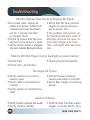
Troubleshooting
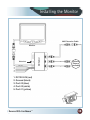
Monitor Displays Blue Screen & Displays No Signal
• Do a hard reset, unplug all
• Verify that the blue positive
cables and power cables from
trigger on power harness is
multiplexer (silver box) leave
put to power 12v+.
out for 1 minute and then
If the problem still persists, verre-connect them.
ify that alternate ports work. If
alternate ports do not work, re• Check to ensure that the connection to the camera is tight. move Blue Trigger wire from
12V+ and select alternate chan• Verify camera cable is plugged
nels.
into port labeled Backup Camera
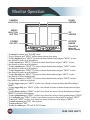
Monitor Will Not Power-Up (no backlight on power button)
• Check fuse
• Check 12v+ to monitor
• Check ground connection
• Verify camera is on correct
camera input
• Verify cable is connected to
monitor
• Verify camera is connected to
cable
• Connect known working
camera and cable to monitor.
• Verify Blue trigger is receiving
power
• Verify chosen camera has audio
• Verify volume setting
• Confirm that the Blue audio
No Image On Screen
Audio on Camera
22
trigger is connected to 12v+
REAR VIEW SAFETY