1
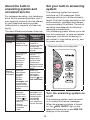
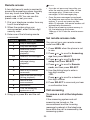
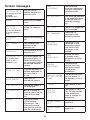
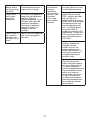
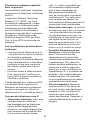
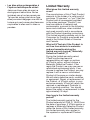
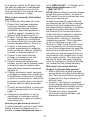
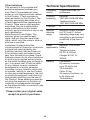
Screen messages
Calling HS X
(for models with two
or more
handsets only)
You are calling
another handset (for
intercom calls).
Ended
You have just ended
a call.
HS X is
calling
(for models with two
or more handsets
only)
Another handset is
calling (for intercom
calls).
Incoming
call
There is an incoming
call.
INT needs 2
HS
Two handsets are
required for an
intercom call.
Intercom
The handset is on an
intercom call.
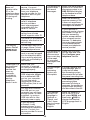
Intercom to
(for models with
three or more
handsets only)
You have started the
intercom process or
started transferring a
call, and need to enter
the desired handset
number.
Line in use
A system handset or
another telephone on
the same line is
in use.
New
voicemail
There are new
voicemail message(s)
from your telephone
service provider.
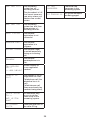
No battery
You place the handset
in the telephone base
or charger without
installing a battery
in it.
No line
There is no telephone
line connected.
No message
There are no
message in the
answering system.
No old
messages
There are no old
messages in the
answering system.
You have no old
messages to be
deleted.
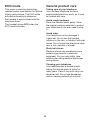
Not
available
Another handset
is already in the
phonebook or caller
ID log.
Number
repeated
The telephone
number you have
entered is already
stored in the
phonebook.
Out of range
or no pwr at
base
The telephone base
has lost power, or
the handset is out of
range.
List empty
There are no
phonebook entries.
Low battery
The battery needs to
be recharged.
Phone
The handset is on a
call.
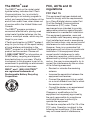
Microphone
on
MUTE is turned off
and the person on the
other end can hear
you.
Put in
charger
The battery is very
low. Put the handset
in the telephone
base or charger for
recharging.
Muted
You have turned
off the handset
microphone. The
other party cannot
hear you but you can
hear the other party.
Quiet mode
off
The quiet mode is
turned off.
Quiet mode
on
The quiet mode is
turned on.
34