1
TABLE OF CONTENTS
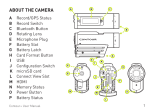
CAMERA DIAGRAM KEY
QUICK START GUIDE
2
CAMERA OVERVIEW
2
SETTING UP
3
CAUTIONS AND WARRANTY
4
CONTACT
6
A Record Status
B Record Slider
C Record Slider Lock
D Rotating Lens
E Laser Line
FMicrophone
G Status Button
N
QUICK START
1
2
3
4
5
Slide the Door Lock to the left so the red
icon isn’t showing.
Slide the camera door up to open.
Insert the microSD Card.
Close the camera door.
Slide the Door Lock to the right to lock it closed.
4
Slide the Record Slider forward to record.
Slide it back to stop recording.
H Reset Button
IUSB
J microSD Card Slot
K Card Format Button
L Door Lock
M Memory Status
N Battery Status
C
D
M
A
H
I
F
D
G
L
F
J
A
K
2
USER MANUAL