1
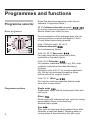
Control Panel
“开始/暂停”
,,
Start/Pause button
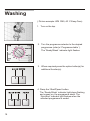
For starting/pausing the wash cycle (programme
must have been selected).
,,
Programme selector
For switching the machine on and off and
for selecting the programme.
Can be rotated in either direction.
The programme selector does not rotate
while the programme is running the
programme sequence is electronically
controlled.
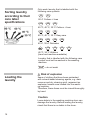
Indicatolr lights
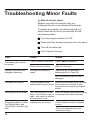
Indicate the status of the washing machine:
Press buttons for additional functions
(Where required to supplement the programme)
“准备/洗涤”
强力去污 Intensive Stains: Increase the
programme duration.
额外漂洗 Extra Rinse: Additional rinse cycle.
Ready/Wash Indicate light flashes, if the
programme is selected; is on, the programme
is running.
“漂洗”
Rinse indicator light is on, the rinsing cycle
is running.
“脱水/结束”
Spin/End indicator light is on, the spinning
cycle is running; flashes, if the selected programme is ended.
Additional options can be combined before the
programme is started.
The indicator lights of the buttons come on, if
the additional options are active.
Switch off additional option: press button again.
7