1
HARDWARE INSTALLATION
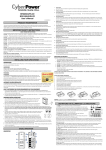
VERTICAL/TOWER INSTALLATION
Step 1: Rotate the Multifunction LCD Module
Step 2: Attach the base stands
Unscrew the right panel of the power module. Separate the right panel
from the UPS. Gently lift the LCD module out. Rotate it to the tower
orientation. Reinstall it for a tower configuration.
Secure the tie bracket with the screws (M5X8*4pcs). Tighten the screws
(M5X12*4pcs) of the base stands (rackmount ears) onto the bottom of
the power module and the Battery module.
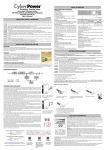
Step 3: Attach dust covers
Insert dust covers into the rackmount ear screw holes that are not being
used.
SAFETY PRECAUTIONS
CAUTION! Installation environment should be in a temperature and
humidity controlled indoor area free of conductive contaminants. Do not
install this UPS where excessive moisture or heat is present (Please see
specifications for acceptable temperature and humidity range).
CAUTION! Never install a UPS, or associated wiring or equipment,
during a lightning storm.
CAUTION! Do not work alone under hazardous conditions.
CAUTION! In case of the risk of electric shock, do not remove the top
cover.
CAUTION! The battery can energize hazardous live parts inside even
when the AC input power is disconnected.
3
Copyright © 2014 CyberPower Systems, Inc.