1
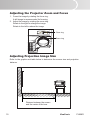
Adjusting the Projector Zoom and Focus
1.
2.
Focus the image by rotating the focus ring.
A still image is recommended for focusing.
Adjust the image by rotating the zoom ring.
Rotate to the right to enlarge the image.
Rotate to the left to reduce the image.
Zoom ring
Focus ring
Adjusting Projection Image Size
Refer to the graphic and table below to determine the screen size and projection
distance.
Distance between the screen
and the center of the lens
19
ViewSonic
PJ658D