1
Section 24 – Scheduling Options
•
The opening and closing windows are programmed in the daily schedule, but the holidays
themselves are defined in Holiday Schedule Programming in #80 Menu Mode.
Temporary Schedule
•
•
•
•
The temporary schedule provides a method for the end user to override the daily and
holiday schedules.
It consists of one opening window and one closing window for each day of the week.
The schedule takes effect for up to one week, after which it is automatically deactivated.
This schedule is programmed using the #81 Temporary Schedule Menu Mode.
Additional Schedules
•
•
Additional opening and closing schedules can be programmed using Time-Driven Event
Programming. For example, a schedule for normal store openings/closings can be
programmed with a daily open/close schedule, and another open/close schedule for a
lunch hour can be programmed using the time-driven event schedule programming.
Refer to Time-Driven Events later in this section for detailed information.
Open/Close Reports by Exception
• The system can help reduce communication traffic to the central station by using the
Open/Close Reports by Exception feature.
• The Open/Close by Exception option suppresses these reports from being sent to the
central station if an arm or disarm is done within the expected time window. Reports
are only sent if the arm or disarm occurs outside the assigned time window.
• The system keeps a record of all openings/closings in its event log.
• If a disarming occurs during a closing window (a person who arms the system forgets
something and has to reenter), the Opening report (although outside of the opening
window) will not be sent (as long as that disarming occurs within the closing window).
•
This option is programmed in partition-specific program field 2✱09.
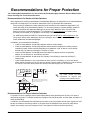
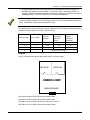
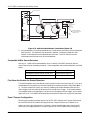
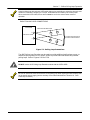
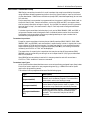
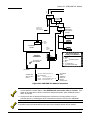
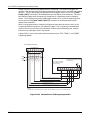
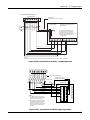
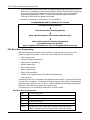
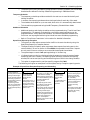
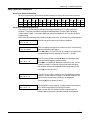
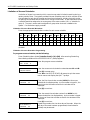
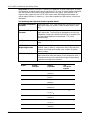
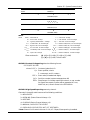
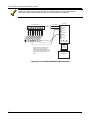
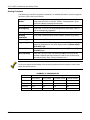
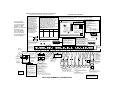
The following chart gives an example of how the Open/Close by Exception reporting works.
Example of Open/Close Exception Reporting and Scheduling
6:01PM
5:59AM
Early Opening reports will
be sent if system is
manually disarmed before
opening window begins.
* Early and Late Opening
and Closing reports are
programmable options in
the Report Code
programming section.
They are not dependent
on the programming of
the Exception Reporting
option.
6AM
9AM
Opening Window
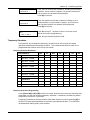
No reports sent if
system disarmed
during this time
window.
If an arming occurs, a
Closing report is sent
to the central station
regardless of how the
Exception Reporting
option is set.
9:01AM
3:59PM
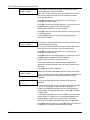
Auto-disarm delay begins.
Auto-disarm occurs after delay
(if auto-disarm is enabled).
4PM
6PM
Closing Window
No reports sent if
system is armed*
Missed Opening reports will be during this time
sent if manual disarming has not window.
occurred at expiration of
* or disarmed if user
opening window.
needs to re-enter
Late Opening reports will be
premises.
sent if disarm occurs after the
opening window expires.
Early Closing reports will be sent
if manual arming occurs before
the closing window begins.
* Missed Opening/Closing type
reports are programmed in the
Report Code programming
section. The Exception
Reporting option must be set for
these to be sent.
6:01PM
5:59AM
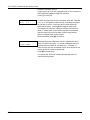
Auto-arm delay begins.
Auto-arm warning begins.
Auto-arm occurs after
warning expires (if autoarm is enabled).
Missed Closing reports will
be sent if manual arming
has not occurred at
expiration of closing
window.
Late Closing reports will be
sent if system is manually
armed after the closing
window expires.
24–5