1
Note: Player continues to use battery power after it’s been turned off, if unit isn’t used for a
while, the battery might need to be charged. Recharging the player at least 2 – 3 times in
three months for maintain the battery life and performance.
a.
b.
Charging the Battery:
You can charge the player battery in two ways:
Connect player to your computer. Or,
Use the USB power charger. (not included)
Connection and Charging:
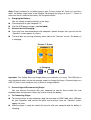
Once you have connected player with computer / power charger, then you will see the
“Connect” screen appear on screen,
The level bars are running in battery status icon at the “Connect” screen. The battery is
in charging.
“Connect” Screen
In Charging
Important: The battery does not charge when your computer is in sleep. The USB port on
most keyboards does not provide enough power to charge the player. Connect player to a
USB 2.0 port on your computer only to prevent charge problem.
3.
Connecting and Disconnecting Player
You can connect the player with your computer to transfer those media files and
recorded voice memos when necessary, and to charge the battery.
a.
To Connecting Player
To connect player to your computer, plug the connector of USB Cable into a USB port
on your computer, and connect the other end to player, then the “Connect” screen
appear for view.
Now the player is ready for media files transfer with your computer and the battery is
charging.