1
FLASH166, User's Manual
2.1. Program a Flash Device
Usage:
FLASH166 /P filename [optionlist]
The specified file is programmed to the flash memory. Finally a checksum is
calculated. If the checksum fails, the contents of the flash memory is written to a
file with the extension DMP.
The type of flash device is normally detected by the software. When autodetect
fails you should use the /DEVICE= option to set the right flash device. The
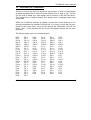
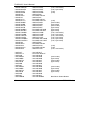
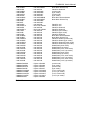
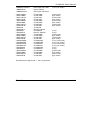
known devices are shown in chapter 1.7 “Supported flash devices”. Don’t mix
different types of flash devices on targets with two 8 bit devices.
If programming overlaps with the chip internal components (80C166:
FA00..FFFF, C16x:E000..FFFF) this region is skipped.
Options:
/DEVICE=devicename
The device is detected automatically by switching to autoselect mode. In case
of trouble you should select the device by using this parameter to avoid
autodetection. Under WinNT the autodetection can take some seconds.
Specifying the option /DEVICE= results in faster operation.
/NOMAN
If you use a flash device which is identical to one of the supported parts, but is
from a different manufacturer, with this option you can suppress the comparison
of the manufacturer identification code. We recommend to use this option
always together with the /DEVICE= option to avoid failures in autodetection.
/DEVICE-BASE=hhhhhh3
By default a device start address of 0h for a 80C166 or 400000h (=4MByte) for
all other members of the microcontroller family is used for accesses to the flash
device. This is done, to minimize conflicts with the chip internal components
(SFRs, CAN-Controller, CPU core).
Default:
/DEVICE-BASE=40000= (or 0)
Abbreviation:
/DB=
3
hhhhhh=number base is HEX
FLSH166b.doc
25