1
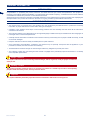
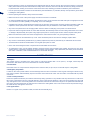
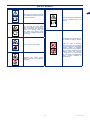
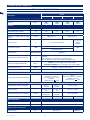
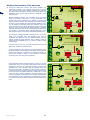
Setting up of the perimeter wire
Before installing the perimeter wire, it is necessary to check the
entire surface of the lawn. Make any necessary adjustments to the
grassy surface during the laying of the perimeter wire in order to
allow the robot to function correctly.
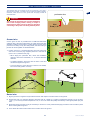
track for laying the perimeter wire
1. Evaluate the best method for returning to the charging station
according to the instructions described in the chapter “REENTRY METHOD TO THE CHARGING STATION”.
2. Evaluate whether a special installation of the perimeter wire
is necessary according to the instructions described in the
chapter “SET-UP OF THE ROBOT’S QUICK RE-ENTRY TO
THE CHARGING STATION”.
3. Preparation and defining of the work areas.
4. Installation of the perimeter wire.
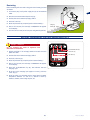
5. Installation of the charging station and power supply unit. When
laying the perimeter wire, respect the installation direction
(clockwise) and the rotation direction around the flowerbeds
(counter-clockwise), As shown in the figure.
Re-entry method to the charging station
The robot can return to the charging station in two different ways
based on what is set in the user menu under the field “Settings
– Re-entry to Base.” Use the “On the Wire” method only when
there are numerous obstacles inside the garden and near the
perimeter wire (within 2 meters). In all other cases it is better to use
the “V-METER” method for the quickest re-entry to the charging
station.
“Follow wire”. This method of re-entry to the charging station
commands the robot to follow the perimeter wire, positioning its
wheels on either side of the wire. If this method is activated, there
is no need to prepare the “Recall on Wire” as described below.
“V-METER”. By setting this method of re-entry to the charging
station, the robot runs along the perimeter wire at an indicative
distance ranging from a few centimetres to one meter (3.2 '),
touching it every now and again in the curved sections until it
recognises the “Recall on the Wire” necessary to properly steer the
robot to the charging station or to guide it along narrow sections.
Once the “Recall On the Wire” has been recognised, the robot will
follow the perimeter wire, positioning its wheels on either side of
the wire for a distance of around 10 meters. (33 ').
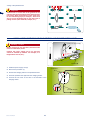
step
lower 2 mt.
5 cm.
2 mt.
4-10 mt.
2 mt.
4-10 mt.
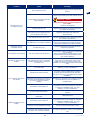
The “Recall on the wire” not only indicates to the robot that it is near the charging station, but also of a narrow passage or of an
arrow for quick re-entry to the charging station.
As soon as a “Recall” is recognised, the robot will follow the perimeter wire at low speed, and with more precision for around 10
meters (33 '). It will then return to the “V-Meter” re-entry mode if it does not encounter the charging station or the arrow for quick
re-entry.
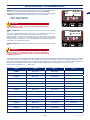
Follow these instructions to install the “Recall.”
•
•
•
•
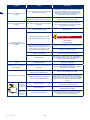
The “Recall” is a piece of wire that extends for around 2 m (6.6 ') with a distance of 5 cm (1.96 ") between each wire.
The “Recall” must be positioned at a distance of 4 and 10 m. (13.2 - 33 ') in front of the charging the station.
The “Recall” must be positioned at a distance of 2 m. (6.6 ') in front of any narrow passages.
The “Recall” must be positioned in the section in front of the “Quick Re-entry.”
NB: If the robot does not find the charging station within a certain amount of time, it will follow the perimeter wire in
“Follow wire” mode.
11
User’s manual
EN