1
Robot safety stop
EN
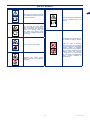
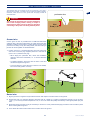
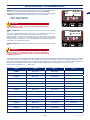
During use, it may be necessary to stop the robot. In normal conditions, the robot can be stopped with the “OFF” key. In case
of danger or when performing any maintenance, it is necessary to stop the robot in safe conditions in order to prevent the blade
from accidently starting. Press the "STOP" key to stop the robot; if the red LED light comes on, it signals the safety stop is
activated. Press "STOP” again to start using the robot once more; the red LED light goes off.
Important
The robot safety stop is necessary during
maintenance and repairs (for example, replacement
and/or recharging of the battery, blade replacement,
cleaning operations, etc.).
ON
OFF
PLAY
PAUSE
HOME
WORK
LED “STOP”
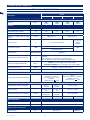
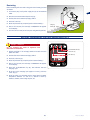
To start, proceed as indicated:
--
“STOP” KEY (A)
Position the robot inside the cutting area.
--
Start the robot with the "ON" key. The display will light up,
"Pause" is indicated shortly after, the robot is now in the pause
state.
--
Press the "PLAY/PAUSE" key.
ENTER
If the robot is started up outside of the cutting area, the blade
motor will not start and after briefly searching for the signal, the
robot will show "OUT OF BORDER" on the display. Press "OFF",
position the robot inside the cutting area and carry out the start up
procedure again.
Automatic return to the charging station
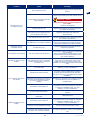
The robot stops the work cycle if the following conditions are verified.
--
End of working time: at the end of the working time, the robot automatically returns to the charging station and starts
operating again according to what has been programmed (see “Programming Mode”).
--
Rain: with the function active, the robot returns to the recharging station automatically and will start working again as
programmed (see "Programming mode").
-- Battery to be charged: the robot automatically returns to the charging station.
--
Lawn mowed (only for some versions, see “Technical Specifications): if the sensor detects that the lawn has already been
mowed, it automatically returns to the charging station and starts operating again according to what has been programmed
(see “Programming Mode”).
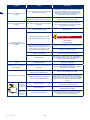
Use of the robot in closed areas with no charging station
The start-up of the robot in “closed area” mode is for mowing
closed areas which are delimited by the perimeter wire and which
have no charging station.
Warning – Caution
Carry the robot using the handle provided. Do not
grab the robot by the body and always use the
handle provided.
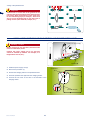
Position the robot inside the work area at a minimum distance
of 100 cm (39.37 ") from the perimeter wire and from any other
obstacle.
User’s manual
28
min. 100 cm
(39,37 ")
min. 100 cm
(39,37 ")