1
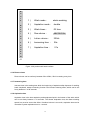
LCD screen: Indicates work status of the instrument.
Plastic cover:Prevent dust from entering into microplate inside.
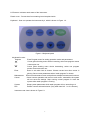
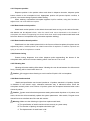
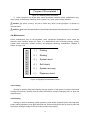
Keyboard:User can operate the instrument by it, which is shown in Figure 1-2.
Figure1-2 Keyboard panel
Keyboard function:
Program
Enter
Maintenance
Cancel
System
Run
Enter Program menu for setting operation mode and parameters.
Cursor glints showing menu choice increasing, select one program means
content plus one.
Cursor glints showing menu choice decreasing, select one program
means content minuses one.
Enter or exit when item is chosen. Choose current item when cursor is
glinting. Save current parameters when “wash program” is chosen.
Enter into maintenance menu and performs multiple maintenance functions.
Cancel current operation and return to main menu, meanwhile, the system
will not save the settings. Stop running current program or reset the
system when wash program is running.
Setup system parameters which wash program will run according to it.
Perform current selected mission (Only when item NO. 1 or 2 is chosen).
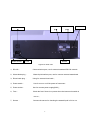
Instrument rear view is shown in Figure1-3:
3