1
Chapter 4 Operation
4.1
Program
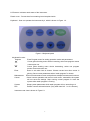
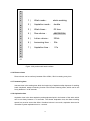
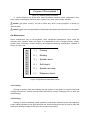
Instrument enters Program interface directly after power on, which is shown in Figure 4-1.
Program menu contains program No., washing mode, aspiration mode, washing time, row
choice, washing volume, immersing time and pause time , these parameters can be set according
to customer’s need.
W
H
O
L
E
1)
Wash mode:
whole washing
W
2)
Aspiration mode:
double
3)
Wash times:
02 time
4)
Row choice:
ABCDEFGH
G
5)
Lotion volume:
200uL
P
6)
Immersing time:
05s
7)
Aspiration time:
01s
A
S
H
I
N
R
O
G
R
A
M
01
Program No.
Figure 4-1 Program menu
4.1.1 Program No.
Program No. places under “wash program”, which is shown in Figure 3-1. User can set 50
groups’ different parameters’ wash programs, and system will store these. And the
instrument will run according to your setting when you chose one group of programs and
press “run” key.
You can choose wash program by pressing “▲”or “▼” key, when you make your choice,
10