1
NUU
Package Description
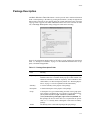
The Main Window’s Describe button is used to provide more detailed information
about a selected package. Alternatively, pressing mouse button 3 (usually the right mouse
button) while on the line for any package and in any column other than Action, will cause
a pop-up menu to appear from which a Describe menu item can be selected. In either
case, a Package Description dialog will appear similar to the following:
Some of the information displayed there is the same as in the package list described in
Table 1-1, “Package List Columns,” on page 1-5. But additional information also is supplied, if available and applicable:
Table 1-5. Package Description Fields
Field
Meaning
Repository
The identifier for the repository from which a package is available. A
Details button also is available which pops up a small window with
additional information about the repository. Also available in this
small window, is a Browse Repository button. See “Browsing Repositories” on page 1-14 for an explanation of this functionality.
Summary
A one-line summary of the purpose of the package.
Description
A detailed description of the purpose of the package.
Group
A description of a type of functionality provided, used to group packages together. Nominally the set of groups is well-defined in the
/usr/share/doc/rpm-version/GROUPS
or
/usr/share/doc/packages/rpm-version/GROUPS file.
But packages do deviate from those sets. In particular the special
value Suite is used by NUU to distinguish a suite from an ordinary
package.
Vendor
The identity of the vendor which packaged the rpm package.
1-11