1
Choose Your Connections
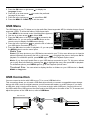
There are several ways to connect components, such as DVD players and set-top boxes, to your
TV. Please use the following chart to determine which connections are best for you. Proceed to the
appropriate pages to connect your components.
Note: No cables are supplied with this unit. Please purchase the necessary cables. A high-speed
HDMI cable is recommended for better compatibility.
Jacks Used
Cable Needed
Go to...
AUDIO/VIDEO
IN (AV)
Video
VIDEO
page 12
L
Audio L and R
AUDIO
R
Audio/Video
COMPONENT IN (CMPT)
page 12
Pb
Y
Pr
Y Pb Pr
L
AUDIO
R
Audio L and R
Component Video
HDMITM
OR
HDMI/DVI
HDMI/DVI IN 1
DVI/PC
AUDIO
IN
Audio
page 13
Audio
HDMITM+ HDMI/DVI Adapter + Audio
DVI/PC
AUDIO
IN
Audio
Audio
PC IN
page 14
VGA
VGA
VGA
HDMI, the HDMI logo, and High-Definition Multimedia Interface are trademarks or registered
trademarks of HDMI Licensing LLC.
Input
Signal Compatability
Antenna/Cable
480i, 480p, 720p, 1080i (NTSC, ATSC, and QAM formats)
Composite Video
480i
Component Video
480i, 480p, 720p/60Hz, 1080i/60Hz, 1080p/60Hz
HDMI
480i, 480p, 720p/60Hz, 1080i/60Hz, 1080p/60Hz
PC
VGA SVGA XGA
11