1
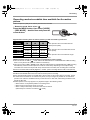
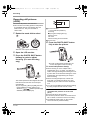
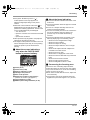
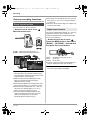
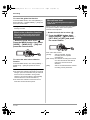
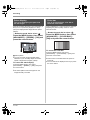
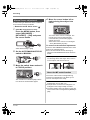
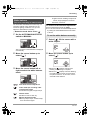
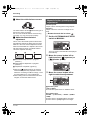
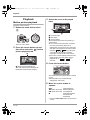
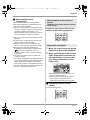
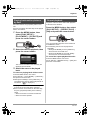
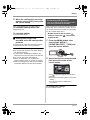
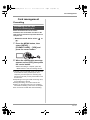
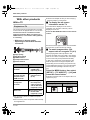
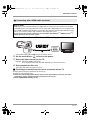
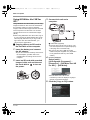
VQT1A24_ENG_PP.book 1 ページ
2007年1月21日 日曜日 午後1時17分
Operating Instructions
High Definition Video Camera
Model No.
HDC-SD1PP
Before connecting, operating or adjusting this product, please read the instructions completely.
Spanish Quick Use Guide is included.
Guía para rápida consulta en español está incluida.
For USA assistance, please call: 1-800-211-PANA(7262) or, contact us via the web at: http://www.panasonic.com/contactinfo
For Canadian assistance, please call: 1-800-561-5505 or visit us at www.panasonic.ca
VQT1A24
VQT1A24_ENG_PP.book 2 ページ
2007年1月21日 日曜日 午後1時17分
Things You Should Know
Thank you for choosing Panasonic!
You have purchased one of the most sophisticated
and reliable products on the market today. Used
properly, we’re sure it will bring you and your family
years of enjoyment. Please take time to fill in the
information on the right.
The serial number is on the tag located on the
underside of your camera. Be sure to retain this
manual as your convenient camera information
source.
Safety Precautions
Date of Purchase
Dealer Purchased From
Dealer Address
Dealer Phone No.
Model No.
Serial No.
WARNING:
TO REDUCE THE RISK OF FIRE, ELECTRIC SHOCK OR PRODUCT DAMAGE,
≥DO NOT EXPOSE THIS APPARATUS TO RAIN, MOISTURE, DRIPPING OR SPLASHING AND
THAT NO OBJECTS FILLED WITH LIQUIDS, SUCH AS VASES, SHALL BE PLACED ON THE
APPARATUS.
≥USE ONLY THE RECOMMENDED ACCESSORIES.
≥DO NOT REMOVE THE COVER (OR BACK); THERE ARE NO USER SERVICEABLE PARTS
INSIDE. REFER SERVICING TO QUALIFIED SERVICE PERSONNEL.
CAUTION!
DO NOT INSTALL OR PLACE THIS UNIT IN A BOOKCASE, BUILT-IN CABINET OR IN
ANOTHER CONFINED SPACE. ENSURE THE UNIT IS WELL VENTILATED. TO PREVENT RISK
OF ELECTRIC SHOCK OR FIRE HAZARD DUE TO OVERHEATING, ENSURE THAT CURTAINS
AND ANY OTHER MATERIALS DO NOT OBSTRUCT THE VENTILATION VENTS.
The socket outlet shall be installed near the equipment and easily accessible. The mains plug of the
power supply cord shall remain readily operable. To completely disconnect this apparatus from the
AC Mains, disconnect the power supply cord plug from AC receptacle.
The following mark and symbols are located on bottom of the unit.
CAUTION
RISK OF ELECTRIC SHOCK
DO NOT OPEN
CAUTION: TO REDUCE THE RISK OF ELECTRIC
SHOCK, DO NOT REMOVE SCREWS.
NO USER-SERVICEABLE PARTS
INSIDE.
REFER SERVICING TO QUALIFIED
SERVICE PERSONNEL.
2
VQT1A24
The lightning flash with arrowhead
symbol, within an equilateral
triangle, is intended to alert the user
to the presence of uninsulated
“dangerous voltage” within the
product’s enclosure that may be of
sufficient magnitude to constitute a
risk of electric shock to persons.
The exclamation point within an
equilateral triangle is intended to
alert the user to the presence of
important operating and
maintenance (servicing) instructions
in the literature accompanying the
appliance.
VQT1A24_ENG_PP.book 3 ページ
2007年1月21日 日曜日 午後1時17分
THE FOLLOWING APPLIES ONLY IN THE U.S.A.
FCC Note:
This equipment has been tested and found to comply with the limits for a Class B digital device,
pursuant to Part 15 of the FCC Rules. These limits are designed to provide reasonable protection
against harmful interference in a residential installation. This equipment generates, uses, and can
radiate radio frequency energy and, if not installed and used in accordance with the instructions,
may cause harmful interference to radio communications. However, there is no guarantee that
interference will not occur in a particular installation. If this equipment does cause harmful
interference to radio or television reception, which can be determined by turning the equipment off
and on, the user is encouraged to try to correct the interference by one or more of the following
measures:
≥Reorient or relocate the receiving antenna.
≥Increase the separation between the equipment and receiver.
≥Connect the equipment into an outlet on a circuit different from that to which the receiver is
connected.
≥Consult the dealer or an experienced radio/TV technician for help.
FCC Caution:
To assure continued compliance, follow the attached installation instructions
and use only shielded interface cables with ferrite core when connecting to
computer or peripheral devices.
Any changes or modifications not expressly approved by the party
responsible for compliance could void the user’s authority to operate this
equipment.
Declaration of Conformity
Trade Name:
Panasonic
Model No.:
HDC-SD1
Responsible party:
Panasonic Corporation of North America
One Panasonic Way, Secaucus, NJ 07094
Support Contact:
Panasonic Consumer Electronics Company
1-800-211-PANA (7262)
This device complies with Part 15 of the FCC Rules. Operation is subject to the following two
conditions: (1)This device may not cause harmful interference, and (2) this device must accept any
interference received, including interference that may cause undesired operation.
THE FOLLOWING APPLIES ONLY IN CANADA
This Class B digital apparatus complies with Canadian ICES-003.
3
VQT1A24
VQT1A24_ENG_PP.book 4 ページ
2007年1月21日 日曜日 午後1時17分
Batteries
1) Battery pack (Lithium ion battery pack)
≥Use the specified unit to recharge the battery pack.
≥Do not use the battery pack with equipment other than the specified unit.
≥Do not get dirt, sand, liquids, or other foreign matter on the terminals.
≥Do not touch the plug terminals (i and j) with metal objects.
≥Do not disassemble, remodel, heat or throw into fire.
2) Button-type battery (Lithium battery)
≥Insert with poles aligned.
≥Do not touch the terminals (i and j) with metal objects.
≥Do not recharge, disassemble, remodel, heat or throw into fire.
≥Keep out of reach of children
If any electrolyte should come into contact with your hands or clothes, wash it off thoroughly with
water.
If any electrolyte should come into contact with your eyes, never rub the eyes. Rinse eyes
thoroughly with water, and then consult a doctor.
Warning
Risk of fire, explosion and burns. Do not disassemble.
Do not heat the batteries above the following temperatures or incinerate.
Button-type battery 60 oC (140 oF)
Battery pack
60 oC (140 oF)
AC adaptor
This AC adaptor operates on AC between 110 V and 240 V.
But
≥In the U.S.A. and Canada, the AC adaptor must be connected to a 120V AC power supply only.
≥When connecting to an AC supply outside of the U.S.A. or Canada, use a plug adaptor to suit the
AC outlet configuration.
≥When connecting to a supply of greater than AC 125V, ensure the cord you use is suited to the
voltage of the AC supply and the rated current of the AC adaptor.
≥Contact an electrical parts distributor for assistance in selecting a suitable AC plug adaptor or AC
cord set.
Marking sign is located on bottom of the unit.
U.S.A./CANADA CONSUMERS: ATTENTION:
A lithium ion/polymer battery that is recyclable powers the product
you have purchased. Please call 1-800-8-BATTERY for information
on how to recycle this battery.
<For USA-California only>
This product contains a CR Coin Cell Lithium Battery which contains Perchlorate Material – special
handling may apply.
See www.dtsc.ca.gov/hazardouswaste/perchlorate.
4
VQT1A24
VQT1A24_ENG_PP.book 5 ページ
2007年1月21日 日曜日 午後1時17分
IMPORTANT SAFETY INSTRUCTIONS
Read these operating instructions carefully before using the unit. Follow the safety instructions on the
unit and the applicable safety instructions listed below. Keep these operating instructions handy for
future reference.
1) Read these instructions.
2) Keep these instructions.
3) Heed all warnings.
4) Follow all instructions.
5) Do not use this apparatus near water.
6) Clean only with dry cloth.
7) Do not block any ventilation openings. Install in accordance with the manufacturer’s instructions.
8) Do not install near any heat sources such as radiators, heat registers, stoves, or other apparatus
(including amplifiers) that produce heat.
9) Do not defeat the safety purpose of the polarized or grounding-type plug. A polarized plug has two
blades with one wider than the other. A grounding-type plug has two blades and a third grounding
prong. The wide blade or the third prong are provided for your safety. If the provided plug does not
fit into your outlet, consult an electrician for replacement of the obsolete outlet.
10) Protect the power cord from being walked on or pinched particularly at plugs, convenience
receptacles, and the point where they exit from the apparatus.
11) Only use attachments/accessories specified by the manufacturer.
12) Use only with the cart, stand, tripod, bracket, or the table specified by the
manufacturer, or sold with the apparatus. When a cart is used, use caution
when moving the cart/apparatus combination to avoid injury from tip-over.
13) Unplug this apparatus during lightning storms or when unused for long periods
of time.
14) Refer all servicing to qualified service personnel. Servicing is required when the apparatus has
been damaged in any way, such as power-supply cord or plug is damaged, liquid has been spilled
or objects have fallen into the apparatus, the apparatus has been exposed to rain or moisture, does
not operate normally, or has been dropped.
5
VQT1A24
VQT1A24_ENG_PP.book 6 ページ
2007年1月21日 日曜日 午後1時17分
Precautions
USE & LOCATION
WARNING
≥TO AVOID SHOCK HAZARD ... Your camera
and power supply should not be exposed to
rain or moisture. Do not connect the power
supply or operate your camera if it gets wet.
Your camera has been designed for outdoor
use, however it is not designed to sustain direct
exposure to water, rain, sleet, snow, sand,
dust, or a direct splashing from a pool or even a
cup of coffee. This action could permanently
damage the internal parts of your camera. Do
not attempt to disassemble this unit. There are
no user serviceable parts inside. Unplug your
camera from the power supply before cleaning.
≥AS WITH ANY SMALL OBJECT, SD CARDS
CAN BE SWALLOWED BY YOUNG
CHILDREN. DO NOT ALLOW CHILDREN TO
HANDLE THE SD CARD.
CAUTION
≥DO NOT AIM YOUR CAMERA AT THE SUN
OR OTHER BRIGHT OBJECTS
≥DO NOT LEAVE THE CAMERA WITH THE
EVF AIMED DIRECTLY AT THE SUN AS
THIS MAY CAUSE DAMAGE TO THE
INTERNAL PARTS OF THE EVF
≥DO NOT EXPOSE YOUR CAMERA TO
EXTENDED HIGH TEMPERATURE ... Such
as, in direct sunlight, inside a closed car, next
to a heater, etc... This action could permanently
damage the internal parts of your camera.
≥AVOID SUDDEN CHANGES IN
TEMPERATURE ... If the unit is suddenly
moved from a cold place to a warm place,
moisture may form on the SD card and inside
the unit.
≥DO NOT LEAVE YOUR CAMERA OR THE
POWER SUPPLY TURNED ON WHEN NOT
IN USE.
≥STORAGE OF YOUR CAMERA ... Store and
handle your camera in a manner that will not
subject it to unnecessary movement (avoid
shaking and striking). Your camera contains a
sensitive pick-up device which could be
damaged by improper handling or storage.
6
VQT1A24
CARE
≥TO CLEAN YOUR CAMERA ... Do not use
strong or abrasive detergents when cleaning
your camera body.
≥TO PROTECT THE LENS ... Do not touch the
surface of the lens with your hand. Use a
commercial camera lens solution and lens
paper when cleaning the lens. Improper
cleaning can scratch the lens coating.
≥TO PROTECT THE FINISH OF YOUR
CAMERA ... Before handling your camera,
make sure your hands and face are free from
any chemical products, such as suntan lotion,
as it may damage the finish.
-If you see this symbolInformation on Disposal in other Countries
outside the European Union
This symbol is only valid in the
European Union.
If you wish to discard this
product, please contact your
local authorities or dealer and
ask for the correct method of
disposal.
VQT1A24_ENG_PP.book 7 ページ
2007年1月21日 日曜日 午後1時17分
ª Indemnity concerning recording
content
The manufacturer shall in no event be liable for
the loss of recordings due to malfunction or
defect of this unit, its accessories or recordable
media.
IMPORTANT
ª Carefully observe copyright laws
Whatever you have recorded and created can
be used for your personal entertainment only.
Under copyright laws, other materials cannot
be used without obtaining permission from
the holders of the copyrights.
ª Cards that you can use with this
unit
SD Memory Card and SDHC Memory Card
For the purposes of these operating instructions,
the following cards are referred to as “the SD
card”.
SD Memory Card
SDHC Memory Card
≥IBM and PC/AT are registered trademarks of
International Business Machines Corporation of
the U.S.
≥Intel®, Pentium® and Celeron® are the
registered trademarks or trademarks of the
Intel Corporation in the United States and other
countries.
≥Other names of systems and products
mentioned in these instructions are usually the
registered trademarks or trademarks of the
manufacturers who developed the system or
product concerned.
This product is licensed under the AVC patent
portfolio license for the personal and noncommercial use of a consumer to (i) encode
video in compliance with the AVC Standard
(“AVC Video”) and/or (ii) decode AVC Video that
was encoded by a consumer engaged in a
personal and non-commercial activity and/or was
obtained from a video provider licensed to
provide AVC Video. No license is granted or shall
be implied for any other use. Additional
information may be obtained from MPEG LA,
LLC. See http://www.mpegla.com.
≥SDHC Logo is a trademark.
≥miniSD Logo is a trademark.
≥“AVCHD” and the “AVCHD” Logo are the
trademarks of Matsushita Electric Industrial
Co., Ltd. and the Sony Corporation.
≥Manufactured under license from Dolby
Laboratories.
“Dolby” and the double-D symbol are
trademarks of Dolby Laboratories.
≥HDMI, the HDMI Logo and the High-Definition
Multimedia Interface are the registered
trademarks or trademarks of HDMI Licensing
LLC.
≥HDAVI Control™ is a trademark of Matsushita
Electric Industrial Co., Ltd.
≥LEICA is a registered trademark of Leica
microsystems IR GmbH and DICOMAR is a
registered trademark of Leica Camera AG.
≥Microsoft®, Windows® and DirectX® are either
registered trademarks or trademarks of the
Microsoft Corporation in the United States and/
or other countries.
≥Microsoft product screen shot(s) reprinted with
permission from Microsoft Corporation.
7
VQT1A24
VQT1A24_ENG_PP.book 8 ページ
2007年1月21日 日曜日 午後1時17分
Contents
Quick Guide .......................................... 10
Recording
Before using
Before recording .................................. 43
Features of the High Definition Video
Camera............................................... 13
Accessories .......................................... 18
Parts identification and handling ....... 19
Using the LCD monitor ........................ 24
Using the remote control..................... 24
Cards that you can use
with this unit...................................... 26
Setup
Charging the battery ............................28
Inserting/removing the battery ........... 29
Charging time and recordable time.... 30
Connecting to the AC outlet................ 31
Selecting a mode
(Turning the unit on/off) ................... 32
Quick start ............................................ 33
Inserting/removing an SD card ........... 34
How to use the cursor button ............. 35
Using the menu screen........................ 39
Setting date and time........................... 41
Switching the language .......................42
Adjusting LCD monitor........................ 42
Auto Ground-Directional Standby
(AGS) ................................................... 44
Recording motion pictures ................. 45
Recording modes/recordable time
available for the motion picture ...... 47
Recording still pictures (JPEG) .......... 48
Picture Quality/Approximate
Number of Recordable Pictures
on an SD Card ................................... 51
Various recording functions ............... 52
Zoom in/out function ................................ 52
Recording yourself ................................... 53
Backlight compensation function ............. 54
Fade in/fade out function ......................... 54
MagicPix function..................................... 55
Soft skin mode ......................................... 56
Tele macro function ................................. 56
Self-timer recording.................................. 57
Built-in flash ............................................. 57
Image stabilizer function .......................... 59
Guide line function ................................... 59
Wind noise reduction function.................. 60
Microphone level...................................... 60
Zebra display ........................................... 62
Color bar .................................................. 62
Manual recording functions ................ 63
Scene mode............................................. 63
Manual focus adjustment ......................... 64
White balance .......................................... 65
Manual shutter speed/aperture
adjustment............................................ 66
Playback
Motion picture playback ...................... 68
Playing back motion pictures by date ...... 71
Repeat playback ...................................... 71
Resuming the previous playback ............. 72
Still picture (JPEG) playback .............. 72
8
VQT1A24
VQT1A24_ENG_PP.book 9 ページ
2007年1月21日 日曜日 午後1時17分
Contents
Editing
Others
Editing scenes...................................... 74
Menus and Indications ...................... 105
Deleting scenes........................................74
Protecting scenes.....................................75
Menu list................................................. 105
Menus related to [ADVANCED] and
[SETUP] ............................................. 107
Indications.............................................. 108
Messages............................................... 110
Editing still pictures............................. 76
Deleting still pictures ................................76
Protecting still pictures .............................77
DPOF setting............................................78
Card management
Formatting ............................................ 79
Formatting an SD card .............................79
With other products
With a TV............................................... 80
Playback using EZ Sync™
(HDAVI Control™)............................. 87
Dubbing images onto a connected
DVD recorder or video device ......... 89
With a printer (PictBridge)................... 90
With a computer
Before using with a computer............. 92
What you can do with a computer ............92
Contents on provided CD-ROM ...............93
End User License Agreement ..................94
Operating environment.............................95
Functions that cannot be used
simultaneously.................................... 113
Troubleshooting................................. 114
Cautions for use................................. 120
Explanation of terms.......................... 123
Specifications..................................... 125
Optional accessories ......................... 128
Accessory Order Form
(For USA Customers) ..................... 129
Request for Service Notice
(USA Only)....................................... 130
Limited Warranty
(For USA Customers) ..................... 131
Customer Services Directory............ 132
Warranty
(For Canadian Customers)............. 133
Index.................................................... 134
Spanish Quick Use Guide/Guía
española para el uso rápido .......... 136
Installation ............................................ 97
Installing HD Writer Ver1.0E for SD1 .......97
Reading the operating instructions
of the software applications ..................98
Software application uninstallation ...........98
Connection and recognition ............... 99
Connection and recognition procedures...99
About the computer display....................100
To disconnect USB cable safely.............101
Verifying the unit is correctly
recognized by the computer ...............101
Using HD Writer Ver1.0E for SD1...... 102
If using Macintosh.............................. 104
9
VQT1A24
VQT1A24_ENG_PP.book 10 ページ
2007年1月21日 日曜日 午後1時17分
Quick Guide
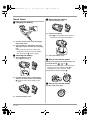
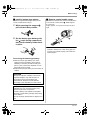
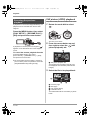
ª Removing the battery
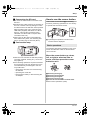
1) Open the battery cover.
ª Charging the battery
A
2) Remove the battery.
≥Move A in the direction of the arrow to
unlock it and then remove the battery.
1) Connect the AC cable to the AC adaptor
and the AC outlet.
2) Put the battery on the battery mount by
aligning the mark, and then securely plug
it in.
≥The output plug of the AC cable is not
completely connected to the AC adaptor
jack. As shown in A, there is a gap.
ª Inserting the battery
A
3) Close the battery cover.
1) Open the battery cover.
≥Push A while sliding it.
ª How to turn on the power
While pressing the lock release button, set
the mode dial to
,
or PC .
≥Rotate the mode dial while at the same time
pressing in the lock release button A if
changing from OFF to another mode.
≥Align with the status indicator B.
A
B
2) Insert the battery until it clicks paying
attention to the direction of the battery.
B Push the center of the battery until it
locks.
A
ª How to turn off the power
Set the mode dial to OFF.
B
3) Close the battery cover.
10
VQT1A24
VQT1A24_ENG_PP.book 11 ページ
2007年1月21日 日曜日 午後1時17分
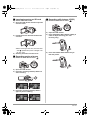
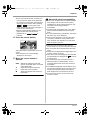
ª Inserting/removing an SD card
ª Recording still pictures (JPEG)
1) Set the mode dial to OFF.
2) Open the LCD monitor and then open the
card slot cover.
1) Rotate the mode dial to select
3) Insert/remove the SD card into/from the
card slot.
.
2) Open the LCD monitor.
3) Press the PHOTO SHOT button halfway in
order to adjust focusing. (For auto
focusing only)
A
≥When inserting an SD card, face the label
side A upwards and press it straight in as
far as it goes.
4) Securely close the card slot cover.
4) Press the PHOTO SHOT button fully to
take the picture.
ª Recording motion pictures
1) Rotate the mode dial to select
.
2) Open the LCD monitor.
3) Press the recording start/stop button to
start recording.
4) Press the recording start/stop button
again to pause recording.
11
VQT1A24
VQT1A24_ENG_PP.book 12 ページ
2007年1月21日 日曜日 午後1時17分
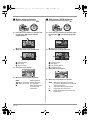
ª Motion picture playback
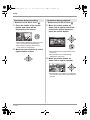
1) Rotate the mode dial to select
ª Still picture (JPEG) playback
.
2) Press the cursor button up and then left
to select the
(motion pict ure
playback) tab.
1) Rotate the mode dial to select
.
2) Press the cursor button up and then right
to select the
(still picture playback)
tab.
A
A
A Motion picture playback tab
3) Select the scene to be played back.
B
C
A Still picture playback tab
3) Select the file to be played back.
B
C
D
D
B Previous page
C Next page
D Scene number
4) Press the cursor button.
E
B Previous page
C Next page
D File number display
E Folder/file name
4) Press the cursor button.
5) Move the cursor button to operate.
1/;:
6 (Move and hold):
5 (Move and hold):
∫:
12
VQT1A24
Playback/Pause
Review playback
Cue playback
Stops the playback
and shows the
thumbnails.
5) Move the cursor button to operate.
1/;: Slide show (playback of the still
pictures on the SD card in numerical
order) start/pause.
E:
Plays back the previous picture.
D:
Plays back the next picture.
∫:
Stops the playback and shows the
thumbnails.
VQT1A24_ENG_PP.book 13 ページ
2007年1月21日 日曜日 午後1時17分
Before using
Before using
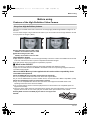
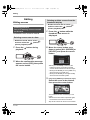
Features of the High Definition Video Camera
Very clear high definition pictures
This unit is an AVCHD format video camera for recording highly detailed high definition images on an
SD card.
You can watch images in high-resolution HD video if you connect this unit and a high definition TV and
then play back the images. (l 80)
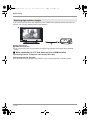
A
B
A High definition images (1440k1080)
Number of available scan lines 1080
B Standard images (720k480)
Number of available scan lines 480
High definition images
≥High definition images have more than approximately 2 times the number of available scan lines and
more than 4 times the number of pixels compared with standard images.
≥The still pictures above are images for explanation purposes.
ª What is the AVCHD?
This is a format for recording and playing back highly detailed high definition images.
Images are recorded based on the MPEG-4 AVC/H.264 codec for compressing images and audio is
recorded in Dolby Digital.
About the SDHC Memory Card supplied with this unit and the compatibility of the
recorded motion pictures
About the SDHC Memory Card (Be careful about the following.)
≥It is not compatible with devices other than those that support SDHC.
≥If you use the SDHC Memory Card in another device, use a device that is SDHC compatible. (l 26)
About the compatibility of the recorded motion pictures
≥They are not compatible with devices other than those that support the AVCHD. Refer to the
operating instructions of the device for details.
≥The recorded motion pictures cannot be played back in a device that is not compatible (does not
support the AVCHD).
≥There are some cases where the recorded motion pictures cannot be played back, even if the device
supports the AVCHD. In such cases, play the recorded motion picture with this unit instead.
Existing DVD recorders and DVD players that do not support the
AVCHD
13
VQT1A24
VQT1A24_ENG_PP.book 14 ページ
2007年1月21日 日曜日 午後1時17分
Before using
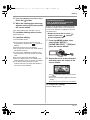
Watching high definition images
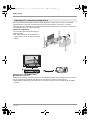
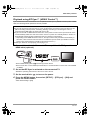
If you connect this unit and a high definition TV with a HDMI cable (optional) and then play back the
pictures, you can enjoy watching them in high definition.
A
B
A High definition TV
B HDMI cable (optional)
≥If you connect this unit to a TV that does not support high definition, the images will be standard
quality.
ª When connecting to a TV that does not have a HDMI terminal
Connecting with the component cable and the AV cable
Connecting with the AV cable
≥The pictures cannot be played in high definition. They will be played back in standard quality.
14
VQT1A24
VQT1A24_ENG_PP.book 15 ページ
2007年1月21日 日曜日 午後1時17分
Before using
Using the remote control for the TV for playback
If you connect this unit to a Panasonic TV compatible with EZ SyncTM (HDAVI ControlTM) with a HDMI
cable, you can use the remote control for the TV for playback. Refer to the operating instructions of the
TV for details.
A
B
A TV compatible with EZ Sync
B HDMI cable (optional)
ª Other linked operations
Turning the power on and off
If you turn off the power on the TV with the remote control for the TV, the power on this unit also turns
off.
Automatic input switching
If you connect with a HDMI cable and then turn on the power on this unit, the input channel on the TV
automatically switches to this unit’s screen. If the TV’s power is in standby status, it will turn on
automatically (if [Set] has been selected for the TV’s [Power on link] setting).
≥Depending on HDMI terminal of the TV, the input channel may not switch automatically. In this case,
use the remote control for the TV to switch input. (For details on how to switch input, please read the
operating instructions for the TV.)
15
VQT1A24
VQT1A24_ENG_PP.book 16 ページ
2007年1月21日 日曜日 午後1時17分
Before using
Listening in 5.1 channel surround sound
This unit has 5 internal microphones and a Dolby Digital 5.1 Creator so you can record sound with
presence that is even closer to the actual sound. The low bass area is sent to the 0.1 channel
subwoofer and you can playback sound with three-dimensional presence if you connect to a device that
is compatible with the 5.1 surround system.
Internal microphones
The 5 mounted internal microphones give
better directivity.
≥Far-away sounds can be recorded more
clearly with the zoom microphone function.
(l 53)
A
B
A AV amplifier with HDMI terminal
B HDMI cable (optional)
≥Refer to the operating instructions of the TV, AV amplifier, speakers etc. for details on how to connect.
≥If you record with an external microphone, the recording is in stereo 2 channel sound.
≥Optical digital cables cannot be used for the connection. Connect to an AV amplifier with an HDMI
terminal.
16
VQT1A24
VQT1A24_ENG_PP.book 17 ページ
2007年1月21日 日曜日 午後1時17分
Before using
Saving the data on the SD card
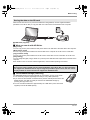
When the SD card is full or to prevent the data from being deleted, use the supplied software
(HD Writer Ver1.0E for SD1) to copy the data on the SD card to the hard disk of the computer.
A
A USB cable (supplied)
ª What you can do with HD Writer
[Copy to PC]
You can copy motion picture data and still picture data on an SD card to the hard disk of the computer.
[Write data to media]
You can copy motion picture data from the hard disk of the computer to an SD card or a DVD disc.
[Copy between media]
You can copy motion picture data from an SD card to a DVD disc or from a DVD disc to an SD card.
[Easy editing]
You can easily edit (split, merge, delete etc.) motion picture data that was copied to the hard disk of the
computer.
≥For details on how to use the software application, read the PDF operating instructions.
Important note
Do not insert a disc created with the supplied HD Writer Ver1.0E for SD1 in a device that does
not support the AVCHD format. It may no longer be possible to eject it. Also, the disc cannot
be played back on devices that do not support the AVCHD format.
ª The SD Media Storage (USA only)
The SD Media Storage (VW-PT2: optional) is convenient if you are on the move.
It is an extremely compact, lightweight and easy to carry HDD (hard disk).
≥If you insert an SD card with recorded motion pictures and still pictures in the SD
Media Storage, the data can easily be saved to the SD Media Storage by
pressing the copy button only.
≥You can save all the data from approximately ten 4 GB cards (one 4 GB card is
supplied) to its 40 GB HDD capacity.
17
VQT1A24
VQT1A24_ENG_PP.book 18 ページ
2007年1月21日 日曜日 午後1時17分
Before using
Accessories
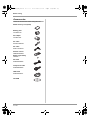
Check the accessories before using this unit.
SDHC memory card (4 GB)
Battery pack
VW-VBG130
AC adaptor
VW-AD21PP
AC cable
K2CA2CA00029
DC cable
K2GJYYC00001
Remote control
N2QAEC000023
Button-type battery
CR2025
AV cable
K2KZ9CB00002
Component cable
K2KZ9DB00004
USB cable
K2KZ4CB00011
CD-ROM
18
VQT1A24
VQT1A24_ENG_PP.book 19 ページ
2007年1月21日 日曜日 午後1時17分
Before using
Parts identification and handling
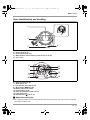
1
5
2
3
1)
2)
3)
4)
5)
Lens (LEICA DICOMAR)
Built-in flash (l 57)
Recording lamp (l 107)
White balance sensor/remote control sensor (l 25, 66)
Lens cover
6
7
8
9
10
6)
7)
8)
9)
10)
11)
12)
13)
14)
4
11
12
13
14
Status indicator (l 32)
Mode dial (l 32)
LCD monitor open latch (l 24)
Menu button [MENU] (l 39)
Battery cable cover (l 22)
Cursor button (l 35)
Recording start/stop button (l 45)
Cooling fan (inlet)
Delete button [ ] (l 74, 76)
ª About the cooling fan
≥The cooling fan rotates to prevent the internal temperature rising. Take care not to cover the inlet and
outlet when using this unit.
19
VQT1A24
VQT1A24_ENG_PP.book 20 ページ
2007年1月21日 日曜日 午後1時17分
Before using
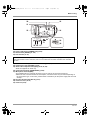
15
16
17
15) Internal microphones (5.1 channel support)
16) Zoom lever [W/T] (In recording mode) (l 52)
Volume lever [sVOLr] (In playback mode) (l 70)
17) Photoshot button [
] (l 48)
18
19
18) Tripod receptacle (l 23)
19) Battery cover (l 29)
20
VQT1A24
VQT1A24_ENG_PP.book 21 ページ
2007年1月21日 日曜日 午後1時17分
Before using
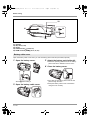
20
23
21
24
22
A/V COMPONENT MIC
28
DC IN 9.3V
25 26 27
29
30
20) Power LCD button [POWER LCD] (l 42)
21) Reset button [RESET] (l 118)
22) LCD monitor (l 24)
Due to limitations in LCD production technology, there may be some tiny bright or dark spots on
the LCD monitor screen. However, this is not a malfunction and does not affect the recorded
picture.
23) Mode select switch [AUTO/MANUAL/FOCUS] (l 44, 63)
24) Card access lamp [ACCESS] (l 35)
25) Audio-video output terminal [A/V] (l 84, 86, 89)
≥Use the supplied AV cable only.
26) Component terminal [COMPONENT] (l 84)
27) Microphone terminal [MIC]
≥A compatible plug-in powered microphone can be used as an external microphone.
≥When the unit is connected with the AC adaptor, sometimes noise may be heard depending on
the microphone type. In this case, please switch to the battery for the power supply and the noise
will stop.
28) DC input terminal [DC IN 9.3V] (l 31)
29) Card slot cover (l 34)
30) Card slot (l 34)
21
VQT1A24
VQT1A24_ENG_PP.book 22 ページ
2007年1月21日 日曜日 午後1時17分
Before using
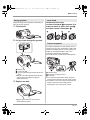
33
31
34
35
32
31)
32)
33)
34)
35)
Speaker
Grip belt (l 23)
Outlet
USB terminal [ ] (l 90, 99)
HDMI terminal [HDMI] (l 81, 83, 87)
Battery cable cover
Open the battery cable cover when you use the battery pack holder kit (VW-VH04; optional).
1 Open the battery cover.
3 Attach the battery pack holder kit.
≥Read the operating instructions of the battery
pack holder kit for details on how to use it.
4 Close the battery cover.
A
≥Push A while sliding it.
2 Open the battery cable cover.
22
VQT1A24
≥The cable of the battery pack holder kit can
pass through the hole.
≥Keep the battery cable cover closed when
using this unit normally.
VQT1A24_ENG_PP.book 23 ページ
2007年1月21日 日曜日 午後1時17分
Before using
Using grip belt
Adjust the length of the grip belt so that it fits your
hand, and hold it properly.
1 Flip the belt.
Lens hood
Rotate the lens hood
counter-clockwise A to remove it. In
order to attach it, place into slot B,
and then rotate it clockwise C.
A
B
C
2 Put your hand through the grip belt.
Tripod receptacle
The tripod receptacle is a hole used to mount a
tripod for the unit. Use of Panasonic’s VW-CT45
(optional) standard tripod is recommended. (For
details on mounting the tripod, refer to the
operating instructions for the tripod.)
≥You cannot use a tripod with a fixed tripod pin.
A Rubber grip
1 Loosen the belt.
2 Put your hand through the belt as far as it
goes.
≥Slip your hand through the belt as far as it
goes so that your fingers will grip the
rubber area firmly.
3 Replace the belt.
A Camera base
B Screw for mounting the unit
C Tripod pin
≥You can perform operations easily using the
remote control when the tripod is used. (l 24)
≥The battery cover cannot be opened when the
tripod is used. Insert the battery before
attaching this unit to the tripod. (l 29)
≥Tighten up the belt so that your hand
remains firmly in place.
23
VQT1A24
VQT1A24_ENG_PP.book 24 ページ
2007年1月21日 日曜日 午後1時17分
Before using
Using the LCD monitor
You can record the image while viewing it on the
LCD monitor.
1 Place your finger on LCD monitor
open latch and pull the LCD
monitor out in the direction of the
arrow.
Using the remote control
1
2
3
PHOTO
EXT
DISPLAY SHOT
DATE/
TIME
8
SEARCH
PLAY
SEARCH
STILL ADV
PAUSE
STILL ADV
SKIP
STOP
SKIP
MENU
5
2 Adjust the angle of the LCD
7
ZOOM
VOL
4
≥It can open up to 90o.
START/
STOP
6
9
ENTER
10
monitor as desired.
A
B
≥It can be rotated 180° towards the lens A
and 90° towards the opposite direction B.
≥The brightness and color level of the LCD
monitor can be adjusted. (l 42)
≥The unit may be damaged or fail if the LCD
monitor is forcibly opened or rotated.
≥Check that the terminal cover is closed before
closing the LCD monitor.
24
VQT1A24
1) Photoshot button [
]*
2) On-screen display button [EXT DISPLAY]
(l 80)
3) Date/time button [DATE/TIME] (l 41)
4) Playback operation buttons (l 68, 69, 70)
5) Delete button [ ]*
6) Direction buttons [3,4,2,1] (l 40)
7) Recording start/stop button [START/
STOP]*
8) Zoom/volume buttons [ZOOM, VOL]*
9) Menu button [MENU]* (l 40)
10) Enter button [ENTER] (l 40)
* means that these buttons function in the
same manner as the corresponding
buttons on the unit.
VQT1A24_ENG_PP.book 25 ページ
2007年1月21日 日曜日 午後1時17分
Before using
ª Install a button-type battery
ª Remote control usable range
Install the supplied button-type battery in the
remote control before using it.
The distance between the remote control and the
unit’s remote control sensor A: Within approx.
5 m (16 feet)
Angle: Approx. 10o up and 15o down, left, and
right
1 While pressing the stopper A,
pull out the battery holder.
A
2 Set the button-type battery with
A
its (i) mark facing upward and
then put the battery holder back
in place.
≥The remote control is intended for indoor
operation. Outdoors or under strong light, the
unit may not operate properly even within the
usable ranges.
Concerning the button-type battery
≥When the button-type battery runs down,
replace it with a new battery (part number:
CR2025). The battery should normally last
about 1 year, however this depends on how
frequently the unit is used.
≥Keep the button-type battery out of the reach of
children.
CAUTION
Danger of explosion if battery is incorrectly
replaced. Replace only with the same or
equivalent type recommended by the
manufacturer. Dispose of used batteries
according to the manufacturer’s instructions.
Replace battery with Panasonic PART NO.
CR2025 only. Use of another battery may
present a risk of fire or explosion.
Caution: Battery may explode if mistreated.
Dispose of used battery promptly. Keep away
from children.
Do not recharge, disassemble or dispose of in
fire.
25
VQT1A24
VQT1A24_ENG_PP.book 26 ページ
2007年1月21日 日曜日 午後1時17分
Before using
Cards that you can use with this unit
Card type
SDHC Memory
Card
SD Memory Card
Capacity
8 MB, 16 MB
32 MB, 64 MB,
128 MB
Motion picture
recording
Cannot be
used.
Cannot be
guaranteed in
operation.¢
Still picture
recording
256 MB, 512 MB,
1 GB, 2 GB
4 GB
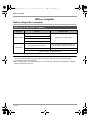
Refer to “About SD cards that you can use
for motion picture recording”.
Can be used.
¢The recording may suddenly stop during motion picture recording depending on the SD card you use.
(l 46)
This unit (an SDHC compatible device) is compatible with both SD Memory Cards and SDHC
Memory Cards. You can use SDHC Memory Cards on devices that are compatible with them.
However, you cannot use SDHC Memory Cards on devices that are only compatible with SD
Memory Cards. (When using an SDHC Memory Card on another device, always read the operating
instructions of that device.)
ª About SD cards that you can use for motion picture recording
We recommend using SD Memory cards and SDHC Memory cards conforming to Class 2 or higher of
the SD Speed Class Rating or the following SD cards made by Panasonic for motion picture recording.
Card type
Pro High Speed
SD Memory Card
Super High Speed
SD Memory Card
High Speed
SD Memory Card
SDHC Memory
Card
256 MB
—
RP-SDH256
—
—
512 MB
RP-SDK512
RP-SDH512¢
RP-SDR512
—
1 GB
RP-SDK01G
RP-SDH01G¢
RP-SDQ01G¢
RP-SDR01G
—
2 GB
RP-SDK02G
—
RP-SDQ02G¢
RP-SDR02G
—
4 GB
—
—
—
RP-SDR04G
¢No longer made.
≥Operation in motion picture recording is not guaranteed with an SD card memory from 32 MB to 4 GB
except the cards above. (The recording may suddenly stop during motion picture recording.)
≥For the purposes of these operating instructions, SD Memory Card and SDHC Memory Card are
referred to as the “SD card”.
≥This unit supports SD Memory Cards formatted in FAT12 system and FAT16 system based on SD
Memory Card Specifications and SDHC Memory Cards formatted in FAT32 system.
≥If you wish to use Memory Cards that are 4 GB, SDHC Memory Cards only can be used.
26
VQT1A24
VQT1A24_ENG_PP.book 27 ページ
2007年1月21日 日曜日 午後1時17分
Before using
≥4 GB (or more) Memory Cards that do not have
the SDHC logo are not based on SD Memory
Card Specifications.
≥Use this unit to format SD cards. If an SD card
is formatted on other products (such as a
computer), the time spent for recording may
become longer and you may not be able to use
the SD card. (l 79) (Do not format it on a PC
etc.)
≥When the write-protect switch A on SD Card is
locked, no recording, deletion or editing will be
possible on the card.
A
4
≥Keep the Memory Card out of reach of children
to prevent swallowing.
≥A MultiMediaCard cannot be used on this unit.
ª
(SD Speed Class
Rating Class 2)
This indicates a Class 2 rating in the high speed
standards (SD Speed Class) stipulated by the
SD Card Association for high speed writing
between SD compatible products and SD
Memory cards.
If you use a Class 2 card compatible with the SD
Speed Class in an SD compatible product, you
can obtain stable recording by using an SD card
conformed with Class 2 or more.
ª Handling precautions
≥Do not expose the terminals of the card to
water, garbage or dust.
≥Do not place in the following areas:
– In direct sunlight.
– In very dusty or humid areas.
– Near a heater.
– Locations susceptible to significant
difference in temperature (condensation can
occur).
– Where static electricity or electromagnetic
waves occur.
≥To protect cards, return them to their cases
when you are not using them.
27
VQT1A24
VQT1A24_ENG_PP.book 28 ページ
2007年1月21日 日曜日 午後1時17分
Setup
Setup
ª Charging lamp
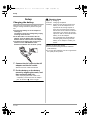
Charging the battery
When this unit is purchased, the battery is not
charged. Charge the battery before using this
unit.
≥Connect the battery to an AC adaptor to
recharge it.
The battery cannot be recharged by simply
inserting it into the unit.
≥If the DC cable is connected to the AC
adaptor, then the battery will not charge.
Remove the DC cable from the AC adaptor.
≥The Panasonic battery that can be used
with this unit is VW-VBG130. Other
Panasonic batteries will not work. (l 30)
A
1 Connect the AC cable to the AC
adaptor and the AC outlet.
≥Remove the DC cable beforehand.
2 Put the battery on the battery
mount by aligning the mark, and
then securely plug it in.
≥The output plug of the AC cable is not
completely connected to the AC adaptor
jack. As shown in A, there is a gap.
28
VQT1A24
Lights up: Charging
Goes off: Charging completed
Flashing: Make sure that the terminals of the
battery or the AC adaptor are not
exposed to dirt, foreign objects or
dust, then reconnect them properly.
Disconnect the AC cable from the AC
outlet when you remove dirt, foreign
objects or dust on the terminals of the
battery or the AC adaptor.
If the charging lamp is still flashing,
something may be wrong with the
battery or AC adaptor. Contact your
dealer.
≥Battery charging time (l 30)
≥We recommend using Panasonic batteries
(VW-VBG130).
≥If you use other batteries, we cannot guarantee
the quality of this product.
VQT1A24_ENG_PP.book 29 ページ
2007年1月21日 日曜日 午後1時17分
Setup
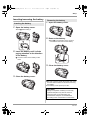
Inserting/removing the battery
Removing the battery
1 Open the battery cover.
Inserting the battery
1 Open the battery cover.
≥Push A while sliding it.
2 Remove the battery.
≥Move A in the direction of the arrow to
unlock it and then remove the battery.
A
2 Insert the battery until it clicks
paying attention to the direction
of the battery.
B Push the center of the battery until it
locks.
A
3 Close the battery cover.
B
3 Close the battery cover.
≥Be sure to set the mode dial to OFF and check
that the status indicator is off before removing
the battery.
≥The battery cover opens up to 180o.
CAUTION
Danger of explosion if battery is incorrectly
replaced. Replace only with the same or
equivalent type recommended by the
manufacturer. Dispose of used batteries
according to the manufacturer’s instructions.
29
VQT1A24
VQT1A24_ENG_PP.book 30 ページ
2007年1月21日 日曜日 午後1時17分
Setup
Charging time and recordable time
ª About batteries that you can use for this unit
The Panasonic battery that can be used with this unit is VW-VBG130.
VW-VBG130 comes with a function to check whether the battery and unit can be safely used together.
≥Batteries made by other companies which have been certified by Panasonic may be used with this
unit, but we offer no guarantee as to the quality, performance or safety of such batteries.
≥In order to safely use the unit, we recommend that you use genuine Panasonic batteries which have
been subject to our quality control process.
≥We cannot accept any liability whatsoever for damages to the unit or accidents caused by
non-genuine Panasonic batteries (including those that have been certified by Panasonic).
≥Exercise care when purchasing batteries. Many fake or imitation batteries have been found among
those sold at unusually low prices and those which customers cannot check for themselves before
purchasing.
ª Charging time
The times shown in the tables below are for when the temperature is 25 oC (77 oF) and the humidity is
60%. If the temperature is higher or lower than 25 oC (77 oF), the charging time will become longer.
Battery model number
Voltage/capacity
Charging time
Supplied battery/
VW-VBG130 (optional)
7.2 V/1320 mAh
2 h 20 min
≥The charging time shown in the table are approximations.
≥“2 h 20 min” indicates 2 hours 20 minutes.
≥When you charge a battery that has not been used for long time, the charging time will become
longer.
ª Recordable time
≥The times shown in the table below are for when the temperature is 25 oC (77 oF) and the humidity is
60%. These times are approximations.
≥The actual recordable time refers to the recordable time on a card when repeatedly starting/stopping
recording, turning the unit on/off, moving the zoom lever etc.
Battery model
number
Voltage/
capacity
Maximum continuously
recordable time
Actual recordable time
Supplied battery/
VW-VBG130
(optional)
7.2 V/1320 mAh
1 h 5 min
40 min
≥The recordable time shown in the table are approximations.
≥“1 h 5 min” indicates 1 hour 5 minutes.
≥The recordable times will vary depending on the status of use. These times are approximations.
≥The recordable time will become shorter in the following case:
– The recordable time will become shorter when you use this unit with the LCD monitor lit up by
pressing the POWER LCD button.
≥The batteries heat up after use or charging. This unit will also heat up while being used. This is not a
malfunction.
≥Be aware that the operating time of the battery will become shorter in low temperatures. We
recommend charging a spare battery for use when recording.
30
VQT1A24
VQT1A24_ENG_PP.book 31 ページ
2007年1月21日 日曜日 午後1時17分
Setup
ª About the remaining battery
capacity indication
The remaining battery capacity is displayed in
minutes when using the Panasonic battery that
you can use for this unit. It may take time to
display the remaining battery capacity.
Connecting to the AC outlet
≥Even if the battery is inserted in this unit, it
will not charge.
DC IN 9.3V
30min
≥The display changes as the battery capacity
reduces.
#
#
#
#
.
If there is less than 3 minutes remaining, then
will become red. If the battery
discharges, then (
) will flash.
≥The remaining battery capacity may not be
displayed correctly where the temperature is
low or high or if the battery was not used for a
long period of time.
To correctly display the remaining battery
capacity, recharge the battery, discharge it and
then charge it again. (Even if this operation is
performed, it may not be possible to display the
remaining battery capacity correctly if the
battery was used for a long period of time
where the temperature is low or high or if the
battery was repeatedly charged.)
≥The times of remaining battery capacity
indication will vary depending on the status of
use. These times are approximations.
≥When turning the mode dial to switch modes,
the time indication will turn off in order to
recalculate the remaining battery capacity time.
≥When using batteries made by other
companies, the remaining battery capacity will
not be shown.
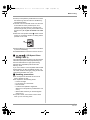
1 Connect the AC cable to the AC
adaptor.
2 Connect the DC cable to the AC
adaptor.
3 Open the terminal cover on this
unit and connect the DC cable to
the DC input terminal
[DC IN 9.3V].
≥Do not use the AC cable with any other
equipment as it is designed only for this
unit. Do not use the AC cable from other
equipment with this unit.
≥Put the battery on the AC adaptor to charge it.
(l 28)
≥While the DC cable is connected to the AC
adaptor, the battery will not charge.
31
VQT1A24
VQT1A24_ENG_PP.book 32 ページ
2007年1月21日 日曜日 午後1時17分
Setup
Selecting a mode
(Turning the unit on/off)
How to turn off the power
Rotate the mode dial to switch to recording,
playback, PC connection or power OFF.
≥Rotate the mode dial slowly.
Set the mode dial to OFF.
How to turn on the power
While pressing the lock release
button, set the mode dial to
,
or PC .
≥Rotate the mode dial while at the same time
pressing in the lock release button A if
changing from OFF to another mode.
≥Align with the status indicator B.
The status indicator goes off and the power turns
off.
≥The lens cover closes when the mode dial is
set to OFF.
Recording mode (l 45, 48)
Use this to record motion pictures and
still pictures on an SD card.
B
Playback mode (l 68, 72)
Use this to play back motion pictures
and still pictures recorded on an SD
card.
A
The status indicator lights and the power turns
on.
≥The lens cover opens in recording mode.
≥When the unit is turned on for the first time, a
message asking you to set the date and time
will appear. Select [YES] and set the date and
time. (l 41)
PC
OFF
PC Connection mode (l 99)
Use this to import motion pictures and
still pictures recorded on an SD card
with a computer by using HD Writer
Ver1.0E for SD1 etc.
The power turns off.
≥Do not forcefully rotate the mode dial.
32
VQT1A24
VQT1A24_ENG_PP.book 33 ページ
2007年1月21日 日曜日 午後1時17分
Setup
Turning the power on and off with
the LCD monitor
The power can be turned on and off with the LCD
monitor when the mode dial is set to
.
ª To turn on the power
Open the LCD monitor.
A
The status indicator A lights and the power turns
on.
ª To turn off the power
Close the LCD monitor.
Quick start
When quick start is ON the battery power is still
being consumed, even when the LCD monitor is
closed.
This unit will resume recording/pause mode
about 1.7 seconds after the LCD monitor is
reopened.
≥When in quick start standby mode about
70% of the power used in recording pause
mode is being consumed, so the recording
time will be reduced.
≥This is only activated in the following case.
– When the mode dial is set to
and an
SD card is inserted.
1 Press the MENU button, then
select [SETUP] # [QUICK START]
# [ON] and press the cursor
button.
A
2 Close the LCD monitor while the
The status indicator A goes off and the power
turns off. (If [QUICK START] (l 33) is set to
[ON], the unit goes into quick start standby mode
and the status indicator lights green.)
≥The power will not turn off while recording a
motion picture even if the LCD monitor is
closed.
Set the mode dial to OFF when this unit is not
being used.
mode dial is set to
.
A
The status indicator A lights green and the
unit goes into quick start standby mode.
≥The lens cover does not close.
33
VQT1A24
VQT1A24_ENG_PP.book 34 ページ
2007年1月21日 日曜日 午後1時17分
Setup
3 Open the LCD monitor.
A
Inserting/removing an SD
card
Be sure to set the mode dial to OFF before
inserting/removing an SD card.
If the SD card is inserted or removed while the
power is on, this unit may malfunction or the
data recorded on the SD card may be lost.
The status indicator A lights red and the unit
is put into recording pause approx.
1.7 seconds after it is turned on.
ª To cancel Quick start
Press the MENU button, then select [SETUP]
# [QUICK START] # [OFF] and press the
cursor button.
≥The status indicator goes off, the lens cover
closes and the power turns off if the mode dial
is set to OFF while the unit is in quick start
standby mode.
≥The status indicator goes off and the power
turns off if quick start standby mode continues
for approx. 5 minutes.
≥Quick start standby mode is canceled, the
status indicator goes off and the power turns off
in the following cases.
– the mode dial is switched
– the battery is removed
≥When this unit is quick-started with the white
balance on automatic, it may take some time
until the white balance is adjusted if the scene
being recorded has a light source different from
the scene last recorded. (When the MagicPix
function is used, however, the white balance of
the scene last recorded is retained.)
≥When this unit is quick-started, the zoom
magnification becomes 1k and the picture size
may differ from what it was before quick start
standby mode.
≥If [POWER SAVE] (l 107) is set to
[5 MINUTES] and the unit automatically goes
into quick start standby mode, close the LCD
monitor and then open it again.
34
VQT1A24
1 Set the mode dial to OFF.
≥Check that the status indicator has gone
off.
2 Open the LCD monitor and then
open the card slot cover.
3 Insert/remove the SD card into/
from the card slot.
A
≥When inserting an SD card, face the label
side A upwards and press it straight in as
far as it goes.
≥When removing the SD card, press the
center of the SD card and then pull it
straight out.
4 Securely close the card slot
cover.
VQT1A24_ENG_PP.book 35 ページ
2007年1月21日 日曜日 午後1時17分
Setup
ª Concerning the SD card
≥Do not touch the terminals on the back of the
SD card.
≥Electrical noise, static electricity or the failure of
this unit or the SD card may damage or erase
the data stored on the SD card. Save important
data recorded on this unit to a PC using the
USB cable (supplied), HD Writer Ver1.0E for
SD1 etc. (l 102) (We recommend using
HD Writer Ver1.0E for SD1 to acquire data
recorded on this unit.)
≥When using an SD card on which data has
been written many times, the remaining time
left for recording may be reduced. (l 46)
ª Card access lamp
How to use the cursor button
This unit has a cursor button A for selecting
functions, performing operations etc. so it is easy
to operate this unit with one hand.
A
1/3 NEXT
B
B Operating the operation icons and menu
screens that are displayed
Basic operations
The following describes operations on the menu
screen and selection of files on the thumbnail
view screen etc.
≥When this unit accesses the SD card (reading,
recording, playback, erasing etc.), the access
lamp lights up.
≥If the following operations are performed when
the access lamp is lit, then the SD card or the
recorded data may be damaged or this unit
may malfunction.
– Opening the card slot cover and removing
the SD card
– Operating the mode dial
– Removing the battery or disconnecting the
AC adaptor
Move the cursor button up, down,
left, or right to select an item or
scene, and then press the cursor
button to set it.
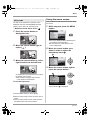
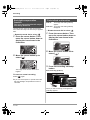
1
5
3
4
2
1 Select by moving up.
2 Select by moving down.
3 Select by moving left.
4 Select by moving right.
5 Press the cursor button to set the item.
≥Menu screen operations (l 39)
35
VQT1A24
VQT1A24_ENG_PP.book 36 ページ
2007年1月21日 日曜日 午後1時17分
Setup
Operations during recording
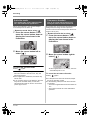
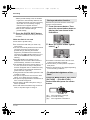
¬ Rotate the mode dial to select
Operations during playback
.
1 Press the center of the cursor
button, and icons will be
displayed on the screen.
¬ Rotate the mode dial to select
.
1 Move the cursor button up,
down, left or right to select the
scene to be played back and
press the cursor button.
≥The indication disappears when the center
of the cursor button is pressed again.
≥The indication changes each time the
cursor button is moved down.
2 Move the cursor button up, left or
right to select an item.
≥The selected scene is played back on the
full screen.
≥The operation icon is automatically
displayed on the screen.
2 Move the cursor button up,
down, left or right to operate.
≥The operation icon appears or disappears
each time the center of the cursor button is
pressed.
36
VQT1A24
VQT1A24_ENG_PP.book 37 ページ
2007年1月21日 日曜日 午後1時17分
Setup
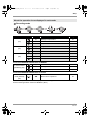
About the operation icons displayed in each mode
Recording mode
Icon
Direction
Page
Backlight compensation
54
2
Fade
54
1
Help mode
39
3
MagicPix
55
2
Soft skin mode
56
1
Tele macro
56
Ø
3
Self-timer
57
ß
2
Flash
57
1
Red eye reduction
58
(1/3)
(2/3)
(3/3)
Function
3
Set the AUTO/MANUAL/FOCUS switch to MANUAL.
In manual mode
[MANUAL] (4/4)
3
White balance
65
2
Iris or gain value
66
1
Shutter speed
66
Set the AUTO/MANUAL/FOCUS switch to FOCUS.
In manual focus
mode [FOCUS]
(5/5)
21
Manual focus adjustment
64
≥The shaded operation icons are not displayed while recording.
≥About switching between AUTO and MANUAL (l 44)
37
VQT1A24
VQT1A24_ENG_PP.book 38 ページ
2007年1月21日 日曜日 午後1時17分
Setup
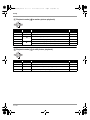
Playback mode (
In motion picture playback)
Icon
Direction
1/;
3
Playback/pause
68
∫
4
Stop playback and show thumbnails
68
Rewind (during playback)
68
Reverse slow/frame playback (during pause)
69
Fast forward (during playback)
68
Forward slow/frame playback (during pause)
69
6
2;
5
;1
2
1
Playback mode (
Function
Page
In still picture playback)
Icon
Direction
1/;
3
Slide show start/pause
73
∫
4
Stop playback and show thumbnails
73
E
2
Playback previous picture (during pause)
73
D
1
Playback next picture (during pause)
73
38
VQT1A24
Function
Page
VQT1A24_ENG_PP.book 39 ページ
2007年1月21日 日曜日 午後1時17分
Setup
Using the menu screen
Help mode
The help mode explains the operation icons
displayed when the AUTO/MANUAL/FOCUS
switch is set to AUTO in recording mode.
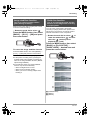
¬ Rotate the mode dial to select
.
Refer to “Menu list” (l 105) for information about
the menus.
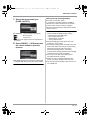
1 While stopped, press the MENU
button.
1 Press the cursor button to
display the icon.
2 Move the cursor button right to
select [
].
≥The menu displayed differs depending on
the position of the mode dial.
≥Do not switch the mode dial when the
menu is displayed.
2 Move the cursor button up or
down in order to select the
desired top menu A.
A
3 Move the cursor button up, left or
right to select the desired icon.
3 Move the cursor button right or
press the cursor button.
An explanation of the selected icon scrolls at
the bottom of the screen.
≥The indication changes each time the
cursor button is moved down.
B
To exit the help mode
≥The submenu B is displayed.
Press the MENU button or select [END].
≥When the help mode is used, functions cannot
be set.
≥When the help mode is used, motion pictures
and still pictures cannot be recorded.
39
VQT1A24
VQT1A24_ENG_PP.book 40 ページ
2007年1月21日 日曜日 午後1時17分
Setup
4 Move the cursor button up or
down in order to select the
submenu item.
To exit the menu screen
Press the MENU button.
C
≥The menu screen does not appear during
recording or playing. You cannot start other
operations while the menu screen appears.
Operating with remote control
C Current settings on menus
5 Move the cursor button right or
press the cursor button.
The menu screen transition is the same as when
the buttons on the main unit are used.
1 Press the MENU button.
MENU
ENTER
2 Select a menu item.
6 Move the cursor button up or
down in order to select the
desired item.
MENU
ENTER
≥Use the direction buttons (3,4,2,1) and
ENTER button in place of the cursor button
on the main unit.
7 Press the cursor button to enter
the selection.
3 Press the MENU button to exit
the menu screen.
MENU
ENTER
To get back to the previous screen
Move the cursor button left.
40
VQT1A24
VQT1A24_ENG_PP.book 41 ページ
2007年1月21日 日曜日 午後1時17分
Setup
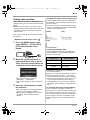
Setting date and time
Changing the date and time display style
When the unit is turned on for the first time, a
message asking you to set the date and time will
appear.
≥Move the cursor button up or down to select
[YES], press the center of the cursor button and
then perform steps 2 and 3 below to set the
date and time.
[DATE]
If the screen shows the incorrect date and time,
then adjust it.
¬ Rotate the mode dial to select
.
1 Press the MENU button, then
select [BASIC] # [CLOCK SET] #
[YES] and press the cursor
button.
Press the MENU button, then select [SETUP] #
[DATE/TIME] # desired display style and press
the cursor button.
≥You can also show or change the date and time
display by repeatedly pressing the DATE/TIME
button on the remote control.
[D/T]
DEC 15 2007
DEC 15 2007 3:30PM
[OFF]
Changing the display style
Press the MENU button, then select [SETUP] #
[DATE FORMAT] # desired display style and
press the cursor button.
2 Move the cursor button left or
right to select the item to be set.
Then, move the cursor button up
or down to set the desired value.
≥The year will change as follows:
2000, 2001, ..., 2039, 2000, ...
≥The 12-hour system is used to display the
time.
3 Press the cursor button to enter
the selection.
≥The clock function starts at [00] seconds
when the cursor button is pressed.
≥After pressing the MENU button to finish
the setting, check the date and time
display.
Display style
Screen display
[Y/M/D]
2007.12.15
[M/D/Y]
DEC 15 2007
[D/M/Y]
15.12.2007
≥The date and time function are driven by a
built-in lithium battery.
≥Make sure to check the time before recording.
≥If the time display becomes [- -], the built-in
lithium battery has run down. Use the following
steps to charge the battery. When you turn on
the power for the first time after charging, a
message asking you to set the date and time
will appear. Select [YES] and set the date and
time.
To recharge the built-in lithium battery:
If you connect the AC adaptor or insert the
battery in this unit, the built-in lithium battery will
be recharged. Leave the unit as it is for approx.
24 hours and the battery will save the date and
time for approx. 6 months. (The battery is still
being recharged even if the mode dial is set to
OFF.)
41
VQT1A24
VQT1A24_ENG_PP.book 42 ページ
2007年1月21日 日曜日 午後1時17分
Setup
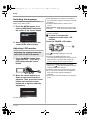
Switching the language
You can switch the language on the screen
display or the menu screen.
1 Press the MENU button, then
select [LANGUAGE] and press
the center of the cursor button.
2 Select [English] and press the
≥After adjustments are made if no operations
are performed for about 2 seconds, the bar will
disappear.
≥Press the MENU button to exit the menu
screen.
[BRIGHTNESS]: Brightness of the LCD monitor
[COLOR]:
Color level of the LCD monitor
≥These settings will not affect the images
actually recorded.
ª In order to increase the
brightness of the entire LCD
monitor
Press the POWER LCD button.
center of the cursor button.
Adjusting LCD monitor
Adjusting the brightness and the
color level of the LCD monitor
1 Press the MENU button, then
select [SETUP] # [LCD SET] #
[YES] and press the cursor
button.
2 Move the cursor button up or
down to select the item to be
adjusted. Then, press the cursor
button and move the cursor
button left or right to make the
adjustment.
The bar display moves.
42
VQT1A24
POWER LCD
The [
] indication appears on the LCD
monitor.
≥Press the POWER LCD button if the
surroundings are bright and the LCD monitor is
difficult to see. The entire LCD monitor will
become approx. twice as bright as usual.
≥When the POWER LCD button is pressed
again, the [
] indication disappears and the
original brightness is restored.
≥This will not affect the images to be recorded.
≥If you turn on the unit when the AC adaptor is
used, this function will automatically be
activated.
≥This function cannot be used in PC Connection
mode.
VQT1A24_ENG_PP.book 43 ページ
2007年1月21日 日曜日 午後1時17分
Recording
Recording
Before recording
First, format the SD card if one which has been used on another device is going to be used for the first
time on this unit. (l 79) When the SD card is formatted, all of the recorded data is deleted. Once the
data is deleted, it cannot be restored. Copy valuable data onto a PC or other device before proceeding
with the formatting.
We recommend using HD Writer Ver1.0E for SD1 to import data recorded on this unit. (l 102)
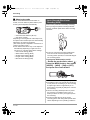
Basic camera positioning
1
3
5
2
B
C
4
A
D
6
E
1 Hold the unit with both hands.
2 Put your hand through the grip belt. Place your fingers on the rubber grip A and grasp the unit
firmly.
3 Do not cover inlet B or outlet C of the cooling fan with your hand as it will prevent heat release.
If heat builds up inside the unit, it could be damaged.
4 Do not cover the microphones D or the sensors E with your hands.
5 Keep your arms near your body.
6 Slightly open your legs.
≥When you are outdoors, record pictures with the sunlight behind you. If the subject is backlit, it will
become dark in the recording.
≥When recording, make sure your footing is stable and there is no danger of colliding with another
person or object.
43
VQT1A24
VQT1A24_ENG_PP.book 44 ページ
2007年1月21日 日曜日 午後1時17分
Recording
ª About auto mode
Set the AUTO/MANUAL/FOCUS switch to
AUTO, and color balance (white balance) and
focusing will be adjusted automatically.
AUTO
MANUAL
FOCUS
– Automatic white balance (l 123)
– Auto focus (l 124)
Depending on the brightness of the subject etc.,
the aperture and shutter speed are automatically
adjusted for an optimum brightness.
(The shutter speed is adjusted to a maximum of
1/250 in recording mode.)
≥Color balance and focus may not be adjusted
automatically depending on light sources or
scenes. If so, manually adjust these settings.
– Scene mode setting (l 63)
– White balance setting (l 65)
– Shutter speed setting (l 66)
– Iris/gain value setting (l 66)
– Manual focus setting (l 64)
Auto Ground-Directional
Standby (AGS)
This function prevents unnecessary recording
when you forget to pause recording and walk
with the unit tilted upside down while recording
continues.
≥If the unit continues to be tilted upside down
from the normal horizontal position while
recording motion pictures, it is automatically put
into recording pause.
Turning the AGS function on/off
¬ Rotate
the mode dial to select
.
Press the MENU button, then select
[VIDEO] # [AGS] # [ON] or [OFF]
and press the cursor button.
≥This function’s default setting is [OFF].
≥The AGS function may activate and cause the
unit to pause the recording if you are recording
a subject right above or right below you. In
these cases, set [AGS] to [OFF] then continue
the recording.
≥Use the recording start/stop button to pause
the recording. The AGS function is only a
backup function for when you forget to pause
the recording.
≥The time it takes the unit to be put into
recording pause after being tilted upside down
varies depending on the operating conditions.
44
VQT1A24
VQT1A24_ENG_PP.book 45 ページ
2007年1月21日 日曜日 午後1時17分
Recording
Recording motion pictures
Record motion pictures on an SD card.
≥Use an SD card that can be used for motion
picture recording. (l 26)
≥This unit records high definition images that are
compatible with the 16:9 aspect ratio of a
wide-screen TV.
1 Rotate the mode dial to select
.
The lens cover opens automatically.
2 Open the LCD monitor.
3 Press the recording start/stop
To end the recording
Press the recording start/stop button again to
pause recording.
≥[¥] and [;] are red during recording. Do not
move this unit until [;] is green.
≥The images recorded between pressing the
recording start/stop button to start recording
and pressing it again to pause recording
become one scene.
≥When about 5 minutes have passed without
any operation in recording pause, the unit
automatically turns off to prevent the battery
from running down. When you want to use the
unit, turn it on again.
This setting can also be set to [OFF]. (l 107,
[POWER SAVE])
button to start recording.
≥While recording is in progress, the
recording will not stop even if the LCD
monitor is closed.
45
VQT1A24
VQT1A24_ENG_PP.book 46 ページ
2007年1月21日 日曜日 午後1時17分
Recording
ª Screen indications in the
recording mode
A
B
C
A Recording mode
B Remaining time left for recording
(When the remaining time is less than
1 minute, [R0min] flashes red.)
C Recording time elapsed
≥Maximum number of recordable scenes: 999 (It
may not be possible to record 999 scenes even
if there is available memory on the SD card.)
≥Maximum number of recordable scenes with
different dates: 99
(In some cases, scenes shot on the same day
will be recorded with different dates. (l 71))
≥SD cards with more than the maximum scenes
or different dates cannot be used with this unit.
≥Sound is recorded from the internal
microphones on the top of this unit. Take care
not to block this microphone.
≥Put the unit in pause mode when connecting or
disconnecting an external microphone with the
MIC terminal. If an external microphone is
connected or disconnected while recording, the
audio will not be recorded properly.
≥Each time the unit is put into recording pause,
the counter display will be reset to “0h00m00s”.
≥When recording motion pictures, do not remove
the battery or disconnect the AC adaptor. Also
do not remove the SD card while the card
access lamp is lit. If you do either of the above,
the scene recovery message is displayed and
the recovery operation will begin when the SD
card is next inserted or the power is turned
back on. (l 112)
46
VQT1A24
ª When recording stops suddenly
during motion picture recording
When using an SD card other than one that can
be used for motion picture recording (l 26), the
recording may stop suddenly. At this time, the
following message appears.
When motion pictures are to be recorded, use a
Panasonic SD card or another SD card which
can be used to record motion pictures. (l 26)
REC STOPPED.
NOW WRITING.
INCOMPATIBLE CARD.
PLEASE CHECK CARD.
Even if you use an SD card that can be used
for motion picture recording (l 26), this kind
of message may appear.
The data on the card has been written many
times and the data writing speed has reduced.
We recommend formatting the SD card being
used. (l 79) When an SD card is formatted, all
the data recorded on it will be deleted so copy
valuable data to the PC prior to formatting.
(l 102) (When acquiring data recorded on this
unit, we recommend using HD Writer Ver1.0E for
SD1 to acquire it. (l 102))
VQT1A24_ENG_PP.book 47 ページ
2007年1月21日 日曜日 午後1時17分
Recording
Recording modes/recordable time available for the motion
picture
Switch the picture quality of the motion pictures to be recorded.
¬ Rotate the mode dial to select
.
Press the MENU button, then select [VIDEO]
# [REC MODE] # desired item and press the
cursor button.
Approximate recording times of motion pictures per SD card made by Panasonic
SD card
memory
HF
HN
256 MB
2 min
3 min
5 min
512 MB
5 min
7 min
10 min
1 GB
10 min
15 min
22 min
2 GB
20 min
30 min
45 min
4 GB
40 min
1h
HE
HF :
Motion pictures can be recorded with the
highest picture quality.
HN :
Motion pictures can be recorded with normal
picture quality.
HE :
Motion
pictures can be recorded for longer.
1 h 30 min
≥The recordable time shown in the table are approximations.
≥Motion pictures can be recorded with the high definition picture quality.
≥This unit records in CBR in HF mode. CBR is an abbreviation for Constant Bit Rate. CBR recording
does not vary the bit rate (amount of data in a fixed time).
≥This unit records in VBR in HN / HE mode. VBR is an abbreviation for Variable Bit Rate. VBR recording
automatically varies the bit rate (amount of data in a fixed time) depending on the subject being
recorded. This means if a subject with sharp movements is recorded, the recording time is reduced.
≥Sound is recorded with the Dolby Digital 5.1 Creator. (when recording with the built-in microphone)
≥Recordable time using the battery (l 30)
≥8 MB and 16 MB SD cards cannot be used for motion picture recording.
≥If the write protection switch on the SD card is set to LOCK, it cannot be used for recording. (l 27)
≥If an SD card is recorded on or erased many times, it may no longer be possible to record motion
pictures even if there is available memory on the SD card. In this case, after saving the data on PC,
format the SD card.
≥Mosaic-pattern noise may appear on a playback image in the following cases.
– When there is a complicated pattern in the background
– When the unit is moved too much or too fast
– When a subject with sharp movements has been recorded
(Particularly if it has been recorded in HE mode.)
47
VQT1A24
VQT1A24_ENG_PP.book 48 ページ
2007年1月21日 日曜日 午後1時17分
Recording
Recording still pictures
(JPEG)
Record the still picture on an SD card.
≥This number of recording pixels for still pictures
is compatible with the 16:9 aspect ratio of a
wide-screen TV. They are recorded at
1920k1080.
1 Rotate the mode dial to select
.
A
B
A Focus indication
± (The white lamp flashes.):
Focusing
¥ (The green lamp lights up.):
When in focus
No mark:
When focusing is unsuccessful.
B Focus area
4 Press the PHOTO SHOT button
fully to take the picture.
The lens cover opens automatically.
2 Open the LCD monitor.
3 Press the PHOTO SHOT button
halfway in order to adjust
focusing. (For auto focusing
only)
≥In order to take better still pictures, the
screen will brighten when recording.
To record still pictures clearly
The shutter speed and the iris/gain value are
fixed and the unit focuses on the subject
automatically.
≥If you set [O.I.S.] (l 59) to [ON], then the
image stabilizer function will be more
effective. ([ MEGA
] (MEGA optical image
stabilizer) will be displayed.)
48
VQT1A24
≥When zooming in on the subject with a
magnification of 4k or higher, it is difficult to
reduce the slight shaking from holding this unit
by hand. We recommend decreasing the zoom
magnification and approaching the subject
when recording.
≥When recording still pictures, hold the unit
firmly with your hands and keep your arms
stationary at your side so as not to shake the
unit.
≥You can record stable pictures without shaking
by using a tripod and the remote control.
≥For information about the number of
recordable still pictures on an SD card
(l 51)
≥The sound cannot be recorded.
≥If the write protection switch on the SD card is
set to LOCK, it cannot be used for recording.
≥The PHOTO SHOT button on the remote
control cannot be pressed halfway.
VQT1A24_ENG_PP.book 49 ページ
2007年1月21日 日曜日 午後1時17分
Recording
≥If the [PICT. QUALITY] is set to [
],
mosaic-pattern noise may appear on a
playback image depending on the picture
content.
≥While this unit accesses the SD card (
is
displayed/the card access lamp is lit), do not
perform the following operations. The SD card
or the recorded data may be damaged.
– Turn the unit off.
– Open the card slot cover and remove the SD
card.
– Operate the mode dial.
≥Other products may degrade or not playback
still pictures recorded on this unit.
≥The edges of still pictures recorded on this unit
with a 16:9 aspect ratio may be cut at printing.
Check the printer or photo studio before
printing.
ª About the screen indications
only when the PHOTO SHOT
button is pressed halfway
2.1M
750
MEGA
A BC D E F G H
Flash (l 57)
Flash level (l 58)
Red eye reduction (l 58)
Quality of still pictures
Size of still pictures
Remaining number of still pictures
(Flashes in red when [0] appears.)
G Card indication (l 108)
H MEGA optical image stabilizer (l 59)
A
B
C
D
E
F
ª About the focus indication
≥The focus indication indicates the status of the
auto focus.
≥The focus indication does not appear in manual
focus mode.
≥Focus on a subject manually when it is not
easily focused automatically.
≥You can record still pictures on the card even if
the focus indication does not appear, but
pictures may be recorded without being
focused.
≥The focus indication does not appear or has
difficulty displaying in the following cases.
– When the zoom magnification is high.
– When the unit is shaken.
– When the subject is moving.
– When the subject stands in front of a light
source.
– When close subjects and far subjects are
included in the same scene.
– When the scene is dark.
– When there is a bright part in the scene.
– When the scene is filled with only horizontal
lines.
– When the scene lacks contrast.
– When recording motion pictures
– When the MagicPix function is used.
ª Concerning the focusing area
When there is a contrasting object ahead or
behind the subject in the focus area, the subject
may not be focused. If so, move the contrasting
object out of the focus area.
≥Even when it is still difficult to focus, adjust the
focus manually.
≥The focusing area is not displayed when the
digital zoom (more than approx. 12k) is used.
49
VQT1A24
VQT1A24_ENG_PP.book 50 ページ
2007年1月21日 日曜日 午後1時17分
Recording
Switching the shutter effect on/off
You can add a shutter sound when recording still
pictures.
Press the MENU button, then select
[PICTURE] # [SHTR EFFECT] #
[ON] or [OFF] and press the cursor
button.
About simultaneous recording
(recording still pictures while
recording motion pictures)
You can record still pictures even while recording
motion pictures.
While recording motion pictures,
press the PHOTO SHOT button fully
(press to the bottom) to take the
picture.
≥This function’s default setting is [ON].
≥This function does not work during motion
picture recording.
≥This function is not activated if the
PHOTO SHOT button is pressed halfway.
≥The screen indications that appear only when
the PHOTO SHOT button is pressed halfway
will be displayed. (l 49) However, the
remaining number of still pictures will not be
displayed.
≥The picture quality is different from normal still
picture recording because priority is given to
the motion picture recording. We recommend
pausing the motion picture recording to record
a still picture with better picture quality.
50
VQT1A24
VQT1A24_ENG_PP.book 51 ページ
2007年1月21日 日曜日 午後1時17分
Recording
Picture Quality/Approximate
Number of Recordable
Pictures on an SD Card
Picture quality
Selecting the picture quality.
Press the MENU button, then select
[PICTURE] # [PICT. QUALITY] #
desired item and press the cursor
button.
: Still pictures with a high picture quality are
recorded.
: Priority is given to the number of still
pictures recorded. Still pictures are
recorded in normal picture quality.
Approximate Number of
Recordable Pictures on an SD
Card
ª Picture quality and number of
recordable pictures
Picture size
2.1M (1920t1080)
Picture quality
8 MB
16 MB
32 MB
64 MB
128 MB
256 MB
512 MB
1 GB
2 GB
4 GB
4
10
20
47
94
200
410
820
1670
3290
6
17
32
74
150
320
640
1290
2630
5160
≥The number of recordable pictures depends
on whether [
] and [
] are used
together and on the subject being recorded.
≥The numbers shown in the table are
approximations.
51
VQT1A24
VQT1A24_ENG_PP.book 52 ページ
2007年1月21日 日曜日 午後1時17分
Recording
Various recording functions
Zoom in/out function
≥If the zoom lever is pushed to the end, you can
zoom from 1k up to 12k in as fast as approx.
1.8 seconds.
≥When the zoom speed is high, the subject may
not be focused easily.
You can zoom in up to 12k optically.
¬ Rotate the mode dial to select
.
Move the zoom lever.
Digital zoom function
If the zoom magnification exceeds 12k, then the
digital zoom function will be activated. The
maximum magnification provided by the digital
zoom can be switched.
VOL
¬ Rotate the mode dial to select
W
T
.
Press the MENU button, then select
[BASIC] # [D.ZOOM] # desired item
and press the cursor button.
T side: Close-up recording (zoom in)
W side: Wide-angle recording (zoom out)
[OFF]:
Optical zoom only (Up to 12k)
[30k]:
Up to 30k
[700k]: Up to 700k
≥If [30k] or [700k] is selected, the digital zoom
range is displayed in blue while zooming.
≥The larger the digital zoom magnification, the
more the image quality is degraded.
≥If you take your finger off the zoom lever during
zoom operation, the operation sound may be
recorded. When returning the zoom lever to the
original position, move it quietly.
≥When zooming in while holding this unit by
hand, we recommend using the image
stabilizer function. (l 59)
≥When distant subjects are brought closer, they
are focused at about 1.2 m (3.9 feet) or more.
≥When the zoom magnification is 1k, this unit
can focus on a subject approx. 4 cm (1.6q)
away from the lens. (Macro function)
≥The zoom speed varies depending on the
range over which the zoom lever is moved.
(The zoom speed does not vary when
operating with the remote control.)
52
VQT1A24
VQT1A24_ENG_PP.book 53 ページ
2007年1月21日 日曜日 午後1時17分
Recording
Recording yourself
About using the zoom
microphone function
The zoom microphone is linked to the zooming
operation and the sound sensitivity direction
(directivity) of the microphone changes as you
zoom. Far away sounds are recorded more
clearly if you zoom in (close-up) and the
surrounding sound is recorded with presence if
you zoom out (wide angle).
¬ Rotate the mode dial to select
You can record yourself while viewing the LCD
monitor.
¬ Rotate the mode dial to select
.
Rotate the LCD monitor towards the
lens side.
.
Press the MENU button, then select
[VIDEO] # [ZOOM MIC] # [ON] and
press the cursor button.
≥The zoom microphone function does not work
with an external microphone.
≥When zooming in, surrounding sounds are
suppressed and the sound near the front of the
unit is recorded. When recording music recitals
or other events where you wish to record
quality sound and keep a realistic sensation
even when zooming in, we recommend that
you turn the zoom microphone function off.
The image is horizontally flipped as if you see a
mirror image. (However the image recorded is
the same as a normal recording.)
≥When the LCD monitor is rotated towards the
lens side, the icon will not be displayed even if
you press the cursor button.
≥Only some indications will appear on the
screen. When [°] appears, return the
direction of the LCD monitor to normal position
and check the warning/alarm indication.
(l 110)
53
VQT1A24
VQT1A24_ENG_PP.book 54 ページ
2007年1月21日 日曜日 午後1時17分
Recording
Backlight compensation
function
Fade in/fade out function
This is for preventing a backlit subject
from being darkened.
Use this function when the light is emanating
from behind the subject and the subject appears
dark.
¬ Rotate the mode dial to select
.
1 Press the cursor button. Then
move the cursor button down to
display the icon shown in the
illustration.
Fade in:
The image and audio gradually
appear.
Fade out: The image and audio gradually
disappear.
¬ Rotate the mode dial to select
1 Press the cursor button. Then
move the cursor button down to
display the icon shown in the
illustration.
2 Move the cursor button left to
2 Move the cursor button up to
select [
select [
].
].
3 Press the recording start/stop
button.
The image on the screen will become
brighter.
Start recording. (Fade in)
To return to normal recording
Select [
] again.
≥If you turn off the power or operate the mode
dial, the backlight compensation function is
canceled.
When you start recording, the image/audio
gradually appears.
54
VQT1A24
.
VQT1A24_ENG_PP.book 55 ページ
2007年1月21日 日曜日 午後1時17分
Recording
4 Press the recording start/stop
button.
Pause recording. (Fade out)
MagicPix function
This allows recording in dark
locations.
This function allows you to record color subjects
in dark locations (Minimum required illumination:
approx. 2 lx) to stand out against the
background.
Attach this unit to a tripod, and you can record
images free from vibration.
≥Recorded scene is seen as if frames were
missed.
The image/audio gradually disappears. After the
image/audio completely disappears, recording
stops.
≥After recording, the fade setting is canceled.
¬ Rotate the mode dial to select
1 Press the cursor button. Then
.
move the cursor button down to
display the icon shown in the
illustration.
To cancel fading
Select [
] again.
To select the color for fade in/out
The color which appears in fading pictures can
be selected.
2 Move the cursor button up to
select [
].
Press the MENU button, then select
[VIDEO] # [FADE COLOR] #
[WHITE] or [BLACK] and press the
cursor button.
≥If you turn off the power, the fade function is
canceled.
≥While the fade in/fade out function is selected,
it takes several seconds to display the image
when you start recording. It also takes several
seconds to pause recording.
≥The thumbnails of scenes recorded using fade
in become black (or white).
To cancel the MagicPix function
Select [
] again.
≥The focus indication does not appear even if
the PHOTO SHOT button is pressed halfway.
≥When using auto focus, it will take some time to
focus in dark areas. If there is difficulty focusing
with auto focus, manually adjust the focus.
≥The flash cannot be used.
≥The MagicPix function makes the signal
charging time of CCD up to approximately 8k
longer than usual, so that dark scenes can be
recorded brightly. For this reason, bright dots
that are usually invisible may be seen, but this
is not a malfunction.
≥If you turn off the power or operate the mode
dial, the MagicPix function is canceled.
≥If set in a bright place, the screen may become
whitish for a while.
55
VQT1A24
VQT1A24_ENG_PP.book 56 ページ
2007年1月21日 日曜日 午後1時17分
Recording
Soft skin mode
Tele macro function
This makes skin colors appear softer
for a more attractive appearance.
This is for close-ups bringing only
what you want to record into focus.
This is more effective if you record a subject
more closely from the torso up.
¬ Rotate the mode dial to select
1 Press the cursor button. Then
.
move the cursor button down to
display the icon shown in the
illustration.
By focusing only on the subject and blurring the
background, the image can be impressive.
The unit can focus on the subject at a distance of
approx. 60 cm (24q).
¬ Rotate the mode dial to select
1 Press the cursor button. Then
.
move the cursor button down to
display the icon shown in the
illustration.
2 Move the cursor button left to
select [
].
2 Move the cursor button right to
select [
].
To cancel the soft skin mode
Select [
] again.
≥If the background or anything else in the scene
has colors similar to the skin color, they will
also be smoothed.
≥If the brightness is insufficient, the effect may
not be clear.
≥If you record a person in the distance, the face
may not be recorded clearly. In this case,
cancel soft skin mode or zoom in on the face
(close-up) to record.
56
VQT1A24
≥If the magnification is 12k or less, then it is
automatically set to 12k.
To cancel the tele macro function
Select [
] again.
≥If a sharper focus cannot be achieved, adjust
the focus manually. (l 64)
≥In the following cases, the tele macro function
is canceled.
– The zoom magnification becomes lower than
12k.
– The power is turned off or the mode dial is
operated.
VQT1A24_ENG_PP.book 57 ページ
2007年1月21日 日曜日 午後1時17分
Recording
Self-timer recording
You can record still pictures on an SD card using
the timer.
¬ Rotate the mode dial to select
1 Press the cursor button. Then
.
move the cursor button down to
display the icon shown in the
illustration.
≥The self-timer is canceled if the power is turned
off or the mode dial is operated.
≥The self-timer standby mode is canceled when
you press the recording start/stop button to
start motion picture recording.
Even if you press the recording start/stop
button while the self-timer is counting down,
motion picture recording is not possible.
≥Depending on the time taken to bring the
subject into focus, the recording may take
longer than set to start.
≥Setting the self-timer to [Ø2] is a good way to
prevent image shake when the PHOTO SHOT
button is pressed while using a tripod etc.
Built-in flash
2 Move the cursor button up to
select [Ø].
Use the built-in flash in order to record still
pictures in dark places.
¬ Rotate the mode dial to select
1 Press the cursor button. Then
.
move the cursor button down to
display the icon shown in the
illustration.
Each time the cursor button is pressed up,
the indication changes by one setting in the
following order:
[Ø10] # [Ø2] # setting canceled
Ø10: Records after 10 seconds
Ø2: Records after 2 seconds
3 Press the PHOTO SHOT button.
A still picture is recorded after the [Ø10] or
[Ø2] display and the recording lamp flashes
for the time which has been set.
≥After recording, the self-timer is canceled.
≥If you press the PHOTO SHOT button
halfway and then fully in auto focus mode,
the subject is focused when the button is
pressed halfway.
≥When you press the PHOTO SHOT button
fully in auto focus mode, the subject is
focused just before recording.
To stop the timer midway through
Press the MENU button. (The self-timer setting is
canceled.)
2 Move the cursor button left to
select [ß].
≥Each time the cursor button is pressed left,
the indication changes by one setting in the
following order: [FLASH ON] >
[FLASH AUTO] > [FLASH OFF]
≥When the PHOTO SHOT button is pressed
halfway, the flash indicator will appear in
the bottom left corner of the screen.
[FLASH ON]:
ß
[FLASH AUTO]: ßA
[FLASH OFF]:
57
VQT1A24
VQT1A24_ENG_PP.book 58 ページ
2007年1月21日 日曜日 午後1時17分
Recording
≥When [FLASH AUTO] is set, the ambient
brightness is automatically detected, and
the flash will activate only when necessary.
(If the flash is not necessary, the [ßA]
indicator will not appear when the
PHOTO SHOT button is pressed halfway.)
≥This function’s default setting is
[FLASH AUTO].
3 Press the PHOTO SHOT button.
Red eye reduction function
Reduces the phenomena where human eyes
become red from flashes.
1 Press the cursor button. Then
move the cursor button down to
display the icon shown in the
illustration.
The flash is activated and the picture will be
recorded.
When the flash is not used
Set the flash to [FLASH OFF].
≥Do not block the flash with your hand or by
other means.
≥The unit automatically determines if the flash is
necessary even when it has been set to
[FLASH OFF] by detecting the ambient
brightness. (If it determines that the flash is
necessary, the [ ] indication lights up in red
when the PHOTO SHOT button is pressed
halfway.)
≥If the [ß] indication etc. flashes or is not
displayed when the PHOTO SHOT button is
pressed halfway, the flash is not activated.
≥The available range of the flash is approx. 1 m
to 2.5 m (3.3 feet to 8.2 feet) in dark places.
Pictures will appear dark or reddish when they
are recorded by using the flash at distances
greater than 2.5 m (8.2 feet).
≥Using the flash fixes the shutter speed of 1/750
or faster to 1/500.
≥The picture may become out of focus in dark
places. If so, adjust the focus manually.
≥The picture may appear dark if the flash is lit in
front of a white background.
≥Set the flash to [FLASH OFF] where using a
flash is prohibited.
≥If the flash will be activated a large number of
times, it may take longer to charge it.
2 Move the cursor button right to
select [
].
≥The flash is activated 2 times. Do not move
until the second flash is finished.
≥Use this when you take pictures of people in
dark places.
≥Red eye phenomenon may appear depending
on the recording conditions.
To adjust the brightness of the
flash
Press the MENU button, then select
[PICTURE] > [FLASH LEVEL] #
desired item and press the cursor
button.
[ßj]: If the brightness is too high.
[ßd0]: In normal recording
[ßi]: If the brightness is insufficient.
58
VQT1A24
VQT1A24_ENG_PP.book 59 ページ
2007年1月21日 日曜日 午後1時17分
Recording
Image stabilizer function
Guide line function
This is for reducing image shakes
(jitter) during recording.
This is for viewing the slope and the
balance of the image while recording
or playing back.
Reduces the image shaking (jitter) due to hand
movement when recording.
¬ Rotate the mode dial to select
.
Press the MENU button, then select
[BASIC] # [O.I.S.] # [ON] and press
the cursor button.
To cancel the image stabilizer function
You can check if the image is level while
recording or playing back motion pictures and
still pictures. The function can also be used to
estimate the balance of the composition.
¬ Rotate the mode dial to select
or
rotate the mode dial to
and then
select the
(motion picture
playback) tab. (l 68)
Press the MENU button, then select
[BASIC] or [PLAY SETUP] #
[GUIDE LINES] # desired item and
press the cursor button.
Press the MENU button, then select [BASIC] #
[O.I.S.] # [OFF] and press the cursor button.
≥This function’s default setting is [ON].
≥In still picture recording mode, pressing the
PHOTO SHOT button halfway increases the
effect of the image stabilizer function. (MEGA
optical image stabilizer)
≥In the following cases, the image stabilizer
function may not work effectively.
– When the digital zoom is used
– When the unit is shaken greatly
– When you record a moving subject while
tracking it
A [HORIZONTAL]
B [GRID1]
C [GRID2]
59
VQT1A24
VQT1A24_ENG_PP.book 60 ページ
2007年1月21日 日曜日 午後1時17分
Recording
To cancel the guide line function
Press the MENU button, then select [BASIC] or
[PLAY SETUP] # [GUIDE LINES] # [OFF] and
press the cursor button.
≥The guide lines do not appear on the images
actually recorded.
Microphone level
This is for adjusting the microphone
input level.
When recording, the input level from the built-in
microphones and the external microphone
terminal can be adjusted.
Wind noise reduction function
¬ Rotate the mode dial to select
This is for reducing the wind noise
coming into the microphone when
recording.
1 Press the MENU button, then
¬ Rotate the mode dial to select
.
.
select [VIDEO] # [MIC LEVEL] #
[SETrAGC] or [SET] and press
the cursor button.
Press the MENU button, then select
[VIDEO] # [WIND CUT] # [ON] and
press the cursor button.
To cancel the wind noise reduction
function
Press the MENU button, then select [VIDEO] #
[WIND CUT] # [OFF] and press the cursor
button.
≥This function’s default setting is [ON].
≥The wind noise reduction depends on the wind
strength. (The surround effect may be reduced
if this function is activated in strong winds.
However, the surround effect is automatically
restored when then the wind weakens.)
≥The wind noise reduction function does not
work with an external microphone.
60
VQT1A24
AGC: Auto Gain Control
[AUTO]:
AGC is activated, and the
recording level is adjusted
automatically.
[SETrAGC]: The desired recording level can be
set. AGC will also be activated to
reduce the amount of sound
distortion.
[SET]:
AGC is not activated and so natural
recording can be performed.
VQT1A24_ENG_PP.book 61 ページ
2007年1月21日 日曜日 午後1時17分
Recording
2 Move the cursor button left or
right to adjust the microphone
input level.
A
B
D
C
E
F
A
D
B
C
To return to automatic setting
Press the MENU button, then select [VIDEO] #
[MIC LEVEL] # [AUTO], and press the cursor
button.
≥Adjust the gain value so that the last 2 bars of
the microphone input level on the center of the
screen are not red. (Otherwise, the sound is
distorted.) Select a lower setting for gain value
or set [MIC LEVEL] to [AUTO].
≥The front left and front right gain values only
work when input is from an external
microphone.
≥The microphone input level meter shows the
largest volume for the microphones.
≥When [ZOOM MIC] is [ON], the volume will be
different depending on the zoom rate. Set
[ZOOM MIC] to [OFF] or set the microphone
input level after adjusting the zoom rate. (l 53)
E
E
A Center
B Front left
C Back left
D Front right
E Back right
F Microphone input level
≥A gain value for each of the 5 built-in
microphones is displayed. (The input level of
the microphones cannot be set individually.)
3 Press the center of the cursor
button to set and then press the
MENU button to finish the
setting.
G
G Microphone input level meter
≥Microphone input level meter is displayed on
the screen.
61
VQT1A24
VQT1A24_ENG_PP.book 62 ページ
2007年1月21日 日曜日 午後1時17分
Recording
Zebra display
Color bar
This is for displaying the parts that
are too bright.
This is for displaying a color bar to
check the color tone.
Parts where white saturation (color saturation) is
likely to occur (extremely brightly lit or shiny
parts) are displayed with diagonal lines (zebra
pattern).
This unit displays a 7 color bar which is useful for
adjusting the picture quality of the TV or the
external monitor.
¬ Rotate the mode dial to select
Press the MENU button, then select
[ADVANCED] # [COLOR BAR]#
[ON] and press the cursor button.
.
Press the MENU button, then select
[ADVANCED] # [ZEBRA]# [ON] and
press the cursor button.
¬ Rotate the mode dial to select
.
To cancel the color bar
A
A Zebra pattern
≥You can record an image with little white
saturation if you manually adjust the shutter
speed or brightness (iris/gain) (l 66).
To cancel the zebra display
Press the MENU button, then select
[ADVANCED] # [ZEBRA] # [OFF] and press
the cursor button.
≥The zebra pattern does not appear on the
images actually recorded.
62
VQT1A24
Press the MENU button, then select
[ADVANCED] # [COLOR BAR] # [OFF] and
press the cursor button.
≥This function is canceled when the power is
turned off.
≥The icon will not be displayed even if you press
the cursor button.
VQT1A24_ENG_PP.book 63 ページ
2007年1月21日 日曜日 午後1時17分
Recording
Manual recording functions
Scene mode
This is for recording in various
situations.
When you record images in different situations,
this mode automatically sets optimum shutter
speeds and apertures.
¬ Rotate the mode dial to select
.
1 Set the AUTO/MANUAL/FOCUS
switch to MANUAL.
AUTO
MANUAL
FOCUS
2 Press the MENU button, then
select [BASIC] # [SCENE MODE]
# desired item and press the
cursor button.
[5] Sports
To record sports scenes or scenes where there
are quick motions
[ ] Portrait
To make people stand out against the
background
[ ] Low light
To make the scene brighter in dark conditions
[
] Spotlight
To make the subject under a spotlight look more
attractive
[
] Surf & snow
To record images in bright places such as ski
slopes and beaches
To cancel the scene mode function
Press the MENU button, then select [BASIC] #
[SCENE MODE] # [OFF].
≥You can also cancel the scene mode function
by setting the AUTO/MANUAL/FOCUS switch
to AUTO.
Sports mode
≥For slow-motion playback or playback pause of
recorded pictures, this mode helps diminish
camera shake.
≥During normal playback, the image movement
may not look smooth.
≥Avoid recording under fluorescent light,
mercury light or sodium light because the color
and brightness of the playback image may
change.
≥If you record a subject illuminated with strong
light or a highly reflective subject, vertical lines
of light may appear.
≥If the brightness is insufficient, the sports mode
does not function. The [5] display flashes.
≥If this mode is used indoors, the screen may
flicker.
Portrait mode
≥If this mode is used indoors, the screen may
flicker. If so, change the scene mode setting to
[OFF].
Low light mode
≥Extremely dark scenes may not be able to be
recorded finely.
Spotlight mode
≥If the recording subject is extremely bright, the
recorded image may become whitish and the
periphery of the recorded image extremely
dark.
Surf & snow mode
≥If the subject is extremely bright, the recorded
image may become whitish.
63
VQT1A24
VQT1A24_ENG_PP.book 64 ページ
2007年1月21日 日曜日 午後1時17分
Recording
4 Move the cursor button left or
Manual focus adjustment
If auto focusing is difficult due to the conditions,
then manual focusing is available.
¬ Rotate the mode dial to select
1
right to bring the subject into
focus.
.
(When MF assist function is used)
Press the MENU button, then
select [ADVANCED] #
[MF ASSIST] # [ON] and press
the cursor button.
The center of the screen is enlarged. The
normal screen returns approximately
2 seconds after you finish bringing the
subject into focus.
≥The center of the screen is not enlarged
when [MF ASSIST] is [OFF].
To restore to the automatic adjustment
≥The default setting is [ON].
2 Set the AUTO/MANUAL/FOCUS
switch to MANUAL.
AUTO
MANUAL
FOCUS
Press the AUTO/MANUAL/FOCUS switch down
again to the FOCUS position.
≥You can also restore the auto focusing by
setting the AUTO/MANUAL/FOCUS switch to
AUTO.
≥The subject may not be in focus when zoomed
in if focusing with a wide angle. First, zoom in
on the subject, and then focus on it.
3 Move the switch down and set it
to FOCUS position.
AUTO
MANUAL
FOCUS
The manual focus indication [MF] and the
icon shown in the illustration appear.
64
VQT1A24
About the MF assist function
The center of the screen is enlarged during
manual focus adjustment. This allows you to
focus on the subject more easily.
≥MF assist does not work if the zoom
magnification is more than 12k.
≥The part of the screen that is enlarged is not
enlarged on the image actually recorded.
≥The zebra pattern does not appear on the part
of the screen that is enlarged when [ZEBRA] is
[ON].
VQT1A24_ENG_PP.book 65 ページ
2007年1月21日 日曜日 午後1時17分
Recording
White balance
This is for recording in natural colors.
The automatic white balance function may not
reproduce natural colors depending on the
scenes or lighting conditions. If so, you can
adjust the white balance manually.
¬ Rotate the mode dial to select
.
1 Set the AUTO/MANUAL/FOCUS
switch to MANUAL.
≥Lights used for wedding receptions at
hotels, stage spotlights in theatres
≥Sunrise, sunset etc.
To restore to the automatic adjustment
Set the white balance mode to [ AWB ].
≥You can also restore the automatic adjustment
by setting the AUTO/MANUAL/FOCUS switch
to AUTO.
To set the white balance manually
1 Select [
], fill the screen with a
white subject.
The icon shown in the illustration is displayed
automatically.
2 Move the cursor button up to
select [
].
3 Move the cursor button left or
right to select the white balance
mode.
2 Move the cursor button up to
select [
].
≥When the [
] display changes from
flashing to on, setting is complete.
≥When the [
] display continues flashing,
the white balance cannot be set because
the place is dark etc. In this case, use the
automatic white balance.
[ AWB ]: Auto white balance adjustment
[
]:
Indoor mode (for recording under
incandescent lamps)
≥Incandescent lights, halogen lamps
[
]:
[
]:
Outdoor mode
≥Outdoors under a clear sky
Manual adjustment mode
≥Mercury-vapor lamps, sodium lamps,
some fluorescent lights
65
VQT1A24
VQT1A24_ENG_PP.book 66 ページ
2007年1月21日 日曜日 午後1時17分
Recording
ª About the white balance sensor
A
The white balance sensor A detects the type of
light source during recording.
Do not cover the white balance sensor during
recording, or it may not function properly.
ª About the black balance
adjustment
This is one of the 3CCD system functions that
automatically adjusts the black when the white
balance is set in the manual adjustment mode.
When the black balance is adjusted, the screen
will temporarily be black. (The black balance
cannot be adjusted manually.)
1
2
3
Manual shutter speed/aperture
adjustment
Shutter Speed:
Adjust it when recording fast-moving subjects.
Aperture:
Adjust it when the screen is too bright or too
dark.
¬ Rotate the mode dial to select
.
1 Set the AUTO/MANUAL/FOCUS
switch to MANUAL.
The icon shown in the illustration is displayed
automatically.
2 Move the cursor button left or
1 Black balance adjustment in progress.
(Flashes.)
2 White balance adjustment in progress.
(Flashes.)
3 Adjustment completed. (Lights up.)
≥When the [ ] display flashes, the manual
white balance previously adjusted is stored.
Whenever recording conditions change, re-set
the white balance for correct adjustment.
≥When setting both the white balance and the
iris/gain, set the white balance first.
right to select [ ] (aperture) or
[ ] (shutter speed).
3 Move the cursor button left or
right to make the adjustment.
A Shutter speed:
1/60 to 1/8000
≥The shutter speed closer to 1/8000 is faster.
B Iris/Gain value:
CLOSE # (F16 to F2.0) # OPEN # (0dB to
18dB)
≥Value closer to [CLOSE] darken the image.
≥Value closer to [18dB] brighten the image.
66
VQT1A24
VQT1A24_ENG_PP.book 67 ページ
2007年1月21日 日曜日 午後1時17分
Recording
≥When the iris value is adjusted to brighter than
[OPEN], it changes to the gain value.
To restore to automatic adjustment
Set the AUTO/MANUAL/FOCUS switch to
AUTO.
≥When setting both the shutter speed and the
iris/gain value, set the shutter speed and then
set the iris/gain value.
Manual shutter speed adjustment
≥Avoid recording under fluorescent light,
mercury light or sodium light because the color
and brightness of the playback image may
change.
≥If you increase the shutter speed manually, the
gain value will increase automatically
depending on how much the sensitivity lowers
and the noise on the screen may increase.
≥When recording still pictures, we recommend
setting the shutter speed to 1/500 or less for
even more beautiful pictures.
≥You may see vertical lines of light in the
playback image of a brightly shining subject or
highly reflective subject, but this is not a
malfunction.
≥During normal playback, image movement may
not look smooth.
≥When recording in an extremely bright place,
the screen may change color or flicker. If so
adjust the shutter speed manually to [1/60] or
[1/100].
Manual iris/gain adjustment
≥If the gain value is increased, the noise on the
screen increases.
≥Depending on the zoom magnification, there
are iris values that are not displayed.
67
VQT1A24
VQT1A24_ENG_PP.book 68 ページ
2007年1月21日 日曜日 午後1時17分
Playback
3 Select the scene to be played
Playback
Motion picture playback
back.
Play back motion pictures.
1 Rotate the mode dial to select
.
B
C
D
The lens cover closes.
2 Press the cursor button up and
then left to select the
picture playback) tab.
(motion
A
B Previous page
C Next page
D Scene number
The selected scene will be encircled by a
yellow frame.
≥If 9 or more scenes have been recorded,
the next (or previous) page can be
displayed by moving the cursor button left
and right or moving the cursor button down,
selecting
/
by moving the
cursor button left and right and then
pressing the center of the cursor button.
≥The scene number display switches to the
page number when the motion picture
playback tab or
/
is
selected.
4 Press the cursor button.
A Motion picture playback tab
The motion pictures are displayed as
thumbnails (reduced-size images).
The selected scene is played back on the full
screen.
≥The operation icon is automatically
displayed on the screen.
5 Move the cursor button to
operate.
Playback/Pause
Review playback*
Cue playback*
Stops the playback
and shows the
thumbnails.
* Press the 6 or 5 button on the remote
control.
1/;:
6 (Move and hold):
5 (Move and hold):
∫:
68
VQT1A24
VQT1A24_ENG_PP.book 69 ページ
2007年1月21日 日曜日 午後1時17分
Playback
ª About motion picture
compatibility
≥This unit is based on the AVCHD format.
≥The video signal that can be played back on
this unit is 1440k1080/60i.
≥This unit may degrade or not playback motion
pictures recorded or created on other products,
and other products may degrade or not
playback motion pictures recorded on this unit,
even if the products support the AVCHD.
≥No sound will be heard except during normal
playback.
≥If pause play is continued for 5 minutes, the
screen returns to the thumbnails.
≥When the amount of time recorded on the
scene is short, playback may not be possible.
≥Scenes which cannot be displayed as
thumbnails (the thumbnails are displayed as
) cannot be played back. An error
message appears and the screen shows the
thumbnails.
≥The power will not turn off even if the LCD
monitor is closed.
≥The date/time displayed may be different from
the recording date/time and it may take time to
display the thumbnail display when playing
back motion pictures not recorded on this unit.
≥The remaining time for playback indication will
be reset to “0h00m00s” each scene.
Skip playback (to the start of a
scene)
(Operation is possible with the remote
control only.)
Press the : or 9 button on the
remote control during playback.
SEARCH
PLAY
SEARCH
STILL ADV
PAUSE
STILL ADV
SKIP
STOP
SKIP
Slow-motion playback
1 Move the cursor button up during
playback to pause the playback.
2 Move and hold the cursor button
right. (Slow-motion pictures will
be played back in reverse when
you move and hold the cursor
button left.)
≥Normal playback is restored when you
move the cursor button up.
≥When slow-motion pictures are played
back in reverse, they will be shown
continuously at intervals of 0.5 seconds.
ª Operating with the remote
control
Press the E or D button.
SEARCH
PLAY
SEARCH
STILL ADV
PAUSE
STILL ADV
SKIP
STOP
SKIP
69
VQT1A24
VQT1A24_ENG_PP.book 70 ページ
2007年1月21日 日曜日 午後1時17分
Playback
Frame-by-frame playback
To adjust the volume
The motion picture is advanced one frame at a
time.
Adjust the speaker volume during playback.
1 Move the cursor button up during
Move the volume lever to change
the volume level.
playback to pause the playback.
2 Move the cursor button right.
(The frames will be advanced one
at a time in the reverse direction
when you move the cursor
button left.)
VOL
15
W
T
Towards “r”: increases the volume
Towards “s”: decreases the volume
≥The further the [ ] indicator moves to the right,
the higher the volume level becomes.
≥When the adjustment is completed, the volume
setting display will disappear.
≥Normal playback is restored when you
move the cursor button up.
≥When the frames are advanced one at a
time in the reverse direction, they will be
shown in intervals of 0.5 seconds.
ª Operating with the remote
control
1) Press the ; button.
SEARCH
PLAY
SEARCH
STILL ADV
PAUSE
STILL ADV
SKIP
STOP
SKIP
2) Press the E or D button.
70
VQT1A24
SEARCH
PLAY
SEARCH
STILL ADV
PAUSE
STILL ADV
SKIP
STOP
SKIP
VQT1A24_ENG_PP.book 71 ページ
2007年1月21日 日曜日 午後1時17分
Playback
Playing back motion pictures
by date
Recorded scenes are grouped by date on this
unit.
Scenes recorded on the same day can be played
back in succession.
1 Press the MENU button, then
Repeat playback
Playback of the first scene starts after playback
of the last scene finishes.
Press the MENU button, then select
[PLAY SETUP] # [REPEAT PLAY] #
[ON] and press the cursor button.
select [PLAY SETUP] #
[PLAY MODE] # [BY DATE] and
press the cursor button.
2 Select the date for playback, then
press the cursor button.
The [
] indication appears on the thumbnail
and full screen views.
≥The following scenes can be played back
repeatedly.
– When [PLAY MODE] is set to [VIEW ALL]:
All the scenes on the SD card
– When [PLAY MODE] is set to [BY DATE]:
All the scenes on the selected date
To cancel the repeat playback function
Press the MENU button, then select
[PLAY SETUP] # [REPEAT PLAY] # [OFF] and
press the cursor button.
The scenes recorded on the same day are
displayed as thumbnails.
3 Select the scene to be played
back.
To return to playing back all the scenes
Press the MENU button, then select
[PLAY SETUP] # [PLAY MODE] # [VIEW ALL]
and press the cursor button.
≥When [PLAY MODE] is set to [VIEW ALL], all
recorded motion pictures will be played back in
succession. ([
] is displayed.)
≥Playing back all the scenes returns if the power
is turned off or the mode dial is operated.
≥Even if scenes are recorded on the same day,
they are grouped separately in the following
cases.
– When the number of scenes exceeds 99
– When the card is repaired
71
VQT1A24
VQT1A24_ENG_PP.book 72 ページ
2007年1月21日 日曜日 午後1時17分
Playback
Resuming the previous
playback
If playback of a scene was stopped halfway, the
playback can be resumed from where it was
stopped.
Still picture (JPEG) playback
Play back the still pictures recorded on the card.
1 Rotate the mode dial to select
.
Press the MENU button, then select
[PLAY SETUP] # [RESUME PLAY] #
[ON] and press the cursor button.
The lens cover closes.
2 Press the cursor button up and
If playback of a motion picture is stopped, [
]
appears on the thumbnail view of the stopped
scene.
then right to select the
picture playback) tab.
(still
A
To cancel the resume playback function
Press the MENU button, then select
[PLAY SETUP] # [RESUME PLAY] # [OFF]
and press the cursor button.
≥The memorized resume position is cleared if
you turn off the power or operate the mode dial.
(The [RESUME PLAY] setting is kept.)
A Still picture playback tab
The still pictures recorded on the SD card
are displayed as thumbnails (reduced-size
images).
3 Select the file to be played back.
B
C
D
E
B Previous page
C Next page
D File number display
E Folder/file name
The selected file will be encircled by a yellow
frame.
72
VQT1A24
VQT1A24_ENG_PP.book 73 ページ
2007年1月21日 日曜日 午後1時17分
Playback
≥If 9 or more files have been recorded, the
next (or previous) page can be displayed
by moving the cursor button left and right or
moving the cursor button down, selecting
/
by moving the cursor
button left and right and then pressing the
center of the cursor button.
≥The file number display switches to the
page number when the still picture
playback tab or
/
is
selected.
4 Press the cursor button.
The selected file is played back on the full
screen.
≥The operation icon is automatically
displayed on the screen.
5 Move the cursor button to
operate.
1/;: Slide show (playback of the still
pictures on the SD card in numerical
order) start/pause.
E:
Plays back the previous picture.
D:
Plays back the next picture.
∫:
Stops the playback and shows the
thumbnails.
ª About still picture compatibility
≥This unit is compliant with the unified standard
DCF (Design rule for Camera File system)
established by JEITA (Japan Electronics and
Information Technology Industries
Association).
≥The file format supported by this unit is JPEG.
(Not all JPEG formatted files will be played
back.)
≥If a non-standard file is played back, the folder/
file name may not be displayed.
≥This unit may degrade or not play back data
recorded or created on other products and
other products may degrade or not play back
data recorded on this unit.
≥While this unit accesses the SD card (the
access lamp is lit), do not remove the SD card.
≥Do not operate the mode dial during the slide
show.
≥It takes time to display the file depending on the
number of pixels of the file.
≥Files which cannot be displayed as thumbnails
(the thumbnails are displayed as
) cannot
be played back.
≥If you attempt to play back a file which is a
different format or a damaged file, an error
message appears and the screen shows the
thumbnails.
≥The date/time displayed may be different from
the recording date/time and it may take time to
display the thumbnail display when playing
back still pictures not recorded on this unit.
≥The power will not turn off even if the LCD
monitor is closed.
73
VQT1A24
VQT1A24_ENG_PP.book 74 ページ
2007年1月21日 日曜日 午後1時17分
Editing
Editing
Deleting multiple scenes from the
thumbnail display
Editing scenes
¬ Rotate the mode dial to select
and then select the
picture playback) tab.
Deleting scenes
This is for deleting scenes recorded
on SD cards.
(motion
1 Press the
button while the
thumbnail view screen is
displayed.
The deleted scenes cannot be restored.
Deleting scenes one at a time
¬ Rotate the mode dial to select
and then select the
picture playback) tab.
1 Press the
(motion
button during
2 Move the cursor button up or
down to select [ALL SCENES] or
[SELECT] and press the cursor
button.
playback.
2 When the confirmation message
appears, select [YES], then press
the cursor button.
≥When [ALL SCENES] is selected, the
following scenes except the protected
scenes will be deleted. Proceed to step 5.
– When [PLAY MODE] is set to [VIEW ALL]:
All the scenes on the SD card
– When [PLAY MODE] is set to [BY DATE]:
All the scenes selected by date
3
(Only when [SELECT] is selected in step 2)
Select the scene to be deleted,
then press the cursor button.
The selected scene is encircled by a red
frame.
≥When the cursor button is pressed again,
the selected scene will be canceled.
≥Up to 50 scenes can be set in succession.
74
VQT1A24
VQT1A24_ENG_PP.book 75 ページ
2007年1月21日 日曜日 午後1時17分
Editing
4
(Only when [SELECT] is selected in step 2)
Press the
button.
5 When the confirmation message
appears, select [YES], then press
the cursor button.
(Only when [SELECT] is selected in step 2)
To continue deleting other scenes
Repeat steps 3-5.
To complete editing
Press the MENU button.
≥Scenes which cannot be played back (the
thumbnails are displayed as
) cannot be
deleted.
≥Protected scenes cannot be deleted.
≥Do not open the card slot cover while deleting.
The deletion will stop.
≥In case of [ALL SCENES], the deletion may
take time if there are many scenes on the SD
card.
≥Do not turn off this unit while deleting.
≥When you delete scenes, use a battery with
sufficient battery power or use the AC adaptor.
≥If you delete scenes recorded on other
products with this unit, all the data related to
the scenes may be deleted.
Protecting scenes
This is for preventing scenes from
being deleted by mistake.
Scenes can be protected so that they are not
deleted by mistake. (Even if you protect some
scenes on an SD card, formatting the SD card
will delete them.)
¬ Rotate the mode dial to select
and then select the
picture playback) tab.
(motion
1 Press the MENU button, then
select [PLAY SETUP] #
[SCENE PROTECT] # [YES] and
press the cursor button.
2 Select the scene to be protected
and then press the center of the
cursor button.
The [
] indication appears and the scene
is protected.
≥Press the cursor button again to cancel the
setting.
≥2 or more scenes can be set in succession.
To complete the settings
Press the MENU button.
75
VQT1A24
VQT1A24_ENG_PP.book 76 ページ
2007年1月21日 日曜日 午後1時17分
Editing
Editing still pictures
Deleting still pictures
This is for deleting still picture files
recorded on SD cards.
The deleted files cannot be restored.
Deleting multiple files from the
thumbnail display
¬ Rotate the mode dial to select
and then select the
playback) tab.
(still picture
1 Press the
button while the
thumbnail view screen is
displayed.
Deleting files one at a time
¬ Rotate the mode dial to select
and then select the
playback) tab.
1 Press the
(still picture
button during
playback.
2 Move the cursor button up or
down to select [ALL SCENES] or
[SELECT] and press the cursor
button.
2 When the confirmation message
appears, select [YES], then press
the cursor button.
≥When [ALL SCENES] is selected, all files
on the SD card except the protected files
will be erased. Proceed to step 5.
3
(Only when [SELECT] is selected in step 2)
Select the file to be deleted, then
press the cursor button.
The selected file is encircled by a red frame.
≥When the cursor button is pressed again,
the selected file will be canceled.
≥Up to 50 files can be set in succession.
4
76
VQT1A24
(Only when [SELECT] is selected in step 2)
Press the
button.
VQT1A24_ENG_PP.book 77 ページ
2007年1月21日 日曜日 午後1時17分
Editing
5 When the confirmation message
appears, select [YES], then press
the cursor button.
(Only when [SELECT] is selected in step 2)
To continue deleting other files
Repeat steps 3-5.
To complete editing
Press the MENU button.
ª Deleting still picture files
recorded on an SD card by other
products
A still picture file (other than JPEG) that cannot
be played back on this unit may be erased.
≥Protected files cannot be deleted.
≥Do not open the card slot cover while deleting.
The deletion will stop.
≥In case of [ALL SCENES], the deletion may
take time if there are many files on the SD card.
≥Do not turn off this unit while deleting.
≥When you delete files, use a battery with
sufficient battery power or use the AC adaptor.
≥If files conforming to DCF standard are deleted,
all the data related to the files will be deleted.
Protecting still pictures
This is for preventing still picture files
from being deleted by mistake.
Files recorded on an SD card can be protected
so that they are not deleted by mistake. (Even if
you protect some files on an SD card, formatting
the SD card will delete them.)
¬ Rotate the mode dial to select
and then select the
playback) tab.
(still picture
1 Press the MENU button, then
select [PLAY SETUP] #
[SCENE PROTECT] # [YES] and
press the cursor button.
2 Select the file to be protected and
then press the center of the
cursor button.
The [
] indication appears and the file is
protected.
≥Press the cursor button again to cancel the
setting.
≥You can also select multiple files in
succession.
To complete the settings
Press the MENU button.
77
VQT1A24
VQT1A24_ENG_PP.book 78 ページ
2007年1月21日 日曜日 午後1時17分
Editing
To cancel all DPOF settings
DPOF setting
This is for writing the printing data on
an SD card.
You can write the data of the still pictures to be
printed and the number of prints (DPOF data)
onto the SD card.
¬ Rotate the mode dial to select
and then select the
playback) tab.
(still picture
1 Press the MENU button, then
select [PLAY SETUP] #
[DPOF SET] # [SET] and press
the cursor button.
2 Select the file to be set and then
press the center of the cursor
button.
The number of prints set to be in DPOF is
displayed.
3 Move the cursor button up or
down to select the number of
prints, then press the cursor
button.
≥You can select from 0 to 999. (The selected
number of pictures can be printed with the
printer supporting DPOF.)
≥To cancel the setting, set the number of
prints to [0].
≥You can also select multiple files in
succession.
To complete the settings
Press the MENU button.
78
VQT1A24
Press the MENU button, then select
[PLAY SETUP] # [DPOF SET] #
[CANCEL ALL] and press the cursor button.
≥When the confirmation message appears,
select [YES], then press the cursor button.
ª What is DPOF?
DPOF stands for Digital Print Order Format. This
enables picture printing information to be written
onto an SD card so that it can be used on a
system supporting DPOF.
≥The DPOF setting can be established for up to
999 prints.
≥DPOF setting made on other devices may not
be recognized by this unit. Please perform the
DPOF settings on this unit.
≥You cannot add the recording date to pictures
to be printed with the DPOF settings.
VQT1A24_ENG_PP.book 79 ページ
2007年1月21日 日曜日 午後1時17分
Card management
Card management
Formatting
Formatting an SD card
This is for initializing cards.
Please be aware that if an SD card is
formatted, then all the data recorded on the
card will be erased. Store important data on a
computer etc.
¬ Rotate the mode dial to select
or
.
1 Press the MENU button, then
select [SETUP] #
[FORMAT CARD] # [YES] and
press the cursor button.
2 When the confirmation message
appears, select [YES], then press
the cursor button.
≥When formatting is complete, press the
MENU button to exit the message screen.
≥Use this unit to format SD cards. If an SD card
is formatted on other products (such as a
computer), the time spent for recording may
become longer and you may not be able to use
the SD card.
≥Depending on the type of SD card being used,
it may take time to format.
≥During formatting, do not turn this unit off.
≥When you format the SD card, use a battery
with sufficient battery power or the AC adaptor.
≥Do not remove the SD card while formatting.
79
VQT1A24
VQT1A24_ENG_PP.book 80 ページ
2007年1月21日 日曜日 午後1時17分
With other products
With other products
≥Use the AC adaptor to free you from worrying
about the battery running down.
With a TV
ª To display the on-screen
information on the TV
Playback on TV
The motion pictures and still pictures recorded
on this unit can be played back on a TV screen.
Connect this unit to a TV with one of the
following terminals. When connecting to a
HDMI terminal, a connection cable (optional)
is necessary.
The information displayed on the screen
(operation icon and time code etc.) can be
displayed on the TV.
Press the EXT DISPLAY button on the remote
control.
PHOTO
EXT
DISPLAY SHOT
¬ Difference in picture quality
DATE/
TIME
depending on the terminal used for
connection
START/
STOP
ZOOM
VOL
≥Press the button again to erase the information.
≥The screen on this unit will not change.
A
B
C
A
B
C
D
E
D
E
High quality
Standard quality
HDMI terminal
Component terminal
Video terminal
TV/Devices you use
Reference items
TV with a HDMI
terminal
1 Connecting with
a HDMI cable
(optional) (l 81)
TV with a HDMI
terminal and AV
amplifier with a
HDMI terminal
2 Listening in 5.1
channel sound
(l 83)
TV with a
component
terminal
3 Connecting with
the component
cable (supplied)
and the AV cable
(supplied) (l 84)
Other TVs
4 Connecting with
the AV cable
(supplied) (l 86)
≥Do not use any other AV cables except the
supplied one.
≥Do not use any other component cables except
the supplied one.
80
VQT1A24
ª To watch images with a 16:9
aspect ratio on a regular TV (4:3)
When playing back motion pictures or still
pictures recorded on this unit with a 16:9 aspect
ratio on a TV with a 4:3 aspect ratio, the images
on the screen may be squeezed horizontally.
In this case, change the menu setting to play
back the pictures in the original aspect ratio.
(Depending on the TV setting, the pictures may
not be displayed correctly. For more information,
please read the operating instructions of your
TV.)
Press the MENU button, then select
[SETUP] # [TV ASPECT] # [4:3] and
press the cursor button.
Example of images with a 16:9 aspect ratio on a
regular TV (4:3)
[TV ASPECT] setting
[16:9]
[4:3]
VQT1A24_ENG_PP.book 81 ページ
2007年1月21日 日曜日 午後1時17分
With other products
1 Connecting with a HDMI cable (optional)
What is HDMI?
HDMI is the next-generation interface for digital devices. When this unit is connected to a HDMI
compatible device, the image and audio can be output with a digital signal. If you connect this unit
and a HDMI compatible high definition TV and then play back the recorded high definition images
(l 13), you can enjoy them in high resolution with high quality sound.
If you connect this unit to a Panasonic TV compatible with EZ SyncTM (HDAVI ControlTM),
linked operations are possible. (l 87)
1 Connect this unit and a TV with the HDMI cable (optional).
HDMI IN
A
Use a HDMI cable (optional) A with the logo shown above.
2 Set the mode dial to
to turn on the power.
3 Select the input channel on the TV.
Example: Select the [HDMI] channel etc.
(The name of the channel may differ depending on the connected TV.)
4 Start playback on this unit.
The image and audio are output on the TV.
ª If the image or audio from this unit is not output on the TV
≥Check that the plugs are inserted as far as they go.
≥Check the connected terminal.
≥Check the input setting (input switch) and the audio input setting on the TV. (For more
information, please read the operating instructions for the TV.)
≥Check [HDMI RESOLUTION]. (l 82)
81
VQT1A24
VQT1A24_ENG_PP.book 82 ページ
2007年1月21日 日曜日 午後1時17分
With other products
ª About the settings when
connecting with HDMI
When this unit is connected to another device
with a HDMI cable, the output setting on this unit
can be changed.
HDMI output resolution
You can switch the method to output the images.
Press the MENU button, then select
[SETUP] # [HDMI RESOLUTION] #
desired item and press the cursor
button.
[AUTO]:The output resolution is automatically set
based on the information from the
connected TV.
Information from the
connected TV
Output resolution
720p, 1080i
1080i
Others
480p
[1080i]: The interlace method with 1080 available
scan lines is used for output.
[480p]: The progressive method with 480
available scan lines is used for output.
≥If the images are not output on the TV when the
setting is [AUTO], switch to the method [1080i]
or [480p] which enables the images to be
displayed on your TV. (Please read the
operating instructions for the TV.)
≥Be sure to connect to an HDMI input terminal.
Do not connect to an HDMI output terminal on
other products.
82
VQT1A24
1080i
This is an interlace scan method which scans
1080 scan lines to display a high definition
image. The 1080 available scan lines are
divided in half and scanned on the screen
alternatively every 1/60th of a second. The
number of available scan lines is more than
double the 480 scan lines used to display
standard images until now so the images have
clearer detail and a lot of presence.
480p
This is a progressive scan method which
scans all 480 available scan lines on the
screen at the same time every 1/60th of a
second. This method reduces the flickering as
the scan lines are not scanned on the screen
alternatively like in the interlace method.
480i
This is an interlace scan method in which the
480 available scan lines are divided in half
and scanned on the screen alternatively every
1/60th of a second.
Interlace method/progressive method
Video signals until now (NTSC) are referred to
as 480i (i is short for interlace) whereas a
high-density video signal that doubles the
number of scan lines is called 480p (p is short
for progressive).
The component terminal and the HDMI
terminal on this unit are also compatible with
high definition image output 1080i. It is
necessary to have a compatible TV to enjoy
progressive and high definition images.
VQT1A24_ENG_PP.book 83 ページ
2007年1月21日 日曜日 午後1時17分
With other products
2 Listening in 5.1 channel sound
If you connect this unit and an AV amplifier with a HDMI terminal with a HDMI cable and then playback,
you can listen to 5.1 channel sound recorded from the internal microphones.
≥Please read the operating instructions for the AV amplifier, speakers and TV for more information
about how to connect them etc.
C
E
B
C
A
F
HDMI IN
D
D
A
A HDMI cable (optional)
≥Use a HDMI cable (optional) with the logo shown above.
B Center speaker
C Front speaker
D Surround speaker
E Subwoofer
F AV amplifier (optional)
≥If you connect this unit to a Panasonic AV amplifier and Panasonic TV that are compatible with
EZ SyncTM (HDAVI ControlTM), linked operations become possible. (l 87)
≥Audio recorded from an external microphone is in stereo (2ch).
83
VQT1A24
VQT1A24_ENG_PP.book 84 ページ
2007年1月21日 日曜日 午後1時17分
With other products
3 Connecting with the component cable (supplied) and the AV cable
(supplied)
1 Connect this unit and a TV with the component cable (supplied) and the
AV cable (supplied).
A/V
A
COMPONENT
C
COMPONENT
VIDEO IN
AUDIO IN
B
A Component cable (supplied)
B AV cable (supplied)
≥Connect to terminals of the same color.
≥The component terminal C is for outputting images only so be sure to also connect the AV cable.
(Insert it in the audio input terminal for the component terminal input. Refer to the operating
instructions of the TV for details.)
2 Set the mode dial to
to turn on the power.
3 Select the input channel on the TV.
Example: Select the [Component] channel etc.
(The name of the channel may differ depending on the connected TV.)
4 Start playback on this unit.
The image and audio are output on the TV.
ª About the setting when connecting the component terminals
When this unit is connected to a TV with the component cable, the output setting on this unit can be
changed. Set it to match the terminal on the TV that you connect to.
Press the MENU button, then select [SETUP] # [COMPONENT OUT] #
desired item and press the cursor button.
[480i]: When connecting to the component terminal on the TV compatible with 480i.
(Playback is in standard quality.)
[1080i]: When connecting to the component terminal on the TV compatible with 1080i.
(Playback is in high definition quality.)
84
VQT1A24
VQT1A24_ENG_PP.book 85 ページ
2007年1月21日 日曜日 午後1時17分
With other products
ª If the image or audio from this
unit is not output on the TV
≥Check that the plugs are inserted as far as they
go.
≥Check the connected terminal.
≥Check the TV’s input setting (input switch).
(For more information, please read the
operating instructions for the TV.)
≥If the images are not displayed correctly on a
wide-screen TV, adjust the aspect setting on
the TV. (Refer to the operating instructions of
the TV for details.) If the pictures are displayed
squeezed horizontally on a regular TV (4:3),
change the setting on this unit. (l 80)
85
VQT1A24
VQT1A24_ENG_PP.book 86 ページ
2007年1月21日 日曜日 午後1時17分
With other products
4 Connecting with the AV cable (supplied)
1 Connect this unit and a TV with the AV cable (supplied).
VIDEO IN
AUDIO IN
A
A AV cable (supplied)
2 Set the mode dial to
to turn on the power.
3 Change the input channel on the TV.
Example: Select the [Video 2] channel etc.
(The name of the channel may differ depending on the connected terminal.)
4 Start playback on this unit.
The image and audio are output on the TV.
ª If the image or audio from this unit is not output on the TV
≥Check that the plugs are inserted as far as they go.
≥Check the connected terminal.
≥Check the TV’s input setting (input switch). (For more information, please read the operating
instructions for the TV.)
≥When a HDMI cable is connected at the same time, priority is given to the output from the HDMI
cable.
≥When the component cable is connected at the same time, priority is given to the component cable for
image output.
≥If the images are not displayed correctly on a wide-screen TV, adjust the aspect setting on the TV.
(Refer to the operating instructions of the TV for details.) If the pictures are displayed squeezed
horizontally on a regular TV (4:3), change the setting on this unit. (l 80)
86
VQT1A24
VQT1A24_ENG_PP.book 87 ページ
2007年1月21日 日曜日 午後1時17分
With other products
Playback using EZ Sync™ (HDAVI Control™)
If you connect this unit to a Panasonic TV compatible with EZ SyncTM (HDAVI ControlTM) with a HDMI
cable, the following linked operations become possible.
≥You can use the remote control for the TV to control playback on this unit.
≥If you use the remote control for the TV to turn off the power, the power on this unit also turns off.
(When recording motion pictures, formatting, deleting, recovering or connecting the unit to a
computer with a USB cable, the power will not turn off.)
≥If you connect with a HDMI cable and then turn on the power on this unit, the input channel on the
TV automatically switches to this unit’s screen. If the TV’s power is in standby status, it will turn on
automatically (if [Set] has been selected for the TV’s [Power on link] setting).
– Depending on the HDMI terminal on the TV, the input channel may not switch automatically. In
this case, use the remote control for the TV to switch the input channel. (For details on how to
switch input, please read the operating instructions for the TV.)
≥If EZ Sync does not work properly, refer to page 119.
1 Connect this unit and a Panasonic TV compatible with EZ Sync with a
HDMI cable (optional).
HDMI IN
A
≥Use a HDMI cable (optional) A with the logo shown above.
≥If the TV has two or more HDMI input terminals, it is recommended to connect this unit to HDMI2
or HDMI3.
2 Set so that EZ Sync is activated on the connected TV.
≥Read the operating instructions of the TV for how to set etc.
3 Set the mode dial to
to turn on the power.
4 Press the MENU button, then select [SETUP] # [EZ Sync] # [ON] and
press the cursor button.
≥The default setting is [ON].
87
VQT1A24
VQT1A24_ENG_PP.book 88 ページ
2007年1月21日 日曜日 午後1時17分
With other products
5 Operate with the remote control for the TV.
1)
2)
A
DISPLAY ON/OFF
B
C
D
1) Press the button up, down, left or right to select a scene or file to be played back, and then press
the button in the center to set it.
2) Activate the operation icons that are displayed on TV screen with the remote control for the TV.
A Operation icons
B Display operation icons
C Cancel operation icons
D Display/Cancel operation icons
≥The playback operation is performed the same as on this unit.
– Playing back motion pictures (l 68)
– Playing back still pictures (l 72)
To cancel EZ SyncTM (HDAVI ControlTM)
Press the MENU button, then select [SETUP] # [EZ Sync] # [OFF] and press the cursor button.
≥If you are unsure whether or not the TV and AV amplifier you are using are compatible with EZ Sync,
read the operating instructions for the devices.
≥Available linked operations between this unit and a Panasonic TV is different depending on the types
of Panasonic TVs even if they are compatible with EZ Sync. Refer to the operating instructions of the
TV for the operations that support on the TV.
≥Operation is not possible with a cable that is not based on the HDMI standard. We recommend
Panasonic cables.
Part numbers: RP-CDHG15 (1.5 m/4.9 feet), RP-CDHG30 (3.0 m/9.8 feet), RP-CDHG50 (5.0 m/
16.4 feet), etc.
88
VQT1A24
VQT1A24_ENG_PP.book 89 ページ
2007年1月21日 日曜日 午後1時17分
With other products
Dubbing images onto a
connected DVD recorder or
video device
≥If the date and time display and function
indication are unnecessary, cancel them before
dubbing. (l 41, 80)
This is for dubbing images recorded on this unit
onto a DVD recorder, video device etc.
≥Images are dubbed in standard quality.
≥Use the AC adaptor to free you from worrying
about the battery running down.
1 Connect this unit and a video
device.
If the dubbed images are played back on a
wide-screen TV, the images may be stretched
vertically.
In this case, refer to the operating instruction
of the device you are connecting to or read the
operating instructions of the wide-screen TV
and set the aspect ratio to 16:9.
A
VIDEO IN
AUDIO IN
A AV cable (supplied)
≥Insert the plugs as far as they will go.
2 Set the mode dial to
to turn
on the power.
3 Change the input channel on the
video device and TV.
≥The channel set will differ depending on the
terminal to which the unit is connected.
4 Start playback on this unit. Then
start recording on the connected
device.
≥See the operating instructions of the video
device for details.
To stop dubbing
1) Stop recording on the connected device.
2) Then stop playback on this unit.
89
VQT1A24
VQT1A24_ENG_PP.book 90 ページ
2007年1月21日 日曜日 午後1時17分
With other products
With a printer (PictBridge)
To print pictures by directly connecting this unit
to the printer, use a printer compatible with
PictBridge. (Read the operating instructions for
the printer.)
≥Use the AC adaptor to free you from worrying
about the battery running down.
¬ Insert an SD card with recorded
images in this unit and then set the
mode dial to
to turn on the power.
1 Connect this unit and a printer.
3 Move the cursor button up or
down to select the desired
number of prints, then press the
cursor button.
≥You can set up to 9 prints.
≥To cancel the setting, set the number of
prints to [0].
≥Up to 8 files displayed can be set in
succession by repeating steps 2 and 3.
4 Press the MENU button to
display the PictBridge menus.
5 Select the date print setting on
[DATE PRINT].
A
A USB cable (supplied)
≥Insert the plugs as far as they will go.
The [PictBridge] indication appears on this unit’s
screen.
≥If the [PictBridge] indication does not appear or
continues to flash, disconnect and then
reconnect the USB cable or check the printer,
SD card and settings on this unit.
≥Do not use any other USB connection cables
except the supplied one. (Operation is not
guaranteed with any other USB cables.)
≥If the printer is not capable of date printing,
this setting is unavailable.
6 Select the paper size setting on
[PAPER SIZE].
2 Select a file to be printed, then
press the cursor button.
The number of pictures set is displayed.
90
VQT1A24
[STANDARD]: Size specific to the printer
[4k5 INCH]:
L size
[5k7 INCH]:
2L size
[4k6 INCH]:
Postcard size
[A4]:
A4 size
≥You cannot set paper sizes not supported on
the printer.
VQT1A24_ENG_PP.book 91 ページ
2007年1月21日 日曜日 午後1時17分
With other products
7 Select the layout setting on
[PAGE LAYOUT].
[STANDARD]: Layout specific to the printer
[
]:
No frame print
[
]:
Frame print
≥You cannot set page layouts not supported on
the printer.
8 Select [PRINT] # [YES] and press
the cursor button to print the
pictures.
≥Exit PictBridge by disconnecting the USB cable
(supplied) after the pictures have been printed.
When you stop printing halfway
Move the cursor button down.
A confirmation message appears. If [YES] is
selected, the number of prints set is canceled
and the screen returns to step 2. If [NO] is
selected, all the settings are kept and the screen
returns to step 3.
≥Avoid the following operations during printing.
These operations disable proper printing.
– Disconnecting the USB cable
– Removing the SD card
– Switching the mode dial
– Turning off the power
≥Check the settings for the paper size, print
quality etc. on the printer.
≥The edges of still pictures recorded on this unit
with a 16:9 aspect ratio may be cut at printing.
When using a printer with a trimming or
borderless printing function, cancel this
function before printing. (Refer to the operating
instructions of the printer for details.)
≥You may not be able to print still pictures
recorded with other products.
≥When the unit is connected directly to the
printer, the DPOF settings cannot be used.
≥Connect the printer directly to this unit. Do not
use a USB hub.
91
VQT1A24
VQT1A24_ENG_PP.book 92 ページ
2007年1月21日 日曜日 午後1時17分
With a computer
With a computer
Before using with a computer
What you can do with a computer
Data type
Can do
Software used
[Copy to PC]
Motion picture
[Write data to media]*
[Copy between media]*
HD Writer Ver1.0E for SD1
[Easy editing]
Still picture
Playing back on a computer
Standard Windows picture viewer or a
commercially available picture viewer
Copying files to a computer
Windows Explorer
Refer to P104 if using a Macintosh.
*Compatible media are SD card and discs (DVD-RAM, DVD-RW, DVD-R and DVD-R DL).
≥When you connect this unit and a computer, always insert the battery and connect the AC adaptor. If
you do not insert the battery and connect the AC adaptor, operation will not be possible after
connecting this unit to the computer.
≥We cannot guarantee operation of this unit if you use software other than that supplied to read/write
motion picture data to this unit.
92
VQT1A24
VQT1A24_ENG_PP.book 93 ページ
2007年1月21日 日曜日 午後1時17分
With a computer
Contents on provided CD-ROM
The following software applications are contained on the provided CD-ROM.
ª HD Writer Ver1.0E for SD1
You can acquire data of motion pictures and still pictures on an SD card to the hard disk of the
computer, easily edit (split, merge, delete) the motion pictures, then write the data to an SD card or
disc.
[Copy to PC]:
If there is no more available memory on the SD card, copy the data to the hard disk of the computer.
You can then easily edit it (split or delete scenes etc.).
[Write data to media]:
You can copy motion picture data and still picture data from the hard disk of the computer to an SD
card. You can also copy motion picture data to a disc.
[Copy between media]:
You can copy motion picture data from an SD card to a disc or from a disc to an SD card.
[Easy editing]:
You can easily edit (split, merge, delete etc.) motion picture data that was copied to the hard disk of the
computer.
[Format disc]:
Depending on the type of disc that you use, formatting is necessary. Discs are formatted using the UDF
2.5 file system that supports the AVCHD.
ª DirectX
Microsoft DirectX 9.0c must be installed in order to operate the HD Writer Ver1.0E for SD1.
If DirectX is not already installed on your computer, you can install it from the CD-ROM. Click [DirectX]
and follow the on-screen messages to install it. If you install the software on a computer that is not
compatible with DirectX 9.0c, the computer may not work properly. If you are unsure whether or not
your computer is compatible, contact the maker of your computer.
93
VQT1A24
VQT1A24_ENG_PP.book 94 ページ
2007年1月21日 日曜日 午後1時17分
With a computer
End User License Agreement
Before opening the CD-ROM package, please
read the following.
You (“Licensee”) are granted a license for the
Software defined in this End User Software
Agreement (“Agreement”) on condition that you
agree to the terms and conditions of this
Agreement. If Licensee does not agree to the
terms and conditions of this Agreement, promptly
return the Software to Matsushita Electric
Industrial Co., Ltd. (“Matsushita”), its distributors
or dealers from which you made the purchase.
Article 1 License
Licensee is granted the right to use the software,
including the information recorded or described
on the CD-ROM, instruction manuals, and any
other media provided to Licensee (collectively
“Software”), but all applicable rights to patents,
copyrights, trademarks and trade secrets in the
Software are not transferred to Licensee.
Article 2 Use by a Third Party
Licensee may not use, copy, modify, transfer or
allow any third party, whether free of charge or
not, to use, copy or modify the Software, except
as expressly provided for in this Agreement.
Article 3 Restrictions on Copying the Software
Licensee may make a single copy of the
Software in whole or in part solely for back-up
purposes.
Article 4 Computer
Licensee may only use the Software on a single
computer at a single location.
Article 5 Reverse Engineering, Decompiling or
Disassembly
Licensee may not reverse engineer, decompile,
or disassemble the Software, except to the
extent either of them is permitted under law or
regulation of the country where Licensee resides.
Matsushita, or its distributors or dealers will not
be responsible for any defects in the Software or
damage to Licensee caused by Licensee’s
reverse engineering, decompiling, or
disassembly of the Software.
94
VQT1A24
Article 6 Limitation of Liability
The Software is provided “AS-IS” without
warranty of any kind, either expressed or implied,
including, but not limited to, warranties of
non-infringement, merchantability and/or fitness
for a particular purpose. Further, Matsushita
does not warrant that the operation of the
Software will be uninterrupted or error free.
Matsushita or any of its distributors or dealers will
not be liable for any damage suffered by
Licensee arising from or in connection with
Licensee’s use of the Software.
Article 7 Export Control
Licensee agrees not to export or re-export to any
country the Software in any form without the
appropriate export licenses under regulations of
the country where Licensee resides, if
necessary.
Article 8 Termination of License
The right granted to Licensee hereunder will be
automatically terminated if Licensee violates any
of the terms and conditions of this Agreement.
Upon such automatic termination, Licensee must
destroy the Software and related documentation
together with all the copies thereof at Licensee’s
own expense.
VQT1A24_ENG_PP.book 95 ページ
2007年1月21日 日曜日 午後1時17分
With a computer
Operating environment
≥A CD-ROM drive is necessary to install the supplied software applications. (A compatible drive and
media are necessary for writing to a DVD.)
≥When 2 or more USB devices are connected to a computer, or when devices are connected through
USB hubs or by using extension cables, proper operation is not guaranteed.
≥Use the supplied USB cable when connecting to the computer. (Operation is not guaranteed with any
other USB cables.)
≥Even if the system requirements mentioned in these operating instructions are fulfilled, some
computers cannot be used.
≥This software is not compatible with Microsoft Windows 3.1, Windows 95, Windows 98/98SE,
Windows Me and Windows NT.
≥Operation on an upgraded OS is not guaranteed.
ª Operating environment for HD Writer Ver1.0E for SD1
Personal computer
IBM PC/AT compatible personal computer
OS
Microsoft Windows 2000 Professional Service Pack 4
Microsoft Windows XP Home Edition Service Pack 2
Microsoft Windows XP Professional Service Pack 2
CPU
Intel Pentium III 1.0 GHz or higher (Intel Pentium 4 HyperThread
3.0 GHz or higher when a “Preview function” is used)
(including compatible CPU)
RAM
512 MB or more (1024 MB or more recommended)
Display
High Color (16 bit) or more (32 bit or more recommended)
Desktop resolution of 1024k768 pixels or more (1280k1024 pixels or
more recommended)
Graphics card complying with DirectX 9.0c, and DirectDraw Overlay
64 MB video memory or more
Free hard disk space
Ultra DMA — 100 or more
250 MB or more
≥When writing to a DVD, more than double the amount of free space as
the disc being created is necessary.
Necessary software
DirectX 9.0c
≥If you install the software on a computer that is not compatible with
DirectX 9.0c, the computer may not work properly. If you are unsure
whether or not your computer is compatible, contact the maker of your
computer.
Adobe Acrobat Reader 5.0 or later
Sound
DirectSound Support
Interface
USB port [Hi-Speed USB (USB 2.0)]
Other requirements
Mouse or equivalent pointing device
≥Supplied CD-ROM is available for Windows only.
≥Operation on an OS other than the one pre-installed is not guaranteed.
≥Operation is not guaranteed on computers that are not PC/AT compatible.
≥Input is not supported in languages other than English, French and Spanish.
≥Operation cannot be guaranteed on all DVD drives.
95
VQT1A24
VQT1A24_ENG_PP.book 96 ページ
2007年1月21日 日曜日 午後1時17分
With a computer
≥DVD discs authored with this software are not guaranteed to play in all DVD players that do not
support the AVCHD.
≥Operation is not guaranteed on Microsoft Windows XP Media Center Edition, Tablet PC Edition and
not compatible with 64 bit operation systems.
≥This software is not compatible with a multi-boot environment.
≥This software is not compatible with a multi-CPU environment.
≥If your computer does not satisfy the above system requirements, an error may occur when writing
data to disc.
≥Set the display resolution to 1024k768 (16 bits color) or higher.
Select [start] # ([Settings] #) [Control Panel] # ([Appearance and Themes] #) [Display] and select
[Settings] tab, and then adjust [Screen resolution] and [Color quality].
ª Operating environment for the card reader function (mass storage)
Personal computer
IBM PC/AT compatible personal computer
OS
Microsoft Windows 2000 Professional Service Pack 4
Microsoft Windows XP Home Edition
Microsoft Windows XP Professional
CPU
Intel Pentium III 450 MHz or higher/Intel Celeron 400 MHz or higher
RAM
128 MB or more (256 MB or more recommended)
Interface
USB port
Other requirements
Mouse or equivalent pointing device
≥The USB equipment operates with the driver installed as standard in the OS.
96
VQT1A24
VQT1A24_ENG_PP.book 97 ページ
2007年1月21日 日曜日 午後1時17分
With a computer
Installation
When installing the software, log on to your
computer as the Administrator or with a user
name with equivalent authorization. (If you do not
have authorization to do this, consult your
manager.)
≥Before starting the installation, close any other
software applications which are running.
≥Do not perform any other operations on your
computer while the software is being installed.
Installing HD Writer Ver1.0E for
SD1
3 Click [Next].
4 Read carefully through the [End
User License Agreement], then
place a check beside [I accept
the terms of the license
agreement] if you agree to them
and click [Next].
1 Insert the CD-ROM into the
computer.
The [Setup Menu] screen will appear.
≥If the [Setup Menu] screen does not
appear, double-click the CD-ROM drive
icon in [My Computer].
≥If you do not agree to the terms and
conditions of the License Agreement,
installation is not possible.
≥Continue to follow the on-screen messages
to install it.
2 Click [HD Writer Ver1.0E for
SD1].
5
After the installation is complete, restrictions
are displayed.
Check the contents, then click [t]
on the top right of the window.
≥The software application may not run
properly if you cancel the installation at any
point e.g. by pressing [Cancel].
≥Microsoft DirectX 9.0c must be installed in
order to operate the HD Writer Ver1.0E for
SD1. (l 93)
If you install the software on a computer
that is not compatible with DirectX 9.0c, the
computer may not work properly. If you are
unsure whether or not your computer is
compatible, contact the maker of your
computer.
97
VQT1A24
VQT1A24_ENG_PP.book 98 ページ
2007年1月21日 日曜日 午後1時17分
With a computer
6 Click [Finish].
Software application
uninstallation
Follow the steps below to uninstall any software
applications that you no longer require.
1 Select [start] # ([Settings] #)
[Control Panel] #
[Add or Remove Programs
(Applications)].
The computer must be rebooted for the
application to work.
Reading the operating
instructions of the software
applications
For details on how to use the software
applications, read the PDF operating
instructions.
≥You will need Adobe Acrobat Reader 5.0 or
later to read the PDF operating instructions.
2 Select [HD Writer Ver1.0E for
SD1], then click [Change/
Remove] ([Change or Remove] or
[Add/Remove]).
Select [start] #
[All Programs (Programs)] #
[Panasonic] # [HD Writer Ver1.0E
for SD1] # [Manual (PDF Format)].
≥Proceed with the uninstallation by following
the on-screen instructions.
≥After uninstalling the software, be sure to
reboot the computer.
98
VQT1A24
VQT1A24_ENG_PP.book 99 ページ
2007年1月21日 日曜日 午後1時17分
With a computer
Connection and recognition
3 Connect this unit and a
computer.
Connection and recognition
procedures
After the software applications are installed, this
unit must be connected to the computer and be
correctly recognized by the computer.
≥Connect after installing the software
applications.
≥Remove the supplied CD-ROM if it is inserted
in the computer. (If the [Setup Menu] screen is
displayed, wait until it finishes and then remove
the CD-ROM.)
≥If the recognition procedure is not
accomplished properly, operation will not be
possible after connecting the unit to the
computer.
≥If the unit fails to operate normally, it may mean
that you have not conducted the installation or
recognition procedure properly.
1 Insert the battery and connect
the AC adaptor.
≥If you do not insert the battery and connect
the AC adaptor, operation will not be
possible after connecting this unit to the
computer.
2 Insert an SD card with recorded
images in this unit and then set
the mode dial to PC to turn on
the power.
A
A USB cable (supplied)
This unit is automatically recognized by the
computer.
≥Insert the plugs as far as they will go. The unit
and computer will not operate properly if the
plugs are not inserted fully.
≥Do not use any other USB connection cables
except the supplied one. (Operation is not
guaranteed with any other USB cables.)
≥When the unit is connected to a computer,
the operation mode cannot be changed and
its power cannot be turned off.
In this case, disconnect the USB cable
(l 101).
≥When a computer is accessing the SD card in
this unit, the card access lamp lights. (When a
card is being accessed,
appears on the
LCD monitor.) Do not disconnect the USB
cable or AC adaptor while the card is being
accessed as it may damage the data.
≥It may be necessary to reboot the computer
after connecting this unit to it for the first time.
99
VQT1A24
VQT1A24_ENG_PP.book 100 ページ
2007年1月21日 日曜日 午後1時17分
With a computer
About the computer display
When the unit is connected to a computer, it is
recognized as an external drive.
[Removable Disk] is displayed in [My Computer].
Example folder structure of an SD card:
Removable Disk
DCIM
100CDPFP
MISC
AVCHD
AVCHDTN
BDMV
≥AVCHD format motion picture files
([00000.MTS] etc.) are saved in the [BDMV]
folder.
≥The motion picture thumbnails are recorded in
the [AVCHDTN] folder.
≥JPEG format still pictures ([IMGA0001.JPG]
etc.) are stored in the [100CDPFP] folder.
These can be opened with picture software that
supports JPEG pictures.
≥Up to 999 files can be recorded in the
[100CDPFP] or other such folder.
≥The DPOF setting files are recorded in the
[MISC] folder.
We recommend HD Writer Ver1.0E for SD1
for copying motion picture data to and from
the SD card.
Using Windows Explorer or other programs on
the computer to copy, move or rename files
and folders recorded with this unit will result in
them being unusable with HD Writer Ver1.0E
for SD1.
100
Card reader function (mass storage)
When an SD card with recorded data on it is
inserted into the unit and the unit is connected to
a computer using a USB cable, the SD card can
be used as an external drive so that still pictures
on the card can be copied to the computer with
Explorer or other programs.
1 Set the mode dial on the unit to
PC and connect the unit to the
computer.
[Removable Disk] is displayed in [My
Computer].
2 Double click the folder that
PRIVATE
VQT1A24
ª Copying still pictures recorded
on the SD card to a computer
contains the files on the
removable disk ([DCIM] #
[100CDPFP]).
3 Drag and drop the files onto the
destination folder (on the
computer hard disk).
≥Do not use the computer to delete the SD
card’s folders. Otherwise, it may no longer be
possible for this unit to read the SD card.
≥Always use this unit to format SD cards.
≥When data not supported by this unit has been
recorded on a computer, it will not be
recognized by this unit.
VQT1A24_ENG_PP.book 101 ページ
2007年1月21日 日曜日 午後1時17分
With a computer
To disconnect USB cable safely
2 Click the [Hardware] tab, then
click [Device Manager].
1 Double click the
icon in task
tray displayed on the computer.
Hardware disconnect dialogue appears.
≥Depending on your computer’s settings,
this icon may not be displayed.
2 Select [USB Mass Storage
Device] and click [Stop].
3 Verify [MATSHITA HDC-SD1 USB
Device] is selected and click [OK].
Click [Close], and you can safely disconnect
the cable.
3 Verify the following items are
displayed.
≥Do not disconnect the USB cable while the card
access lamp is lit (
appears on the LCD
monitor) as it may damage the data.
Verifying the unit is correctly
recognized by the computer
To verify this unit is correctly recognized by the
computer, rotate the mode dial on this unit to
select PC connection mode, then connect the
unit to the computer with a USB cable and follow
the steps below.
≥With some computers including those made by
NEC, the Device Manager may not be
displayed if a mode that places restrictions on
the functions has been established. Consult the
manufacturer or follow the steps in your
computer’s operating instructions to establish a
mode in which all the functions can be used,
then proceed with operation.
1 Select [start] # ([Settings] #)
[Control Panel] # ([Performance
and Maintenance] #) [System].
ª If the driver has been recognized
properly
[USB Mass Storage Device] is displayed at
[Universal Serial Bus controllers].
ª If the driver has not been
recognized properly
[!] or [Unknown device] appears at [Universal
Serial Bus controllers] or [Other devices] etc.
(Where the display will appear depends on the
type of computer you are using.)
You can use the following methods to enable it to
be recognized.
Method 1: Turn off the unit and your computer
once and try verifying again.
Method 2: Remove the SD card and try verifying
again.
Method 3: Try connecting the unit to another
USB port on your computer.
101
VQT1A24
VQT1A24_ENG_PP.book 102 ページ
2007年1月21日 日曜日 午後1時17分
With a computer
Using HD Writer Ver1.0E for
SD1
3 Connect this unit and a
computer.
Using HD Writer Ver1.0E for SD1, you can copy
images recorded on this unit to the hard disk of
the computer. When you want to playback
images, write back the images from the hard disk
of the computer to an SD card. You can then
connect this unit to a TV to watch the images.
(l 80)
≥When using HD Writer Ver1.0E for SD1, log on
to your computer as Administrator with a login
name equally authorized. If you log on with a
login name other than Administrator, you
cannot use the applications.
A
A USB cable (supplied)
≥Insert the plugs as far as they will go. The
unit and computer will not operate properly
if the plugs are not inserted fully.
≥Do not use any other USB connection
cables except the supplied one. (Operation
is not guaranteed with any other USB
cables.)
ª Copying data on an SD card to
the hard disk of the computer
1 Insert the battery and connect
the AC adaptor.
≥If you do not insert the battery and connect
the AC adaptor, operation will not be
possible after connecting this unit to the
computer.
2 Insert an SD card with recorded
images in this unit and then set
the mode dial to PC to turn on
the power.
4
(On the computer)
Select [start] #
[All Programs (Programs)] #
[Panasonic] # [HD Writer Ver1.0E
for SD1] # [HD Writer].
≥The HD Writer Ver1.0E for SD1
introductory screen is displayed. If [OK] is
clicked, the software will start.
5 Click the [Copy to PC] button.
102
VQT1A24
VQT1A24_ENG_PP.book 103 ページ
2007年1月21日 日曜日 午後1時17分
With a computer
6 Click the [Start copying] button.
≥A confirmation message appears. Click
[Yes] and copying starts.
≥After copying is complete, a message
appears. If [Yes] is clicked, all the motion
pictures and still pictures on the SD card
will be deleted.
ª Writing back to an SD card
≥Insert an SD card in this unit and format the
card. (l 79)
(Use an SD card that can be used for motion
picture recording. (l 26))
Please be aware that if an SD card is
formatted, then all the data recorded on the
card will be erased. Store important data on a
computer etc.
≥Insert the battery and connect the AC
adaptor, then rotate the mode dial to select
PC .
≥Connect this unit to the computer and start
HD Writer Ver1.0E for SD1.
1 Click the [Write data to media]
button.
2 Click
on the top right and
select the folder with the image
data you want to copy to the SD
card.
3 Select [Start writing] to copy the
images from the hard disk of the
computer to the SD card.
≥A confirmation message appears. Click
[Yes] and copying starts.
≥Refer to the operating instructions of the
software (PDF file) for details on how to use it.
≥Do not insert a disc created with HD Writer
Ver1.0E for SD1 in a device that does not
support the AVCHD format. It may no longer be
possible to eject it. Also, the disc cannot be
played back on devices that do not support the
AVCHD format.
≥Some discs created with HD Writer Ver1.0E for
SD1 cannot be played on other devices, even if
they support the AVCHD. In such cases,
rewrite the motion pictures to the SD card and
play them back on this unit instead.
≥The menu screen created with HD Writer
Ver1.0E for SD1 does not appear on this unit.
Use a device that supports the AVCHD for
playback.
103
VQT1A24
VQT1A24_ENG_PP.book 104 ページ
2007年1月21日 日曜日 午後1時17分
With a computer
If using Macintosh
≥Even if the system requirements mentioned in these operating instructions are fulfilled, some personal
computers cannot be used.
≥Apple, Mac OS is either registered trademarks or trademarks of Apple Computer, Inc. in the United
States and/or other countries.
≥PowerPC is a trademark of International Business Machines Corporation.
≥Intel® CoreTM Solo and Intel® CoreTM Duo are either registered trademarks or trademarks of Intel
Corporation in the United States and/or other countries.
ª Operating environment for the card reader function (mass storage)
Personal computer
Macintosh
OS
Mac OS X v10.3 to v10.4
CPU
PowerPC G3 (400 MHz or higher)
PowerPC G4
PowerPC G5
Intel Core Duo
Intel Core Solo
RAM
64 MB or more
Interface
USB port
≥The USB equipment operates with the driver installed as standard in the OS.
≥Supplied CD-ROM is available for Windows only.
ª Copying still pictures on PC
1 Connect this unit to the personal computer via the supplied USB cable.
2 Double-click [NO_NAME] or [Untitled] displayed on the desktop.
≥Files are stored in [100CDPFP] folder etc. in the [DCIM] folder.
3 Using a drag-and-drop operation, move the pictures you want to acquire
or the folder storing those pictures to any different folder on the personal
computer.
ª To disconnect USB cable safely
Drag [NO_NAME] or [Untitled] disk icon to the [Trash], and then disconnect the USB cable.
104
VQT1A24
VQT1A24_ENG_PP.book 105 ページ
2007年1月21日 日曜日 午後1時17分
Others
Others
Menus and Indications
Menu list
Recording menus
ª [BASIC]
[SCENE MODE] (l 63)
[D.ZOOM] (l 52)
[O.I.S.] (l 59)
[GUIDE LINES] (l 59)
[CLOCK SET] (l 41)
ª [SETUP]
[FORMAT CARD] (l 79)
[DISPLAY] (l 107)
[DATE/TIME] (l 41)
[DATE FORMAT] (l 41)
[POWER SAVE] (l 107)
[QUICK START] (l 33)
[BEEP SOUND] (l 107)
[LCD SET] (l 42)
[COMPONENT OUT] (l 84)
[HDMI RESOLUTION] (l 82)
[EZ Sync] (l 87)
[TV ASPECT] (l 80)
[INITIAL SET] (l 107)
[DEMO MODE] (l 107)
ª [LANGUAGE] (l 42)
ª [VIDEO]
[REC MODE] (l 47)
[FADE COLOR] (l 55)
[WIND CUT] (l 60)
[ZOOM MIC] (l 53)
[MIC LEVEL] (l 60)
[AGS] (l 44)
ª [PICTURE]
[PICT. QUALITY] (l 51)
[FLASH LEVEL] (l 58)
[SHTR EFFECT] (l 50)
ª [ADVANCED]
[REC LAMP] (l 107)
[ZEBRA] (l 62)
[COLOR BAR] (l 62)
[MF ASSIST] (l 64)
105
VQT1A24
VQT1A24_ENG_PP.book 106 ページ
2007年1月21日 日曜日 午後1時17分
Others
Playback menus
(motion picture playback)
Playback menus
(still picture playback)
ª [PLAY SETUP]
ª [PLAY SETUP]
[PLAY MODE] (l 71)
[REPEAT PLAY] (l 71)
[RESUME PLAY] (l 72)
[SCENE PROTECT] (l 75)
[GUIDE LINES] (l 59)
[SCENE PROTECT] (l 77)
[DPOF SET] (l 78)
ª [SETUP]
[FORMAT CARD] (l 79)
[DISPLAY] (l 107)
[DATE/TIME] (l 41)
[DATE FORMAT] (l 41)
[POWER SAVE] (l 107)
[BEEP SOUND] (l 107)
[LCD SET] (l 42)
[COMPONENT OUT] (l 84)
[HDMI RESOLUTION] (l 82)
[EZ Sync] (l 87)
[TV ASPECT] (l 80)
ª [LANGUAGE] (l 42)
106
VQT1A24
ª [SETUP]
[FORMAT CARD] (l 79)
[DISPLAY] (l 107)
[DATE/TIME] (l 41)
[DATE FORMAT] (l 41)
[POWER SAVE] (l 107)
[BEEP SOUND] (l 107)
[LCD SET] (l 42)
[COMPONENT OUT] (l 84)
[HDMI RESOLUTION] (l 82)
[EZ Sync] (l 87)
[TV ASPECT] (l 80)
ª [LANGUAGE] (l 42)
VQT1A24_ENG_PP.book 107 ページ
2007年1月21日 日曜日 午後1時17分
Others
Menus related to [ADVANCED]
and [SETUP]
ª [REC LAMP]
≥[OFF]
≥[ON]
The recording lamp lights during recording and
flashes when the unit receives a signal from the
remote control or when the self-timer is counting
down. When this is set to [OFF], it does not light
during recording.
ª [DISPLAY]
≥[OFF]
≥[ON]
The screen indications are selected as shown in
the illustration below.
[OFF]
ª [BEEP SOUND]
≥[OFF]
≥[ON]
This allows operations such as starting and
ending recording to be signaled by a beep.
When [OFF] is set, no beep is heard when an
operation such as recording is started or ended.
1 Beep
When you start recording
When you turn on the power
When this unit is recognized by the computer or
the printer etc.
2 Beeps
When you pause recording
When you turn off the power
2 Beeps/4 times
When an error occurs e.g. recording not starting.
Check the sentence displayed on the screen.
(l 110)
ª [INITIAL SET]
≥[YES]
[ON]
HN
0h00m00s
30min
R30min
AUTO
15.12.2006
When there is a menu that cannot be selected
due another function or mode being activated,
set to [YES] for changing the menu settings back
to the initial shipping condition.
(The language setting cannot be changed back
to the initial shipping condition.)
ª [DEMO MODE]
ª [POWER SAVE]
≥[OFF]
≥[NO]
≥[5 MINUTES]
[OFF]:
The power saving function is not activated.
[5 MINUTES]:
When about 5 minutes have passed without any
operation, this unit automatically turns off to
prevent the battery from running down. When
you use this unit, turn it on again.
≥In the following cases, the unit may not turn off
even when you set this to [5 MINUTES].
– When using the AC adaptor
– When connecting the unit to a computer or
printer via the USB cable
≥[OFF]
≥[ON]
This item is used to start the unit demonstration.
(Only when the mode dial is at the
position)
If you set [DEMO MODE] to [ON] without
inserting an SD card, the demonstration
automatically starts. If any operation takes place,
the demonstration is canceled. However if no
operations take place for approx. 10 minutes, the
demonstration automatically starts again. To
stop the demonstration, set [DEMO MODE] to
[OFF] or insert an SD card. For normal use, set
[DEMO MODE] to [OFF].
107
VQT1A24
VQT1A24_ENG_PP.book 108 ページ
2007年1月21日 日曜日 午後1時17分
Others
,
Indications
MagicPix function
ª Recording indications
Zoom microphone
Motion picture recording
HN
Wind noise reduction
30min
0h00m00s
Fade (White), Fade (Black)
Microphone level
R30min
MNL
MF
Zebra display
AWB
1/100
OPEN
0dB
DEC 15 2007 3:30PM
HF , HN , HE
Motion picture recording mode
5
Sports mode
Portrait mode
Still picture recording
(when the PHOTO SHOT button is pressed
halfway)
HN
Low light mode
Spotlight mode
Surf & snow mode
30min
0h00m00s
R30min
MNL
Auto white balance
AWB
MF
AWB
Indoor mode (recording under
incandescent lamp)
1/100
OPEN
0dB
2.1M
100
MEGA
Outdoor mode
Manual adjustment mode
Remaining battery power
ß/ßA/
Flash
30min
Remaining battery time
ßi/ßj
Flash level
R30min
Remaining time for motion
picture recording
Red eye reduction
0h00m00s
Elapsed recording time
± (White)
¥ (Green)
DEC 15 2007
Date indication
Ø10, Ø2
3:30 PM
Time indication
MEGA
MEGA OIS
¥/; (Red)
Recording/writing to a card
2.1M
; (Green)
Recording pause
Number of recording pixels for
still pictures
1920k1080
AUTO
Auto mode
MNL
Manual mode
MF
Manual focus
10t
Zoom magnification indication
Backlight compensation
Image stabilizer
Power LCD
1/100
Shutter speed
OPEN, F2.0
F number
0dB
Gain value
Soft skin mode
Tele macro
108
VQT1A24
100
Focus indication
Self-Timer recording
(White)
Card can be recorded to
(Green)
Recognizing the card
(Red)
Recording/accessing the card
,
Still picture quality
Remaining number of still
pictures
VQT1A24_ENG_PP.book 109 ページ
2007年1月21日 日曜日 午後1時17分
Others
ª Playback indications
Motion picture playback
2.1M
Number of recording pixels for
still pictures
1920k1080
The picture size is not displayed for still
pictures recorded with other products that have
different picture sizes from the sizes shown
above.
Still picture playback
ª PC connection indications
Accessing the card (When
connected to a computer)
ª Confirmatory indications
1
Playback
;
Pause
5/6
Cue/Review playback
7/8
Last/first scene paused
9/:
Skip playback
D/E
Slow motion playback
;1/2;
Frame-by-frame playback
0h00m00s
Playback time
Play mode
–– (Time
display)
The built-in battery is low. (l 41)
°
The warning/alarm indication
appears when LCD monitor is
rotated towards the lens side.
Return the direction of the LCD
monitor to normal position and
check the warning/alarm
indication.
No SD card is inserted/unusable
card.
All scenes
Scenes recorded on the
selected date
No.10
15
Scene number
Volume adjustment
Repeat playback
Resume playback
100-0001
Still picture folder/file number
display
PictBridge
When a printer compatible
with PictBridge is connected
1
DPOF already set
(to more than 1)
Protected still pictures
109
VQT1A24
VQT1A24_ENG_PP.book 110 ページ
2007年1月21日 日曜日 午後1時17分
Others
Messages
CANNOT RECORD.
Data writing to the SD card has failed.
NO DATA.
There are no motion pictures or still pictures recorded on the SD
card.
If this message appears although data is recorded on the SD card,
the condition of the card is probably not stable.
Turn off the power and then turn it on again.
CANNOT BE USED DUE
TO INCOMPATIBLE DATA.
The recording format is different so it cannot be used. Save the data
on the SD card to a computer, then use the SD card after formatting
it.
CANNOT RECORD INCOMPATIBLE CONTROL
DATA.
CHECK CARD.
This card is not compatible or it cannot be recognized by the unit.
THIS CARD CANNOT
RECORD IN VIDEO MODE.
An 8 MB or 16 MB SD card on which motion pictures cannot be
recorded is inserted.
CARD LOCKED.
The write protection switch on the SD Card is set to LOCK. (l 27)
NOW ACCESSING.
PLEASE DO NOT REMOVE
CARD.
The data is being processed. Close the card slot cover and wait for
a while.
CARD FULL.
The SD card is full so no further data can be recorded. Delete
unnecessary scenes/files or insert a new SD card. (l 34, 74, 76)
CANNOT RECORD.
THE NUMBER OF SCENES
HAS EXCEEDED THE
MAXIMUM LIMIT.
The maximum number of recordable scenes on 1 SD card has been
reached so recording is not possible. Delete unnecessary scenes or
insert a new SD card. (l 34, 74, 76)
CANNOT RECORD - DATE
CAPACITY IS FULL.
The number of scenes grouped together on a date has reached the
maximum number so recording is not possible. Delete unnecessary
scenes or insert a new SD card. (l 34, 74, 76)
CANNOT OPERATE.
TEMPERATURE IS HIGH.
PLEASE TURN OFF AND
WAIT A WHILE.
The internal temperature of this unit is high so it cannot be operated.
Turn off the power, wait until the temperature falls and then turn on
the power again.
THIS BATTERY CANNOT
BE USED.
Use a battery that is compatible with this unit. (l 30)
You are attempting to connect an AC adaptor not compatible with
this unit. Use the supplied AC adaptor. (l 31)
If using a Panasonic battery compatible with this unit (l 30),
remove the battery and then insert it again. If the message appears
even after repeating this several times, this unit needs repair.
Detach the power and consult the dealer who you purchased this
unit from. Do not attempt to repair it by yourself.
110
VQT1A24
VQT1A24_ENG_PP.book 111 ページ
2007年1月21日 日曜日 午後1時17分
Others
CANNOT PROTECT.
Scenes on SD cards for which the top menu has been created with
HD Writer Ver1.0E for SD1 cannot be protected. (l 75)
AGS MODE ON-REC
PAUSED
The AGS function is activated. (l 44)
PUSH THE RESET
SWITCH.
An irregularity in the unit has been detected. Press the RESET
button to restart the unit. (l 118)
CANNOT SET.
The [GUIDE LINES], [ZEBRA], [MF ASSIST] and [MIC LEVEL]
menu settings cannot be set when the color bar is set.
CHANGE MODE TO USE
USB.
The USB cable is connected in recording mode.
DISCONNECT USB
CABLE.
You are attempting to switch the mode dial from PC Connection
mode to another mode with the USB cable connected.
PLEASE CONNECT AC
ADAPTOR AND BATTERY.
You are attempting to connect to a computer in PC Connection
mode when the AC adaptor is not connected or the battery is not
inserted.
RECONNECT USB CABLE.
Disconnect the USB cable, then connect the AC adaptor with the
battery inserted in this unit and reconnect the USB cable.
DISCONNECT USB
CABLE.
The unit cannot correctly establish the connection to the computer
or printer. Disconnect and then reconnect the USB cable.
DISCONNECT USB
CABLE.
When the unit is connected to a computer, its power cannot be
turned off.
111
VQT1A24
VQT1A24_ENG_PP.book 112 ページ
2007年1月21日 日曜日 午後1時17分
Others
About recovery
When the SD card is accessed, you try to playback a scene or faulty control information is read, one of
the messages below may be displayed. (Depending on the error, this may take time.)
CONTROL DATA ERROR HAS BEEN
DETECTED.
When connecting to AC adaptor or the remaining capacity of the battery is enough:
[FINISHED.]
When the remaining capacity of the battery is low:
[PLEASE CONNECT AC ADAPTOR OR CHANGE BATTERY.]
THUMBNAIL DATA ERROR IS
DETECTED.
When connecting to AC adaptor or the remaining capacity of the battery is enough:
[THUMBNAIL DATA HAS BEEN REPAIRED SUCCESSFULLY.]
When the remaining capacity of the battery is low:
[PLEASE CONNECT AC ADAPTOR OR CHANGE BATTERY.]
≥Use a sufficiently charged battery or the AC adaptor.
≥Depending on the condition of the data, it may not be possible to completely repair the data.
≥If the recovery fails, you will no longer be able to playback the scenes recorded before the power went
off.
≥When data recorded on another device is recovered, it may not be possible to play back the data on
this unit or the other device.
≥If the recovery fails, format the SD card on this unit.
≥If the thumbnail information is recovered, displaying the thumbnails may become slower.
112
VQT1A24
VQT1A24_ENG_PP.book 113 ページ
2007年1月21日 日曜日 午後1時17分
Others
Functions that cannot be used simultaneously
Some functions in this unit are disabled or cannot be selected due to the unit’s specifications.
The table below shows examples of functions restricted by various conditions.
Functions
Conditions which disable the functions
Backlight compensation
≥When the MagicPix function is used
≥When the iris/gain is set
MagicPix (Set and cancel)
≥While recording
Soft skin mode (Set and cancel)
Tele macro (Set and cancel)
Help mode
Shutter effect
≥While recording motion pictures
Flash
≥While recording motion pictures
≥When the MagicPix function is used
Zoom
≥When the PHOTO SHOT button is pressed halfway
Zoom microphone
≥An external microphone is used
Wind noise reduction
Scene mode
≥When setting the AUTO/MANUAL/FOCUS switch to
AUTO
≥When the MagicPix function is used
MF assist function
≥When digital zoom (12k or higher) is used
Change of white balance
≥When digital zoom (12k or higher) is used
≥When the MagicPix function is used
Adjusting the shutter speed, iris/gain
≥When the MagicPix function is used
≥When the scene mode is used
113
VQT1A24
VQT1A24_ENG_PP.book 114 ページ
2007年1月21日 日曜日 午後1時17分
Others
Troubleshooting
ª Unit operations
Problem
Check points
This unit cannot be
turned on.
≥Is the battery fully charged?
# Charge it with the AC adaptor. (l 28)
≥The battery protection circuit may have operated. Attach the battery
to the AC adaptor for 5 to 10 seconds. If the unit still cannot be
used, the battery is faulty.
≥Is the LCD monitor open?
This unit is turned off
automatically.
≥If you do not use the unit for approximately 5 minutes, the power is
automatically turned off to conserve the battery charge. To resume
recording, turn the power back on.
The power will not turn off automatically when the power save
function (l 107) is set to [OFF].
≥Are you connecting to a TV compatible with EZ Sync with a HDMI
cable?
# If you connect to a TV compatible with EZ Sync with a HDMI
cable and turn off the power on the TV with the remote control for
the TV, the power on this unit also turns off. If you are not using
EZ Sync, set [EZ Sync] to [OFF]. (l 88)
This unit does not stay
on long enough.
≥Is the battery low?
# If the remaining battery power indication is flashing or the
message “LOW BATTERY.” is displayed, the battery has run
down. Charge the battery. (l 28)
A clicking sound is heard
when the unit is shaken.
≥This is the sound of the lens moving and is not a defect. This sound
will no longer be heard when the unit’s power is turned on.
Battery runs down
quickly.
≥Is the battery fully charged?
# Charge it with the AC adaptor. (l 28)
≥Are you using the battery in an extremely cold place?
# The battery is affected by ambient temperature. In cold places,
the operating time of the battery becomes shorter.
≥Has the battery worn out?
# The battery has a limited life. If the operating time is still too short
even after the battery is fully charged, the battery has worn out
and can no longer be used.
The minute display of the
remaining battery power
indication is not
displayed correctly.
≥The remaining battery capacity indication is an approximation.
If you think the remaining battery capacity indication is not displayed
correctly, fully charge the battery, discharge it and then charge it
again. (Even if this operation is performed, it may not be possible to
display the remaining battery capacity correctly if the battery was
used for a long period of time where the temperature was low or
high or if the battery was repeatedly charged.)
114
VQT1A24
VQT1A24_ENG_PP.book 115 ページ
2007年1月21日 日曜日 午後1時17分
Others
Problem
This unit cannot be
operated though
powered up.
This unit does not
operate normally.
Check points
≥The unit cannot be operated if the LCD monitor is not opened.
≥Press the RESET button. (l 118) If normal conditions are not
restored yet, remove the battery or AC adaptor, wait about 1 minute
and then reconnect the battery or AC adaptor. Then about 1 minute
later, turn on the power again. (Conducting the above operation
while the card is being accessed may damage the data on the
SD card.)
The remote control does
not function.
≥Has the button-type battery of the remote control run out?
# Replace it with a new button-type battery. (l 25)
The screen has changed
suddenly.
≥Has the demonstration started?
# If you set [DEMO MODE] to [ON] without inserting an SD card in
recording mode, the demonstration automatically starts.
Normally this should be set to [OFF]. Press the MENU button,
then select [SETUP] # [DEMO MODE] # [OFF] and press the
cursor button.
A function indication
such as the remaining
time indication or the
elapsed time indication is
not shown.
≥If you set [SETUP] > [DISPLAY] > [OFF], indications other than
warnings and date indications disappear.
Recording does not start
although power is
supplied to this unit and
the SD card is correctly
inserted.
≥Has the SD card’s write protect switch been set to LOCK?
# No recording is possible while the write protect switch is set to
LOCK. (l 27)
≥Is the memory of the SD card full?
# If there is no more available memory, free up some memory by
deleting unnecessary scenes or use a new SD card. (l 34, 74,
76)
≥Is the unit set to recording mode?
# No recording is possible if the mode dial is set to other than
.
≥Is the card slot cover open?
# If the card slot cover is open, this unit may not operate normally.
Close the card slot cover.
The unit arbitrarily stops
recording.
≥Can the SD card be used for motion picture recording?
# Use an SD card that can be used for motion picture recording.
(l 26)
≥Is the AGS function activated?
# Record in the normal horizontal position or set [AGS] to [OFF].
(l 44)
115
VQT1A24
VQT1A24_ENG_PP.book 116 ページ
2007年1月21日 日曜日 午後1時17分
Others
Problem
Check points
Auto focus function does
not work.
≥Is manual focus mode selected?
# Set the AUTO/MANUAL/FOCUS switch to AUTO.
≥Are you trying to record a scene which is hard to bring into focus in
auto focus mode?
# There are some recording subjects and surroundings for which
the auto focus does not operate correctly. (l 124) If so, use the
manual focus mode to adjust the focus. (l 64)
Recorded still pictures
are not clear.
≥Are you trying to record small or finely detailed objects with
[PICT. QUALITY] set at [
]?
# If you try to record small or finely detailed objects with
[PICT. QUALITY] set at [
], the images may break up into a
mosaic-like pattern. Record with [PICT. QUALITY] set at [
]
instead. (l 51)
Sound is not played back
from the built-in speaker
of this unit.
≥Is the volume too low?
# During playback, move the volume lever to display the volume
indication and adjust it. (l 70)
Sound is played back
from one side of
speakers when motion
pictures recorded on this
unit are played back on
another device.
≥The internal microphones of this unit record sound with Dolby Digital
5.1 Creator. When the sound is played back on another device, if
stereo 2 channel speakers on TV are used, the sound may be
played back from one side of the speakers.
When the TV has surround sound effect function, we recommend
using it.
Refer to the operating instructions of the TV for how to operate the
surround sound effect.
Although this unit is
correctly connected to a
TV, images cannot be
seen.
≥Does the input switch on the TV match the connected terminal?
# Please read the operating instructions of your TV and select the
channel that matches the input used for the connection.
≥Is the [TV ASPECT] setting correct?
# Change the setting to match the aspect ratio of the TV.
Press the MENU button, then select [SETUP] # [TV ASPECT]
# [16:9] or [4:3] and press the cursor button.
≥Are the HDMI and component cables connected to the unit while in
recording or PC connection mode?
# If both HDMI and component cables are to be connected, set the
unit to playback mode.
The images are squeezed
horizontally.
116
VQT1A24
VQT1A24_ENG_PP.book 117 ページ
2007年1月21日 日曜日 午後1時17分
Others
Problem
Check points
Scenes cannot be
deleted.
≥Is the scene on the SD card protected?
# Protected scenes cannot be deleted. Release the protect setting.
(l 75)
≥Scene which cannot be displayed as thumbnails (the thumbnails are
displayed as
) cannot be deleted. If the scenes are
unnecessary, format the card to erase the data. (l 79) Please be
aware that if a card is formatted then all the data recorded on the
card will be erased.
≥Is the file on the SD card protected?
# Protected files cannot be deleted. Release the protect setting.
(l 77)
≥If the SD card’s write protect switch is set to LOCK, then deletion is
disabled. (l 27)
The images on the SD
card do not look normal.
≥The data may be destroyed. It may have been destroyed by static or
electromagnetic waves. Store important data on a computer or other
products as well.
Even if an SD card is
formatted, it cannot be
used.
≥Either this unit or the SD card may be damaged. Please consult a
dealer. Use an SD card from 8 MB to 4 GB with this unit.
If the SD card is inserted
in this unit, it is not
recognized.
≥Is the SD card formatted on a computer inserted?
# Use this unit to format SD cards. Please be aware that if an SD
card is formatted, then all the data recorded on the card will be
erased. (l 79)
If the SD card is inserted
in another device, it is not
recognized.
≥Check that the device is compatible with the capacity or type of SD
card (SD Memory Card/SDHC Memory Card) that you inserted.
(l 26)
# Refer to the operating instructions of the device for details.
The indication
disappears.
≥Is this unit connected to a computer?
# No operation can be performed on this unit when it is connected
to a computer.
≥Turn off the power to this unit. If the power cannot be turned off,
press the RESET button, or remove the battery or AC adaptor and
then reattach it. After that, turn on the power again. If normal
operation is still not restored, detach the power connected, and
consult the dealer who you purchased this unit from.
The screen is frozen.
No operation can be
performed.
117
VQT1A24
VQT1A24_ENG_PP.book 118 ページ
2007年1月21日 日曜日 午後1時17分
Others
Problem
“PUSH THE RESET
SWITCH.” is displayed.
Check points
≥The unit has automatically detected an error. Press the RESET
button with the projecting part of the grip belt A. This will restart the
unit.
A
1
≥If you do not press the RESET button, the power to this unit is
turned off automatically about 1 minute later.
≥Even after you press the RESET button, the indication may still
appear repeatedly. If so, this unit needs repair. Detach the power
connected, and consult the dealer who you purchased this unit
from. Do not attempt to repair the unit by yourself.
118
VQT1A24
VQT1A24_ENG_PP.book 119 ページ
2007年1月21日 日曜日 午後1時17分
Others
ª When connected to another device
Problem
Check points
EZ Sync does not work.
≥Are you connecting with the component cable or the AV cable?
# Connect with a HDMI cable (optional). (l 87)
≥Is the [EZ Sync] setting appropriate?
# Press the MENU button, then select [SETUP] # [EZ Sync] #
[ON] with the cursor button.
≥Depending on HDMI terminal of the TV, the input channel may not
switch automatically. In this case, use the remote control for the TV
to switch input. (For details on how to switch input, please read the
operating instructions for the TV.)
≥Check the EZ Sync setting on the connected device.
≥Turn the power to the unit off and then back on again.
≥Set [Ctrl with HDMI] to [Off] on the TV and then turn it back to [On].
(Refer to the operating instructions of the TV for details.)
With the EZ Sync on, the
power to the unit does
not turn off even if the TV
is turned off.
≥Is the mode dial on the unit set to PC connection mode?
# EZ Sync does not work with the unit in PC connection mode.
ª With a computer
Problem
Check points
Even if connected by the
USB cable, this unit is not
recognized by the
computer.
≥Have you set this unit to the correct mode?
# This unit is not recognized in recording/playback mode. Set it to
PC connection mode.
≥Is the battery inserted and the AC adaptor connected?
# Insert the battery and connect the AC adapter when connecting
this unit on the computer.
≥Select another USB terminal on the computer.
≥Check the operating environment. (l 95)
≥Turn the power to the unit off and then back on again and reconnect
the USB cable.
When the USB cable is
disconnected, an error
message will appear on
the computer.
≥To disconnect the USB cable safely, double-click the
task tray and follow the instructions on the screen.
Cannot playback a disc
written to with HD Writer
Ver1.0E for SD1.
≥There is no playback function on HD Writer Ver1.0E for SD1. To
playback the disc, use commercially available playback software
that supports the AVCHD.
Cannot see the PDF
operating instructions for
HD Writer Ver1.0E for
SD1.
≥Is Adobe Acrobat Reader 5.0 or later installed in the computer you
are using?
# You will need Adobe Acrobat Reader 5.0 or later to read the PDF
operating instructions for HD Writer Ver1.0E for SD1.
icon in the
119
VQT1A24
VQT1A24_ENG_PP.book 120 ページ
2007年1月21日 日曜日 午後1時17分
Others
Cautions for use
About this unit
The unit and the SD card become warm during
use. This is not a malfunction.
Keep the High Definition Video Camera as far
away as possible from electromagnetic
equipment (such as microwave ovens, TVs,
video games etc.).
≥If you use the High Definition Video Camera on
top of or near a TV, the pictures and sound on
the High Definition Video Camera may be
disrupted by electromagnetic wave radiation.
≥Do not use the High Definition Video Camera
near cell phones because doing so may result
in noise adversely affecting the pictures and
sound.
≥Recorded data may be damaged, or pictures
may be distorted, by strong magnetic fields
created by speakers or large motors.
≥Electromagnetic wave radiation generated by
microprocessors may adversely affect the High
Definition Video Camera, disturbing the
pictures and sound.
≥If the High Definition Video Camera is
adversely affected by electromagnetic
equipment and stops functioning properly, turn
the High Definition Video Camera off and
remove the battery or disconnect AC adaptor.
Then reinsert the battery or reconnect the AC
adaptor and turn the High Definition Video
Camera on.
Do not use the High Definition Video Camera
near radio transmitters or high-voltage lines.
≥If you record near radio transmitters or
high-voltage lines, the recorded pictures and
sound may be adversely affected.
Make sure to use the supplied cords and
cables. If you use optional accessories, use
the cords and the cables supplied with them.
Do not extend the cords and the cables.
Do not spray insecticides or volatile
chemicals onto the unit.
≥If the unit is sprayed with such chemicals, its
body may be marred and the surface finish may
peel off.
≥Do not leave rubber or plastic products in
contact with the unit for a long time.
When you use the unit in a sandy or dusty
place such as a beach, do not let sand or fine
dust get into the body and terminals of the
unit.
Also, keep the unit away from sea water.
≥Sand or dust may damage the unit. (Care
should be taken when inserting and removing a
card.)
≥If sea water splashes onto the unit, wipe off the
water with a well wrung cloth. Then wipe the
unit again with a dry cloth.
When carrying the unit, do not drop or bump
it.
≥A strong impact can break the unit’s casing,
causing it to malfunction.
Do not use benzine, paint thinner or alcohol
for cleaning the unit.
≥Before cleaning, detach the battery or pull out
the AC cable from the AC outlet.
≥The camera body may be discolored and the
surface finish may peel off.
≥Wipe the unit with a soft dry cloth to remove
dust and fingerprints. To remove stubborn
stains, thoroughly wring a cloth that has been
soaked in a neutral detergent diluted with water
and wipe the unit with it. Afterwards, wipe it
with a dry cloth.
≥When you use a chemical dust cloth, follow the
instructions that came with the cloth.
Do not use the unit for surveillance purposes
or other business uses.
≥If you use the unit for a long time, heat will build
up inside it and this may cause a malfunction.
≥This unit is not intended for business use.
When you are not going to use the unit for an
extended time
≥When storing the unit in a cupboard or cabinet,
it is recommended that you place a desiccant
(silica gel) in with it.
120
VQT1A24
VQT1A24_ENG_PP.book 121 ページ
2007年1月21日 日曜日 午後1時17分
Others
About the battery
The battery used in this unit is a rechargeable
lithium-ion battery. It is susceptible to humidity
and temperature and the effect increases the
more the temperature rises or falls. In cold areas,
the full charge indication may not appear or the
low battery indication may appear about
5 minutes after starting use. At high
temperatures, the protection function may be
triggered, making it impossible to use the unit.
Be sure to detach the battery after use.
≥If the battery is left attached, a minute amount
of current continues to flow even if the unit’s
power is off. Keeping the unit in this state may
result in over discharge of the battery. This may
result in you not being able to use the battery
even after it is charged.
≥The battery should be stored in the vinyl bag so
metal does not come into contact with the
terminals.
≥The battery should be stored in a cool place
free from humidity, with as constant
temperature as possible. (Recommended
temperature: 15 °C to 25 °C (59 °F to 77 °F),
Recommended humidity: 40% to 60%)
≥Extremely high temperatures or low
temperatures will shorten the life of the battery.
≥If the battery is kept in high-temperature,
high-humidity, or oily-smoky places, the
terminals may rust and cause malfunctions.
≥To store the battery for a long period of time,
we recommend you charge it once every year
and store it again after you have completely
used up the charged capacity.
≥Dust and other matter attached to the battery
terminals should be removed.
Prepare spare batteries when going out for
recording.
≥Prepare batteries enough to last for 3 to 4 times
the period during you want to record pictures in.
In cold places such as a ski resort, the period
during which you can record pictures is
shortened.
≥When you travel, do not forget to bring an AC
adaptor so that you can recharge the batteries
at your destination.
If you drop the battery accidentally, check to
see if the terminals are damaged.
≥Attaching a battery with damaged terminals can
damage the unit or AC adaptor.
Do not throw old battery into fire.
≥Heating a battery or throwing it into a fire may
result in an explosion.
If the operating time is very short even after
the battery has been recharged, the battery
has worn out. Please purchase a new battery.
About the AC adaptor
≥If the temperature of the battery is extremely
high or extremely low, charging may take time
or the battery may not be charged.
≥If the charging lamp keeps flashing, make sure
that the terminals of the battery or the AC
adaptor are not exposed to dirt, foreign objects
or dust, then reconnect them properly.
Disconnect the AC cable from the AC outlet
when you remove dirt, foreign objects or dust
on the terminals of the battery or the AC
adaptor.
If the charging lamp is still flashing, something
may be wrong with the battery or AC adaptor.
Contact your dealer.
≥If you use the AC adaptor near a radio, radio
reception may be disturbed. Keep the AC
adaptor 1 m (3.3 feet) or more away from the
radio.
≥When using the AC adaptor, it may generate
whirring sounds. However, this is normal.
≥After use, be sure to disconnect the AC
adaptor. (If it is left connected, a minute amount
of current is consumed.)
≥Always keep the electrodes of the AC adaptor
and battery clean.
Put this unit near the outlet to make it easy
for the interrupting device (plug) to reach it.
121
VQT1A24
VQT1A24_ENG_PP.book 122 ページ
2007年1月21日 日曜日 午後1時17分
Others
About the SD card
≥The memory capacity indicated on the label of
an SD card is the total of the capacity for
copyright protection and management and the
capacity which can be used on the unit, a
computer etc.
≥During prolonged use, the unit’s surfaces and
the SD card will heat up slightly. This is normal.
Always set the mode dial to OFF when
inserting or removing an SD card.
While this unit accesses the SD card (while
or
is being displayed/the access
lamp is lit), do not remove the SD card,
operate the mode dial, turn off the power or
shake or impact the unit.
About the miniSD Card
≥Be sure to insert miniSD Cards in the dedicated
card adaptor before use. Inserting a card in this
unit without the adaptor may damage the unit
or the card.
≥Do not insert an empty card adaptor in this unit.
Do not leave the adaptor in this unit while
inserting or removing miniSD Cards. This may
cause the unit to malfunction.
122
VQT1A24
LCD monitor
≥When the LCD monitor gets dirty, wipe it with a
dry soft cloth.
≥In a place with drastic temperature changes,
condensation may form on the LCD monitor.
Wipe it with soft dry cloth.
≥When the unit has become very cold, for
example due to storage in a cold area, its LCD
monitor will be slightly darker than usual
immediately after the power is turned on. The
normal brightness will be restored when the
unit’s internal temperature rises.
Extremely high precision technology is
employed to produce the LCD Monitor screen
featuring a total of approximately 251,000
pixels. The result is more than 99.99%
effective pixels with a mere 0.01% of the
pixels inactive or always lit. However, this is
not a malfunction and does not affect the
recorded picture.
VQT1A24_ENG_PP.book 123 ページ
2007年1月21日 日曜日 午後1時17分
Others
About condensation
When condensation forms on the unit, the lens
will cloud up and the unit may not work properly.
Make every effort to ensure that condensation
does not form. If it does form, take the actions
described below.
Causes of condensation
Condensation takes place when the ambient
temperature or humidity is changed as
follows.
≥When this unit is brought inside from the cold
(e.g. a ski slope) to a warm room.
≥When this unit is moved from an
air-conditioned car to outside.
≥When a cold room has been warmed up
quickly.
≥When cool wind from an air conditioner is
directly blown onto this unit.
≥After summer afternoon showers of rain.
≥When this unit is in a very humid place where
the air is thick with steam. (e.g. a heated
swimming pool)
When this unit is taken to a location with a
significant temperature difference such as
from a cold place to a hot place.
If, for example, you have used this unit for
recording on a ski slope and are taking it into a
heated room, place the unit inside a plastic bag,
remove as much of the air from inside the bag as
possible, then seal the bag. Leave the unit for
about an hour in the room so the temperature of
the unit is close to the ambient temperature of
the room, then use it.
What to do with the lens is fogged
up.
Remove the battery or AC adaptor and leave the
unit for about 1 hour. When the unit becomes
close to the ambient temperature, the fog
disappears naturally.
Explanation of terms
Automatic white balance
White balance adjustment recognizes the color
of light and adjusts so the white color will
become a purer white. The unit determines the
hue of light that comes through the lens and
white balance sensor, thereby judging the
recording condition, and selects the closest hue
setting.
This is called automatic white balance
adjustment.
However, since the unit only stores white color
information under several light sources,
automatic white balance adjustment does not
function normally under other light sources.
2)
10 000K
9 000K
8 000K
7 000K
3)
4)
6 000K
5)
5 000K
6)
1)
4 000K
7)
3 000K
8)
2 000K
9)
10)
1 000K
The illustration above shows the range over
which the auto white balance functions.
1) The effective range of automatic white
balance adjustment on this unit
2) Blue sky
3) Cloudy sky (rain)
4) TV screen
5) Sunlight
6) White fluorescent lamp
7) Halogen light bulb
8) Incandescent light bulb
9) Sunrise or sunset
10) Candlelight
123
VQT1A24
VQT1A24_ENG_PP.book 124 ページ
2007年1月21日 日曜日 午後1時17分
Others
Outside of the effective range of automatic white
balance adjustment, the image will become
reddish or bluish. Even within the effective range
of automatic white balance adjustment, the
automatic white balance adjustment may not
function properly if there is more than one light
source. For light outside the functional automatic
white balance adjustment range, use the manual
white balance adjustment mode.
Recording a subject behind dirty or dusty
window
The subject behind the window will not be
focused because the focus is on the dirty
window.
Similarly, when recording something on the
opposite side of a road with heavy traffic, a
vehicle that happens to pass by may be brought
into focus.
White balance
Recording a subject that is surrounded by
objects with glossy surfaces or by highly
reflective objects
Since whatever is shiny or glistens is brought into
focus, it is hard to focus on the subject to be
recorded. The focus may become blurry when
recording subjects at the beach, in night views or
in scenes involving fireworks or special lights.
The images recorded by the unit may become
bluish or reddish under the influence of certain
light sources. To avoid such phenomena, adjust
the white balance.
White balance adjustment determines the white
color under different light sources. By
recognizing which is the white color under
sunlight and which is the white color under a
fluorescent light, the unit can adjust the balance
among the other colors.
Since the white color is the reference for all the
colors (that make up light), the unit can record
pictures in a natural hue if it can recognize the
reference color white.
Auto focus
The lens is moved forward or backward
automatically to bring the subject into focus.
Auto focus has the following characteristics.
≥Adjusts so that the vertical lines of a subject are
seen more clearly.
≥Attempts to bring an object with higher contrast
into focus.
≥Focuses on the screen center only.
Due to these characteristics, auto focus does not
work correctly in the following situations. Record
pictures in the manual focus mode.
Recording distant and close-up objects at the
same time
Since the unit focuses on whatever is at the
center of the screen, it is difficult to bring the
background into focus when close-up objects are
placed in focus. When recording people with
distant mountains in the background, you cannot
focus on both the subject which is close-up and
the objects which are in the distance.
124
VQT1A24
Recording a subject in dark surroundings
The unit cannot focus correctly because the light
information that comes through the lens
decreases considerably.
Recording a fast-moving subject
As the focus lens-inside moves mechanically, it
cannot keep up with a fast-moving subject.
When, for example, recording a sports event with
fast moving subjects, the focus may lose its
sharpness.
Recording a subject with little contrast
It is easy to bring subjects with a sharp contrast
or vertical lines or stripes into focus. This means
that a subject with little contrast, such as a white
wall, may become blurry because the unit
achieves focus based upon the vertical lines of
an image.
VQT1A24_ENG_PP.book 125 ページ
2007年1月21日 日曜日 午後1時17分
Others
Specifications
High Definition Video Camera
Information for your safety
Power source:
Power consumption:
DC 9.3 V (When using AC adaptor)
DC 7.2 V (When using battery)
Recording: 8.0 W
Signal system
1080/60i
Recording format
AVCHD format compliant
Image sensor
1/4z 3CCD image sensor
Total: 560 Kk3
Effective pixels:
Motion picture: 520 Kk3
Still picture: 520 Kk3
Lens
Auto Iris, F1.8 to F2.8
Focal length:
4.0 mm to 48.0 mm
Macro (Full range AF)
Filter diameter
43 mm
Zoom
12k optical zoom, 30k/700k digital zoom
Monitor
3z wide LCD monitor (approx. 251 K pixels)
Microphone
5.1 channel surround microphone (with a zoom function)
Speaker
1 round speaker ‰ 20 mm
White balance
adjustment
Auto tracking white balance system
Standard illumination
1,400 lx
Minimum required
illumination
Approx. 6 lx (1/60 in Low light mode)
Approx. 2 lx with the MagicPix function
Video output level
1.0 Vp-p, 75 h
125
VQT1A24
VQT1A24_ENG_PP.book 126 ページ
2007年1月21日 日曜日 午後1時17分
Others
Component terminal
output level
Y: 1.0 Vp-p, 75 h
Pb: 0.7 Vp-p, 75 h
Pr: 0.7 Vp-p, 75 h
HDMI terminal output
level
HDMI Ver. 1.2a [1125i (1080i)/525p (480p)]
Audio output level (Line)
316 mV, 600 h
Mic input
Mic sensitivity j50 dB (0 dB=1 V/Pa, 1 kHz)
(‰ 3.5 mm stereo mini jack)
USB
Card reader/writer function (No copyright protection support)
Hi-Speed USB (USB 2.0), USB terminal Type mini B
PictBridge-compliant
Flash
Available range: Approx. 1.0 m to 2.5 m (3.3 feet to 8.2 feet)
Dimensions
74.1 mm (W)k64.9 mm (H)k137 mm (D)
[2.9 q (W)k2.6 q (H)k5.4 q (D)]
(excluding projecting parts)
Mass
Approx. 430 g (Approx. 0.95 lbs.)
(without supplied battery and an SD card)
Mass in operation
Approx. 490 g (Approx. 1.08 lbs.)
(with supplied battery and an SD card)
Operating temperature
0 °C to 40 °C (32 °F to 104 °F)
(0 °C to 30 °C (32 °F to 86 °F) when connected to the computer)
Operating humidity
10% to 80%
Battery operation time
See page 30
Motion pictures
Recording media
SD Memory Card:
256 MB, 512 MB, 1 GB, 2 GB (FAT12 and FAT16 system compliant)
SDHC Memory Card:
4 GB (FAT32 system compliant)
Compression
MPEG-4 AVC/H.264
Recording mode and
transfer rate
HF : Approx. 13 Mbps (CBR)
HN : Approx. 9 Mbps (VBR)
HE : Approx. 6 Mbps (VBR)
Audio compression
Dolby Digital (Dolby AC3), 5.1 ch
126
VQT1A24
VQT1A24_ENG_PP.book 127 ページ
2007年1月21日 日曜日 午後1時17分
Others
Still pictures
Recording media
SD Memory Card:
8 MB, 16 MB, 32 MB, 64 MB, 128 MB, 256 MB, 512 MB, 1 GB, 2 GB
(FAT12 and FAT16 system corresponding)
SDHC Memory Card:
4 GB (FAT32 system corresponding)
Compression
JPEG (Design rule for Camera File system, based on Exif 2.2
standard), DPOF corresponding
Picture size
1920k1080
AC adaptor
Information for your safety
Power source:
Power consumption:
DC output:
AC 110 V to 240 V, 50/60 Hz
19 W
DC 9.3 V, 1.2 A (Unit operation)
DC 8.4 V, 0.75 A (Battery charging)
Dimensions
92 mm (W)k33 mm (H)k61 mm (D)
[3.6 q (W)k1.3 q (H)k2.4 q (D)]
Mass
Approx. 115 g (Approx. 0.25 lbs.)
Battery pack
Information for your safety
Maximum voltage:
Nominal voltage:
Rated capacitance:
DC 8.4 V
DC 7.2 V
1320 mAh
Specifications may change without prior notice.
127
VQT1A24
VQT1A24_ENG_PP.book 128 ページ
2007年1月21日 日曜日 午後1時17分
Others
Optional accessories
Others
Accessory No.
Figure
Description
VW-AD21PP-K
AC adaptor with AC Cable and DC Cables
VW-VBG130*
1320 mAh/Rechargeable Lithium Ion Battery Pack
RP-SDR01GU1A
RP-SDR512U1A
Class 2 1 GB SD Memory Card
Class 2 512 MB SD Memory Card
RP-SDM04GU1K
RP-SDM02GU1A
Class 4 4 GB SDHC Memory Card
Class 4 2 GB SD Memory Card
RP-SDV04GU1K
RP-SDV02GU1A
RP-SDV01GU1A
Class 6 4 GB SDHC Memory Card
Class 6 2 GB SD Memory Card
Class 6 1 GB SD Memory Card
*Please refer to page 30, concerning the battery charging time and available recording time.
NOTE: Accessories and/or model numbers may vary by country. Please consult your local
dealer.
128
VQT1A24
VQT1A24_ENG_PP.book 129 ページ
2007年1月21日 日曜日 午後1時17分
Others
Accessory Order Form (For USA Customers)
Please photocopy this form when placing an order.
1. Model #
2. Items Ordered
Accessory #
Description
Price Each
Quantity
Total Price
Subtotal
Your State & Local Sales Tax
Shipping & Handling
6.95
Total Enclosed
3. Method of payment (check one)
Check of Money Order enclosed (NO C.O.D.SHIPMENTS)
VISA
Credit Card #
MasterCard
Expiration Date
Discover
Customer Signature
Make Check or Money Order Payable to: PANASONIC ACCESSORIES
(Please do not send cash)
4. Shipping information (UPS delivery requires complete street address)
Ship To:
Mr.
Mrs.
Ms.
First
Phone#:
Last
Day
(
)
Night
(
)
Street Address
City
State
Zip
TO OBTAIN ANY OF OUR ACCESSORIES YOU CAN DO ANY OF
THE FOLLOWING:
VISIT YOUR LOCAL PANASONIC DEALER
OR
CALL PANASONIC’S ACCESSORY ORDER LINE AT 1-800-332-5368
[6 AM-6 PM M-F, PACIFIC TIME]
OR
MAIL THIS ORDER TO: PANASONIC SERVICE AND TECHNOLOGY COMPANY ACCESSORY ORDER OFFICE
20421 84th Avenue South Kent, WA. 98032
In CANADA, please contact your local Panasonic dealer for more information on Accessories.
129
VQT1A24
VQT1A24_ENG_PP.book 130 ページ
2007年1月21日 日曜日 午後1時17分
Others
Request for Service Notice (USA Only)
Please photocopy this form when making a request for service notice, in the
unlikely event this product needs service.
Request for Service Notice:
•Please include your proof of purchase.
(Failure to do so will delay your repair.)
•To further speed your repair, please provide
an explanation of what is wrong with the unit
and any symptom it is exhibiting.
Mail this completed form and your Proof of Purchase along with your unit to:
Panasonic Camera and Digital Service Center
1590 Touhy Ave.
Elk Grove Village, IL 60007
130
VQT1A24
VQT1A24_ENG_PP.book 131 ページ
2007年1月21日 日曜日 午後1時17分
Others
Limited Warranty (For USA Customers)
PANASONIC CONSUMER ELECTRONICS
COMPANY, DIVISION OF PANASONIC
CORPORATION OF NORTH AMERICA
One Panasonic Way, Secaucus, New Jersey 07094
PANASONIC PUERTO RICO, INC.
Ave. 65 de Infantería, Km. 9.5 San Gabriel Industrial Park,
Carolina, Puerto Rico 00985
Panasonic Video Products
Limited Warranty
Limited Warranty Coverage
If your product does not work properly because of a defect in materials or workmanship, Panasonic Consumer Electronics Company or
Panasonic Puerto Rico, Inc. (collectively referred to as “the warrantor”) will, for the length of the period indicated on the chart below,
which starts with the date of original purchase (“warranty period”), at its option either (a) repair your product with new or refurbished
parts, or (b) replace it with a new or a refurbished product. The decision to repair or replace will be made by the warrantor.
Product
Parts
Labor
Service
Contact Number
Camcorder
One (1) Year (except CCD Image Sensor)
CCD Image Sensor - 6 (Six) Months
Ninety (90) Days
Ninety (90) Days
Carry-In or Mail-In
1-800-211-PANA(7262)
DVD/VCR Deck,
A/V Mixer
One (1) Year
Ninety (90) Days
Carry-In or Mail-In
1-800-211-PANA(7262)
TV/VCR, TV/DVD, One (1) Year (except CRT)
TV/DVD/VCR
CRT - Two (2) Years
Combination
Ninety (90) Days
Ninety (90) Days
Carry-In: 21”
CRTand Smaller
1-800-211-PANA(7262)
In-Home or Carry-In:
22” CRT and Larger
One (1) Year (except CRT)
CRT - Two (2) Years
Ninety (90) Days
Ninety (90) Days
In-Home or Carry-In 1-888-843-9788
Ten (10) Days
Not Applicable
Carry-In or Mail-In
1-800-211-PANA(7262)
Five (5) Days
Not Applicable
Carry-In or Mail-In
1-800-211-PANA(7262)
Ninety (90) Days
Not Applicable
Carry-In or Mail-In
1-800-211-PANA(7262)
TV/HDR
Combination
Rechargeable
Batteries
(in exchange for
defective item)
Tape
(in exchange for
defective item)
Memory Cards
(in exchange for
defective item)
During the “Labor” warranty period there will be no charge for labor. During the “Parts” warranty period, there will be no charge for parts.
You must carry-in or mail-in (prepaid) your product or arrange for in-home service, as applicable, during the warranty period.
If non-rechargeable batteries are included, they are not warranted. This warranty only applies to products purchased and serviced in the
United States or Puerto Rico. This warranty is extended only to the original purchaser of a new product which was not sold “as is”.
A purchase receipt or other proof of the original purchase date is required for warranty service.
Carry-In, Mail-in (Prepaid) or In-Home Service
For Carry-In, Mail-In (prepaid) or In-HomeService (as applicable) in the United States call toll free contact number listed above or visit
Panasonic Web Site: http://www.panasonic.com
For assistance in Puerto Rico call Panasonic Puerto Rico, Inc. (787)-750-4300 or fax (787)-768-2910.
In-Home service, if applicable, requires clear, complete and easy access to the product by the authorized servicer and does not include
removal or re-installation of an installed product. It is possible that certain in-home repairs will not be completed in-home, but will require
that the product, or parts of the product, be removed for shop diagnosis and/or repair and then returned.
Limited Warranty Limits And Exclusions
This warranty ONLY COVERS failures due to defects in materials or workmanship, and DOES NOT COVER normal wear and tear or
cosmetic damage, nor does it cover markings or retained images on the picture tube resulting from viewing fixed images (including,
among other things, letterbox pictures on standard 4:3 screen TV’s, or non-expanded standard 4:3 pictures on wide screen TV’s, or
onscreen data in a stationary and fixed location). The warranty ALSO DOES NOT COVER damages which occurred in shipment, or
failures which are caused by products not supplied by the warrantor, or failures which result from accidents, misuse, abuse, neglect,
bug infestation, mishandling, misapplication, alteration, faulty installation, set-up adjustments, misadjustment of consumer controls,
improper maintenance, power line surge, lightning damage, modification, or commercial use (such as in a hotel, office, restaurant, or
other business), rental use of the product, service by anyone other than a Factory Service Center or other Authorized Servicer, or
damage that is attributable to acts of God.
THERE ARE NO EXPRESS WARRANTIES EXCEPT AS LISTED UNDER “LIMITED WARRANTY COVERAGE”.
THE WARRANTOR IS NOT LIABLE FOR INCIDENTAL OR CONSEQUENTIAL DAMAGES RESULTING FROM
THE USE OF THIS PRODUCT, OR ARISING OUT OF ANYBREACH OF THIS WARRANTY.
(As examples, this excludes damages for lost time, cost of having someone remove or re-install an installed unit if applicable, or travel
to and from the servicer, loss of media or images, data or other memory or recorded content. The items listed are not exclusive, but are
for illustration only.)
ALL EXPRESS AND IMPLIED WARRANTIES, INCLUDING THE WARRANTY OF MERCHANTABILITY, ARE
LIMITED TO THE PERIOD OF THE LIMITED WARRANTY.
Some states do not allow the exclusion or limitation of incidental or consequential damages, or limitations on how long an implied
warranty lasts, so the exclusions may not apply to you. This warranty gives you specific legal rights and you may also have other rights
which vary from state to state. If a problem with this product develops during or after the warranty period, you may contact your dealer
or Service Center. If the problem is not handled to your satisfaction, then write to the warrantor’s Consumer Affairs Department at the
addresses listed for the warrantor.
PARTS AND SERVICE (INCLUDING COST OF AN IN-HOME SERVICE CALL, WHERE APPLICABLE) WHICH
ARE NOT COVERED BY THIS LIMITED WARRANTY ARE YOUR RESPONSIBILITY.
131
VQT1A24
VQT1A24_ENG_PP.book 132 ページ
2007年1月21日 日曜日 午後1時17分
Others
Customer Services Directory
Service in Canada: As per Sevicenter listed in Canadian warranty information on page 133.
Obtain Product Information and Operating Assistance; locate your nearest Dealer
or Service Center; purchase Parts and Accessories; or make Customer Service and
Literature requests by visiting our Web Site at:
http://www.panasonic.com/consumersupport
or, contact us via the web at:
http://www.panasonic.com/contactinfo
You may also contact us directly at:
1-800-211-PANA (7262),
Monday-Friday 9 am-9 pm; Saturday-Sunday 10 am-7 pm, EST
For hearing or speech impaired TTY users, TTY : 1-877-833-8855
Accessory Purchases
Purchase Parts, Accessories and Instruction Books online for all Panasonic Products
by visiting our Web Site at:
http://www.pstc.panasonic.com
or, send your request by E-mail to:
[email protected]
You may also contact us directly at:
1-800-332-5368 (Phone) 1-800-237-9080 (Fax Only) (Monday – Friday 9 am to 9 pm, EST.)
Panasonic Service and Technology Company
20421 84th Avenue South,
Kent, WA 98032
(We Accept Visa, MasterCard, Discover Card, American Express, and Personal Checks)
For hearing or speech impaired TTY users, TTY : 1-866-605-1277
Product Repairs
Centralized Factory Service Center
Panasonic Camera and Digital Service Center
1590 Touhy Ave.
Elk Grove Village, IL 60007
Please carefully pack and ship, prepaid and insured, to the Elk Grove Village Centralized
Factory Service Center.
Customer’s in Puerto Rico, please ship or carry in to location below (“Service in Puerto Rico”).
MAIL TO:
Service in Puerto Rico
Panasonic Puerto Rico, Inc.
Ave. 65 de Infantería, Km. 9.5, San Gabriel Industrial Park,
Carolina, Puerto Rico 00985
Phone (787)750-4300, Fax (787)768-2910
As of January 2007
132
VQT1A24
VQT1A24_ENG_PP.book 133 ページ
2007年1月21日 日曜日 午後1時17分
Others
Warranty (For Canadian Customers)
Panasonic Canada Inc.
5770 Ambler Drive, Mississauga, Ontario L4W 2T3
PANASONIC PRODUCT – LIMITED WARRANTY
Panasonic Canada Inc. warrants this product to be free from defects in material and workmanship and
agrees to remedy any such defect for a period as stated below from the date of original purchase.
Camcorder Product – One (1) year, parts and labour
LIMITATIONS AND EXCLUSIONS
This warranty does not apply to products purchased outside Canada or to any product which has been
improperly installed, subjected to usage for which the product was not designed, misused or abused,
damaged during shipping, or which has been altered or repaired in any way that affects the reliability or
detracts from the performance, nor does it cover any product which is used commercially. Dry cell
batteries are also excluded from coverage under this warranty.
This warranty is extended to the original end user purchaser only. A purchase receipt or other proof of
date of original purchase is required before warranty service is performed.
THIS EXPRESS, LIMITED WARRANTY IS IN LIEU OF ALL OTHER WARRANTIES, EXPRESS OR
IMPLIED, INCLUDING ANY IMPLIED WARRANTIES OF MERCHANTABILITY AND FITNESS FOR
A PARTICULAR PURPOSE.
IN NO EVENT WILL PANASONIC CANADA INC. BE LIABLE FOR ANY SPECIAL, INDIRECT OR
CONSEQUENTIAL DAMAGES.
In certain instances, some jurisdictions do not allow the exclusion or limitation of incidental or
consequential damages, or the exclusion of implied warranties, so the above limitations and exclusions
may not be applicable.
WARRANTY SERVICE
FOR PRODUCT OPERATION ASSISTANCE, please contact:
Our Customer Care Centre: Telephone #: (905) 624-5505
1-800 #:
1-800-561-5505
Fax #:
(905) 238-2360
Email link:
“Customer support” on www.panasonic.ca
FOR PRODUCT REPAIRS, please locate your nearest Authorized Servicentre at www.panasonic.ca :
Link: “ServicentresTM locator” under “Customer support”
IF YOU SHIP THE PRODUCT TO A SERVICENTRE
Carefully pack and send prepaid, adequately insured and preferably in the original carton.
Include details of the defect claimed, and proof of date of original purchase.
133
VQT1A24
VQT1A24_ENG_PP.book 134 ページ
2007年1月21日 日曜日 午後1時17分
Others
Index
Others
ª Numerics
5.1 channel ....................................................83
ª A
A/V terminal .......................................21, 84, 86
AC adaptor .......................................28, 31, 121
Aperture .........................................................66
Auto focus ....................................................124
Auto Ground-Directional Standby (AGS) .......44
Automatic white balance ........................65, 123
AVCHD ..........................................................13
ª B
Backlight compensation .................................54
Battery .............................................28, 29, 121
Battery cable cover ........................................22
Beep sound ..................................................107
Black balance ................................................66
ª C
Card .................................................26, 34, 122
Charging time ................................................30
Color bar ........................................................62
Component ....................................................84
Cooling fan .....................................................19
Cursor button .................................................35
Customer Services Directory .......................132
ª D
Date and time display ....................................41
Date and time setting .....................................41
Delete
Scene ....................................................74
Still picture .............................................76
Demo mode .................................................107
Digital zoom ...................................................52
Display .........................................................107
DPOF setting .................................................78
Dubbing .........................................................89
ª E
EZ Sync .........................................................87
ª F
Fade ...............................................................54
Flash ..............................................................57
Focus .......................................................48, 64
Format
Card .......................................................79
Frame-by-frame playback ..............................70
ª G
Gain ...............................................................66
Grip belt .........................................................23
Guide line function .........................................59
134
VQT1A24
ª H
HDMI terminal ............................................... 81
Help mode ..................................................... 39
High definition ................................................ 13
ª I
Image stabilizer ............................................. 59
Initial setting ................................................ 107
Iris .................................................................. 66
ª L
Language ...................................................... 42
LCD monitor .................................... 24, 42, 122
Lens hood ...................................................... 23
Limited Warranty (Canada) ......................... 133
Limited Warranty (USA) .............................. 131
ª M
MagicPix function .......................................... 55
Manual focus ................................................. 64
Menu ............................................................. 39
Menu list ...................................................... 105
MF assist function ......................................... 64
Microphone level ........................................... 60
Microphone terminal ...................................... 21
Mode dial ....................................................... 32
Motion picture compatibility ........................... 69
Motion picture playback ................................. 68
Motion picture recording ................................ 45
ª N
Number of Recordable Pictures
on an SD Card ............................................... 51
ª O
Operation icons ............................................. 37
ª P
PictBridge ...................................................... 90
Picture quality ................................................ 51
Playing back motion pictures by date ............ 71
POWER LCD ................................................. 42
Power save .................................................. 107
Protecting scenes .......................................... 75
Protecting still pictures .................................. 77
ª Q
Quick start ..................................................... 33
VQT1A24_ENG_PP.book 135 ページ
2007年1月21日 日曜日 午後1時17分
Others
ª R
Recordable time .......................................30, 47
Recording lamp ............................................107
Recording modes ...........................................47
Recording time elapsed .................................46
Red eye reduction ..........................................58
Remaining battery capacity indication ...........31
Remaining number of still pictures .................49
Remaining time left for recording ...................46
Remote control ..............................................24
Repair ..........................................................112
Repeat playback ............................................71
Request for Service Notice (USA Only) .......130
Resume playback ..........................................72
ª S
Scene mode ...................................................63
SD Memory Card ...........................................26
SD Speed Class ............................................27
SDHC Memory Card ......................................26
Self-recording ................................................53
Self-timer recording .......................................57
Shutter effect .................................................50
Shutter speed ................................................66
Simultaneous recording .................................50
Skip playback .................................................69
Slide show .....................................................73
Slow-motion playback ....................................69
Soft skin mode ...............................................56
Still picture (JPEG) playback .........................72
Still picture (JPEG) recording ........................48
Still picture compatibility ................................73
ª T
Tele macro .....................................................56
Tripod receptacle ...........................................23
TV aspect .......................................................80
ª V
Volume adjustment ........................................70
ª W
White balance ........................................65, 124
Wind noise reduction function ........................60
ª Z
Zebra display .................................................62
Zoom ..............................................................52
Zoom microphone ..........................................53
135
VQT1A24
VQT1A24_ENG_PP.book 136 ページ
2007年1月21日 日曜日 午後1時17分
Others
Spanish Quick Use Guide/Guía
española para el uso rápido
Others
ª Extracción de la batería
1) Abra la tapa de la batería.
ª Carga de la batería
A
2) Extraiga la batería.
≥Deslice A en la dirección de la flecha para
desbloquearlo y luego extraiga la batería.
1) Conecte el cable de CA al adaptador de
CA y a la toma de CA.
2) Instale la batería en el compartimiento
alineando la marca y, a continuación,
conéctela de forma segura.
≥La clavija de salida del cable de CA no
queda completamente conectada al
conector del adaptador de CA. Como se
muestra en A, queda un espacio.
ª Inserción de la batería
1) Abra la tapa de la batería.
≥Empuje A mientras lo desliza.
A
3) Cierre la tapa de la batería.
ª Cómo encender la unidad
Mientras pulsa el botón de desbloqueo,
ajuste el selector de modo en
,
o PC .
≥Gire el selector de modo mientras pulsa el
botón de desbloqueo A si cambia de OFF a
otro modo.
≥Alinee con el indicador de estado B.
A
B
2) Inserte la batería hasta escuchar un clic
prestando atención al sentido de la
batería.
B Empuje la batería hasta que queda
bloqueada.
B
3) Cierre la tapa de la batería.
136
VQT1A24
A
ª Cómo apagar la unidad
Coloque el selector de modo en OFF.
VQT1A24_ENG_PP.book 137 ページ
2007年1月21日 日曜日 午後1時17分
Others
ª Insertar/extraer una tarjeta SD
1) Ajuste el selector de modo en la posición
OFF.
2) Abra la pantalla LCD y luego abra la tapa
de la ranura de la tarjeta.
4) Vuelva a pulsar el botón de inicio/parada
de grabación para hacer una pausa en la
grabación.
ª Grabación de fotografías (JPEG)
3) Inserte/extraiga la tarjeta SD de la ranura
de la tarjeta.
A
≥Para insertar una tarjeta SD, colóquela con
el lado de la etiqueta A hacia arriba e
insértela derecho hacia dentro, hasta que
tope.
4) Cierre la tapa de la ranura de la tarjeta de
forma segura.
1) Gire el selector de modo para seleccionar
.
2) Abra la pantalla LCD.
3) Pulse el botón PHOTO SHOT hasta la
mitad para ajustar el enfoque. (Solo para
enfoque automático)
ª Grabación de películas
1) Gire el selector de modo para seleccionar
.
4) Pulse el botón PHOTO SHOT
completamente para sacar la foto.
2) Abra la pantalla LCD.
3) Pulse el botón de inicio/parada de
grabación para iniciar la grabación.
137
VQT1A24
VQT1A24_ENG_PP.book 138 ページ
2007年1月21日 日曜日 午後1時17分
Others
ª Reproducción de películas
1) Gire el selector de modo para seleccionar
.
2) Pulse el cursor hacia arriba y luego hacia
la izquierda para seleccionar la ficha
(reproducción de películas).
A
ª Reproducción de fotografías
(JPEG)
1) Gire el selector de modo para seleccionar
.
2) Pulse el cursor hacia arriba y luego hacia
la derecha para seleccionar la ficha
(reproducción de fotografías).
A
A Ficha reproducción de películas
3) Seleccione la escena que desea
reproducir.
B
C
D
B Página anterior
C Página siguiente
D Número de escena
4) Pulse el cursor.
5) Mueva el cursor para realizar una de las
siguientes operaciones.
Reproducción/
Pausa
6 (Mover y sostener): Revisión
5 (Mover y sostener): Localización
∫:
Detener la
reproducción y
visualizar las
miniaturas.
1/;:
138
VQT1A24
A Ficha de reproducción de fotografías
3) Select the file to be played back.
B
C
D
E
B Página anterior
C Página siguiente
D Indicación de número de archivo
E Nombre carpeta/archivo
4) Pulse el cursor.
5) Mueva el cursor para realizar una de las
siguientes operaciones.
1/;: Iniciar o hacer una pausa en la
presentación de diapositivas
(reproducción de las fotografías
contenidas en la tarjeta SD en orden
numérico).
E:
Reproducir la imagen anterior.
D:
Reproducir la imagen siguiente.
∫:
Detener la reproducción y visualizar
las miniaturas.
VQT1A24_ENG_PP.book 139 ページ
2007年1月21日 日曜日 午後1時17分
139
VQT1A24
VQT1A24_ENG_PP.book 140 ページ
2007年1月21日 日曜日 午後1時17分
Panasonic Consumer Electronics Company,
Division of Panasonic Corporation of North America
One Panasonic Way, Secaucus, NJ 07094
Panasonic Puerto Rico, Inc.
Ave. 65 de Infantería, Km. 9.5, San Gabriel Industrial Park, Carolina, Puerto Rico 00985
Panasonic Canada Inc.
5770 Ambler Drive, Mississauga, Ontario, L4W 2T3
P
VQT1A24
S0107Mk0
C
© 2007 Matsushita Electric Industrial Co., Ltd.