1
BenQ DC 5530 User’s Manual
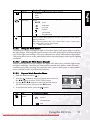
Item
Functional Description
COPY TO
CARD
Allows you to copy your files from the digital still camera’s internal memory
to a memory card. Of course, you can only do this if you have a memory
card installed and some files in internal memory.
– YES/NO
THUMBNAIL
Allows you to view 4 or 9 thumbnail images on the LCD monitor at the
same time, which can quickly search for the image that you want.
– 4/9
RESIZE
Changes the size of a recorded image.
– 2560 x 1920
– 2048 x 1536
– 1280 x 960
– 640 x 480
– EXIT
CHANGE
LOGO
Allows you to specify one of your recorded images as your startup screen,
which will be displayed on the monitor whenever you turn on the camera.
– EXECUTE/CANCEL
DPOF
DPOF (Digital Print Order Format) allows you to embed printing information on your memory card. Files saved in the DPOF format can be printed
using compatible printers or through a laboratory printing device.
Index
R
LOGO
DPOF
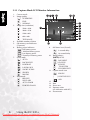
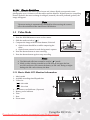
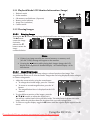
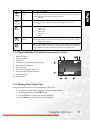
3.3.4 Playback Mode LCD Monitor Information (Video)
1. Playback mode
2. Frame number
3. Video size
4. SD memory card indicator (if present)
5. Battery power indicator
6. Stop indicator
7. Fast reverse playback indicator
8. Fast forward playback indicator
9. Video status bar
10. Movie mode
1
2
3 4
100-0001
10
5
VGA
9
1X
STOP :
8
7
6
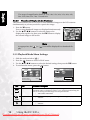
3.3.5 Playing Back Video Clips
Press the shutter button to start playing back a video clip.
•
•
•
•
To pause or resume video playback, press the shutter button.
To stop playback, press the OK button.
Use the T button to start fast-reverse playback.
Use the S button to start fast-forward playback.
Using the DC E53+
Downloaded From camera-usermanual.com BenQ Manuals
17
English
Icon
COPY