1
BenQ DC 5530 User’s Manual
Icon
English
COPY
Index
R
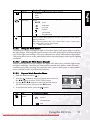
Item
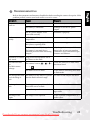
Functional Description
FORMAT
Erases all data and reformats the internal memory or the SD card loaded in
your camera. Protected images are also erased. SD card cannot be formatted if it is write-protected.
– YES/NO
SLEEP
If the camera goes unused for a certain period of time while the camera is
powered on, it will switch to idle mode. If the camera is idle, re-active it by
pressing any button.
– OFF / 30SEC / 1MIN. / 2MIN
RESET
Returns all basic settings to the digital still camera’s default settings. The
time setting will not be reset.
– YES/NO
POWER OFF
If no operation is performed for a specific period of time, the camera will
automatically turn off. This feature is useful to reduce battery consumption.
– OFF / 3MIN. / 5MIN. / 10MIN.
DATE
PRINTING
The date of recording can be printed directly on still images. This function
must be activated before the image is captured.
– ON/OFF
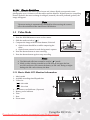
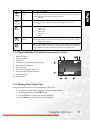
3.5.2 Setup Menus in Playback Mode
1. Slide the mode switch to [
].
2. Press the
button.
3. Press the W/X buttons to select the [SETUP] menu.
4. Use the S/T/W/X buttons to select the desired setting,
then press the OK button.
Icon
Y/M/D
PLAY
Y/M/D
SETUP
DATE
NTSC
PAL
SELECT PAGE:
SELECT ITEM:
EXIT:
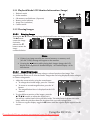
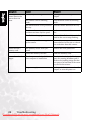
Item
Functional Description
DATE TYPE
Sets the displayed type of date and time on the screen.*[Y/M/D]:
Year/Month/Day
– [D/M/Y]: Day/Month/Year
– [M/D/Y]: Month/Day/Year
DATE SETUP
Sets the date and the time.
LANGUAGE
Sets the language that is displayed on the LCD monitor.
VIDEO OUT
VIDEO OUTSets video output standard of the camera so you may connect
your camera to video equipment.
– PAL / NTSC
VERSION
Displays the firmware version of the camera.
DATE
NTSC
PAL
20
Using the DC E53+
Downloaded From camera-usermanual.com BenQ Manuals