1
About your Belkin Software | For the Mouse
For the Mouse
1
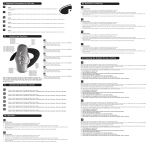
Mouse Functions
Through your Mouse “Properties” dialog box, you can find and
control the following button-function features:
Sixth Button
Scroll up pages
in Internet
Left Button
Primary mouse button
Seventh Button
Scroll down pages
in Internet
Right Button
Context menu
Eight Button
Launch Internet
Fourth Button
Internet Explorer
back (if available)
3
4
5
Section
Wheel Button
Quick/auto scroll
2
6
7
8
9
Fifth Button
Internet Explorer
forward (if available)
10
Fig. 3
Note: When Internet is running, clicking the eighth button again
will launch a quick launch wheel. Select from Open, Save, Refresh,
Append My Favorite, Mail Webpage, Mail Link, Find, and New. For
description, place the cursor over the button, then right-click.
To close the wheel, click the “x” button in the middle of the wheel.
4834-A_F8E860-BNDL_man.indd 12
12
19/5/05 11:28:39 am