1
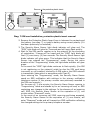
In order to “Arm” the unit, briefly (1-2 sec.) bring the keychain
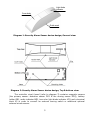
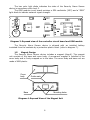
magnet up to where the Security Alarm Sensor magnet is located (see:
Diag. 9 & 3) or briefly (1-2 sec.) press the optional external button/ switch
(if installed). For the duration of 30 seconds (default ArmDelay setting),
the Security Alarm Sensor will emit audio chirps. During this duration of
time, it is necessary to close the door. At the conclusion of the time delay,
the Security Alarm Sensor will enter “Armed” mode.
During the span of the time delay, arming can be cancelled with the
assistance of the keychain magnet (briefly bring the keychain magnet up to
where the Security Alarm Sensor magnet is located or simply press the
optional external button/ switch.
In order to “Disarm” the unit, place a call from any one of the mobile
telephones registered to the Security Alarm Sensor SIM card. Attention:
Disarming is only possible in Active “AutoArm” Delay, Alarm & Standby
“NotDelay” modes, i.e. in the absence of a triggered “Alarm”, in order to
“Disarm” the unit, it is necessary to open the door.
In the event that the “ArmDisarm” cell (see: Chart 4, cell# 16) on the
Security Alarm Sensor SIM card contains and indicates “1”, the primary
notification number will be sent an SMS containing the text “Armed” or
“Disarmed by a call from…” (see: Diag. 6a, 6b).
If, while in Armed “On Guard” mode, a violation is detected and the
“Notification Delay” time span expires (default setting of 40 seconds, see:
Chart 4, cell# 20), the Security Alarm Sensor will transmit “Alarm” SMS
messages (see: diag. 8) and/ or will execute calls to the registered
telephone numbers, depending on the notification parameter selected (see:
Chart 4, cell# 18).
In case the “Notification Delay” time span is set to between 0-20
seconds, the Security Alarm Sensor will without any additional delay
proceed to execute notifications because the “Notification Delay” time span
includes the time required for the GSM module to power up and for the SIM
card sign-on to the network. The required time for GSM module power-up
and SIM card network sign-on is 10-30 seconds.
After the Security Alarm Sensor concludes transmitting Alarm
notifications, it stands by to receive incoming calls from numbers
“1SMS”…”6SMS” in order to Disarm. Upon receiving an incoming call, the
Security Alarm Sensor will reset the call, transmit an SMS to the primary
number containing “Disarmed by a call from +1xxxxxxxxxx” (when value
“1” is indicated in the “ArmDisarm” cell location) and will then enter
“Disarmed” mode.
In the event there is no incoming call received within 60 seconds after
the notification delay cycle concludes (default setting, see: Chart 4,
cell#17) and there is no further violation (door closed),the Security Alarm
Sensor will enter Armed “On Guard” mode.
11