1
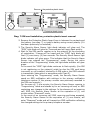
Inspect that the installation was correctly performed and verify operational
integrity as described in item 2.5 (by arming the device and opening the door).
If an external switch/ button was installed, test arming (and disarming) the
Security Alarm Sensor by briefly activating the optional external switch/ button.
2.7.2
Installing the Security Alarm Sensor with External Sensors
Install the Security Alarm Sensor and External Sensor at the intended
locations.
Attention! In the Security Alarm Sensor settings, @ cell#37, value
“1” or “2” must be selected.
Verify the correct installation of the external sensor (as described in
item 2.5) and check the proper operation of each installed Alarm
Sensor.
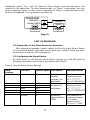
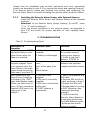
3- TROUBLESHOOTING
Chart 5- Troubleshooting Guide
Description of
Symptom
No Audio beeps or “GSM”
light diode flashes in the
Alarm Sensor after the
Battery is installed.
Possible Cause
Solution
1. Battery improperly
installed;
2. Battery is discharged
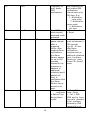
When arming using the
Keychain magnet, there
Is no response from the
Alarm Sensor ( No audio
Beeps during the arming
Delay span; see chart 3)
After powering up the
Alarm Sensor (installing
The battery) the “GSM”
Light diode flashes rapidly
& does not flash once (1)
Every (4) four seconds as
Required (SIM card is not
Logging on to the
network)
The keychain magnet is
more
than 10mm away from
the
Alarm Sensor
1.Remove the battery
& re-install properly
using proper polarity;
2.Install a new fresh
Battery: CR123A 3v
Reduce the distance
between the keychain
magnet and Alarm Sensor
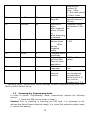
1.SIM card is not
installed;
2.SIM card is incorrectly
installed;
3.SIM card is locked with
a PIN code;
4.”GSM” network is
inaccessible.
21
1.Verify the presence of a
SIM card;
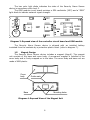
2.Remove SIM card & reinstall as shown in diag.7;
3.Disable the SIM card
PIN code feature by using
a GSM Telephone (see
telephone operating
manual).
4.(a) Re-locate the
Security Alarm Sensor to
a spot with good access
to a GSM Network signal.
(b)Change the mobile
network provider.