1
Table of Contents
Features........................................................................................... p. 3
System Components….................................................................... p. 3
Compatibility…............................................................................... p. 3
Configuration…............................................................................... p. 4
Front View................................................................................ p. 4
Rear View................................................................................. p. 5
Installation……............................................................................... p. 6
Pre-Installation Guidelines....................................................... p. 6
Connecting the NetCommander KVM System…................... p. 6
NetCommander Server Interface Units.................................p. 6-7
Connecting the Power Supply.................................................. p. 7
Resetting the NetCommander KVM System........................... p. 7
Rackmount Considerations...................................................... p. 8
Rackmounting the NetCommander KVM System ................. p. 8
Cascading NetCommander KVM Switches............................ p. 9
Connecting the B050-000...................................................... p. 10
Operation....................................................................................... p. 10
Basic Operation...................................................................... p. 10
Keyboard Hotkeys.................................................................. p. 10
On-Screen Display................................................................. p. 11
Navigating the OSD............................................................... p. 11
Selecting a Computer............................................................. p. 11
OSD Settings (F2).................................................................. p. 11
General Settings................................................................p. 12-13
F7 Defaults............................................................................. p. 14
Port Settings........................................................................... p. 14
Time Settings......................................................................... p. 15
Security.................................................................................. p. 16
Users....................................................................................... p. 17
OSD Help Window (F1)........................................................ p. 17
Scanning Computers (F4)...................................................... p. 17
Tuning (F5)............................................................................ p. 18
Moving the Label (F6)........................................................... p. 18
System Requirements for Firmware Upgrade............................... p. 18
Software....................................................................................... p. 18
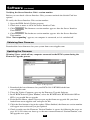
Upgrading the KVM Firmware.............................................. p. 18
Connecting RS232 Serial Cable............................................ p. 19
Installing the Software........................................................... p. 19
Starting and Configuring the KVM Update......................p. 19-20
Verifying the Version Numbers.........................................p. 20-21
Obtaining New Firmware....................................................... p. 21
Updating the Firmware.......................................................... p. 21
Reset....................................................................................... p. 22
Troubleshooting............................................................................. p. 22
USB/SUN Combo Keys................................................................ p. 23
Specifications................................................................................. p. 23
1-Year Limited Warranty/Warranty Registration........................... p. 24
Español ....................................................................................... p. 25
Françis ....................................................................................... p. 52
2