Transcript
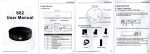
User Manual
4. Use ofAudio
4.1 When you using thoAUDlOfunction, please insertthe headphone
into tha speaker interfacs. Use the player software to play the mi:sic
filas ol ths computer, in ordor to listen to your favorite muaic.
4.2 Whgn you using the SKYPE web to chat, please insert the
headphone lnto the Speaker interface and insgrt the microphone
into the Mlc-lnterface or not b€ inserted.
6, Noto.
1 . Beforo uslng thls product, firstly connect USB cable on the back.
then open tho maln switch , so the computer can sasily read usb
3.0 dovlco8.
2. Wh6n uso MIC function, please avoid MIC closing to spsaker.
3. Tho motal of product does not touch computor,s metal shell.
L lntroduction
Thankyou very much to choose our company,s product
USB3.O Docking Stailon, thls product uses
-Multi-function
USB3.0
standard cable, supporspeed reachss 5Gbp/s.
Hot swappable, plug and play.lt has been charact€rizod by
ths majority of customers due to it is stylish and durablo.
Bafore using this product, please read the usor manuals so that
you can oparate the product more quickly.
2. System Roqulremsnts
window 2000/2003/ xp / vista / win7, L|NUX, MAc
3.
Accsssorieg
os
5.Wayr of u.a
l.Conncct
.Flrst uso tho uob 3.0 cablo bohind tho back,thon opon HUB
switch powcr.
1.2.Computcr boglns to read.
2.HUB of use
2.1 .when USB 3.0 Portl , USB 3.0 port2 lnsort to USB3.O Etoraoo
devlca, tho lottorof storage wlll appear in tho computorscreen
opon the dcvloe ,you can trangfer the data now.
2.2 Whon uslng the HUB usb 2.0, the tett€r of storago wlll appoar
in the computer scroen,open the dsvice ,you can trancfer thi data now.
3.Use of Cardreedar
Thls product supports ths following sories of memorv cards. And the
card8 can read and write at ths samo timo and transler data botwoen
with th6 d6vic6 connected with HUB.
SD/MIni SD/SDHC/SDXC/MMC/RS.MMC
1 .1
3.1 CD
3.2 User Manual
3.3.Power adapter 5V 5A
4, Product lnterfaca Schematic Dlagram
XAINSUTCX
XD.M/XD.H
MS/MS Pro/MS Duo/MS Pro Ouo
cFt/cFI
IF
M2
2
I