1
LCD Projector Commercial Use
Operating Instructions
Model No.
PT-LB20NTU
PT-LB20U
PT-LB20SU
PT-LB20VU
POWER
INPUT
VIDEO
AUTO
SETUP
RGB
MENU
ENTER
SHUTTER
FREEZE
STD
VOLUME
D.ZOOM
INDEX
WINDOW
PROJECTOR
Before operating this product, please read the instructions carefully and save this
manual for future use.
TQBJ 0166
ENGLISH
R
Dear Panasonic Customer:
This instruction booklet provides all the necessary operating information that
you might require. We hope it will help you to get the most out of your new
product, and that you will be pleased with your Panasonic LCD projector.
The serial number of your product may be found on its bottom. You should
note it in the space provided below and retain this booklet in case service is
required.
Model number: PT-LB20NTU / PT-LB20U / PT-LB20VU / PT-LB20SU
Serial number:
IMPORTANT SAFETY NOTICE
WARNING: TO REDUCE THE RISK OF FIRE OR ELECTRIC SHOCK, DO
NOT EXPOSE THIS PRODUCT TO RAIN OR MOISTURE.
Power Supply: This LCD Projector is designed to operate on 100 V – 240 V, 50 Hz/60
Hz AC, house current only.
CAUTION: The AC power cord which is supplied with the projector as an accessory can
only be used for power supplies up to 125 V, 7 A. If you need to use higher
voltages or currents than this, you will need to obtain a separate 250 V
power cord. If you use the accessory cord in such situations, fire may result.
The lightning flash with arrowhead symbol, within an
equilateral triangle, is intended to alert the user to the
presence of uninsulated “dangerous voltage” within the
product’s enclosure that may be of sufficient magnitude to
constitute a risk of electric shock to persons.
The exclamation point within an equilateral triangle is
intended to alert the user to the presence of important
operating and maintenance (servicing) instructions in the
literature accompanying the product.
2-ENGLISH
Do not remove
WARNING:
This equipment has been tested and found to comply with the limits for a
Class B digital device, pursuant to Part 15 of the FCC Rules. These limits
are designed to provide reasonable protection against harmful interference
in a residential installation. This equipment generates, uses, and can
radiate radio frequency energy and, if not installed and used in accordance
with the instructions, may cause harmful interference to radio
communications. However, there is no guarantee that interference will not
occur in a particular installation. If this equipment does cause harmful
interference to radio or television reception, which can be determined by
turning the equipment off and on, the user is encouraged to try to correct
the interference by one or more of the following measures:
– Reorient or relocate the receiving antenna.
– Increase the separation between the equipment and receiver.
– Connect the equipment into an outlet on a circuit different from that to
which the receiver is connected.
– Consult the dealer or an experienced radio/TV technician for help.
FCC CAUTION: To assure continued compliance, use only shielded
interface cables when connecting to computers or
peripheral devices.
Any unauthorized changes or modifications to this
equipment will void the users authority to operate.
If you use serial port to connect PC for external control of
projector, you must use optional RS-232C serial interface
cable with ferrite core. Any unauthorized changes or
modifications to this equipment will void the user’s
authority to operate.
FCC RF Exposure Warning: (if provided with wireless device)
– This equipment complies with FCC radiation exposure limits set forth for
an uncontrolled environment.
– This equipment has been approved for mobile operation and requires
minimum 20 cm spacing be provided between antenna(s) and all
person's body (excluding extremities of hands, wrist and feet) during
wireless modes of operation.
– This equipment may not be used with other installed transmitters, which
may be capable of simultaneous transmission.
ENGLISH-3
Preparation
CAUTION:
This equipment is equipped with a three-pin
grounding-type power plug. Do not remove the
grounding pin on the power plug. This plug will only
fit a grounding-type power outlet. This is a safety
feature. If you are unable to insert the plug into the
outlet, contact an electrician. Do not defeat the
purpose of the grounding plug.
WARNING:
B Not for use in a computer room as defined in the Standard for the
Protection of Electronic Computer/Data Processing Equipment,
ANSI/NFPA 75.
B For permanently connected equipment, a readily accessible disconnect
device shall be incorporated in the building installation wiring;
B For pluggable equipment, the socket-outlet shall be installed near the
equipment and shall be easily accessible.
Declaration of Conformity
Model Number:
PT-LB20NTU/PT-LB20U/PT-LB20VU/PT-LB20SU
Trade Name:
Panasonic
Responsible party: Panasonic Corporation of North America
Address:
One Panasonic Way Secaucus New Jersey 07094
Telephone number: 1-800-528-8601 or 1-800-222-0741
Email:
[email protected]
This device complies with Part 15 of the FCC Rules. Operation is subject to
the following two conditions: (1) This device may not cause harmful
interference, and (2) this device must accept any interference received,
including interference that may cause undesired operation.
4-ENGLISH
Preparation
IMPORTANT SAFETY NOTICE ...2
Precautions with regard to
safety .........................................6
Accessories ...............................10
Before use ..................................11
Location and function of each
part...........................................13
Getting started
Setting-up...................................18
Projection methods, Projector
position, Projection distances
Connections...............................21
Connecting to computer,
Connecting to video equipment
Preparation for the remote
control unit..............................23
Basic operation
Turning on the power................24
Turning off the power................26
Useful functions
Correcting keystone distortion
and automatic positioning.....28
Turning off the picture and sound
momentarily ............................29
Pausing a picture.......................29
Enlarging the picture.................30
Adjusting the volume ................30
Displaying two screens.............31
Adjustments and settings
On-screen menus ......................32
Menu screens, Menu operation
guide, Returning a setting to the
factory default
Correcting keystone distortion...36
Adjusting the picture.................37
PICTURE MODE, CONTRAST,
BRIGHT, COLOR, TINT,
SHARPNESS, COLOR TEMP.,
White balance R/G/B,
DAYLIGHTVIEW, AI,
TV-SYSTEM, STILL MODE,
SIGNAL MODE, Projecting sRGBcompatible pictures
Adjusting the position...............41
POSITION, DOT CLOCK, CLOCK
PHASE, ASPECT, RESIZING,
FRAME LOCK
Changing the display
language..................................44
Option settings ..........................45
OSD, AUTO SEARCH, AUTO
SIGNAL, AUTO KEYSTN, RGB2
SELECT, RGB/YPBPR, VGA60/480p,
SXGA MODE, Noise Reduction (NR),
BLACKBOARD, BACK COLOR,
FRONT/REAR, DESK/CEILING, FAN
CONTROL, LAMP POWER, LAMP
RUNTIME, FUNC 1, CONTROL KEY,
AUTO POW.OFF, POWER MEMORY
Setting up the security
function ...................................49
INPUT PASSWD, AMEND PASSWD,
TEXT DISPLAY, TEXT CHANGE
Network setup............................51
Care and maintenance
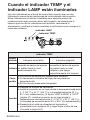
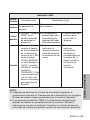
When the TEMP indicator and the
LAMP indicator are
illuminated...............................52
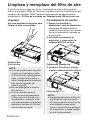
Cleaning and replacing
the air filter ..............................54
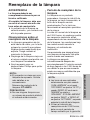
Replacing the lamp unit ............55
Before calling for service..........58
Cleaning and maintenance .......59
Others
Specifications ............................60
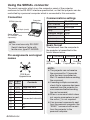
Appendix ....................................62
List of compatible signals, Projection
dimensions calculation methods,
Using the SERIAL connector
Dimensions ................................66
Trademark acknowledgements...66
NOTES IMPORTANTES
CONCERNANT LA SECURITE...67
Précautions de sécurité..............68
Avant l’utilisation..........................72
Remplacement du bloc de lampe...74
ENGLISH-5
Preparation
Contents
Precautions with regard to safety
WARNING
If you notice smoke, strange smells or noise coming from the
projector, disconnect the power cord plug from the wall outlet.
B Do not continue to use the projector in such cases, otherwise fire or
electric shocks could result.
B Check that no more smoke is coming out, and then contact an Authorized
Service Center for repairs.
B Do not attempt to repair the projector yourself, as this can be dangerous.
Do not install this projector in a place which is not strong enough to
take the full weight of the projector.
B If the installation location is not strong enough, it may fall down or tip over,
and severe injury or damage could result.
Installation work (such as ceiling suspension) should only be carried
out by a qualified technician.
B If installation is not carried out correctly, there is the danger that injury or
electric shocks may occur.
If foreign objects or water get inside the projector, or if the projector is
dropped or the cabinet is broken, disconnect the power cord from the
wall outlet.
B Continued use of the projector in this condition may result in fire or electric
shocks.
B Contact an Authorized Service Center for repairs.
Do not overload the wall outlet.
B If the power supply is overloaded (for example, by using too many
adapters), overheating may occur and fire may result.
Do not remove the cover or modify it in any way.
B High voltages can cause fire or electric shocks.
B For any inspection, adjustment and repair work, please contact an
Authorized Service Center.
Clean the power cord plug regularly to prevent it from becoming
covered in dust.
B If dust builds up on the power cord plug, the resulting humidity can
damage the insulation, which could result in fire. Pull the power cord plug
out from the wall outlet and wipe it with a dry cloth.
B If not using the projector for an extended period of time, pull the power
cord plug out from the wall outlet.
Do not do anything that might damage the power cord or the power
cord plug.
B Do not damage the power cord, make any modifications to it, place it near
any hot objects, bend it excessively, twist it, pull it, place heavy objects on
top of it or wrap it into a bundle.
6-ENGLISH
ENGLISH-7
Preparation
B If the power cord is used while damaged, electric shocks, short-circuits or
fire may result.
B Ask an Authorized Service Center to carry out any repairs to the power
cord that might be necessary.
Do not handle the power cord plug with wet hands.
B Failure to observe this may result in electric shocks.
Insert the power cord plug securely into the wall outlet.
B If the plug is not inserted correctly, electric shocks or overheating could
result.
B Do not use plugs which are damaged or wall outlet which are coming
loose from the wall.
Do not place the projector on top of surfaces which are unstable.
B If the projector is placed on top of a surface which is sloped or unstable, it
may fall down or tip over, and injury or damage could result.
Do not place the projector into water or let it become wet.
B Failure to observe this may result in fire or electric shocks.
Do not place the projector on soft materials such as carpets or sponge
mats.
B Doing so may cause the projector to overheat, which can cause burns, fire
or damage to the projector.
Do not place liquid containers on top of the projector.
B If water spills onto the projector or gets inside it, fire or electric shocks
could result.
B If any water gets inside the projector, contact an Authorized Service
Center.
Do not insert any foreign objects into the projector.
B Do not insert any metal objects or flammable objects into the projector or
drop them onto the projector, as doing so can result in fire or electric
shocks.
Keep the batteries out of the reach of infants.
B If the batteries are swallowed, death by suffocation may result. If you
believe that the batteries may have been swallowed, seek medical advice
immediately.
Do not allow the + and - terminals of the batteries to come into contact
with metallic objects such as necklaces or hairpins.
B Failure to observe this may cause the batteries to leak, overheat, explode
or catch fire.
B Store the batteries in a plastic bag and keep them away from metallic objects.
During a thunderstorm, do not touch the projector or the cable.
B Electric shocks can result.
Do not use the projector in a bath or shower.
B Fire or electric shocks can result.
Do not look into the lens while the projector is being used.
B Strong light is emitted from the projector’s lens. If you look directly into this
light, it can hurt and damage your eyes.
B Be especially careful not to let young children look into the lens. In
addition, disconnect the power cord when you are away from the projector.
Do not place your hands or other objects close to the air outlet port.
B Heated air comes out of the air outlet port. Do not place your hands or
face, or objects which cannot withstand heat close to this port, otherwise
burns or damage could result.
Replacement of the lamp unit should only be carried out by a qualified
technician.
B The lamp unit has high internal pressure. If improperly handled, explosion
might result.
B The lamp unit can easily become damaged if struck against hard objects
or dropped, and injury or malfunctions may result.
When replacing the lamp, allow it to cool for at least one hour before
handling it.
B The lamp cover gets very hot, and touching it can cause burns.
Before replacing the lamp, be sure to disconnect the power cord from
the wall outlet.
B Electric shocks or explosions can result if this is not done.
Caution
Do not cover the air inlet port or the air outlet port.
B Doing so may cause the projector to overheat, which can cause fire or
damage to the projector.
B Do not place the projector in narrow, badly ventilated places such as
closets or bookshelves.
B Do not place the projector on cloth or papers, as these materials could be
drawn into the air inlet port.
Do not set up the projector in humid or dusty places or in places where
the projector may come into contact with smoke or steam.
B Using the projector under such conditions may result in fire or electric
shocks.
When disconnecting the power cord, hold the plug, not the lead.
B If the power cord itself is pulled, the lead will become damaged, and fire,
short-circuits or serious electric shocks may result.
Always disconnect all cables before moving the projector.
B Moving the projector with cables still attached can damage the cables,
which could cause fire or electric shocks to occur.
Do not place any heavy objects on top of the projector.
B Failure to observe this may cause the projector to become unbalanced
and fall, which could result in damage or injury.
8-ENGLISH
ENGLISH-9
Preparation
Do not short-circuit, heat or disassemble the batteries or place them
into water or fire.
B Failure to observe this may cause the batteries to overheat, leak, explode
or catch fire, and burns or other injury may result.
When inserting the batteries, make sure the polarities (+ and -) are
correct.
B If the batteries are inserted incorrectly, they may explode or leak, and fire,
injury or contamination of the battery compartment and surrounding area
may result.
Use only the specified batteries.
B If incorrect batteries are used, they may explode or leak, and fire, injury or
contamination of the battery compartment and surrounding area may
result.
Insulate the battery using tape or similar before disposal.
B If the battery comes into contact with metallic objects or other batteries, it
may catch fire or explode.
Do not put your weight on this projector.
B You could fall or the projector could break, and injury may result.
B Be especially careful not to let young children stand or sit on the projector.
If not using the projector for an extended period of time, disconnect the
power cord plug from the wall outlet.
B If dust builds up on the power cord plug, the resulting humidity may
damage the insulation, which could result in fire.
B This projector continues to draw approximately 4 W of power even when
the power is turned off.
Disconnect the power cord plug from the wall outlet as a safety
precaution before carrying out any cleaning.
B Electric shocks can result if this is not done.
Ask an Authorized Service Center to clean inside the projector at least
once a year.
B If dust is left to build up inside the projector without being cleaned out, it
can result in fire or problems with operation.
B It is a good idea to clean the inside of the projector before the season for
humid weather arrives. Ask your nearest Authorized Service Center to
clean the projector when required. Please discuss with the Authorized
Service Center regarding cleaning costs.
We are constantly making efforts to preserve and maintain a clean
environment. Please take non repairable units back to your dealer or a
recycling company.
NOTICE:
B This product has a High Intensity Discharge (HID) lamp that contains a
small amount of mercury. It also contains lead in some components.
Disposal of these materials may be regulated in your community due to
environmental considerations. For disposal or recycling information
please contact your local authorities, or the Electronics Industries
Alliance: <http://www.eiae.org.>
Accessories
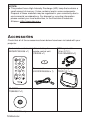
Check that all of the accessories shown below have been included with your
projector.
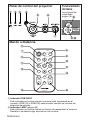
Card remote control unit Lithium battery for
(N2QADC000008 x1)
remote control unit
(CR2025 x1)
POWER
RGB signal cable
[1.8 m (5´10˝),
K1HA15DA0002 x1]
INPUT
VIDEO
AUTO
SETUP
RGB
MENU
ENTER
FREEZE
SHUTTER
STD
VOLUME
D.ZOOM
INDEX
WINDOW
PROJECTOR
CD-ROM*
(TQBH9007 x1)
*PT-LB20NTU only
10-ENGLISH
Power cord
(K2CG3DR00006 x 1)
Carrying bag
(TPEP013-1 x 1)
Caution when moving the projector
Be sure to attach the lens cover before moving the projector.
The projection lens is extremely susceptible to vibration and shocks. When
moving the projector, use the accessory carrying bag. When placing the
projector inside the carrying bag, position it so that the lens is facing upward.
Do not put anything else in the bag other than the projector and the cables.
Cautions regarding setting-up
Avoid setting up in places which are subject to vibration or shocks.
The internal parts can be damaged, which may cause malfunctions or
accidents.
Avoid setting up in places which are subject to sudden temperature
changes, such as near an air conditioner.
The life of the lamp may be shortened.
Do not set up the projector near high-voltage power lines or near
motors.
The projector may be subject to electromagnetic interference.
If installing the projector to the ceiling, ask a qualified technician to
carry out all installation work.
You will need to purchase the separate installation kit (Model No.ET-PKB30).
Furthermore, all installation work should only be carried out by a qualified
technician.
If using this projector at high elevations (above 1 400 m), set the “FAN
CONTROL” to “HIGH”. (Refer to page 47.)
Failure to observe this may result in malfunctions.
ENGLISH-11
Preparation
Before use
Notes on use
In order to get the best picture quality
Draw curtains or blinds over any windows and turn off any lights near the
screen to prevent outside light or light from indoor lamps from shining onto
the screen.
Do not touch the surfaces of the lens with your bare hands.
If the surface of the lens becomes dirty from fingerprints or anything else, this
will be magnified and projected onto the screen. Moreover, when not using
the projector, retract the lens and then cover it with the lens cover.
Screen
Do not apply any volatile substances which may cause discoloration to the
screen, and do not let it become dirty or damaged.
Lamp
The lamp may need to be replaced earlier due to variables such as individual
lamp characteristics, usage conditions and the installation environment,
especially when the projector is subjected to continuous use for more than
10 hours or the power is frequently turned on and off.
Liquid crystal panel
The liquid crystal panel of the projector is built with very high precision
technology to provide fine picture details. Occasionally, a few non-active
pixels may appear on the screen as fixed points of blue, green or red.
Please note that this does not affect the performance of your LCD.
12-ENGLISH
Preparation
Location and function of each part
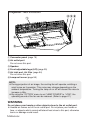
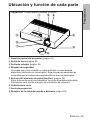
Projector <Top, right and front>
#
$ %
'
&
*
)
'
(
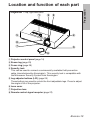
# Projector control panel (page 16)
$ Zoom ring (page 25)
% Focus ring (page 25)
& Security lock
This can be used to connect a commercially-available theft-prevention
cable (manufactured by Kensington). This security lock is compatible with
the Microsaver Security System from Kensington.
' Leg adjuster buttons (L/R) (page 25)
These buttons are used to unlock the front adjustable legs. Press to adjust
the angle of tilt of the projector.
( Lens cover
) Projection lens
* Remote control signal receptor (page 23)
ENGLISH-13
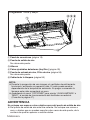
Projector <Back and bottom>
$ %$
#
(
'
&
# Connector panel (page 15)
$ Air outlet port
Do not cover this port.
% Speaker
& Front adjustable legs (L/R) (page 25)
' Air inlet port, Air filter (page 54)
Do not cover this port.
( Lamp unit cover (page 55)
NOTE:
B During projection of an image, the cooling fan will operate, emitting a
small noise as it operates. This noise may change depending on the
ambient temperature. Turning the lamp on or off will cause this noise to
increase a little.
B By using the “OPTION” menu to set “LAMP POWER” to “LOW”, the
operating sound of the fan can be reduced. (Refer to page 47.)
WARNING
Do not place your hands or other objects close to the air outlet port.
B Heated air comes out of the air outlet port. Do not place your hands or
face, or objects which cannot withstand heat close to this port, otherwise
burns or damage could result.
14-ENGLISH
Preparation
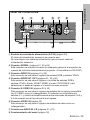
Connector panel
$
%
#
&
'
)
*
(
# Power input socket (AC IN) (page 24)
The accessory power cord is connected here.
Do not use any power cord other than the accessory power cord.
$ SERIAL connector (pages 21, 22 and 64)
This connector is used to connect a personal computer to the projector in
order to control the projector externally. (RS-232C compatible)
% RGB1 IN connector (pages 21 and 22)
This connector is used to input RGB signals and YPBPR signals.
& RGB2 IN/1 OUT connector (pages 21, 22 and 46)
This connector is used to input or output RGB signals and YPBPR signals.
Adjust “RGB2 SELECT” in the “OPTION” menu to select whether you want
input or output with this connector.
' S-VIDEO IN connector (pages 22 and 42)
This connector is used to input signals from S-VIDEO-compatible
equipment such as a video deck. The connector is S1 signal compatible,
and it automatically switches between 16:9 and 4:3 aspect ratios in
accordance with the type of signal being input.
( VIDEO IN connector (page 22)
This connector is used to input video signals from video equipment such
as a video deck.
) AUDIO IN L-R connectors (pages 21 and 22)
* Menu operation (page 16)
ENGLISH-15
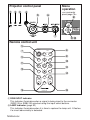
Projector control panel
Menu
operation
# $ %
<on connector
panel:page 15>
&
'
(
*
)
+,
Remote control unit
'
)
POWER
(
INPUT
VIDEO
RGB
*
+
AUTO
SETUP
MENU
,
ENTER
.
/
FREEZE
SHUTTER
0
STD
VOLUME
D.ZOOM
INDEX
WINDOW
1
PROJECTOR
2
# RGB INPUT indicator
This indicator illuminates when a signal is being input to the connector
(RGB1 IN or RGB2 IN) selected using the input select buttons.
$ LAMP indicator (page 53)
This indicator illuminates when it is time to replace the lamp unit. It flashes
if a circuit abnormality is detected.
16-ENGLISH
ENGLISH-17
Preparation
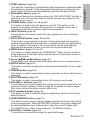
% TEMP indicator (page 52)
This indicator illuminates if an abnormally high temperature is detected inside
the projector or around it. If the temperature rises above a certain level, the
power supply will be turned off automatically and the indicator will flash.
& Illumination sensor (page 39)
This sensor detects the luminance when the “DAYLIGHTVIEW” function is
operating. Do not cover the projector and do not place any object on the
projector when using it.
' POWER button (pages 24, 26 and 27)
This button is used to turn the power on and off. This button on the
projector illuminates red when the projector is in standby mode, and it
illuminates green when a picture starts to be projected.
( INPUT buttons (page 25)
These buttons are used to switch the input signals from the connected
equipment.
) AUTO SETUP button (pages 25 and 28)
If this button is pressed while a picture is being projected, the projection
settings will be adjusted automatically in accordance with the signal being
input. In addition, the angle of tilt of the projector will be automatically
detected and adjusted in order to correct any keystone distortion.
* MENU button (pages 32 and 34)
This button is used to display the “MAIN MENU”. When a menu screen is
being displayed, this button can be used to return to a previous screen or
to clear the screen.
FGI and H) buttons (page 34)
+ Arrow (F
These buttons are used to select and adjust items in the on-screen menus.
, ENTER button (page 34)
This button is used to accept and to activate items selected in the on-screen
menus.
- FREEZE button (page 29)
This button is used to momentarily freeze projection so that a still picture is
displayed.
. SHUTTER button (page 29)
This button is used to momentarily turn off the picture and sound.
/ VOLUME +/- buttons (page 30)
These buttons are used to adjust the volume of the sound output from the
projector’s built-in speaker. Refer to page 33 for details on how to adjust
the volume without using the remote control unit.
0 STD (standard) button (page 35)
This button is used to reset the projector adjustment values to the factory
default settings.
1 INDEX WINDOW button (page 31)
This button can be used to split the image projection area into a still picture
and a moving picture. When NETWORK is selected, the screen display will
be switched between four window style, index style, and 16 Index style.
(PT-LB20NTU only. Refer to the accessory CD-ROM for details.)
2 D.ZOOM +/- buttons (page 30)
These buttons are used to enlarge the projected image.
Setting-up
Projection methods
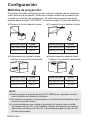
In way of installing projector, any one of the following four projection methods
are used. Select whichever projection method matches the setting-up
method. (The projection method can be set from the “OPTION” menu. Refer
to pages 46 and 47 for details.)
BFront-desk projection
BFront-ceiling projection
Menu items
Setting
Menu items
Setting
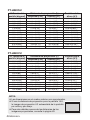
FRONT/REAR
FRONT
FRONT/REAR
FRONT
DESK/CEILING
DESK
DESK/CEILING
CEILING
BRear-desk projection
(Using a translucent screen)
BRear-ceiling projection
(Using a translucent screen)
Menu items
Setting
Menu items
Setting
FRONT/REAR
REAR
FRONT/REAR
REAR
DESK/CEILING
DESK
DESK/CEILING
CEILING
NOTE:
B You will need to purchase the separate ceiling bracket (ET-PKB30)
when using the ceiling installation method.
B Do not set up the projector vertically or tilted horizontally, otherwise it
may cause damage to the projector.
B It is recommended that you set up the projector in a place that is tilted
at less than ±30° vertically. Setting up the projector in places that are
tilted at more than ±30° vertically may shorten component life.
18-ENGLISH
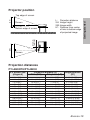
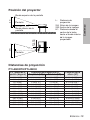
Projector position
Screen
H1
L
81.2 mm
(3-3/16˝ )
Bottom edge of screen
L: Projection distance
SH: Image height
SW:Image width
H1: Distance from center
of lens to bottom edge
of projected image
SW
L
Screen
Projection distances
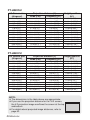
PT-LB20NTU/PT-LB20U
4:3 Screen size
(diagonal)
0.84 m(33˝)
1.02 m(40˝)
1.27 m(50˝)
1.52 m(60˝)
1.78 m(70˝)
2.03 m(80˝)
2.29 m(90˝)
2.54 m(100˝)
3.05 m(120˝)
3.81 m(150˝)
5.08 m(200˝)
6.35 m(250˝)
7.62 m(300˝)
Projection distance (L)
Wide (LW)
Telephoto (LT)
—
1.2 m(3´11˝)
1.5 m(4´11˝)
1.8 m(5´10˝)
2.1 m(6´10˝)
2.4 m(7´10˝)
2.7 m(8´10˝)
3.0 m(9´10˝)
3.6 m(11´9˝)
4.5 m(14´9˝)
6.0 m(19´8˝)
7.5 m(24´7˝)
9.0 m(29´6˝)
1.1 m(3´7˝)
1.4 m(4´7˝)
1.7 m(5´6˝)
2.1 m(6´10˝)
2.4 m(7´10˝)
2.8 m(9´2˝)
3.2 m(10´5˝)
3.5 m(11´5˝)
4.2 m(13´9˝)
5.3 m(17´4˝)
7.1 m(23´3˝)
8.9 m(29´2˝)
10.7 m(35´1˝)
Height position
(H1)
0.08 m(3-1/8˝)
0.09 m(3-17/32˝)
0.11 m(4-5/16˝)
0.14 m(5-1/2˝)
0.16 m(6-9/32˝)
0.18 m(7-1/16˝)
0.20 m(7-27/32˝)
0.22 m(8-21/32˝)
0.26 m(10-7/32˝)
0.33 m(12-31/32˝)
0.44 m(17-5/16˝)
0.55 m(21-5/8˝)
0.66 m(25-31/32˝)
ENGLISH-19
Getting started
SH
Top edge of screen
PT-LB20SU
4:3 Screen size
(diagonal)
0.84 m(33˝)
1.02 m(40˝)
1.27 m(50˝)
1.52 m(60˝)
1.78 m(70˝)
2.03 m(80˝)
2.29 m(90˝)
2.54 m(100˝)
3.05 m(120˝)
3.81 m(150˝)
5.08 m(200˝)
6.35 m(250˝)
7.62 m(300˝)
Projection distance (L)
Wide (LW)
Telephoto (LT)
—
1.2 m(3´11˝)
1.5 m(4´11˝)
1.8 m(5´10˝)
2.1 m(6´10˝)
2.4 m(7´10˝)
2.8 m(9´2˝)
3.0 m(9´10˝)
3.7 m(12´1˝)
4.6 m(15´1˝)
6.1 m(20´)
7.6 m(24´11˝)
9.2 m(30´2˝)
Height position
(H1)
0.08 m(3-1/8˝)
0.09 m(3-17/32˝)
0.11 m(4-5/16˝)
0.14 m(5-1/2˝)
0.16 m(6-9/32˝)
0.18 m(7-1/16˝)
0.20 m(7-27/32˝)
0.22 m(8-21/32˝)
0.26 m(10-7/32˝)
0.33 m(12-31/32˝)
0.44 m(17-5/16˝)
0.55 m(21-5/8˝)
0.66 m(25-31/32˝)
1.1 m(3´7˝)
1.4 m(4´7˝)
1.8 m(5´10˝)
2.1 m(6´10˝)
2.5 m(8´2˝)
2.9 m(9´6˝)
3.2 m(10´5˝)
3.6 m(11´9˝)
4.3 m(14´1˝)
5.4 m(17´8˝)
7.3 m(23´11˝)
9.1 m(29´10˝)
11.0 m(36´1˝)
PT-LB20VU
4:3 Screen size
(diagonal)
0.84 m(33˝)
1.02 m(40˝)
1.27 m(50˝)
1.52 m(60˝)
1.78 m(70˝)
2.03 m(80˝)
2.29 m(90˝)
2.54 m(100˝)
3.05 m(120˝)
3.81 m(150˝)
5.08 m(200˝)
6.35 m(250˝)
7.62 m(300˝)
Projection distance (L)
Wide (LW)
Telephoto (LT)
—
1.4 m(4´7˝)
1.7 m(5´6˝)
2.1 m(6´10˝)
2.4 m(7´10˝)
2.8 m(9´2˝)
3.1 m(10´2˝)
3.5 m(11´5˝)
4.2 m(13´9˝)
5.2 m(17´)
7.0 m(22´11˝)
8.7 m(28´6˝)
10.5 m(34´5˝)
Height position
(H1)
1.4 m(4´7˝)
1.7 m(5´6˝)
2.1 m(6´10˝)
2.5 m(8´2˝)
2.9 m(9´6˝)
3.4 m(11´1˝)
3.8 m(12´5˝)
4.2 m(13´9˝)
5.0 m(16´4˝)
6.3 m(20´8˝)
8.4 m(27´6˝)
10.6 m(34´9˝)
12.7 m(41´8˝)
NOTE:
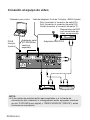
B The dimensions in the table above are approximate.
B If you use the projection distance for the 16:9 screen,
the 4:3 projection image overflows the screen at the top
and bottom.
B For details about projected image distances, refer to
page 63.
20-ENGLISH
0.04 m(1-9/16˝)
0.05 m(1-15/16˝)
0.06 m(2-11/32˝)
0.07 m(2-3/4˝)
0.08 m(3-1/8˝)
0.09 m(3-17/32˝)
0.11 m(4-5/16˝)
0.12 m(4-23/32˝)
0.14 m(5-1/2˝)
0.18 m(7-1/16˝)
0.23 m(9-1/32˝)
0.29 m(11-13/32˝)
0.35 m(13-3/4˝)
Connections
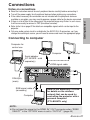
B Read the instruction manual for each peripheral device carefully before connecting it.
B Turn off the power supply for all peripheral devices before making any connections.
B If the cables necessary for connection are not included with the peripheral device or
available as an option, you may need to prepare a proper cable for the device concerned.
B If there is a lot of jitter in the video signal, the projected image may flicker. In such cases,
it will be necessary to connect a TBC (time base corrector).
B Refer to the list on page 62 for details on compatible signals which can be input to the
projector.
B Only one audio system circuit is available for the AUDIO IN L-R connectors, so if you
change the audio input source, you will need to remove and insert the appropriate plugs.
Connecting to computer
Computer for
control use
Computer
Monitor
Serial adapter
(ET-ADSER : sold
separately)
RGB signal cable
DIN 8-pin
(male)
RGB signal cable
(accessory)
Computer
Refer to the accessory CD-ROM
for details on the wireless
network that can be used for
controlling the projector with a
personal computer.
(PT-LB20NTU only)
NOTE:
B Do not input the signal to the RGB2 IN/1 OUT connector when “RGB2
SELECT” in the “OPTION” menu is set to “OUTPUT”. (page 46)
ENGLISH-21
Getting started
Notes on connections
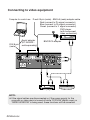
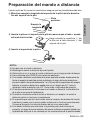
Connecting to video equipment
Computer for control use
DIN 8-pin
(male)
D-sub15-pin (male) - BNCx5 (male) adapter cable
Red (connect to PR signal connector)
Blue (connect to PB signal connector)
Green (connect to Y signal connector)
DVD player
(with component
video connectors)
Serial adapter
(ET-ADSER :
sold separately)
BNC/RCA adapter
DVD player
Video deck
NOTE:
B If the signal cables are disconnected or if the power supply for the
computer or video deck is turned off while “D.ZOOM”(digital zoom) or
“INDEX WINDOW” is being used, these functions will be cancelled.
22-ENGLISH
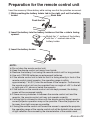
Preparation for the remote control unit
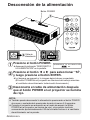
Insert the accessory lithium battery while making sure that the polarities are correct.
# While pushing the battery holder tab to the right, pull out the battery
holder.
Back side
Pull out
$ Insert the battery into the battery holder so that the + side is facing
upward.
Match the “+” surface of the battery
with the “+” marked side of the
battery holder.
% Insert the battery holder.
NOTE:
B Do not drop the remote control unit.
B Keep the remote control unit away from liquids.
B Remove the battery if not using the remote control unit for long periods.
B Use only CR2025 batteries as replacement batteries.
B If the remote control unit is held so that it is facing directly in front of the
remote control signal receptor, the operating range is within
approximately 7 m (23´) from the surfaces of the receptor. Furthermore,
the remote control unit can be operated from an angle of ±30° to the left
or right and ±15° above or below the receptor.
B If the buttons on the remote control unit are kept pressed, the battery
power will be consumed rapidly.
B If there are any obstacles in between the remote control unit and the
receptor, the remote control unit may not operate correctly.
B If strong light is allowed to shine onto the remote control signal receptor,
correct projector operation may not be possible. Place the projector as
far away from light sources as possible.
B If facing the remote control unit toward the screen to operate the projector,
the operating range of the remote control unit will be limited by the amount
of light reflection loss caused by the characteristics of the screen used.
ENGLISH-23
Getting started
Push the tab
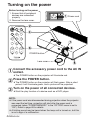
Turning on the power
Before turning on the power
1. Ensure that all peripheral
devices are connected
properly.
2. Remove the lens cover.
POWER
$
INPUT
VIDEO
# Power cord
RGB
&
AUTO
SETUP
MENU
ENTER
)
SHUTTER
FREEZE
STD
VOLUME
D.ZOOM
INDEX
WINDOW
*
(
POWER button
PROJECTOR
Lens cover
'
the accessory power cord to the AC IN
# Connect
socket.
BThe POWER button on the projector will illuminate red.
the POWER button.
$ Press
BThe POWER button on the projector will flash green. After a short
period, it will illuminate green, and a picture will be projected.
on the power of all connected devices.
% Turn
BStart the play function of a device such as a DVD player.
NOTE:
B If the power cord was disconnected during projection when the projector
was used the last time, projection will start after the power cord is
connected (when “POWER MEMORY” in the “OPTION” menu is set to
“ON”). Refer to page 48 for details.
B A tinkling sound may be heard when the lamp unit is turned on, but this
is not a sign of a malfunction.
24-ENGLISH
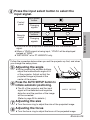
the input select button to select the
& Press
input signal.
Input select
button
Remote
control
unit
Changing
signals
Input select
buttons
Changing
signals
RGB1
RGB2
S-VIDEO
VIDEO
VIDEO
VIDEO
S-VIDEO
NETWORK
RGB
RGB1
RGB2
NETWORK
BA picture will be projected in accordance with the selected input
signal.
BWhen a YPBPR signal is being input, “YPBPR” will be displayed
instead of “RGB”.
B“NETWORK” is for PT-LB20NTU only.
Follow the procedure below when you set the projector up first, and when
you change the setup place.
the angle
' Adjusting
BWhile pressing the adjuster buttons,
adjust the forward/back angle of tilt
of the projector. Adjust so that the
projected image is placed at the
center of the screen.
the AUTO SETUP button to
( Press
initiate automatic positioning.
BThe tilt of the projector and the input
signal will be detected and keystone
distortion and the position of the image
will be corrected.
(Refer to page 28 for details.)
AUTO SETUP
the size
) Adjusting
BTurn the zoom ring to adjust the size of the projected image.
the focus
* Adjusting
BTurn the focus ring to adjust the focus of the projected image.
ENGLISH-25
Basic operation
Control
panel
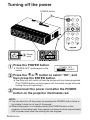
Turning off the power
POWER button
#
POWER
INPUT
VIDEO
AUTO
SETUP
RGB
MENU
ENTER
FREEZE
$
SHUTTER
STD
VOLUME
D.ZOOM
INDEX
WINDOW
PROJECTOR
% Power
cord
the POWER button.
# Press
B“POWER OFF” is displayed on the
screen.
POWER OFF
OK
CANCEL
the I or H button to select “OK”, and
$ Press
then press the ENTER button.
BThe lamp unit will switch off and the picture will stop being projected.
(The POWER button on the projector will illuminate orange while the
cooling fan is still operating.)
the power cord after the POWER
% Disconnect
button on the projector illuminates red.
NOTE:
B You can also turn off the power by pressing the POWER button twice or
by holding it down for at least 0.5 seconds.
B When the projector is in standby mode (the POWER button on the
projector is illuminated red), the projector continues to draw approximately
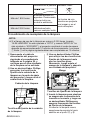
4 W of power even when the cooling fan has stopped.
26-ENGLISH
You can disconnect the power cord during projection or immediately after
use and move the projector. The cooling fan will operate by the internal
power supply to cool down the lamp.
B When this function is used, it may take more time for the lamp to turn back
on again compared to when the lamp cools down with the power cord
connected.
B Do not put the projector in a bag while the POWER button on the
projector is illuminated.
CAUTION
If not using the projector for an extended period of time, disconnect the
power cord plug from the wall outlet.
B If dust builds up on the power cord plug, the resulting humidity may
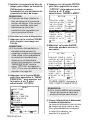
damage the insulation, which could result in fire.
B This projector continues to draw approximately 4 W of power even when
the power is turned off.
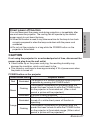
POWER button on the projector
POWER button status
Red
Green
Illuminated
Flashing
Illuminated
Illuminated
Orange
Flashing
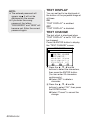
Projector status
The projector is in standby mode and image projection
is possible by pressing the POWER button.
The projector is preparing for projection after the
power has been turned on while the POWER button
on the projector is illuminated red. (After a short
period, a picture will be projected.)
A picture is being projected.
The lamp is cooling down after the power has been
turned off or while direct power off function is
operating.
The projector is preparing for projection after the
power has been turned on while the POWER button
on the projector is illuminated orange. (After a short
period, a picture will be projected.)
ENGLISH-27
Basic operation
Direct power off function
Correcting keystone distortion and
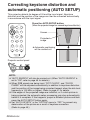
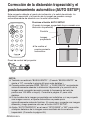
automatic positioning (AUTO SETUP)
This projector detects its degree of tilt and the input signal. Keystone
distortion and the position of the image can then be corrected automatically
in accordance with the input signal.
POWER
Press the AUTO SETUP button.
(When the projected image has caused keystone distortion)
INPUT
VIDEO
AUTO
SETUP
RGB
MENU
Screen
ENTER
SHUTTER
FREEZE
Projected
image
STD
VOLUME
D.ZOOM
INDEX
WINDOW
B Automatic positioning
will be carried out.
[
PROJECTOR
Projector control panel
NOTE:
B “AUTO SEARCH” will also be carried out. (When “AUTO SEARCH” is
set to “ON”, refer to page 45 for details.)
B When RGB signals are being input, “DOT CLOCK”, and “CLOCK
PHASE” will be adjusted automatically in addition to keystone distortion
and the position of the image being corrected (except when the dot clock
frequency is 100 MHz or higher). Refer to page 41 for details.
B If the edges of the projected image are indistinct, or if a dark picture is
being projected, the automatic setup processing may stop automatically
before it is complete. If this happens, project a different picture and then
press the AUTO SETUP button again.
B Set “AUTO KEYSTN” in the “OPTION” menu to “OFF” to prevent any
deterioration of the picture as a result of keystone correction.
(Refer to page 45.)
28-ENGLISH
Turning off the picture and sound
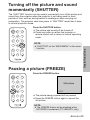
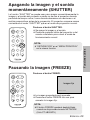
momentarily (SHUTTER)
The “SHUTTER” function can be used to momentarily turn off the picture and
sound from the projector when the projector is not being used for short
periods of time, such as during breaks in meetings or when carrying out
preparation. The projector uses less power in “SHUTTER” mode than it does
in normal projection mode.
POWER
INPUT
VIDEO
RGB
AUTO
SETUP
MENU
Press the SHUTTER button.
B The picture and sound will be turned off.
B Press any button on either the projector or
remote control unit to return to normal operating
mode.
SHUTTER
FREEZE
NOTE:
B “SHUTTER” on the “MAIN MENU” is the same
function.
STD
VOLUME
D.ZOOM
INDEX
WINDOW
PROJECTOR
Pausing a picture (FREEZE)
POWER
Press the FREEZE button.
INPUT
VIDEO
AUTO
SETUP
RGB
MENU
Still picture
ENTER
FREEZE
SHUTTER
STD
VOLUME
D.ZOOM
INDEX
WINDOW
PROJECTOR
B The picture being projected will be paused.
B Press the FREEZE button again to cancel the
still picture.
NOTE:
B The FREEZE button will be disabled when
NETWORK is selected. (PT-LB20NTU only)
ENGLISH-29
Useful functions
ENTER
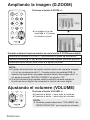
Enlarging the picture (D.ZOOM)
POWER
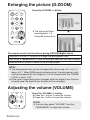
Press the D.ZOOM +/- button.
INPUT
VIDEO
AUTO
SETUP
RGB
MENU
ENTER
FREEZE
SHUTTER
STD
D.ZOOM
VOLUME
INDEX
WINDOW
B The picture will then
be enlarged to 1.5
times the normal size.
[
PROJECTOR
The remote control unit functions during D.ZOOM (digital zoom)
Press the D.ZOOM +/- buttons to change the enlargement ratio.
Press the F,G,IandHbuttons to move the enlarged area which you want to project.
Press the MENU button to return to the normal screen.
NOTE:
B The enlargement ratio can be changed within the range of x1 to x2, in
steps of 0.1. When RGB signals are being input, the enlargement ratio
can be changed within the range of x1 to x3, except when the “FRAME
LOCK” is set to “ON”.
B If the type of signal being input changes while the digital zoom function
is being used, the digital zoom function will be cancelled.
Adjusting the volume (VOLUME)
STD
VOLUME
D.ZOOM
INDEX
WINDOW
PROJECTOR
30-ENGLISH
Press the VOLUME +/- button.
B Press the + button to raise the volume.
B Press the - button to lower the volume.
NOTE:
B You can also select “VOLUME” from the
“MAIN MENU” to adjust the volume.
Displaying two screens (INDEX WINDOW)
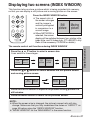
This function lets you store a picture which is being projected into memory,
so that you can display a still picture and a moving picture on the screen.
AUTO
SETUP
Press the INDEX WINDOW button.
B The aspect ratio of
the screen changes
and the image is
vertically elongated
in comparison to a
normal image.
B When NETWORK is
selected, the screen
display will be switched between four window style,
index style, and 16 Index style. (PT-LB20NTU only.
Refer to the accessory CD-ROM for details.)
MENU
ENTER
FREEZE
Still
picture
SHUTTER
STD
VOLUME
D.ZOOM
INDEX
WINDOW
PROJECTOR
Moving
picture
Press the F or G button to select a screen size.
It can switch to three stages.
Still
picture
Still
picture
Moving
picture
Still Moving
picture picture
Moving
picture
Press the I or H button to switch between the still picture screen
and moving picture screen.
Still
picture
Moving
picture
Moving
picture
Still
picture
Press the ENTER button to capture the present moving picture in a
still window.
Press the MENU button to return to the previous screen.
NOTE:
B When the screen size is changed, the picture’s aspect ratio will also
change. Make sure that you fully understand the notes on “ASPECT” on
page 43 before using the “INDEX WINDOW” function.
B “INDEX WINDOW” on the “MAIN MENU” is the same function.
ENGLISH-31
Useful functions
The remote control unit functions during INDEX WINDOW
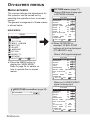
On-screen menus
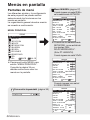
Menu screens
The various settings and adjustments for
this projector can be carried out by
selecting the operations from on-screen
menus.
The general arrangement of these menus
is shown below.
MAIN MENU
MENU
KEYSTONE
PICTURE
POSITION
INDEX WINDOW
SHUTTER
VOLUME
LANGUAGE
OPTION
SECURITY
NETWORK
SELECT ENTER
PICTURE menu (page 37)
When an RGB signal is being input
or NETWORK is selected
PICTURE
PICTURE MODE DYNAMIC
CONTRAST
32
BRIGHT
32
SHARPNESS
0
COLOR TEMP. STANDARD
W-BAL R
32
W-BAL G
32
W-BAL B
32
DAYLIGHTVIEW
AI
ON
SIGNAL MODE
XGA
STANDARD
SELECT ADJ
RETRN
B When NETWORK is
selected, “W-BAL R/G/B”
settings will not be displayed.
(PT-LB20NTU only)
When a YPBPR signal is being input
EXIT
B Press the MENU button to
display the “MAIN MENU”.
Refer to page 34 for details on
how to operate the on-screen
menus.
PICTURE
PICTURE MODE STANDARD
CONTRAST
32
BRIGHT
32
COLOR
32
TINT
32
SHARPNESS
6
COLOR TEMP. STANDARD
DAYLIGHTVIEW
AI
ON
SIGNAL MODE
480p
STANDARD
SELECT ADJ
RETRN
When an S-VIDEO/VIDEO
signal is being input
KEYSTONE correction (page 36)
KEYSTONE
32-ENGLISH
0
PICTURE
PICTURE MODE STANDARD
CONTRAST
32
BRIGHT
32
COLOR
32
TINT
32
SHARPNESS
8
COLOR TEMP. STANDARD
DAYLIGHTVIEW
AI
ON
TV-SYSTEM
AUTO
STILL MODE
OFF
STANDARD
SELECT ADJ
RETRN
POSITION
POSITION
DOT CLOCK
32
CLOCK PHASE
16
ASPECT
4:3
RESIZING
ON
FRAME LOCK
OFF
STANDARD
SELECT ENTER RETRN
B When an S-VIDEO/VIDEO signal
is being input, “DOT CLOCK”,
“CLOCK PHASE” and “FRAME
LOCK” settings will not be
displayed.
INDEX WINDOW function
(page 31)
SHUTTER function (page 29)
VOLUME adjustment
Press the ENTER button, and
then press the I or H button
to adjust the volume.
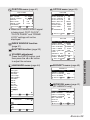
LANGUAGE menu (page 44)
LANGUAGE
DEUTSCH
FRANÇAIS
ESPAÑOL
ITALIANO
PORTUGUÊS
SVENSKA
NORSK
DANSK
POLSKI
CESTINA
MAGYAR
ENGLISH
ENTER
LANGUAGE
OPTION
OSD
ON
AUTO SEARCH
ON
AUTO SIGNAL
ON
AUTO KEYSTN
ON
RGB2 SELECT
INPUT
AUTO
RGB/YPB PR
VGA60/480p
480p
SXGA MODE
SXGA
NR
OFF
BLACKBOARD
OFF
▼
SELECT
ADJ
RETRN
OPTION
▲
BACK COLOR
BLUE
FRONT/REAR
FRONT
DESK/CEILING
DESK
FAN CONTROL STANDARD
LAMP POWER
HIGH
LAMP RUNTIME
10H
FUNC 1
DAYLIGHT
CONTROL KEY
ON
AUTO POW.OFF DISABLE
POWER MEMORY
ON
SELECT ADJ
RETRN
SECURITY menu (page 49)
SECURITY
INPUT PASSWD
OFF
AMEND PASSWD
TEXT DISPLAY
OFF
TEXT CHANGE
RETRN
SELECT ADJ
NETWORK menu (page 51)
(PT-LB20NTU only)
▼
SELECT
OPTION menu (page 45)
RETRN
ENGLISH
▲
NETWORK
NETWORK
1
NAME CHANGE
LB20NT
INPUT PASSWD
OFF
AMEND PASSWD
WEB CONTROL
ON
STATUS
DEFAULT
SELECT ENTER RETRN
ENGLISH
中文
日本語
SELECT
ENTER
RETRN
ENGLISH-33
Adjustments and settings
POSITION menu (page 41)
Menu operation guide
POWER
# Press the MENU button.
The “MAIN MENU”
will be displayed.
INPUT
VIDEO
AUTO
SETUP
RGB
MENU
ENTER
SHUTTER
FREEZE
STD
VOLUME
D.ZOOM
MENU
KEYSTONE
PICTURE
POSITION
INDEX WINDOW
SHUTTER
VOLUME
LANGUAGE
OPTION
SECURITY
NETWORK
SELECT ENTER
EXIT
INDEX
WINDOW
PROJECTOR
Menu operation
(on connector panel)
NOTE:
B Press the MENU
button to return to
the previous
screen.
34-ENGLISH
$ Press the F or G button to select an item.
Selected item will
MENU
be displayed in
KEYSTONE
blue.
PICTURE
POSITION
INDEX WINDOW
SHUTTER
VOLUME
LANGUAGE
OPTION
SECURITY
NETWORK
SELECT ENTER
EXIT
% Press the ENTER button to accept the
selection.
PICTURE
The selected
PICTURE MODE STANDARD
menu screen or
CONTRAST
32
adjustment
BRIGHT
32
COLOR
32
screen will then
TINT
32
be displayed.
SHARPNESS
8
(Example:
COLOR TEMP. STANDARD
“PICTURE”
DAYLIGHTVIEW
menu)
AI
ON
TV-SYSTEM
AUTO
STILL MODE
OFF
STANDARD
SELECT ADJ
RETRN
& Press the F or G button to select
an item, and then press the I or
H button to change or adjust the
setting.
An individual adjustment screen
such as the one shown below will
be displayed for bar scale items.
BRIGHT
32
The bar scale will turn green when
any adjustment changes the setting
from the factory set value.
Unavailable on-screen
menu items
This projector has unadjustable
items and unusable functions
depending on the signal being
input.
When an item cannot be adjusted
or a function cannot be used, the
corresponding on-screen menu
display does not appear, and the
item or function will not work even
if the ENTER button is pressed.
Returning a setting to the factory default
If you press the STD (standard) button on the remote control unit, you can
return settings to the factory default settings. However, the operation of this
function varies depending on which screen is being displayed.
PICTURE
STD
PICTURE MODE STANDARD
CONTRAST
32
BRIGHT
32
COLOR
32
TINT
32
SHARPNESS
8
COLOR TEMP. STANDARD
DAYLIGHTVIEW
AI
ON
TV-SYSTEM
AUTO
STILL MODE
OFF
STANDARD
SELECT ENTER RETRN
All items displayed will be returned
to their factory default settings,
“STD” will be displayed in the topright screen and the bar scale will
appear white.
NOTE:
B You can also select
“STANDARD” from the menu
screen and then press the
ENTER button.
B When an individual adjustment
screen is being displayed
BRIGHT
32
Only the item displayed will be
returned to the factory default
setting, and the bar scale will
appear white.
NOTE:
B Triangle symbols above and below
the bar scale indicate the factory
default setting. Items which do not
have these triangle symbols
cannot be returned to the factory
default setting.
Indicates the standard factory
default setting
Indicates the current
adjustment value
B The positions of triangle
symbols vary depending on the
type of signal being input.
ENGLISH-35
Adjustments and settings
B When a menu screen is being
displayed
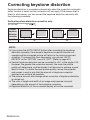
Correcting keystone distortion
Keystone distortion is corrected automatically when the projector’s automatic
setup function is used, but this correction will not apply if the screen itself is
tilted. In such cases, you can correct the keystone distortion manually with
the following procedure.
Vertical keystone distortion correction only.
KEYSTONE
0
Vertical
keystone
distortion
correction
Operation
Press the H button.
Press the I button.
NOTE:
B If you press the AUTO SETUP button after correcting the keystone
distortion manually, the automatic keystone correction function will
operate and the corrected picture will return to its previous incorrect
condition. To prevent this from happening, you can set “AUTO
KEYSTN” in the “OPTION” menu to “OFF”. (Refer to page 45.)
B Vertical keystone distortion can be corrected to ±30° of the angle of tilt.
However, the greater the correction amount, the more the picture
quality will deteriorate, and the harder it will become to achieve a good
level of focus. To obtain the best picture quality, set up the projector
and screen in such a way that the amount of keystone correction
required is as minimal as possible.
B The picture size will also change when correction of keystone distortion
is carried out.
B The ratio of length and width of an image may become incorrect
depending on the amount of the keystone correction.
B Keystone distortion of the on-screen display will not be corrected.
36-ENGLISH
Adjusting the picture
When an RGB signal is being input
or NETWORK is selected
PICTURE
PICTURE MODE DYNAMIC
CONTRAST
32
BRIGHT
32
SHARPNESS
0
COLOR TEMP. STANDARD
W-BAL R
32
W-BAL G
32
W-BAL B
32
DAYLIGHTVIEW
AI
ON
SIGNAL MODE
XGA
STANDARD
SELECT ADJ
RETRN
When NETWORK is selected,
“W-BAL R/G/B” settings will not be
displayed. (PT-LB20NTU only)
When an YPBPR signal is being
input
PICTURE
PICTURE MODE STANDARD
CONTRAST
32
BRIGHT
32
COLOR
32
TINT
32
SHARPNESS
6
COLOR TEMP. STANDARD
DAYLIGHTVIEW
AI
ON
SIGNAL MODE
480p
STANDARD
SELECT ADJ
RETRN
When an S-VIDEO/VIDEO signal is
being input
PICTURE
PICTURE MODE STANDARD
CONTRAST
32
BRIGHT
32
COLOR
32
TINT
32
SHARPNESS
8
COLOR TEMP. STANDARD
DAYLIGHTVIEW
AI
ON
TV-SYSTEM
AUTO
STILL MODE
OFF
STANDARD
SELECT ADJ
RETRN
PICTURE MODE
PICTURE MODE NATURAL
[
STANDARD
[
DYNAMIC
[
BLACK-BD
Select the picture mode that best
matches the image source and
room conditions.
The mode best used in dark rooms
is “NATURAL”. For rooms having
regular lighting conditions in use,
select “STANDARD”. For
exceptionally bright rooms, use
“DYNAMIC”.
“BLACK-BD” is available only when
“BLACKBOARD” in the “OPTION”
menu is set to “ON”.
Select “BLACK-BD” when projecting
onto blackboards.
ENGLISH-37
Adjustments and settings
Press the F or G button on the
projector or remote control unit to
select an item, and then press the
I or H button to change the
setting.
For items with bar scales, press the
ENTER button or the I or H button
to display the adjustment screen,
and then press the I or H button
to make the adjustment.
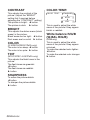
CONTRAST
COLOR TEMP.
This adjusts the contrast of the
picture. (Adjust the “BRIGHT”
setting first if required before
adjusting the “CONTRAST” setting.)
The picture is bright: I button
The picture is dark: H button
COLOR TEMP.
BRIGHT
This adjusts the darker areas (black
areas) in the picture.
Black areas are too light: I button
Dark areas are too solid: H button
COLOR
(S-VIDEO/VIDEO/YPBPR only)
The color is too deep: I button
The color is too pale: H button
TINT
(NTSC/NTSC 4.43/YPBPR only)
This adjusts the flesh tones in the
picture.
The flesh tones are greenish:
I button
The flesh tones are reddish:
H button
SHARPNESS
To soften the picture details:
I button
To sharpen the picture details:
H button
38-ENGLISH
STANDARD
[
HIGH
[
LOW
This is used to adjust the white
areas of the picture if they appear
bluish or reddish.
White balance R/G/B
(W-BAL R/G/B)
(RGB only)
This is used to adjust the white
areas of the picture if they appear
colorised.
To make the selected color lighter:
I button
To make the selected color stronger:
H button
DAYLIGHTVIEW
W-BAL
This adjusts the vividness of the
projected images when the projector
is used under bright lighting.
Press the ENTER button to display
the “DAYLIGHTVIEW” screen.
W-BAL
MODE
MODE
AUTO
[
ON
[
OFF
AUTO
The vividness of the projected
images will be adjusted according to
the lighting condition of the room.
ON
The projected images will have the
highest vividness regardless of the
lighting condition of the room.
OFF
“DAYLIGHTVIEW” is disabled.
NOTE:
B “AUTO” may not function
correctly if any objects are
placed on the projector.
B “AUTO” will be disabled when
“FRONT/REAR” in the
“OPTION” menu is set to
“REAR”.
When fluorescent lamps are used
for room lighting.
When incandescent lamps are used
for room lighting.
NOTE:
B “W-BAL” is disabled when
“MODE” in “DAYLIGHTVIEW”
is set to “OFF”.
AI
ON
The lamp is controlled according to
the input signals to project images
with the best quality.
OFF
“AI” is disabled.
NOTE:
B “AI” is disabled when “LAMP
POWER” is set to “LOW”.
(Refer to page 47.)
ENGLISH-39
Adjustments and settings
DAYLIGHTVIEW
MODE
AUTO
W-BAL
RETRN
SELECT ADJ
[
TV-SYSTEM
SIGNAL MODE
(S-VIDEO/VIDEO only)
TV-SYSTEM
AUTO
(RGB/YPBPR/NETWORK only)
This displays the type of signal
which is currently being projected.
Refer to the list on page 62 for
details on each type of signal.
[
NTSC
[
NTSC4.43
[
PAL
[
PAL-M
[
PAL-N
[
SECAM
This should normally be set to
“AUTO”. If the signal is of such poor
quality that the correct format
cannot be automatically
distinguished, change the setting
manually to the required TV system.
NOTE:
B When set to “AUTO”, the
projector automatically
distinguishes between
NTSC/NTSC 4.43/PAL/PAL60/
PAL-M/PAL-N/SECAM signals.
STILL MODE
(S-VIDEO/VIDEO only)
To reduce flickering of still images
(vertical flicker), set “STILL MODE”
to “ON”.
NOTE:
B Set to “OFF” when playing
back moving images.
40-ENGLISH
Projecting sRGBcompatible pictures
sRGB is an international color
reproduction standard (IEC61966-21) established by the International
Electrotechnical Commission (IEC).
If you would like the colors in
sRGB-compatible pictures to be
reproduced more faithfully, make
the following settings.
# Press the F or G button to
select “PICTURE MODE”, and
then press the I or H button
to select “NATURAL”.
$ Press the STD (standard)
button on the remote control
unit.
% Press the F or G button to
select “COLOR TEMP.”, and
then press the I or H button
to select “STANDARD”.
NOTE:
B sRGB is only enabled when
RGB signals are being input
(when “LAMP POWER” is set
to “HIGH”, “AI” is set to “OFF”,
and “MODE” in
“DAYLIGHTVIEW” is set to
“OFF”).
Adjusting the position
Press the F or G button on the
projector or remote control unit to
select an item, and then press the I
or H button to change the setting.
For items with bar scales, press the
ENTER button or the I or H button
to display the adjustment screen,
and then press the I or H button
to make the adjustment.
When an RGB/YPBPR signal is
being input
POSITION
POSITION
DOT CLOCK
32
CLOCK PHASE
16
ASPECT
4:3
RESIZING
ON
FRAME LOCK
OFF
STANDARD
SELECT ENTER RETRN
When an S-VIDEO/VIDEO signal is
being input
POSITION
POSITION
ASPECT
4:3
RESIZING
ON
STANDARD
SELECT ENTER RETRN
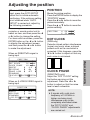
POSITION
Moves the picture position.
Press the ENTER button to display the
“POSITION” screen.
Press the I or H button to move the
picture horizontally.
Press the F or G button to move the
picture vertically.
POSITION
H
V
64
32
DOT CLOCK
(RGB only)
Periodic striped pattern interference
(noise) may occur when a striped
pattern such as the one below is
projected. If this happens, press the
I or H button to adjust so that any
such noise is minimised.
CLOCK PHASE
(RGB/YPBPR only)
Adjust the “DOT CLOCK” setting
first before carrying out this
adjustment. Press the I or H
button to adjust so that the noise
level is least noticeable.
NOTE:
B If signals with a dot clock
frequency of 100 MHz or
higher are being input,
interference may not be
completely eliminated when
the “DOT CLOCK” and
“CLOCK PHASE” adjustments
are carried out.
ENGLISH-41
Adjustments and settings
When an RGB signal is being
input, press the AUTO SETUP
button first to initiate automatic
positioning. If the optimum setting
is not obtained when “AUTO
SETUP” is carried out, adjust by
the following procedure.
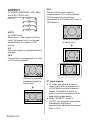
ASPECT
(S-VIDEO/VIDEO/480i, 576i, 480p
and 576p YPBPR only)
ASPECT
AUTO
[
4:3
S4:3
The size of the input signal is
compressed to 75% and projected.
(This is useful for projecting a
picture with a 4:3 aspect ratio onto a
16:9 screen.)
[
16:9
[
S4:3
AUTO
(S-VIDEO only)
When an S1 video signal is being
input, the aspect ratio is changed
automatically to project a 16:9
picture.
4:3
The input signal is projected without
change.
16:9
The picture is compressed to a ratio
of 16:9 and projected.
When a 4:3 signal
is being input.
[
When using the 16:9 screen
When a horizontally
squeezed signal is
being input.
[
42-ENGLISH
S1 video signals
B S1 video signals are a type of
video signal with an aspect ratio
of 16:9 which include a detector
signal. This detector signal is
output by some sources such as
wide-vision video decks.
B When “ASPECT” is set to
“AUTO”, the projector recognizes
the detector signal and
automatically switches the aspect
ratio to 16:9.
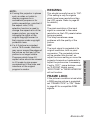
RESIZING
This should normally be set to “ON”.
(This setting is only for signals
which have lower resolutions than
the LCD panels. Refer to page 62
for details.)
ON
The pixel resolution of the input
signal is converted to the same
resolution as the LCD panels before
being projected.
This may sometimes cause
problems with the quality of the
picture.
OFF
The input signal is projected at its
original resolution, with no pixel
conversion. The projected picture
will be smaller than normal, so
adjust the zoom setting or move the
projector forwards or backwards to
adjust the picture size if necessary.
If set to “OFF”, some features, such
as “D.ZOOM” (digital zoom),
“KEYSTONE” or “INDEX WINDOW”
will not function.
FRAME LOCK
If the picture’s condition is bad while
a RGB moving picture is projected,
set “FRAME LOCK” to “ON”. Refer
to page 62 for compatible RGB
signals.
ENGLISH-43
Adjustments and settings
NOTE:
B If using this projector in places
such as cafes or hotels to
display programs for a
commercial purpose or for
public presentation, note that if
the aspect ratio (16:9)
selection function is used to
change the aspect ratio of the
screen picture, you may be
infringing the rights of the
original copyright owner for
that program under copyright
protection laws.
B If a 4:3 picture is projected
onto a 16:9 screen, distortion
may occur around the edges of
the picture so that part of the
picture is no longer visible.
Programs which have 4:3
aspect ratios should be viewed
in 4:3 mode to give proper
consideration to the aims and
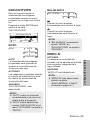
intentions of the original
program’s creator.
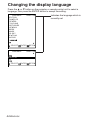
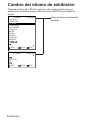
Changing the display language
Press the F or G button on the projector or remote control unit to select a
language, then press the ENTER button to accept the setting.
LANGUAGE
DEUTSCH
FRANÇAIS
ESPAÑOL
ITALIANO
PORTUGUÊS
SVENSKA
NORSK
DANSK
POLSKI
CESTINA
MAGYAR
ENGLISH
▼
SELECT
ENTER
LANGUAGE
RETRN
ENGLISH
▲
ENGLISH
中文
日本語
SELECT
44-ENGLISH
ENTER
RETRN
Indicates the language which is
currently set.
Option settings
OPTION
OSD
ON
AUTO SEARCH
ON
AUTO SIGNAL
ON
AUTO KEYSTN
ON
RGB2 SELECT
INPUT
AUTO
RGB/YPB PR
VGA60/480p
480p
SXGA MODE
SXGA
NR
OFF
BLACKBOARD
OFF
▼
SELECT
ADJ
RETRN
OPTION
▲
AUTO SEARCH
This should normally be set to “ON”
ON
When the power is turned on and
“AUTO SETUP” is running, the
projector detects which signals are
being input, and uses these signals
for projection.
(If a picture is being projected, the
signal source is not automatically
changed.)
OFF
Use this setting when you do not
want the signal source to be
changed automatically when the
power is turned on and “AUTO
SETUP” is running.
BACK COLOR
BLUE
FRONT/REAR
FRONT
DESK/CEILING
DESK
FAN CONTROL STANDARD
LAMP POWER
HIGH
LAMP RUNTIME
10H
FUNC 1
DAYLIGHT
CONTROL KEY
ON
AUTO POW.OFF DISABLE
POWER MEMORY
ON
SELECT ADJ
RETRN
AUTO SIGNAL
OSD
AUTO KEYSTN
ON
The signal name is displayed in the
top-right corner of the screen when
the input signal is changed.
OFF
Use this setting when you do not want
the signal name to be displayed.
This should normally be set to “ON”.
ON
During “AUTO SETUP”, the angle
of tilt of the projector is detected
and keystone distortion is corrected
automatically.
OFF
Use this setting when you do not
want automatic keystone correction
to be carried out during “AUTO
SETUP”, such as when the screen
itself is at an angle.
NOTE:
B The setting for “TV-SYSTEM”
will also be displayed when an
S-VIDEO/VIDEO signal is being
input.
This should normally be set to “ON”.
ON
“AUTO SETUP” will be carried out
automatically when the input signal
is changed.
OFF
“AUTO SETUP” will not function
when the input signal is changed.
ENGLISH-45
Adjustments and settings
Press the F or G button on the
projector or remote control unit to
select an item, then press the I or
H button to change the setting.
RGB2 SELECT
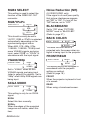
Noise Reduction (NR)
This setting is used to select the
function of the RGB2 IN/1 OUT
connector.
(S-VIDEO/VIDEO only)
If the signal is of such poor quality
that picture interference appears,
set “NR” to “ON”. To turn off the
“NR” feature, set to “OFF”.
RGB/YPBPR
RGB/YPB PR
AUTO
[
RGB
[
YPB PR
This should normally be set to
“AUTO”. RGB or YPBPR is selected
automatically depending on the
synchronising signal status.
When 480i, 576i, 480p, 576p,
1 080/60i, 1 080/50i, 720/60p and
some VGA480 signals are being
input, select “RGB” or “YPBPR” in
accordance with the input signal.
VGA60/480p
VGA60/480p
480p
[
SXGA MODE
SXGA
[
SXGA+
This setting is only for an SXGA
signal.
SXGA
Select this item normally.
SXGA+
When the edges of the projected
image are not visible, select this
item.
46-ENGLISH
Set to “ON” when “PICTURE
MODE” is set to “BLACK-BD”.
(Refer to page 37.)
BACK COLOR
BACK COLOR
BLUE
[
BLACK
This sets the color which is
projected onto the screen when no
signal is being input to the projector.
FRONT/REAR
FRONT/REAR
VGA60
Set to “VGA60” when 59.9Hz
VGA480 signals are being input
(refer to page 62 for details). Set to
“480p” when 480p RGB signals are
being input.
SXGA MODE
BLACKBOARD
FRONT
[
REAR
This setting should be changed in
accordance with the projector
setting-up method.
(Refer to page 18.)
FRONT
When the projector is placed in front
of a screen.
REAR
When using a translucent screen.
DESK/CEILING
DESK
[
CEILING
This setting should be changed in
accordance with the projector
setting-up method.
(Refer to page 18.)
DESK
When the projector is placed on a
desk or similar.
CEILING
When the projector is suspended
from a ceiling using the ceiling
bracket (sold separately).
FAN CONTROL
FAN CONTROL
STANDARD
[
HIGH
Set “FAN CONTROL” to “HIGH”,
when using this projector at high
elevations (above 1 400 m) only.
LAMP POWER
LAMP POWER
HIGH
[
LOW
This setting changes the lamp
brightness. When set to “LOW”, the
luminance of the lamp is reduced,
but the projector uses less power,
and the operating noise is also
reduced. This can help to extend
the lamp’s operating life. If using the
projector in small rooms where high
luminance is not required, it is
recommended that you set the
“LAMP POWER” to “LOW”.
LAMP RUNTIME
This setting displays the usage time
for the lamp unit which is currently
being used. When replacing the
lamp unit, follow the instructions on
page 56, and reset “LAMP
RUNTIME” to “0”.
NOTE:
B The lamp’s operating life varies
depending on the usage
conditions (such as the “LAMP
POWER” setting and the
number of times the power is
turned on and off).
FUNC 1
FUNC1
DAYLIGHT
[
KEYSTONE
This assigns a function to the
FUNC1 button of the ET-RM300
wireless remote control unit (sold
separately).
DAYLIGHT
Functions in the same way as when
“DAYLIGHTVIEW” is selected from
the “PICTURE” menu. (page 39)
KEYSTONE
Functions in the same way as when
“KEYSTONE” is selected from the
“MAIN MENU”. (page 36)
NOTE:
B “LAMP POWER” cannot be set
when no signal is being input.
ENGLISH-47
Adjustments and settings
DESK/CEILING
CONTROL KEY
To disable the buttons on the
projector, set “CONTROL KEY” to
“OFF”. A confirmation screen will
then be displayed. Select “OK” by
using I or H button. To use the
buttons on the projector, set to “ON”
by using the remote control unit.
AUTO POW.OFF
If no signal is input to the projector
for the duration of the period you
set, the projector will return to
standby mode. The period can be
set from 15 minutes to 60 minutes
in 5 minute intervals. If you don’t
use this feature, set it to “DISABLE”.
This feature will not function when
using the “FREEZE” function.
POWER MEMORY
This sets the projector’s start up
status for when the power cord is
connected.
ON
The projector will start from the
same status as when the power
cord was disconnected. If the power
cord was disconnected during
projection when the projector was
used the last time, projection will
start after the power cord is
connected.
OFF
The projector will be in standby
mode.
48-ENGLISH
Setting up the security function
This projector is equipped with a security function. A password input screen
can be displayed, or a company URL can be set up and displayed at the
bottom of the projected image.
MENU
KEYSTONE
PICTURE
POSITION
INDEX WINDOW
SHUTTER
VOLUME
LANGUAGE
OPTION
SECURITY
NETWORK
SELECT ENTER
EXIT
INPUT PASSWD
The password input screen can be
displayed when the power is turned
on. All of the controls other than the
POWER button are disabled unless
the password is entered correctly.
ON
“INPUT PASSWD” is enabled.
OFF
“INPUT PASSWD” is disabled. The
password input screen will not be
displayed when the power is turned
on.
AMEND PASSWD
Passwords can be changed. Press
the ENTER button to display the
“AMEND PASSWD” screen.
AMEND PASSWD
PASSWORD
NEW
OK
RETURN
CONFIRM
(When you use the “SECURITY”
function for the first time)
Press the F, H, G, I, F, H, G
and I buttons in order, then press
the ENTER button.
(When a password change has
been made before)
Type in the changed password, then
press the ENTER button.
SECURITY
INPUT PASSWD
OFF
AMEND PASSWD
TEXT DISPLAY
OFF
TEXT CHANGE
RETRN
SELECT ADJ
OK
RETURN
# Set a password by pressing the
F,G,I, and H buttons.
(A maximum of 8 buttons can be
set.)
$ Press the ENTER button.
% Enter the password again for
confirmation.
& Press the ENTER button.
Password change will be
completed.
ENGLISH-49
Adjustments and settings
Press the F or G button on the
projector or remote control unit to
select “SECURITY”, then press the
ENTER button.
NOTE:
B The entered password will
appear as . It will not be
displayed on the screen.
B If you enter the wrong
password, the letters
“PASSWORD” and “NEW” will
become red. Enter the correct
password again.
TEXT DISPLAY
You can set text to be displayed at
the bottom of the projected image at
all times.
ON
“TEXT DISPLAY” is enabled.
OFF
“TEXT DISPLAY” is disabled.
TEXT CHANGE
The text which is displayed when
“TEXT DISPLAY” is set to “ON” can
be changed.
Press the ENTER button to display
the “TEXT CHANGE” screen.
TEXT CHANGE
ABCDEFGHIJKLMNO
PQRSTUVWXYZ;:,.
abcdefghijklmno
pqrstuvwxyz/+−*
0123456789 _@[]
BS
OK
Cancel
# Press the F, G, I and H
buttons to select the characters,
then press the ENTER button.
(You can enter 22 characters
continuously.)
C Select “BS” to delete a
character.
$ Press the F, G, I and H
buttons to select “OK”, then press
the ENTER button.
C Select “Cancel” to cancel the
change.
50-ENGLISH
Network setup (PT-LB20NTU only)
You need to make adjustments on some items when controlling the projector
with a personal computer by means of the wireless network. Refer to the
accessory CD-ROM for details.
NETWORK
NETWORK
1
NAME CHANGE
LB20NT
INPUT PASSWD
OFF
AMEND PASSWD
WEB CONTROL
ON
STATUS
DEFAULT
SELECT ENTER RETRN
INPUT PASSWD
Set to “ON” if you want password
confirmation to be used when
controlling the projector with a
personal computer by means of the
wireless network.
AMEND PASSWD
Passwords can be changed.
Select the network setting you want
to use.
NAME CHANGE
The name for this projector can be
set.
WEB CONTROL
To control the projector with a
personal computer by means of the
wireless network, set the “WEB
CONTROL” to “ON”.
STATUS
The network settings will be
displayed.
DEFAULT
Network settings can be returned to
the factory default settings.
ENGLISH-51
Adjustments and settings
NETWORK
When the TEMP indicator and the
LAMP indicator are illuminated
There are two indicators on the control panel of the projector which give
information about the operating condition of the projector. These indicators
illuminate or flash to warn you about problems that have occurred inside the
projector, so if you notice that one of the indicators is on, turn off the power
and check the table below for the cause of the problem.
LAMP indicator
TEMP indicator
TEMP indicator
Illuminated (red)
(Lamp unit on)
The surrounding temperature or
the temperature inside the
projector has become unusually
Problem high.
Indicator
display
Flashing (red)
(Lamp unit off)
The surrounding temperature or
the temperature inside the
projector has become
dangerously high, causing the
lamp unit to automatically shut
off.
B The ventilation holes may be covered.
Possible
B The ambient temperature in the place of use may be too high.
cause
B The air filter may be blocked.
B Uncover the ventilation holes.
B Set up the projector in a place where the temperature is
between 0 °C (32 °F) and 40 °C (104 °F) and the humidity is
between 20% and 80% (with no condensation). [If you set the
“FAN CONTROL” to “HIGH” (page 47), set up the projector in a
Remedy
place where the temperature is between 0 °C (32 °F) and 35 °C
(95 °F) and the humidity is between 20% and 80% (with no
condensation).]
B Disconnect the power cord by following the procedure on page
26, and then clean the air filter. (Refer to page 54.)
52-ENGLISH
LAMP indicator
Indicator
display
Illuminated (red)
It is nearly time to
Problem replace the lamp
unit.
Flashing (red)
An abnormality has been detected in the lamp
circuit.
B This occurs when B Wait for a while
B Disconnect the
the operation time
until the lamp unit
power cord by
for the lamp unit is
cools down before
following the
nearing 1 800
turning the power
procedure on
hours (when
back on again.
page 26, and then
“LAMP POWER”
contact an
has
been
set
to
Authorized
Remedy
“HIGH” and when
Service Center.
“AI” has been set
to “OFF”). Ask
your dealer or an
Authorized
Service Center to
replace the lamp
unit.
NOTE:
B Be sure to disconnect the power cord by following the procedure given
in “Turning off the power” on page 26 before carrying out any of the
procedures in the “Remedy” column.
B If the TEMP indicator is illuminated and the power turns off after the
procedures in the “Remedy” column have been carried out, it means an
abnormality has occurred. Please contact an Authorized Service Center
so that the necessary repairs can be made.
ENGLISH-53
Care and maintenance
B Does “REPLACE B The power may
B There may be an
LAMP” appear on
have been turned
abnormality in the
Possible
the screen after
on straight away
lamp circuit.
cause
the projector is
after it was turned
turned on?
off.
Cleaning and replacing the air filter
If the air filter becomes clogged with dust, the internal temperature of the
projector will rise, the TEMP indicator will illuminate and the projector’s
power will turn off (the TEMP indicator will flash after the power is turned off).
The air filter should be cleaned every 100 hours of use.
Cleaning
Replacement procedure
Use a vacuum cleaner to clean off
any accumulated dust.
# Turn off the power and
disconnect the power cord.
Be sure to disconnect the power
cord by following the procedure
given on page 26.
$ Gently turn the projector
upside down, and then remove
the air filter cover.
Air filter cover
NOTE:
B If the dust cannot be cleaned
by a vacuum cleaner, remove
the air filter and soak it in
water, and then wash out the
dust by hand. Be sure to install
the air filter after it has dried.
B Do not use detergent when
washing the air filter.
B If the dust cannot be removed
by cleaning, it is time to
replace the air filter. Please
consult your dealer.
Furthermore, if the lamp unit is
being replaced, replace the air
filter at this time also.
54-ENGLISH
Air filter cover
% Replace the air filter, and then
install the air filter cover.
Air filter
NOTE:
B Be sure to install the air filter
before using the projector. If
the projector is used without
the air filter installed, dust and
other foreign particles will be
drawn into the projector, and
malfunctions will result.
Replacing the lamp unit
The lamp unit should only be
replaced by a qualified
technician.
When replacing the lamp, allow it
to cool for at least one hour
before handling it.
B The lamp cover gets very hot,
and touching it can cause burns.
Notes on replacing the lamp
unit
B The light generating lamp is
made of glass, so dropping it or
allowing it to hit hard objects may
cause it to burst. Be careful when
handling the lamp.
B Dispose of the removed old lamp
with the same care that would be
taken with a fluorescent light.
B A Phillips screwdriver is
necessary for removing the lamp
unit.
NOTE:
B The projector is not supplied
with a replacement lamp unit.
Please ask your dealer for
details. Lamp unit product
no.: ET-LAB10
CAUTION:
B Do not use any lamp unit other
than the one with the product
number indicated above.
Lamp unit replacement
period
The lamp is a consumable product.
Even when the full life of the bulb
has not been exhausted, the
brightness of the light will gradually
decline. Therefore periodic
replacement of the lamp is
necessary.
The intended lamp replacement
interval is 2 000 hours, but it is
possible that the lamp may need to
be replaced earlier due to variables
such as a particular lamp’s
characteristics, usage conditions
and the installation environment.
Early preparation for lamp
replacement is encouraged.
The lamp will automatically shut off
after approximately 10 minutes
when 2 000 hours of use have been
reached because of a much greater
chance of it exploding after this
time.
NOTE:
B The usage hours explained
above are for when “LAMP
POWER” in the “OPTION”
menu has been set to “HIGH”
and when “AI” in the
“PICTURE” menu has been set
to “OFF”. If “LAMP POWER” is
set to “LOW”, or “AI” is set to
“ON”, the life of the lamp can
be extended.
B While 2 000 hours is the
intended replacement interval,
it is not a period of time
covered by warranty.
ENGLISH-55
Care and maintenance
Warning
On-screen display
LAMP indicator
Displayed for 30
seconds. Pressing any
More than 1 800 hours
button will clear the
display.
More than 2 000 hours
Illuminates red during
image projection and
standby mode.
Remains displayed until
any button is pressed.
Lamp unit replacement procedure
NOTE:
B If the lamp usage time has passed 2 000 hours (when “LAMP POWER” has
been set to “HIGH” and when “AI” has been set to “OFF”), the projector will
switch to standby mode after approximately 10 minutes of operation. The
steps ) to - on the next page should thus be completed within 10 minutes.
# Disconnect the power cord
from the projector by following
the procedure on page 26, and
check that the area around the
lamp unit has cooled down.
$ Use a Phillips screwdriver to
turn the lamp unit cover fixing
screws at the bottom of the
projector, and then remove the
lamp unit cover.
% Use a Phillips screwdriver to
loosen the two lamp unit fixing
screws until the screws turn
freely. Then hold the handle of
the lamp unit and gently pull it
out from the projector.
Handle
A
B
Lamp unit cover
Lamp unit fixing screws
Lamp unit cover fixing screws
56-ENGLISH
& Insert the new lamp unit while
making sure that the direction
of insertion is correct, and then
use a Phillips screwdriver to
securely tighten the lamp unit
fixing screws.
When inserting the new lamp
unit, be sure to push it in at the
point A and B.
NOTE:
B Be sure to install the lamp unit
and the lamp unit cover
securely. If they are not securely
installed, it may cause the
protection circuit to operate so
that the power cannot be turned
on.
( Connect the power cord.
) Press the POWER button so
that a picture is projected onto
the screen.
NOTE:
B If the power cord was
disconnected during projection
when the projector was used
the last time, projection will
start after the power cord is
connected (when “POWER
MEMORY” in the “OPTION”
menu is set to “ON”). Refer to
page 48 for details.
* Press the MENU button to
display the “MAIN MENU”, and
then press the F or G button
to select “OPTION”.
MENU
KEYSTONE
PICTURE
POSITION
INDEX WINDOW
SHUTTER
VOLUME
LANGUAGE
OPTION
SECURITY
NETWORK
SELECT ENTER
+ Press the ENTER button to
display the “OPTION” menu, and
then press the F or G button to
select “LAMP RUNTIME”.
OPTION
▲
BACK COLOR
BLUE
FRONT/REAR
FRONT
DESK/CEILING
DESK
FAN CONTROL STANDARD
LAMP POWER
HIGH
LAMP RUNTIME 1820H
FUNC 1
DAYLIGHT
CONTROL KEY
ON
AUTO POW.OFF DISABLE
POWER MEMORY
ON
SELECT
RETRN
, Press and hold the ENTER
button for approximately 3
seconds.
OPTION
▲
BACK COLOR
BLUE
FRONT/REAR
FRONT
DESK/CEILING
DESK
FAN CONTROL STANDARD
LAMP POWER
HIGH
TIME RESET [POWER OFF]
FUNC 1
DAYLIGHT
CONTROL KEY
ON
AUTO POW.OFF DISABLE
POWER MEMORY
ON
SELECT
RETRN
The “LAMP RUNTIME” will
change to “TIME RESET
[POWER OFF]”.
NOTE:
B If the MENU button is pressed,
the lamp time resetting screen
will be cancelled.
EXIT
- Turn off the power and
disconnect the power cord.
This will reset the cumulative
usage time for the lamp unit to “0”.
Refer to page 26 for details on
how to turn off the power.
ENGLISH-57
Care and maintenance
' Install the lamp unit cover, and
then use a Phillips screwdriver
to securely tighten the lamp
unit cover fixing screws.
Before calling for service
Before calling for service, check the following points.
Problem
Possible cause
Power does not B The power cord may not be connected.
turn on.
B The main power supply is not being supplied to the
wall outlet.
B TEMP indicator is illuminated or flashing.
B LAMP indicator is illuminated or flashing.
B The lamp unit cover has not been securely
installed.
No picture
B The video signal input source may not be
appears.
connected properly.
B The input selection setting may not be correct.
B The “BRIGHT” adjustment setting may be at the
minimum possible setting.
B The “SHUTTER” function may be in use.
The picture is B The lens cover may still be attached to the lens.
fuzzy.
B The lens focus may not have been set correctly.
B The projector may not be at the correct distance
from the screen.
B The lens may be dirty.
B The projector may be tilted too much.
The color is pale B “COLOR” or “TINT” adjustment may be incorrect.
or grayish.
B The input source which is connected to the
projector may not be adjusted correctly.
No sound can B The audio signal source may not be connected
be heard.
properly.
B The volume adjustment may be at the lowest
possible setting.
The remote
B The battery may be weak.
control unit
B The battery may not be inserted correctly.
does not
B The remote control signal receptor on the projector
operate.
may be obstructed.
B The remote control unit may be out of the
operation range.
The buttons on B The “CONTROL KEY” may be set to “OFF”.
the projector do
In order to set the “CONTROL KEY” to “ON”
not function.
without using the remote control unit, keep holding
down the ENTER button on the projector and press
the MENU button for more than 2 seconds.
58-ENGLISH
Page
–
–
52
53
–
–
25
38
29
–
25
19,
20
–
18
38
–
–
30,
33
–
23
23
23
48
Problem
Possible cause
Page
The picture does B The signal format (“TV-SYSTEM”) may not be set 40
not display
correctly.
correctly.
–
B There may be a problem with the video tape or
other signal source.
B A signal which is not compatible with the projector 62
may be being input.
Picture from
B The cable may be too long.
–
computer does B The external video output for the laptop computer
–
not appear.
may not be set correctly.
(You may be able to change the external output
settings by pressing the [Fn]+[F3] or [Fn]+[F10]
keys simultaneously. The actual method varies
depending on the type of computer, so refer to the
documentation provided with your computer for
further details.)
B If an RGB INPUT indicator is turned off, the video
16
signals may not be output from the computer.
B “RGB2 SELECT” in the “OPTION” menu is set to
46
“OUTPUT” when the signals are input to RGB2
IN/1 OUT connector.
Before carrying out cleaning and maintenance, be
sure to disconnect the power cord plug from the
wall outlet.
Wipe the cabinet with a soft, dry cloth.
If the cabinet is particularly dirty, soak the cloth in water with a small amount
of neutral detergent in it, squeeze the cloth very well, and then wipe the
cabinet. After cleaning, wipe the cabinet dry with a dry cloth. If using a
chemically-treated cloth, read the instructions supplied with the cloth before
use.
Do not wipe the lens with a cloth that is dusty or which produces lint.
If any dust or lint gets onto the lens, such dust or lint will be magnified and
projected onto the screen. Use a blower to clean any dust and lint from the
lens surface, or use a soft cloth to wipe off any dust or lint.
ENGLISH-59
Care and maintenance
Cleaning and maintenance
Specifications
Power supply:
Power consumption:
100 V - 240 V ~, 50 Hz/60 Hz
220 W [During standby (when fan is
stopped): Approx. 4 W]
2.5 A - 1.3 A
Amps:
LCD panel:
Panel size (diagonal):
PT-LB20NTU/PT-LB20U/PT-LB20SU: 0.7 type (17.78 mm)
PT-LB20VU:
0.6 type (15.24 mm)
Aspect ratio:
4:3
Micro lens array:
Available
Display method:
3 transparent LCD panels (RGB)
Drive method:
Active matrix method
Pixels:
PT-LB20NTU/PT-LB20U/PT-LB20VU: 786 432 (1 024 x 768) x 3 panels
PT-LB20SU:
480 000 (800 x 600) x 3 panels
Lens:
Manual zoom (1 - 1.2) / Manual focus
PT-LB20NTU/PT-LB20U/PT-LB20VU: F 1.7 - 1.9 f 21.5 mm - 25.8 mm
PT-LB20SU:
F 1.8 - 2.1 f 22.0 mm - 26.2 mm
Lamp:
UHM lamp (155 W)
Luminosity:
PT-LB20NTU/PT-LB20U/PT-LB20SU: 2 000 lm
PT-LB20VU:
1 600 lm
Scanning frequency (for RGB signals):
Horizontal scanning frequency: 15 kHz - 91 kHz
Vertical scanning frequency:
50 Hz - 85 Hz
Dot clock frequency:
Less than 100 MHz
YPBPR signals:
480i, 576i, 480p, 576p, 1 080/60i,
1 080/50i, 720/60p
Color system:
7 (NTSC/NTSC 4.43/PAL/PAL-M/PAL-N/
PAL60/SECAM)
Projection size:
838.2 mm - 7 620 mm (33˝ - 300˝)
Throw distance:
PT-LB20NTU/PT-LB20U:
1.1 m - 10.7 m (3´7˝ - 35´1˝)
PT-LB20SU:
1.1 m - 11.0 m (3´7˝ - 36´1˝)
PT-LB20VU:
1.4 m - 12.7 m (4´7˝ - 41´8˝)
Optical axis shift:
PT-LB20NTU/PT-LB20U/PT-LB20SU: 6:1 (fixed)
PT-LB20VU:
12:1 (fixed)
Screen aspect ratio:
4:3
Installation:
Front/Rear/Ceiling/Desk (menu selection)
Speaker:
4 cm x 3 cm oval x 1
Max. usable volume output:
1 W (mono)
Wireless LAN (PT-LB20NTU only): IEEE802.11 b/g
60-ENGLISH
During YPBPR input/output:
Y:
PB, PR :
During RGB input/output:
R.G.B.:
G.SYNC:
HD, VD:
VIDEO IN:
S-VIDEO IN:
AUDIO IN:
SERIAL:
Cabinet:
Dimensions:
Width:
Height:
Length:
Weight:
PT-LB20NTU:
PT-LB20U/PT-LB20SU/PT-LB20VU:
Operating environment:
Temperature:
Humidity:
Certifications:
<Remote control unit>
Power supply:
Operating range:
Weight:
Dimensions:
Width:
Length:
Height:
<Options>
Ceiling bracket
Wireless remote control unit
Serial adapter
(DIN 8-pin/D-sub 9-pin)
Dual line, D-sub HD 15-pin (female)
(One line is available for input and output,
selectable using an on-screen menu)
1.0 V [p-p] (Including sync), 75 Ω
0.7 V [p-p], 75 Ω
0.7 V [p-p], 75 Ω
1.0 V [p-p], 75 Ω
TTL, automatic positive/negative polarity
compatible
Single-line, RCA pin jack, 1.0 V [p-p], 75 Ω
Single-line, Mini DIN 4-pin
Y 1.0 V [p-p], C 0.286 V [p-p], 75 Ω
Single-line, RCA pin jack x 2 (L-R)
0.5 V [rms]
DIN 8-pin RS-232C compatible
Moulded plastic (PC/ABS)
297 mm (11-11/16˝)
73 mm (2-27/32˝)
210 mm (8-1/4˝)
2.2 kg (4.9 lbs.)
2.1 kg (4.6 lbs.)
0 °C - 40 °C (32 °F - 104 °F)
[When the “FAN CONTROL” is set to
“HIGH” (page 47): 0 °C - 35 °C (32 °F - 95 °F)]
20% - 80% (no condensation)
UL60950, C-UL
FCC Class B
3 V DC (Lithium CR2025 battery x1)
Approx. 7 m (23´) (when operated directly
in front of signal receptor)
18 g (0.6 ozs.) (including battery)
40 mm (1-9/16˝)
6.5 mm (-1/4˝)
86 mm (3-3/8˝)
Others
Connectors
RGB IN/OUT:
ET-PKB30
ET-RM300
ET-ADSER
ENGLISH-61
Appendix
List of compatible signals
Mode
Scanning
Picture
Resizing*3
Display
Dot clock
frequency
quality*2
resolution
frequency LB20NTU
Format
LB20NTU
H
V
(dots)*1
(MHz) LB20U LB20SU LB20U LB20SU
(kHz) (Hz)
LB20VU
LB20VU
NTSC/NTSC4.43/
720 x 480i
PAL-M/PAL60
PAL/PAL-N/SECAM 720 x 576i
480i
720 x 480i
576i
720 x 576i
480p
720 x 483
576p
720 x 576
1 080/60i
1 920 x 1 080i
1 080/50i
1 920 x 1 080i
720/60p
1 280 x 720
VGA400
640 x 400
640 x 400
VGA480 4 640 x 480
* 640 x 480
640 x 480
640 x 480
640 x 480
SVGA
800 x 600
*4 800 x 600
800 x 600
800 x 600
800 x 600
MAC16
832 x 624
4 1 024 x 768
XGA
* 1 024 x 768
1 024 x 768
1 024 x 768
1 024 x 768i
MXGA
1 152 x 864
1 152 x 864
1 152 x 864
MAC21
1 152 x 870
MSXGA *4 1 280 x 960
SXGA *4 1 280 x 1 024
1 280 x 1 024
1 280 x 1 024
*44 1 400 x 1 050
* 1 400 x 1 050
UXGA *4 1 600 x 1 200
15.7
59.9
15.6
15.7
15.6
31.5
31.3
33.8
28.1
45.0
31.5
37.9
31.5
35.0
37.9
37.5
43.3
35.2
37.9
48.1
46.9
53.7
49.7
48.4
56.5
60.0
68.7
35.5
64.0
67.5
76.7
68.7
60.0
64.0
80.0
91.1
64.0
65.1
75.0
50.0
59.9
50.0
59.9
50.0
60.0
50.0
60.0
70.1
85.1
59.9
66.7
72.8
75.0
85.0
56.3
60.3
72.2
75.0
85.1
74.6
60.0
70.1
75.0
85.0
87.0
71.2
74.9
85.0
75.1
60.0
60.0
75.0
85.0
60.0
59.9
60.0
13.5
13.5
27.0
27.0
74.3
74.3
74.3
25.2
31.5
25.2
30.2
31.5
31.5
36.0
36.0
40.0
50.0
49.5
56.3
57.3
65.0
75.0
78.8
94.5
44.9
94.2
108.0
121.5
100.0
108.0
108.0
135.0
157.5
108.0
122.4
162.0
A
A
OK
OK
Video/S-Video
A
A
A
A
A
A
A
A
A
A
A
A
A
A
A
A
A
A
A
A
A
AA
AA
AA
AA
AA
A
B
B
B
B
B
B
B
B
B
B
A
A
A
A
A
A
A
A
A
A
A
A
A
A
A
AA
AA
AA
AA
AA
A
A
A
A
A
A
A
B
B
B
B
B
B
B
B
B
B
OK
OK
OK
OK
OK
OK
OK
OK
OK
OK
OK
OK
OK
OK
OK
OK
OK
OK
OK
OK
OK
OK
OK
OK
OK
OK
OK
OK
OK
OK
Video/S-Video
YPBPR/RGB
YPBPR/RGB
YPBPR/RGB
YPBPR/RGB
YPBPR/RGB
YPBPR/RGB
YPBPR/RGB
RGB
RGB
RGB
RGB
RGB
RGB
RGB
RGB
RGB
RGB
RGB
RGB
RGB
RGB
RGB
RGB
RGB
RGB
RGB
RGB
RGB
RGB
RGB
RGB
RGB
RGB
RGB
RGB
RGB
*1 The “i” appearing after the resolution indicates an interlaced signal.
*2 The following symbols are used to indicate picture quality.
AA Maximum picture quality can be obtained.
A Signals are converted by the image processing circuit before picture
is projected.
B Some loss of data occurs to make projection easier.
*3 Signals with “OK” are compatible with the “RESIZING” function. (page 43)
*4 Signals that are compatible with the “FRAME LOCK” function. (page 43)
62-ENGLISH
Projection dimensions calculation methods
If the screen size (diagonal) is SD (m), then the following formula is used to
calculate the projection distance for the wide lens position (LW) and the
projection distance for the telephoto lens position (LT).
SD
H1
SH
4:3
LW/LT
PT-LB20NTU/PT-LB20U
PT-LB20SU
PT-LB20VU
SW
LW=0.030xSD/0.0254-0.037
LT=0.036xSD/0.0254-0.037
LW=0.031xSD/0.0254-0.038
LT=0.037xSD/0.0254-0.038
LW=0.035xSD/0.0254-0.037
LT=0.042xSD/0.0254-0.036
For 16:9 aspect ratios, the following formula can be used to calculate the
projection distance.
PT-LB20NTU/PT-LB20U
PT-LB20SU
PT-LB20VU
LW=0.032xSD/0.0254-0.037
LT=0.039xSD/0.0254-0.037
LW=0.033xSD/0.0254-0.038
LT=0.040xSD/0.0254-0.038
LW=0.038xSD/0.0254-0.037
LT=0.046xSD/0.0254-0.037
Others
*The values obtained from the formulas above are approximate.
ENGLISH-63
Using the SERIAL connector
The serial connector which is on the connector panel of the projector
conforms to the RS-232C interface specification, so that the projector can be
controlled by a personal computer which is connected to this connector.
Connection
Communications settings
Computer
SERIAL(female)
DIN 8-pin (male)
Serial adapter
(ET-ADSER : sold
separately)
NOTE:
B You must use only RS-232C
Serial Interface Cable with
ferrite core, type ET-ADSER.
Pin assignments and signal
names
1
2
3
5
6
8
DIN 8-pin
Appearance
Pin Signal
Contents
No. name
%
RXD Received data
&
GND Earth
'
TXD Transmitted data
#
$
Connected internally
(
)
NC
NC
*
64-ENGLISH
Signal level
Sync. method
Baud rate
Parity
Character length
Stop bit
X parameter
S parameter
RS-232C
Asynchronous
9 600 bps
None
8 bits
1 bit
None
None
Basic format
The data sent from the computer to
the projector is transmitted in the
format shown below.
STX Command : Parameter ETX
Start byte
1 byte
End byte
(02h)
3 bytes 1 byte-5 bytes (03h)
NOTE:
B The projector can not receive
the command for 10 seconds
after the lamp is switched on.
Wait 10 seconds before sending
the command.
B If sending multiple commands,
check that a response has been
received from the projector for
one command before sending
the next command.
B When a command which does
not require parameters is sent,
the colon (:) is not required.
B If an incorrect command is sent
from the personal computer, the
“ER401” command will be sent
from the projector to the
personal computer.
Control commands
The commands which the personal computer can use to control the projector
are shown in the following table.
Command
Control
Contents
PON
Power ON
POF
Power OFF
AVL
Volume
IIS
Remarks
In standby mode, all commands other than
the PON command are ignored.
B The PON command is ignored during
lamp ON control.
B If a PON command is received while the
cooling fan is operating after the lamp
has switched off, the lamp is not turned
back on again straight away, in order to
protect the lamp.
Input signal
selection
Q$S
Lamp ON
condition query
OSH
Shutter function
Parameter
000-063 (Adjustment value 0-63)
Parameter
VID=VIDEO
SVD=S-VIDEO
RG1=RGB1
RG2=RGB2
NWP=NETWORK (PT-LB20NTU only)
Callback
0 = Standby
1 = Lamp ON control active
2 = Lamp ON
3 = Lamp OFF control active
Operation will be switched between ON and
OFF each time the command is sent. Do
not switch operation ON and OFF after only
short periods of time.
Cable specifications
(When connected to a personal computer)
At the computer
(DTE specifications)
1
7
2
8
3
3
4
5
5
2
6
6
7
1
8
4
Others
At the projector
9
ENGLISH-65
Dimensions
81.2(3-3/16)
297(11-11/16)
73(2-27/32)
7(-1/4)
41.8(1-5/8)
210(8-1/4)
<Units: mm (inch)>
196(7-11/16)
Trademark acknowledgements
B VGA and XGA are trademarks of International Business Machines
Corporation.
B Macintosh is a registered trademark of Apple Computer, Inc.
B S-VGA is a registered trademark of the Video Electronics Standards
Association.
All other trademarks are the property of the various trademark owners.
These Operating Instructions are printed on recycled paper.
66-ENGLISH
NOTES IMPORTANTES
CONCERNANT LA SECURITE
AVERTISSEMENT: POUR REDUIRE LES RISQUES DE FEU OU DE CHOC
ÉLECTRIQUE, NE PAS EXPOSER CE PRODUIT À L’EAU
OU À L’HUMIDITÉ
Alimentation: Ce projecteur LCD est conçu pour fonctionner sur secteur
de 100 V - 240 V, 50 Hz/60 Hz seulement.
ATTENTION: Le cordon d’alimentation secteur fourni avec le projecteur
peut être utilisé uniquement pour une alimentation électrique
de 125 V, 7 A maximum. Si on veut l’utiliser avec une
tension ou un courant plus forts, on doit se procurer un autre
cordon d’alimentation de 250 V. Si on utilise le cordon fourni
sous ces conditions, risque de provoquer un incendie.
Le symbole de la flèche en forme d’éclair, dans un triangle,
avertit l’usager de la présence de “tensions dangereuses” à
l’intérieur du produit qui peuvent être de force suffisante pour
constituer un risque de choc électrique aux personnes.
ATTENTION: Cet appareil est équipé d’une fiche
de courant à trois broches avec
mise à la terre. Ne pas retirer la
broche de mise à la masse de la
Ne pas retirer
fiche.
Cette fiche ne pourra être utilisée que dans une prise avec
mise à la terre. Ceci est une précaution sécuritaire. S’il est
impossible d’insérer la fiche dans la prise, s’adresser à un
électricien. Ne pas annuler la protection de la fiche à mise à
la terre.
FRANÇAIS-67
Others
Le point d’exclamation dans un triangle avertit l’usager de la
présence d’instructions importantes concernant l’utilisation et
l’entretien (réparation) dans la littérature accompagnant le
produit.
AVERTISSEMENT:
B Ne peut être utilisé dans une salle d’ordinateurs telle que définie dans la
norme ANSI/NFPA 75 Standard for Protection of Electronic
Computer/Data Processing Equipment.
B Pour l’équipement branché en permanence, un dispositif de disconnexion
d’accès facile doit être incorporé dans le câble d’installation du bâtiment;
B Pour l’équipement branchable, une prise secteur d’accès facile doit être
installée près de l’équipement.
Précautions de sécurité
AVERTISSEMENT
Si l’on remarque une émission de fumée, d’odeurs suspectes ou de
bruits provenant du projecteur, débrancher la fiche du cordon
d’alimentation de la prise de courant.
B Ne pas continuer d’utiliser le projecteur dans ces cas, autrement cela peut
entraîner un incendie ou des chocs électriques.
B Après s’être assuré que de la fumée ne se dégage plus, s’adresser à un centre
technique agréé et demander que les réparations nécessaires soient faites.
B Le fait de réparer le projecteur soi-même est très dangereux, et ne doit
jamais être fait.
Ne pas installer ce projecteur dans un endroit qui n’est pas assez
résistant pour supporter le poids du projecteur.
B Si l’emplacement d’installation n’est pas assez résistant, le projecteur
risque de tomber et causer de graves blessures et (ou) des dommages.
Demander à un technicien qualifié d’installer le projecteur par exemple
s’il est installé au plafond.
B Si l’installation n’est pas faite correctement, cela peut entraîner des
blessures ou des chocs électriques.
Si de l’eau ou des objets étrangers entrent dans le projecteur, si le
projecteur tombe, ou si le boîtier est endommagé, débrancher
immédiatement la fiche du cordon d’alimentation de la prise de courant.
B Si l’on continue d’utiliser le projecteur dans cette condition, cela peut
entraîner un incendie ou des chocs électriques.
B S’adresser à un centre technique agréé pour que les réparations
nécessaires puissent être faites.
Ne pas surcharger la prise de courant.
B Si l’alimentation est surchargée (par exemple, par l’utilisation de trop
d’adaptateurs), cela risque de faire surchauffer le projecteur et peut
entraîner un incendie.
Ne pas retirer le capot ou le modifier.
B Des hautes tensions qui peuvent causer de graves blessures sont
présentes à l’intérieur du projecteur.
68-FRANÇAIS
FRANÇAIS-69
Others
B Pour toute inspection, réglage ou réparation, s’adresser à un centre
technique agréé.
Nettoyer la fiche du cordon d’alimentation régulièrement afin d’éviter
toute accumulation de poussière.
B Si de la poussière s’accumule sur la fiche du cordon d’alimentation, l’humidité
peut endommager l’isolant et entraîner un incendie. Débrancher la fiche du
cordon d’alimentation de la prise de courant et l’essuyer avec un tissu sec.
B Si le projecteur n’est pas utilisé pendant une période prolongée,
débrancher la fiche du cordon d’alimentation de la prise de courant.
Faire attention à ne pas endommager le cordon d’alimentation.
B Ne pas endommager le cordon d’alimentation, ne pas le modifier, ne pas
le placer sous des objets lourds, ne pas le chauffer, ne pas le placer près
d’objets chauffants, ne pas le tordre, ne pas le plier ou le tirer
excessivement et ne pas le rouler en boule.
B Si le cordon d’alimentation est endommagé, cela peut entraîner un
incendie et des chocs électriques.
B Si le cordon d’alimentation est endommagé, le faire réparer par un centre
technique agréé.
Ne pas manipuler le cordon d’alimentation avec les mains mouillées.
B Cela peut entraîner des chocs électriques.
Brancher la fiche du cordon d’alimentation fermement dans la prise de
courant.
B Si la fiche n’est pas complètement insérée, cela peut entraîner des chocs
électriques ou la faire surchauffer.
B Si la fiche est endommagée ou la plaque de la prise est desserrée, elles
ne devraient pas être utilisées.
Ne pas placer le projecteur sur des surfaces instables.
B Si le projecteur est placé sur une surface qui est inclinée ou instable, il risque de
tomber ou de se renverser et cela peut causer des blessures ou des dommages.
Ne pas placer le projecteur dans l’eau ou ne pas le laisser se mouiller.
B Sinon cela peut causer un incendie ou des chocs électriques.
Ne pas placer le projecteur sur des matériaux comme du tapis ou du
tissus éponge.
B Cela peut provoquer une surchauffe du projecteur, pouvant entraîner des
brûlures, un incendie ou endommager le projecteur.
Ne pas placer des récipients de liquide sur le projecteur.
B Si de l’eau se renverse sur le projecteur ou pénètre dans celui-ci, il y aura
risque d’incendie ou d’électrocution.
B Si de l’eau entre à l’intérieur du projecteur, entrer en contact avec un
centre technique agréé.
Ne pas mettre d’objets étrangers dans le projecteur.
B Ne pas insérer d’objets métalliques ou inflammables dans les orifices de
ventilation ou les faire tomber sur le projecteur, car cela peut causer un
incendie ou des chocs électriques.
Garder les piles hors de portée des enfants.
B Si les piles sont ingérées, il y aura risque de décès par étouffement. En
cas d’ingestion des piles, consulter immédiatement un médecin.
Veiller à ce que les bornes + et - des piles n’entrent pas en contact
avec des objets métalliques tels que colliers ou épingles à cheveux.
B Sinon, les piles risquent de fuir, de surchauffer, d’exploser ou de prendre feu.
B Ranger les piles dans un sac en plastique, et ne pas les ranger à
proximité d’objets métalliques.
Pendant un orage, ne pas toucher le projecteur ou le câble.
B Il y a risque d’électrocution.
Ne pas utiliser l’appareil dans un bain ou une douche.
BIl y a risque d’incendie ou d’électrocution.
Ne pas regarder directement dans l’objectif pendant que le projecteur
fonctionne.
B Une lumière intense est émise par l’objectif du projecteur. Si l’on regarde
directement dans cette lumière, elle risque de causer des blessures et de
graves lésions aux yeux.
B Veiller particulièrement à ne pas laisser les jeunes enfants regarder dans
l’objectif. En outre, débrancher la fiche du cordon d’alimentation de la
prise de courant lorsqu’on laisse le projecteur sans surveillance.
Ne pas placer les mains ou autres objets près de l’orifice de sortie d’air.
B De l’air chaud sort par l’orifice de sortie d’air. Ne pas placer les mains, le
visage, ou d’autres objets qui ne peuvent résister à la chaleur près de cette
sortie d’air, sinon des brûlures ou des dommages risqueraient de s’ensuivre.
Le remplacement de l’unité de lampe ne devrait être effectué que par un
technicien qualifié.
B Le bloc de lampe a une haute pression interne. S’il est mal manipulé, une
explosion peut s’ensuivre
B Le bloc de lampe peut être facilement endommagé s’il est cogné contre
des objets durs ou si on le laisse tomber, pouvant entraîner des blessures
ou des mauvais fonctionnements.
Lors du remplacement de la lampe, la laisser refroidir pendant au
moins une heure avant de la manipuler.
B Le couvercle de la lampe devient très chaud, et on risque de se brûler si
on le touche.
Avant de remplacer la lampe, veiller à débrancher la fiche du cordon
d’alimentation de la prise de courant.
B Il y a risque d’électrocution ou d’explosion.
Attention
Ne pas obstruer les orifices d’entrée et de sortie d’air.
B Cela risque de faire surchauffer le projecteur, et causer un incendie ou
endommager le projecteur.
70-FRANÇAIS
FRANÇAIS-71
Others
B Ne pas installer le projecteur dans des endroits étroits, mal ventilés tels
que des placards ou des étagères.
B Ne pas placer le projecteur sur des tissus ou du papier, ces matériaux
peuvent être aspirés dans l’orifice d’entrée d’air.
Ne pas installer le projecteur dans des endroits humides ou
poussiéreux ou dans des endroits où le projecteur peut entrer en
contact avec de la fumée ou la vapeur.
B L’utilisation du projecteur dans de telles conditions peut causer un
incendie ou des chocs électriques.
Pour débrancher le cordon d’alimentation, tenir la fiche et non pas le cordon.
B Si le cordon d’alimentation est tiré, le cordon sera endommagé et cela peut
causer un incendie, des courts-circuits ou des chocs électriques sérieux.
Débrancher toujours tous les câbles avant de déplacer le projecteur.
B Le fait de déplacer le projecteur avec des câbles branchés peut endommager
les câbles, ce qui pourrait causer un incendie ou des chocs électriques.
Ne pas placer d’objets lourds sur le projecteur.
B Cela peut déséquilibrer le projecteur et le faire tomber, ce qui peut
entraîner des dommages ou des blessures.
Ne pas court-circuiter, chauffer ou démonter les piles, et ne pas les
mettre dans l’eau ou dans le feu.
B Sinon, les piles risqueront de surchauffer, de fuir, d’exploser ou de
prendre feu, et donc de causer des brûlures ou d’autres blessures.
Lorsqu’on insère les piles, veiller à ce que les polarités (+ et -) soient
bien respectées.
B Si l’on insère les piles incorrectement, elles risqueront d’exploser ou de
fuir, ce qui peut causer un incendie, des blessures ou une contamination
du logement des piles et de la zone environnante.
Utiliser uniquement les piles spécifiées.
B Si l’on utilise des piles incorrectes, elles risqueront d’exploser ou de fuir,
ce qui peut causer un incendie, des blessures ou une contamination du
logement des piles et de la zone environnante.
Isoler la pile à l’aide d’adhésif ou autre avant de la mettre au rebut.
B Si la pile entre en contact avec des objets métalliques ou d’autres piles,
elle peut prendre feu ou éclater.
Ne pas peser de tout son poids sur ce projecteur.
B On risque de tomber ou de casser l’appareil, ce qui peut causer des blessures.
B Veiller tout particulièrement à ce que les enfants ne se tiennent pas
debout ou ne s’asseyent pas sur le projecteur.
Si l’on n’utilise pas le projecteur pendant une période prolongée,
débrancher la fiche du cordon d’alimentation de la prise de courant.
B Si de la poussière s’accumule sur la fiche du cordon d’alimentation,
l’humidité ainsi créée risquera d’endommager l’isolation, ce qui peut
provoquer un incendie.
B Ce projecteur continue de consommer environ 4 W de courant, même
lorsque l’alimentation électrique est coupée.
Débrancher la fiche du cordon d’alimentation de la prise de courant
comme mesure de sécurité avant d’effectuer tout nettoyage.
B Sinon cela peut causer des chocs électriques.
Demander à un centre technique agréé de nettoyer l’intérieur du
projecteur au moins une fois par an.
B S’il n’est pas nettoyé et que de la poussière s’accumule à l’intérieur du
projecteur, cela peut causer un incendie ou des problèmes de fonctionnement.
B Il est recommandé de nettoyer l’intérieur du projecteur avant l’arrive de la
saison humide. Demander au centre technique agréé le plus proche de
nettoyer le projecteur lorsque cela est requis. Se renseigner auprès du
centre technique agréé pour le coût du nettoyage.
Nous faisons tous les efforts possibles afin de préserver
l’environnement. Prière de rapporter l’appareil, s’il n’est pas réparable,
à votre revendeur ou à un centre de recyclage.
Avant l’utilisation
Précaution à prendre lors du déplacement du projecteur
Veiller à bien mettre le capuchon d’objectif en place avant de déplacer
le projecteur.
L’objectif de projection est très sensible aux vibrations et aux chocs. Lorsqu’on
déplace le projecteur, utiliser la sacoche de transport fournie. Lorsqu’on place le
projecteur dans la sacoche de transport, le placer de façon que l’objectif soit orienté
vers le haut. Dans le sacoche, ne rien mettre d’autre que le projecteur et les
câbles.
Avertissements concernant l’installation
Éviter de l’installer dans les endroits sujets à des vibrations ou à des
chocs.
Les pièces internes peuvent être endommagées, ce qui peut causer des
pannes ou des accidents.
Éviter d’installer le projecteur à des endroits sujets à des changements
de température brusques, à proximité d’un climatiseur par exemple.
La durée de vie de la lampe risquerait d’être réduite.
Ne pas installer le projecteur près de lignes d’alimentation électrique à
haute tension ou de moteurs.
Le projecteur peut être soumis à des interférences électromagnétiques.
72-FRANÇAIS
Si le projecteur est installé au plafond, demander à un technicien
qualifié de faire tous les travaux d’installation.
Il faut acheter le kit d’installation séparé (numéro de modèle: ET-PKB30).
En outre, tous les travaux d’installation doivent être exécutés uniquement par
un technicien qualifié.
Si l’on utilise ce projecteur à un endroit élevé (au-dessus de 1 400 m),
régler le “VENTILATEUR” sur “FORT” (se référer à la page 45).
Sinon, des anomalies pourront se produire.
Notes sur l’utilisation
Afin d’obtenir la meilleure qualité d’image
Fermer les rideaux ou les volets de toutes les fenêtres et éteindre les lampes
fluorescentes situées à proximité de l’écran afin que la lumière extérieure ou
la lumière des lampes intérieures n’éclaire pas l’écran.
Ne pas toucher aux surfaces de l’objectif avec les mains nues.
Si la surface de l’objectif est salie par des empreintes digitales ou autre, ceci
sera agrandi et projeté sur l’écran. Par ailleurs, lorsque le projecteur n’est
pas utilisé, rétracter l’objectif, puis la couvrir à l’aide du capuchon d’objectif.
Écran
N’appliquer aucun produit volatil qui risque de décolorer l’écran, et veiller à
ce que l’écran ne soit pas sale ou endommagé.
Affichage à cristaux liquides
L’affichage à cristaux liquides du projecteur a été fabriqué en utilisant une
technologie de haute précision afin d’offrir une image très détaillée. Il est
possible que parfois quelques pixels non actifs apparaissent sur l’écran sous
forme de points fixes bleus, verts ou rouges. Bien noter que ceci n’affecte
pas le bon fonctionnement de votre LCD.
FRANÇAIS-73
Others
Lampe
Il est possible qu’il faille remplacer la lampe plus tôt en raison de facteurs
variables comme les caractéristiques de la lampe, des conditions d’utilisation
et un environnement d’installation particuliers, notamment si elle est utilisée
de façon continue pendant plus de 10 heures ou si l’alimentation est
fréquemment mise en et hors circuit.
Remplacement du bloc de lampe
AVERTISSEMENT
Le bloc de lampe ne devrait être
remplacé que par un technicien
qualifié.
Lors du remplacement de la
lampe, la laisser refroidir pendant
au moins une heure avant de la
manipuler.
B Le couvercle de la lampe devient
très chaud, et on risque de se
brûler si on le touche.
Notes sur le remplacement
du bloc de lampe
B La lampe produisant la lumière
est en verre; il ne faut donc pas la
laisser tomber ou la cogner
contre des objets rigides, car elle
risquerait d’éclater. Faire bien
attention lorsqu’on manipule la
lampe.
B Jeter la lampe usagée de la
même manière qu’une lampe
fluorescente.
B Il faut utiliser un tournevis Phillips
pour déposer le bloc de lampe.
REMARQUE:
B Le projecteur n’est pas fourni
avec un bloc de lampe de
rechange. Demander les
détails au revendeur. Numéro
de produit du bloc de lampe:
ET-LAB10
ATTENTION:
B Ne pas utiliser un bloc de
lampe avec un numéro de
pièce autre que celui indiqué
ci-dessus.
74-FRANÇAIS
Période de remplacement du
bloc de lampe
La lampe est un produit qui doit être
remplacé. Même si la durée de vie
complète de l’ampoule n’est pas encore
épuisée, la luminosité de la lampe
diminuera progressivement. Il faut donc
remplacer périodiquement la lampe.
L’intervalle de remplacement de la
lampe prévu est de 2 000 heures; il
est toutefois possible qu’il faille
remplacer la lampe avant ce délai en
raison d’éléments variables comme
les caractéristiques particulières de la
lampe, les conditions d’utilisation et
l’environnement d’installation. Il est
recommandé de toujours avoir un bloc
de lampe de rechange prêt à l’emploi.
La lampe s’éteindra automatiquement
après environ 10 minutes lorsque la
limite de 2 000 heures d’utilisation est
atteinte, car le risque d’explosion de la
lampe devient beaucoup plus grand
passé cette limite.
REMARQUE:
B Les heures d’utilisation
expliquées ci-dessus concernent
l’utilisation lorsque
“PUIS.LAMPE” dans le menu
“OPTION” a été réglée sur
“FORTE” et lorsque “AI” dans le
menu “IMAGE” a été réglé sur
“NON”. Si “PUIS.LAMPE” est
réglée sur “FAIBLE”, ou si “AI” est
réglé sur “OUI”, la durée de vie
de la lampe peut être allongée.
B Bien que le délai de 2 000
heures soit l’intervalle de
remplacement prévu,
l’obtention de cette durée n’est
pas couverte par la garantie.
Affichage à l’écran
Plus de 1 800 heures
Plus de 2 000 heures
Indicateur LAMP
Affiché pendant 30
secondes. L’affichage
disparaît si l’on appuie sur S’allume en rouge
pendant que l’image est
n’importe quelle touche.
projetée et en mode
Reste affiché jusqu’à ce d’attente.
qu’une touche
quelconque soit pressée.
Méthode de remplacement du bloc de lampe
REMARQUE:
B Si la durée d’utilisation de la lampe a dépassée 2 000 heures (lorsque
“PUIS.LAMPE” a été réglé sur “FORTE” et lorsque “AI” a été réglé sur “NON”), le
projecteur passe en mode d’attente après environ 10 minutes de fonctionnement.
Dès lors, faire les étapes ) à - à la page suivante dans les 10 minutes.
# Débrancher le cordon
d’alimentation du projecteur en
procédant comme indiqué à la
page 26, puis vérifier si la zone
environnant le bloc de lampe
s’est bien refroidie.
$ Utiliser un tournevis Phillips
pour desserrer les vis de
fixation du couvercle du bloc
de lampe sur le fond du
projecteur, puis enlever le
couvercle du bloc de lampe.
% Utiliser un tournevis Phillips
pour desserrer les deux vis de
fixation du bloc de lampe jusqu’à
ce que les vis tournent
librement. Tenir la poignée du
bloc de lampe et tirer doucement
pour le sortir du projecteur.
Poignée
A
B
Couvercle du bloc de lampe
Vis de fixation du couvercle du
bloc de lampe
& Insérer le bloc de lampe neuf tout
en s’assurant que le sens
d’insertion est correct, puis
utiliser un tournevis Phillips pour
resserrer fermement les vis de
fixation du bloc de lampe.
Lors de l’insertion du bloc de lampe
neuf, veiller à le pousser aux points
A et B.
FRANÇAIS-75
Others
Vis de fixation du bloc de lampe
' Installer le couvercle du bloc de
lampe, puis utiliser un tournevis
Phillips pour resserrer
fermement les vis de fixation du
couvercle du bloc de lampe.
REMARQUE:
B S’assurer de bien installer le
bloc de lampe et le couvercle
du bloc de lampe. S’ils ne sont
pas bien installés, cela peut
déclencher le circuit de
protection et le projecteur ne
pourra pas être allumé.
( Brancher le cordon d’alimentation.
) Appuyer sur la touche POWER
pour projeter une image sur
l’écran.
REMARQUE:
B Si le cordon d’alimentation a
été débranché pendant la
projection lorsque le projecteur
a été utilisé la fois précédente,
la projection s’enclenchera
après qu’on ait branché le
cordon d’alimentation (lorsque
“MEMOIRE ALIM” dans le
menu “OPTION” est réglé sur
“OUI”). Pour plus de détails, se
reporter à la page 48.
* Appuyer sur la touche MENU
pour faire apparaître le “MENU
PRINCIPAL”, puis appuyer sur
la touche F ou G pour
sélectionner “OPTION”.
MENU
COR TRAP
IMAGE
POSITION
RÉGL FENETRE
OBTURATEUR
VOLUME
LANGAGE
OPTION
SÉCURITÉ
RESEAU
SÉL.
VALID
76-FRANÇAIS
+ Appuyer sur la touche ENTER
pour faire apparaître le menu
“OPTION”, puis appuyer sur la
touche F ou G pour
sélectionner “DURÉE LAMPE”.
OPTION
▲
COULEUR FOND
BLEU
INSTALLATION FAÇADE
SOL/PLAFOND
SOL
VENTILATEUR STANDARD
PUIS.LAMPE
FORTE
DURÉE LAMPE
1820H
FONCTION 1
DAYLIGHT
TOUCHE CTRL
OUI
ARRET AUTO
INACTIF
MEMOIRE ALIM
OUI
SÉL.
ESC
, Maintenir la touche ENTER
enfoncée pendant environ 3
secondes.
OPTION
▲
COULEUR FOND
BLEU
INSTALLATION FAÇADE
SOL/PLAFOND
SOL
VENTILATEUR STANDARD
PUIS.LAMPE
FORTE
INIT COMPT [POWER OFF]
FONCTION 1
DAYLIGHT
TOUCHE CTRL
OUI
ARRET AUTO
INACTIF
MEMOIRE ALIM
OUI
SÉL.
ESC
“DURÉE LAMPE” changera à
“INIT COMPT [POWER OFF]”.
REMARQUE:
B Si la touche MENU est pressée,
l’écran de remise à zéro de la
durée de lampe sera annulé.
SORT.
- Couper l’alimentation et débrancher
le cordon d’alimentation.
Le temps d’utilisation total du bloc
de lampe est alors remis à zéro.
Pour plus de détails concernant
la mise hors tension, se
reporter à la page 26.
R
Proyector LCD Para uso comercial
Instrucciones de funcionamiento
PT-LB20NTU
PT-LB20U
PT-LB20SU
PT-LB20VU
POWER
ESPAÑOL
Modelo
INPUT
VIDEO
AUTO
SETUP
RGB
MENU
ENTER
SHUTTER
FREEZE
STD
VOLUME
D.ZOOM
INDEX
WINDOW
PROJECTOR
Antes de usar este producto, lea cuidadosamente las instrucciones y guárdelas
en un lugar seguro para futuras consultas.
ESPAÑOL-1
Estimado cliente de Panasonic:
Este manual de instrucciones le brinda toda la información necesaria para usar
su proyector. Esperamos que pueda obtener el máximo rendimiento de este
nuevo producto y que esté muy conforme con su proyector LCD de Panasonic.
El número de serie de su producto se puede encontrar en la parte de abajo
del mismo. Anótelo en el espacio brindado a continuación y conserve este
folleto en caso de que necesite servicio.
Modelo: PT-LB20NTU / PT-LB20U / PT-LB20VU / PT-LB20SU
Número de serie:
AVISO IMPORTANTE DE SEGURIDAD
ADVERTENCIA: PARA REDUCIR EL RIESGO DE INCENDIO O GOLPES
ELECTRICOS, NO EXPONGA ESTE PRODUCTO A LA
LLUVIA O HUMEDAD.
Fuente de alimentación: Este proyector LCD fue diseñado para funcionar en CA de
100 V – 240 V, 50 Hz/60 Hz, solamente en el hogar.
PRECAUCION: El cable de alimentación de CA suministrado con el proyector como un
accesorio sólo puede ser usado para fuentes de alimentación de hasta
125 V, 7 A. Si necesita usar voltajes o corrientes mayores que esta,
necesitará un cable de alimentación separado de 250 V. Si usa el cable
en esas situaciones, podría resultar en un incendio.
El símbolo del rayo con una flecha, dentro de un triángulo
equilátero, tiene la intención de advertir al usuario de la
presencia de “voltaje peligroso” sin aislación dentro del gabinete
del producto que puede ser de suficiente magnitud como para
constituir un riesgo de golpe eléctrico para las personas.
El signo de exclamación dentro de un triángulo equilátero tiene
la intención de alertar al usuario de la presencia de
instrucciones de funcionamiento y mantenimiento (servicio)
importantes en la literatura que acompaña el producto.
2-ESPAÑOL
No quite
ADVERTENCIA:
Este equipo ha sido probado y se encuentra que cumple con los límites para
un dispositivo digital Clase B, que cumple con la Parte 15 de las reglas FCC.
Estos límites fueron establecidos para proveerle protección razonable contra
las interferencias dañinas en una instalación residencial. Este equipo genera,
usa y puede irradiar energía de radiofrecuencia y, si no se instala y usa de
acuerdo con las instrucciones, puede provocar interferencias dañinas a las
comunicaciones de radio. Sin embargo, esto no es garantía que no ocurran
interferencias en una instalación en particular. Si este equipo provoca
interferencias dañinas a la recepción de radio o televisión, que se pueden
determinar apagando y encendiendo el equipo, se recomienda al usuario
corregir la interferencia mediante uno o más de los siguientes métodos:
– Reorientando o reubicando la antena receptora.
– Aumentando la separación entre el equipo y el receptor.
– Conectando el equipo a un tomacorriente de un circuito diferente del que se
encuentra conectado el receptor.
– Consulte por ayuda al distribuidor o un técnico de radio/TV experimentado.
PRECAUCION: Para asegurarse el cumplimiento continuo, use sólo cables
de interfaz blindados al conectar a ordenadores o
dispositivos periféricos.
Cualquier cambio o modificación sin autorización de este
equipo anulará la autoridad del usuario para usarlo.
Si usa el puerto serial para conectar la PC para control
externo del proyector, deberá usar el cable de interfaz
serial RS-232C con núcleo de ferrita. Cualquier cambio o
modificación no autorizada de este equipo invalidará la
autoridad de los usuarios a usarlo.
Advertencia de exposición FCC RF (si provisto con dispositivo inalámbrico)
– Este equipo cumple con los límites de radiación FCC impuestos para un
ambiente sin control.
– Este equipo ha sido aprobado para funcionamiento en movimiento y
requiere un mínimo de 20 cm de espacio entre la(s) antena(s) y el cuerpo
de una persona (incluyendo extremidades de las manos, muñecas y pies)
durante el modo de funcionamiento inalámbrico.
– Este equipo no puede ser usado con otros transmisores instalados, que
pueden ser capaces de transmisiones simultáneas.
ESPAÑOL-3
Preparativos
PRECAUCION:
Este aparato tiene un enchufe de tres patas con
conexión a tierra. Este enchufe debe ser enchufado
sólo en toma de corriente con conexión a tierra.
Esta es una característica de seguridad. Si no fuera
posible conectar el enchufe en la toma de corriente,
consulte a un electricista.
No anule el enchufe con conexión a tierra. No quite
la clavija de tierra del enchufe de alimentación.
ADVERTENCIA:
B Este producto es para ser usado en un cuarto de ordenadores tal como
se define en el estándar para Protección de equipos de procesamiento
de datos/ordenadores, ANSI/NFPA 75.
B Para equipos conectados continuamente, se debe de agregar un
dispositivo de desconexión accesible en el cableado de instalación de la
construcción;
B Para equipos enchufables, el tomacorriente de la pared debe estar
instalado cerca del equipo y debe ser fácilmente accesible.
Declaración de conformidad
Número de modelo: PT-LB20NTU/PT-LB20U/PT-LB20VU/PT-LB20SU
Marca:
Panasonic
Parte responsable: Panasonic Corporation of North America
Dirección:
One Panasonic Way Secaucus New Jersey 07094
Número de teléfono: 1-800-528-8601 or 1-800-222-0741
Email:
[email protected]
Este dispositivo cumple con la Parte 15 de las reglas FCC. La operación
está sujeta a las siguientes dos condiciones: (1) Este dispositivo no de be
provocar interferencias dañinas, y (2) este dispositivo debe aceptar
cualquier interferencia recibida, incluyendo interferencias que puedan
causar un funcionamiento no deseado.
4-ESPAÑOL
Preparativos
AVISO IMPORTANTE DE
SEGURIDAD ..............................2
Precauciones respecto a la
seguridad ..................................6
Accesorios .................................10
Antes de usar.............................11
Ubicación y función de cada
parte.........................................13
Comienzo
Configuración ............................18
Métodos de proyección, Posición
del proyector, Distancias de
proyección
Conexiones ................................21
Conexión a un ordenador, Conexión
al equipo de vídeo
Preparación del mando a
distancia ..................................23
Funcionamiento básico
Conecte la alimentación ...........24
Desconexión de la alimentación ...26
Funciones útiles
Corrección de la distorsión
trapezoidal y el posicionamiento
automático.................................28
Apagando la imagen y el sonido
momentáneamente.................29
Pausando la imagen..................29
Ampliando la imagen ................30
Ajustando el volumen ...............30
Mostrando dos pantallas ..........31
Configuración y ajustes
Menús en pantalla .....................32
Pantallas de menú, Guía de
funcionamiento de menú,
Reponiendo un ajuste al valor por
defecto de fábrica
Corrección de la distorsión
trapezoidal...............................36
Ajuste de la imagen...................37
MODO IMAGEN, CONTRASTE,
BRILLO, COLOR, TINTE,
DEFINICION, TEMP. COLOR,
Balance del blanco R/G/B,
DAYLIGHTVIEW, MODO AI,
SISTEMA TV, IMAGEN FIJA,
MODO SEÑAL, Proyectando
imágenes sRGB compatibles
Ajuste de la posición.................41
POSICION, RELOJ, FASE RELOJ,
ASPECTO, REDIMENSION,
BLOQU. CUADRO
Cambio del idioma de exhibición...44
Ajuste de las opciones..............45
MENU EN PAN., BUSQU.ENTR.,
SEÑAL AUTO, AUTOTRAPECIO,
SELEC RGB2, RGB/YPBPR,
VGA60/480p, MODO SXGA,
Reducción de ruidos (NR),
PIZARRA, COLOR FONDO,
INSTALACION, MESA/TECHO,
VENTILADOR, ALIM.LAMPARA,
TIEMPO LAMP, FUNC 1, TECLA
CTRL, AUTOAPAGADO,
MEM.ESTADO
Ajustando la función de seguridad ...49
ENT.CONTRSÑ, CAMB.CONTRSÑ,
VER TEXTO, CAMB.TEXTO
Instalación de red .......................51
Cuidados y mantenimiento
Cuando el indicador TEMP y el indicador
LAMP están iluminados................52
Limpieza y reemplazo del filtro
de aire ......................................54
Reemplazo de la lámpara..........55
Antes de solicitar servicio ........58
Limpieza y mantenimiento........59
Otros
Especificaciones .......................60
Apéndice ....................................62
Lista de señales compatibles,
Métodos de cálculo de dimensiones
de proyección, Uso del conector
SERIAL
Dimensiones ..............................66
Reconocimiento de marcas
registradas ..............................66
ESPAÑOL-5
Preparativos
Contenido
Precauciones respecto a la seguridad
ADVERTENCIA
Si nota la presencia de humo, olores extraños o ruidos que salen desde
el proyector, desenchufe el cable de alimentación del tomacorriente de
la pared.
B No continúe usando el proyector en tales casos, de lo contrario podrían
producirse choques eléctricos o un incendio.
B Verifique que no salga más humo, y luego contacte a un Centro de
servicio autorizado para la reparación.
B No intente reparar el proyector usted mismo, ya que esto puede ser
peligroso.
No instale este proyector en un lugar que no sea lo suficientemente
fuerte como para soportar el peso completo del proyector.
B Si el lugar de instalación no es lo suficientemente fuerte, el proyector
puede caerse o volcarse, lo cual podría causar heridas o daños serios.
El trabajo de instalación (tal como la colocación en el techo) debería
ser realizado solamente por un técnico calificado.
B Si la instalación no se realiza correctamente, pueden producirse choques
eléctricos o heridas.
Si penetran objetos extraños o agua dentro del proyector, o si el
proyector se cae o el gabinete se rompe, desenchufe el cable de
alimentación del tomacorriente de la pared.
B Si continúa usando el proyector en estas condiciones podría producirse
un incendio o choques eléctricos.
B Contacte a un Centro de servicio autorizado para la reparación.
No sobrecargue el tomacorriente de la pared.
B Si se sobrecarga el suministro de alimentación (por ejemplo, usando
demasiados adaptadores), puede producirse un sobrecalentamiento que
podría ocasionar un incendio.
No quite la tapa ni la modifique de ninguna manera.
B Hay alto voltaje dentro del proyector que podría causar un incendio o
choques eléctricos.
B Para cualquier trabajo de inspección, ajuste y reparación, consulte a un
Centro de servicio autorizado.
Limpie regularmente el enchufe del cable de alimentación para evitar la
acumulación de polvo.
B Si se acumula polvo en el enchufe del cable de alimentación, la humedad
resultante puede dañar el aislamiento, lo cual podría ocasionar un
incendio. Desenchufe el cable de alimentación del tomacorriente de la
pared y límpielo con un paño seco.
B Si no va a usar el proyector por un largo tiempo, desenchufe el cable de
alimentación del tomacorriente de la pared.
6-ESPAÑOL
ESPAÑOL-7
Preparativos
No haga nada que pueda dañar el cable de alimentación o el enchufe
del cable de alimentación.
B No dañe el cable de alimentación, no le realice ninguna modificación, no
lo coloque cerca de objetos calientes, no lo doble excesivamente, no lo
tuerza, no tire de él, no coloque objetos pesados sobre él ni lo enrolle.
B Si se usa el cable de alimentación dañado, pueden producirse choques
eléctricos, cortocircuitos o un incendio.
B Pida a un Centro de servicio autorizado que realice cualquier reparación
necesaria del cable de alimentación.
No toque el enchufe del cable de alimentación con las manos húmedas.
B Si no observa esto podrían producirse choques eléctricos.
Inserte firmemente el enchufe del cable de alimentación en el
tomacorriente de la pared.
B Si el enchufe no se inserta correctamente, podrían ocurrir choques
eléctricos o sobrecalentamientos.
B No use enchufes que estén dañados ni tomas que no estén bien fijadas
en la pared.
No coloque el proyector encima de superficies que sean inestables.
B Si se coloca el proyector en una superficie inclinada, inestable, éste
puede caerse o volcarse, y podría ocasionar heridas o daños.
No coloque el proyector en el agua ni permita que se moje.
B Si no observa esto podría producirse un incendio o choques eléctricos.
No coloque el proyector sobre materiales suaves como alfombras o
superficies acolchadas.
B De lo contrario el proyector se puede sobrecalentar, lo que puede causar
quemaduras, incendios o daños al proyector.
No coloque recipientes con líquido encima del proyector.
B Si se derrama agua en el proyector o penetra dentro de él, podría
producirse un incendio o choques eléctricos.
B Si penetra agua dentro del proyector, consulte a un Centro de servicio
autorizado.
No inserte ningún objeto extraño dentro del proyector.
B No inserte ningún objeto de metal ni objetos inflamables dentro del
proyector ni los deje caer sobre el proyector. La no observación podría
ocasionar un incendio o choques eléctricos.
Mantenga las pilas lejos del alcance de los niños.
B Si las pilas son tragadas, pueden producir la muerte por sofocación. Si piensa
que alguien se ha tragado las pilas, consulte inmediatamente a un médico.
No permita que los terminales + y – de las pilas hagan contacto con
objetos metálicos como collares u horquillas.
B De lo contrario esto podría causar que las pilas tengan pérdidas, se
sobrecalienten, exploten o se incendien.
B Guarde las pilas en una bolsa de plástico y manténgala lejos de los
objetos metálicos.
Durante una tormenta, no toque el proyector ni el cable.
B Podría sufrir golpes eléctricos.
No use el proyector en un baño o ducha.
B Podría ocasionar un incendio o sufrir golpes eléctricos.
No mire hacia la lente mientras se usa el proyector.
B La lente del proyector emite luz fuerte. Si mira directamente hacia esta
luz, ésta puede herir sus ojos.
B Tenga mucho cuidado de que los niños no miren directamente la lente.
Además, cuando deje sin cuidado el proyector desenchufe el cable de
alimentación del tomacorriente de la pared.
No coloque sus manos u otros objetos cerca del puerto de salida de aire.
B Del puerto de salida de aire sale aire caliente. No coloque sus manos o
cara, u objetos que no pueden soportar calor cerca de este puerto, de lo
contrario se podrían quemar o resultar daños.
El cambio de la lámpara solo debe ser realizado por un técnico calificado.
B La lámpara tiene un presión interna alta. Si no se usa correctamente,
podría explotar.
B La lámpara se puede dañar fácilmente si se golpea contra objetos duros o
se cae, y puede resultar en heridas o malfuncionamientos.
Al cambiar la lámpara, deje que se enfríe al menos durante una hora
antes de manipularla.
B La cubierta de la lámpara se calienta mucho, y el contacto con ella le
puede quemar.
Antes de cambiar la lámpara, asegúrese de desenchufar el cable de
alimentación del tomacorriente de la pared.
B Caso contrario se pueden producir golpes eléctricos o explosiones.
Precaución
No cubra la entrada o salida de aire.
B La no observación puede dar lugar a que el proyector se sobrecaliente y
causar un incendio o daños al proyector.
B No coloque el proyector en lugares angostos, mal ventilados como
roperos o bibliotecas.
B No coloque el proyector sobre telas o papeles, pues estos materiales
pueden tapar los puertos de entrada de aire.
No coloque el proyector en lugares húmedos o polvorientos o lugares
donde el proyector pueda entrar en contacto con humo o vapor.
B Usar el proyector bajo tales condiciones puede ocasionar un incendio o
choques eléctricos.
Cuando desconecte el cable de alimentación, sujete el enchufe, no el cable.
B Si se tira del cable de alimentación mismo, el cable se dañará, lo cual
podría ocasionar un incendio, cortocircuitos o choques eléctricos serios.
8-ESPAÑOL
ESPAÑOL-9
Preparativos
Siempre desconecte todos los cables antes de mover el proyector.
B Mover el proyector con cables todavía conectados puede dañar los
cables, lo cual podría causar un incendio o choques eléctricos.
No coloque ningún objeto pesado encima del proyector.
B Si no observa esto podría ocasionar que el proyector se desequilibre y
caiga, lo cual podría ocasionar daños o heridas.
No cortocircuite, caliente o desarme las pilas ni las coloque en agua o fuego.
B Si no observa esto podría causar que las pilas se sobrecalienten, tengan
pérdidas, exploten o se incendien, lo cual podría ocasionar quemaduras u
otras heridas.
Cuando inserte las pilas, asegúrese que la polaridad (+ y -) es correcta.
B Si se insertan incorrectamente las pilas, éstas puede explotar o tener
fugas, lo cual podría ocasionar un incendio, heridas o contaminación del
compartimiento de pilas y del área circundante.
Use solamente las pilas especificadas.
B Si se usan pilas incorrectas, éstas pueden explotar o tener fugas, y podrían
ocasionar un incendio, heridas o contaminación del compartimiento.
Aísle la pila usando cinta o algo similar antes de tirarla a la basura.
B Si la pila entra en contacto con objetos metálicos u otras pilas, puede
incendiarse o explotar.
No se apoye sobre este proyector
B Usted se podría caer y herirse, y el aparato se podría dañar.
B Tenga mucho cuidado que los niños no se paren o sienten encima del proyector.
Si no usa el proyector por un largo período de tiempo, desenchufe el
cable de alimentación del tomacorriente de la pared.
B Si se acumula polvo en el enchufe, la humedad resultante podría dañar la
aislación, lo que puede resultar en un incendio.
B Este proyector consume aproximadamente 4 W de corriente incluso con la
alimentación desconectada.
Desenchufe el cable de alimentación del tomacorriente de la pared
como una medida de seguridad antes de realizar cualquier limpieza.
B Podría ocasionar choques eléctricos si esto no se hace.
Pida a un Centro de servicio autorizado que limpie el interior del
proyector al menos una vez al año.
B Si deja acumular polvo dentro del proyector sin limpiarlo, podría ocasionar
un incendio o problemas de funcionamiento.
B Es una buena idea limpiar el interior del proyector antes de la llegada de
la estación húmeda. Pida al Centro de servicio autorizado más cercano
que limpie el proyector cuando sea necesario. Consulte con el Centro de
servicio autorizado el tema de los costos de la limpieza.
Nos esforzamos en mantener el medio ambiente limpio. Por favor lleve
su aparato que no pueda ser reparado a su concesionario o a una
compañía de reciclado.
Accesorios
Verifique que todos los accesorios mostrados a continuación hayan sido
incluidos con su proyector.
Mando a distancia
Pila de litio para el
Cable de señal RGB
mando a distancia
[1,8 m (5´10˝),
(N2QADC000008 x1)
(CR2025 x 1)
K1HA15DA0002 x1]
POWER
INPUT
VIDEO
AUTO
SETUP
RGB
MENU
ENTER
FREEZE
SHUTTER
STD
VOLUME
D.ZOOM
INDEX
WINDOW
PROJECTOR
CD-ROM*
(TQBH9007 x1)
*Sólo PT-LB20NTU
10-ESPAÑOL
Cable de alimentación Bolsa de transporte
para Europa continental (TPEP013-1 x 1)
(K2CG3DR00006 x 1)
Precaución al mover el proyector
Asegúrese de colocar la cubierta de la lente antes de mover el
proyector.
La lente de proyección es extremadamente susceptible a las vibraciones y
golpes. Cuando mueva el proyector, use la bolsa de transporte accesoria.
Cuando coloque el proyector dentro de la bolsa de transporte, debe
colocarlo de manera que la lente quede mirando hacia arriba. No ponga
ninguna otra cosa en la bolsa que no sea el proyector y los cables.
Precauciones respecto a la instalación
Evite la instalación en lugares sujetos a vibraciones o golpes.
Las partes internas se pueden dañar, lo cual puede causar mal
funcionamiento o accidentes.
Evite la instalación en lugares sujetos a cambios bruscos de
temperatura, como cerca de un acondicionador de aire.
Se podría acortar la vida útil de la lámpara.
No instale el proyector cerca de cables de alto voltaje ni cerca de
motores.
El proyector puede estar sujeto a interferencias electromagnéticas.
Si instala el proyector en el techo, pida a un técnico calificado que
realice todo el trabajo de instalación.
Deberá comprar el kit de instalación por separado (Modelo No.ET-PKB30).
Además, todo el trabajo de instalación deberá realizarlo un técnico
calificado.
Para usar este proyector a gran altitud (más de 1 400 m), ajuste
“VENTILADOR” a “ALTO”. (Consulte la página 47.)
De lo contrario podría ocurrir un mal funcionamiento.
ESPAÑOL-11
Preparativos
Antes de usar
Notas sobre el uso
A fin de obtener la mejor calidad de imagen
Cierre las cortinas o persianas de cualquier ventana y apague cualquier luz
fluorescente que esté cerca a la pantalla para evitar que la luz del exterior o
la luz de luces interiores se refleje en la pantalla.
No toque la lente con sus manos descubiertas.
Si la lente se ensucia con huellas de los dedos o con cualquier otra cosa,
esto será ampliado y proyectado en la pantalla. Especialmente cuando no
use el proyector retraiga la lente y cúbrala con la cubierta de la lente.
Pantalla
No aplique ninguna sustancia volátil que pueda causar decoloración en la
pantalla, y no deje que se ensucie o dañe.
Lámpara
Quizás sea necesario cambiar la lámpara antes debido a variables como las
características particulares de la lámpara, condiciones de uso y lugar de
instalación, especialmente cuando se someten al uso continuo durante más
de 10 horas o cuando la corriente se conecta y desconecta frecuentemente.
Panel de cristal líquido
El panel de cristal líquido del proyector está fabricado con una tecnología de
alta precisión que le provee de detalles de imagen finos. Ocasionalmente,
pueden aparecer unos pocos píxeles no activos en la pantalla como si
fueran puntos azules, verdes o rojos. Tenga en cuenta que esto no afecta el
rendimiento de su LCD.
12-ESPAÑOL
Preparativos
Ubicación y función de cada parte
Proyector <Vista superior, derecha y frontal>
#
$ %
'
&
*
)
'
(
# Panel de control del proyector (página 16)
$ Anillo de zoom (página 25)
% Anillo de enfoque (página 25)
& Bloqueo de seguridad
Se puede usar para conectar un cable antirrobo comercialmente
disponible (fabricado por Kensington). Este bloqueo de seguridad es
compatible con el sistema de seguridad Microsaver de Kensington.
' Botones del ajustador de patas (Izq./Der.) (página 25)
Estos botones se usan para destrabar las patas ajustables delanteras.
Presiónelos para ajustar el ángulo de inclinación del proyector.
( Cubierta de la lente
) Lente de proyección
* Receptor de la señal del mando a distancia (página 23)
ESPAÑOL-13
Proyector <Atrás y abajo>
$ %$
#
(
'
&
# Panel de conectores (página 15)
$ Puerto de salida de aire
No cubra este puerto.
% Altavoz
& Patas ajustables delanteras (Izq./Der.) (página 25)
' Puerto de entrada de aire, Filtro de aire (página 54)
No cubra este puerto.
( Cubierta de la lámpara (página 55)
NOTA:
B Durante la proyección de una imagen, el ventilador de enfriamiento
funcionará, emitiendo un pequeño ruido. El ruido puede cambiar
dependiendo de la temperatura ambiente. Al apagar o encender la
lámpara este ruido aumentará un poco.
B Accediendo al menú “OPCIONES” para ajustar “ALIM.LAMPARA” a
“BAJO”, el sonido de funcionamiento del ventilador se reducirá.
(Consulte la página 47.)
ADVERTENCIA
No coloque sus manos u otros objetos cerca del puerto de salida de aire.
B Del puerto de salida de aire sale aire caliente. No coloque sus manos o
cara, u objetos que no pueden soportar calor cerca de este puerto, de lo
contrario se podrían quemar o resultar daños.
14-ESPAÑOL
Preparativos
Panel de conectores
$
%
#
&
'
)
*
(
# Enchufe de entrada de alimentación (AC IN) (página 24)
El cable de alimentación accesorio se conecta aquí.
No use ningún otro cable de alimentación que no sea el cable de
alimentación accesorio.
$ Conector SERIAL (páginas 21, 22 y 64)
Este conector se usa para conectar un ordenador personal al proyector de
manera de controlar externamente el proyector. (Compatible con RS-232C)
% Conector RGB1 IN (páginas 21 y 22)
Este conector se usa para el ingreso de señales RGB y señales YPBPR.
& Conector RGB2 IN/1 OUT (páginas 21, 22 y 46)
Este conector se usa para el ingreso o la salida de señales RGB y
señales YPBPR. Ajuste “SELEC RGB2” al menú “OPCIONES” para
seleccionar si desea el ingreso o la salida con este conector.
' Conector S-VIDEO IN (páginas 22 y 42)
Este conector se usa para el ingreso de señales de un equipo compatible
con S-VIDEO como un videograbador. El conector es compatible con
señales S1, y cambia automáticamente entre relaciones de aspecto 16:9 y
4:3 de acuerdo con el tipo de señal que ingresa.
( Conector VIDEO IN (página 22)
Este conector se usa para el ingreso de señales de video como un
videograbador.
) Conectores AUDIO IN L-R (páginas 21 y 22)
* Funcionamiento del menú (página 16)
ESPAÑOL-15
Panel de control del proyector
Funcionamiento
del menú
# $ %
<en el panel de
conectores:
página 15>
&
'
(
*
)
+,
Mando a distancia
'
)
POWER
(
INPUT
VIDEO
RGB
*
+
AUTO
SETUP
MENU
,
ENTER
.
/
FREEZE
SHUTTER
0
STD
VOLUME
D.ZOOM
INDEX
WINDOW
1
PROJECTOR
2
# Indicador RGB INPUT
Este indicador se ilumina cuando una señal está ingresando en el
conector (RGB1 IN o RGB2 IN) seleccionado usando los botones de
selección de entrada.
$ Indicador LAMP (página 53)
Este indicador se ilumina cuando es tiempo de reemplazar la lámpara.
Destella si se detecta algo anormal en los circuitos.
16-ESPAÑOL
ESPAÑOL-17
Preparativos
% Indicador TEMP (página 52)
Este indicador se ilumina si se detecta una temperatura anormalmente alta dentro
del proyector o alrededor de él. Si la temperatura sube encima de cierto nivel, la
fuente de alimentación se apagará automáticamente y el indicador destellará.
& Sensor de iluminación (página 39)
Este sensor detecta la luminancia cuando la función “DAYLIGHTVIEW”
está funcionando. No cobra el proyector ni coloque ningún objeto sobre el
proyector cuando lo esté usando.
' Botón POWER (páginas 24, 26 y 27)
Este botón se usa para conectar y desconectar la alimentación. Este
botón en el proyector se ilumina de rojo cuando el proyector se encuentra
en el modo de espera, y se ilumina de verde cuando se comienza a
proyectar una imagen.
( Botones INPUT (página 25)
Estos botones se usan para cambiar las señales de entrada desde el
equipo conectado.
) Botón AUTO SETUP (páginas 25 y 28)
Si se presiona este botón mientras se está proyectando una imagen, los ajustes
de proyección se ajustarán a automáticamente de acuerdo con la señal que
esté ingresando. Además, el ángulo de inclinación del proyector será detectado
automáticamente y ajustado a fin de corregir cualquier distorsión trapezoidal.
* Botón MENU (páginas 32 y 34)
Este botón se usa para exhibir el “MENU PRINCIPAL”. Cuando se exhibe
una pantalla de menú, se puede usar para volver a una pantalla anterior o
borrar la pantalla.
+ Botones de flechas (F,G,I y H) (página 34)
Estos botones se usan para seleccionar y ajustar los ítems de los menús
en pantalla.
, Botón ENTER (página 34)
Este botón se usa para aceptar y para activar ítems seleccionados en los
menús en pantalla.
- Botón FREEZE (página 29)
Este botón se usa para congelar momentáneamente la proyección de
manera de exhibir una imagen fija.
. Botón SHUTTER (página 29)
Este botón se usa para apagar momentáneamente la imagen y el sonido.
/ Botones VOLUME +/- (página 30)
Estos botones se usan para ajustar el volumen de sonido emitido por el
altavoz integrado. Consulte la página 33 por detalles sobre como ajustar
el volumen sin usar el mando a distancia.
0 Botón STD (standard) (página 35)
Este botón se usa para reponer los valores de ajuste del proyector a los
ajustes por defecto de fábrica.
1 Botón INDEX WINDOW (página 31)
Este botón se puede usar para dividir el área de proyección de imágenes
en una instantánea y una imagen en movimiento. Cuando se selecciona
NETWORK, la exhibición en la pantalla cambiará entre cuatro estilos de
ventanas, el estilo de índice y 16 estilos de índice. (Sólo PT-LB20NTU.
Consulte el CD-ROM accesorio para más detalles.)
2 Botones D.ZOOM +/- (página 30)
Estos botones se usan para ampliar la imagen proyectada.
Configuración
Métodos de proyección
El proyector se puede configurar para ser usado en cualquiera de los siguientes
cuatro métodos de proyección. Seleccione cualquier método de proyección que
coincida con el método de configuración. (El método de proyección puede ser
ajustado desde el menú “OPCIONES”. Consulte la página 47 para más detalles.)
BProyección frontal desde la mesa
BProyección frontal desde el techo
Items del menú
Ajuste
Items del menú
Ajuste
INSTALACION
FRONTAL
INSTALACION
FRONTAL
MESA/TECHO
MESA
MESA/TECHO
TECHO
BRetroproyección desde la mesa
(Usando una pantalla translúcida)
BRetroproyección desde el techo
(Usando una pantalla translúcida)
Items del menú
Ajuste
Items del menú
Ajuste
INSTALACION
RETRO
INSTALACION
RETRO
MESA/TECHO
MESA
MESA/TECHO
TECHO
NOTA:
B Debe comprar el soporte de techo (ET-PKB30) por separado cuando
use el método de instalación de techo.
B No instale el proyector verticalmente ni lo incline horizontalmente, de lo
contrario se podría dañar.
B Le recomendamos que instale el proyector en lugares que no estén
inclinados más de ±30° verticalmente. Instalar el proyector en lugares
que están inclinados más de ±30° verticalmente puede acortar la vida
útil del componente.
18-ESPAÑOL
Posición del proyector
Borde superior de la pantalla
H1
L
81,2 mm
(3-3/16˝ )
Borde inferior de la
pantalla
Distancia de
proyección
SH: Altura de la imagen
SW:Ancho de la imagen
H1: Distancia desde el
centro de la lente
hasta el borde inferior
de la imagen
proyectada
SW
L
Pantalla
Distancias de proyección
PT-LB20NTU/PT-LB20U
4:3 Tamaño de la
pantalla (diagonal)
0,84 m(33˝)
1,02 m(40˝)
1,27 m(50˝)
1,52 m(60˝)
1,78 m(70˝)
2,03 m(80˝)
2,29 m(90˝)
2,54 m(100˝)
3,05 m(120˝)
3,81 m(150˝)
5,08 m(200˝)
6,35 m(250˝)
7,62 m(300˝)
Distancia de proyección (L)
Amplitud (LW)
Telefoto (LT)
—
1,2 m(3´11˝)
1,5 m(4´11˝)
1,8 m(5´10˝)
2,1 m(6´10˝)
2,4 m(7´10˝)
2,7 m(8´10˝)
3,0 m(9´10˝)
3,6 m(11´9˝)
4,5 m(14´9˝)
6,0 m(19´8˝)
7,5 m(24´7˝)
9,0 m(29´6˝)
1,1 m(3´7˝)
1,4 m(4´7˝)
1,7 m(5´6˝)
2,1 m(6´10˝)
2,4 m(7´10˝)
2,8 m(9´2˝)
3,2 m(10´5˝)
3,5 m(11´5˝)
4,2 m(13´9˝)
5,3 m(17´4˝)
7,1 m(23´3˝)
8,9 m(29´2˝)
10,7 m(35´1˝)
Posición de la
altura (H1)
0,08 m(3-1/8˝)
0,09 m(3-17/32˝)
0,11 m(4-5/16˝)
0,14 m(5-1/2˝)
0,16 m(6-9/32˝)
0,18 m(7-1/16˝)
0,20 m(7-27/32˝)
0,22 m(8-21/32˝)
0,26 m(10-7/32˝)
0,33 m(12-31/32˝)
0,44 m(17-5/16˝)
0,55 m(21-5/8˝)
0,66 m(25-31/32˝)
ESPAÑOL-19
Comienzo
SH
L:
Pantalla
PT-LB20SU
4:3 Tamaño de la
pantalla (diagonal)
0,84 m(33˝)
1,02 m(40˝)
1,27 m(50˝)
1,52 m(60˝)
1,78 m(70˝)
2,03 m(80˝)
2,29 m(90˝)
2,54 m(100˝)
3,05 m(120˝)
3,81 m(150˝)
5,08 m(200˝)
6,35 m(250˝)
7,62 m(300˝)
Distancia de proyección (L)
Amplitud (LW)
Telefoto (LT)
—
1,2 m(3´11˝)
1,5 m(4´11˝)
1,8 m(5´10˝)
2,1 m(6´10˝)
2,4 m(7´10˝)
2,8 m(9´2˝)
3,0 m(9´10˝)
3,7 m(12´1˝)
4,6 m(15´1˝)
6,1 m(20´)
7,6 m(24´11˝)
9,2 m(30´2˝)
Posición de la
altura (H1)
0,08 m(3-1/8˝)
0,09 m(3-17/32˝)
0,11 m(4-5/16˝)
0,14 m(5-1/2˝)
0,16 m(6-9/32˝)
0,18 m(7-1/16˝)
0,20 m(7-27/32˝)
0,22 m(8-21/32˝)
0,26 m(10-7/32˝)
0,33 m(12-31/32˝)
0,44 m(17-5/16˝)
0,55 m(21-5/8˝)
0,66 m(25-31/32˝)
1,1 m(3´7˝)
1,4 m(4´7˝)
1,8 m(5´10˝)
2,1 m(6´10˝)
2,5 m(8´2˝)
2,9 m(9´6˝)
3,2 m(10´5˝)
3,6 m(11´9˝)
4,3 m(14´1˝)
5,4 m(17´8˝)
7,3 m(23´11˝)
9,1 m(29´10˝)
11,0 m(36´1˝)
PT-LB20VU
4:3 Tamaño de la
pantalla (diagonal)
0,84 m(33˝)
1,02 m(40˝)
1,27 m(50˝)
1,52 m(60˝)
1,78 m(70˝)
2,03 m(80˝)
2,29 m(90˝)
2,54 m(100˝)
3,05 m(120˝)
3,81 m(150˝)
5,08 m(200˝)
6,35 m(250˝)
7,62 m(300˝)
Distancia de proyección (L)
Amplitud (LW)
Telefoto (LT)
—
1,4 m(4´7˝)
1,7 m(5´6˝)
2,1 m(6´10˝)
2,4 m(7´10˝)
2,8 m(9´2˝)
3,1 m(10´2˝)
3,5 m(11´5˝)
4,2 m(13´9˝)
5,2 m(17´)
7,0 m(22´11˝)
8,7 m(28´6˝)
10,5 m(34´5˝)
Posición de la
altura (H1)
1,4 m(4´7˝)
1,7 m(5´6˝)
2,1 m(6´10˝)
2,5 m(8´2˝)
2,9 m(9´6˝)
3,4 m(11´1˝)
3,8 m(12´5˝)
4,2 m(13´9˝)
5,0 m(16´4˝)
6,3 m(20´8˝)
8,4 m(27´6˝)
10,6 m(34´9˝)
12,7 m(41´8˝)
NOTA:
B Las dimensiones en el cuadro anterior son aproximadas.
B Si usa la distancia de proyección para la pantalla 16:9,
la imagen de proyección 4:3 sobresaldrá de la pantalla
por arriba y por abajo.
B Para más detalles acerca de las distancias de las
imágenes proyectadas, consulte la página 63.
20-ESPAÑOL
0,04 m(1-9/16˝)
0,05 m(1-15/16˝)
0,06 m(2-11/32˝)
0,07 m(2-3/4˝)
0,08 m(3-1/8˝)
0,09 m(3-17/32˝)
0,11 m(4-5/16˝)
0,12 m(4-23/32˝)
0,14 m(5-1/2˝)
0,18 m(7-1/16˝)
0,23 m(9-1/32˝)
0,29 m(11-13/32˝)
0,35 m(13-3/4˝)
Conexiones
B Lea cuidadosamente el manual de instrucciones para cada dispositivo periférico antes de
conectarlo.
B Apague el suministro de alimentación para todos los dispositivos periféricos antes de realizar
cualquier conexión.
B Si los cables necesarios para la conexión no estuvieran incluidos con el dispositivo periférico
o disponible como una opción, deberá preparar un cable adecuado para el dispositivo
correspondiente.
B Si existiera mucha inestabilidad en la señal de vídeo, las imágenes proyectadas podrían
parpadear. En ese caso, será necesario conectar un TBC (corrector en base a tiempo).
B Consulte la lista en la página 62 por detalles sobre señales compatibles que pueden entrar
en el proyector.
B Solo existe un circuito de sistema disponible para los conectores AUDIO IN L-R, por lo tanto
si cambia la fuente de entrada de audio, deberá quitar e insertar los enchufes apropiados.
Conexión a un ordenador
Ordenador
para control
Ordenador
Monitor
Adaptador serial
(ET-ADSER:en
venta por separado)
Cable de señal RGB
DIN 8 clavijas
(macho)
Cable de señal RGB
(accesorio)
Ordenador
Consulte el CD-ROM accesorio
para detalles sobre la red
inalámbrica que se usa para
controlar el proyector con un
ordenador.
(Sólo PT-LB20NTU)
NOTA:
B No ingrese la señal al conector RGB2 IN/1 OUT cuando “SELEC RGB2”
en el menú “OPCIONES” está ajustado a “SALIDA”. (página 46)
ESPAÑOL-21
Comienzo
Notas sobre las conexiones
Conexión al equipo de vídeo
Ordenador para control
DIN 8
clavijas
(macho)
Cable del adaptador D-sub de 15 clavijas - BNCx5 (macho)
Rojo (conectar al conector de señal PR)
Azul (conectar al conector de señal PB)
Verde (conectar al conector de señal Y)
Reproductor de DVD
(con conectores de
video componente)
Adaptador serial
(ET-ADSER:en
venta por
separado)
Adaptador BNC/RCA
Reproductor de DVD
Videograbador
NOTA:
B Si los cables de señales están desconectados o si la fuente de
alimentación del ordenador o videograbador están apagados mientras
se usa “D.ZOOM”(zoom digital) o “INDEX WINDOW”(“INDICE”), estas
funciones se cancelarán.
22-ESPAÑOL
Preparación del mando a distancia
Empuje la
lengüeta
Tire
$ Inserte la pila en el soporte de la pila de manera que el lado + quede
mirando hacia arriba.
Haga coincidir la superficie “+” de
la pila con el lado marcado “+” del
soporte de la pila.
% Inserte el soporte de la pila.
NOTA:
B No deje caer el mando a distancia.
B Mantenga el mando a distancia lejos de líquidos.
B Quite la pila si no va a usar el mando a distancia por un largo periodo de tiempo.
B Use solamente pilas CR2025 como pilas de reemplazo.
B Si el mando a distancia se sostiene de manera que esté mirando directamente de
frente al receptor de señal de mando a distancia, el rango de funcionamiento se
encuentra dentro de aproximadamente 7 m (23 pies) de las superficies del receptor.
Además, el mando a distancia se puede usar con un ángulo de ±30 ° hacia la
izquierda o hacia la derecha y de ±15 ° hacia arriba o hacia abajo del receptor.
B Si mantiene presionando los botones en el mando a distancia, la alimentación
de la pila se consumirá rápidamente.
B Si existe un obstáculo entre el mando a distancia y el receptor, el mando a
distancia podría no funcionar correctamente.
B Si se permite que una luz fuerte incida sobre el receptor de señales del mando
a distancia, puede ocurrir que el mando a distancia no funcione correctamente.
Coloque el proyector tan lejos de fuentes de luz como sea posible.
B Si el mando a distancia se usa frente a la pantalla para hacer funcionar el
proyector, el rango de funcionamiento del mando a distancia quedará limitado por
la pérdida de reflejo de la luz causada por las características de la pantalla usada.
ESPAÑOL-23
Comienzo
Inserte la pila de litio accesoria mientras se asegura que las polaridades estén bien.
# Mientras empuja la lengüeta del soporte de la pila hacia la derecha,
tire del soporte de la pila.
Parte
posterior
Conecte la alimentación
Antes de conectar la alimentación
1. Asegúrese que todos los
dispositivos periféricos estén
conectados correctamente.
2. Retire la cubierta de la lente.
POWER
de
# Cable
alimentación
$
INPUT
RGB
VIDEO
&
AUTO
SETUP
MENU
ENTER
)
SHUTTER
FREEZE
STD
VOLUME
D.ZOOM
INDEX
WINDOW
*
(
Botón POWER
PROJECTOR
Cubierta de la
lente
'
el cable de alimentación accesorio al
# Conecte
enchufe AC IN.
BEl botón POWER en el proyector se iluminará de rojo.
el botón POWER.
$ Presione
BEl botón POWER en el proyector destellará de verde. Después de
un corto período de tiempo, se iluminará de verde, y se proyectará la
imagen.
la alimentación de todos los
% Conecte
dispositivos conectados.
BComience la función de reproducción del dispositivo como un reproductor de DVD.
NOTA:
B Si se ha desconectado el cable de alimentación durante la proyección
cuando se usó el proyector por última vez, la proyección comenzará después
de conectar el cable de alimentación (cuando “MEM.ESTADO” en el menú
“OPCIONES” se ajusta a “SÍ”). Consulte la página 48 para más detalles.
B Escuchará un sonido cuando la lámpara se encienda, pero esto no es
señal de un mal funcionamiento.
24-ESPAÑOL
el botón de selección de entrada
& Presione
para seleccionar la señal de entrada.
Botón de selección
de entrada
Señales
cambiantes
Botones de selección
de entrada
Mando a
distancia
Señales
cambiantes
RGB1
RGB2
S-VIDEO
VIDEO
VIDEO
VIDEO
S-VIDEO
NETWORK
RGB
RGB1
RGB2
NETWORK
B Se proyectará una imagen de acuerdo con la señal de entrada
seleccionada.
B Cuando ingresa una señal YPBPR, se exhibirá “YPBPR” en vez de “RGB”.
B “NETWORK” es sólo para PT-LB20NTU.
Siga el procedimiento a continuación cuando ajuste el proyector por
primera vez, y cuando cambie el lugar de instalación.
el ángulo
' Ajustando
BMientras presiona los botones del
ajustador, ajuste el ángulo hacia
delante/atrás de la inclinación del
proyector. Ajuste de manera que la
imagen proyectada se ubique en el
centro de la pantalla.
el botón AUTO SETUP
( Presione
para iniciar el posicionamiento
automático.
AUTO AJUSTE
BLa inclinación del proyector y la señal de
entrada serán detectadas y la distorsión
trapezoidal y la posición de la imagen
serán corregidas. (Consulte la página 28 para más detalles.)
el tamaño
) Ajuste
BGire el anillo de zoom para ajustar el tamaño de la imagen proyectada.
el enfoque
* Ajuste
BGire el anillo de enfoque para ajustar el enfoque de la imagen proyectada.
ESPAÑOL-25
Funcionamiento básico
Panel de
control
Desconexión de la alimentación
Botón POWER
#
POWER
INPUT
VIDEO
AUTO
SETUP
RGB
MENU
ENTER
FREEZE
$
SHUTTER
STD
VOLUME
D.ZOOM
INDEX
WINDOW
PROJECTOR
de
% Cable
alimentación
el botón POWER.
# Presione
BAparecerá la indicación “DESCONECTA
DESCONECTA LA ALIMENTACIÓN
SÍ
NO
LA ALIMENTACIÓN” en la pantalla.
el botón I o H para seleccionar “SÍ”,
$ Presione
y luego presione el botón ENTER.
BLa lámpara se apagará y la imagen dejará de ser proyectada.
(El botón POWER en el proyector se iluminará de naranja mientras
el ventilador de enfriamiento todavía está funcionando.)
el cable de alimentación después
% Desconecte
que el botón POWER en el proyector se ilumina
de rojo.
NOTA:
B También puede desconectar la alimentación presionando el botón POWER
dos veces o sosteniéndolo presionado durante al menos 0,5 segundos.
B Cuando el proyector se encuentra en el modo de espera (el botón
POWER en el proyector se ilumina de rojo), el proyector continúa
consumiendo aproximadamente 4 W de corriente incluso si el ventilador
de enfriamiento se ha parado.
26-ESPAÑOL
Puede desconectar el cable de alimentación durante la proyección o
inmediatamente después de usar y mover el proyector. El ventilador de
enfriamiento funcionará mediante la fuente de alimentación interna para
enfriar la lámpara.
B Cuando use esta función, podría tomar más tiempo para que la lámpara
se vuelva a encender comparado con cuando la lámpara se enfría con
el cable de alimentación conectado.
B No ponga el proyector en una bolsa mientras el botón POWER en el
proyector esté iluminado.
PRECAUCION
Si no usa el proyector por un largo período de tiempo, desenchufe el
cable de alimentación del tomacorriente de la pared.
B Si se acumula polvo en el enchufe, la humedad resultante podría dañar la
aislación, lo que puede resultar en un incendio.
B Este proyector consume aproximadamente 4 W de corriente incluso con la
alimentación desconectada.
Botón POWER en el proyector
Estado del botón POWER
Estado del proyector
El proyector se encuentra en el modo de espera y se
Rojo
Iluminado
puede proyectar la imagen presionando el botón POWER.
El proyector se está preparando para proyectar después
de conectar la alimentación mientras el botón POWER
Destellando
en el proyector se ilumina de rojo. (Después de un corto
Verde
período, se proyectará la imagen.)
Iluminado Se proyecta una imagen.
La lámpara se está enfriando después de que se
Iluminado desconecta la alimentación o se activa la función de
corte de alimentación directa.
Naranja
El proyector se está preparando para proyectar después
de conectar la alimentación mientras el botón POWER
Destellando
en el proyector se ilumina de naranja. (Después de un
corto período, se proyectará la imagen.)
ESPAÑOL-27
Funcionamiento básico
Función de corte de alimentación directa
Corrección de la distorsión trapezoidal y el
posicionamiento automático (AUTO SETUP)
Este proyector detecta el grado de inclinación y la señal de entrada. La
distorsión trapezoidal y la posición de la imagen se pueden corregir
automáticamente de acuerdo con la señal de entrada.
POWER
INPUT
VIDEO
RGB
AUTO
SETUP
Presione el botón AUTO SETUP.
(Cuando la imagen proyectada haya causado una
distorsión trapezoidal)
MENU
Pantalla
ENTER
Imagen
proyectada
SHUTTER
FREEZE
STD
VOLUME
D.ZOOM
INDEX
WINDOW
B Se realiza el
posicionamiento
automático.
[
PROJECTOR
Panel de control del proyector
NOTA:
B También se realizará “BUSQU.ENTR.”. (Cuando “BUSQU.ENTR.” se
ajuste a “SÍ”, consulte la página 45 para más detalles.)
B Cuando entren señales RGB, “RELOJ”, y “FASE RELOJ” se ajustarán
automáticamente además la distorsión trapezoidal y la posición de la
imagen será corregida (excepto cuando la frecuencia del reloj de
puntos sea 100 MHz o mayor). Consulte la página 41 para más
detalles.
B Si los bordes de la imagen proyectada son indistintos o si se proyecta
una imagen oscura, el ajuste automático se puede parar
automáticamente antes de finalizar. Si ocurre eso, proyecte una imagen
diferente y luego presione otra vez el botón AUTO SETUP.
B Ajuste “AUTOTRAPECIO” en el menú “OPCIONES” a “NO” para evitar
cualquier deterioro de la imagen como resultado de la corrección
trapezoidal. (Consulte la página 45.)
28-ESPAÑOL
Apagando la imagen y el sonido
momentáneamente (SHUTTER)
La función “SHUTTER” se puede usar para apagar momentáneamente la
imagen y el sonido del proyector cuando no se usa el proyector durante
períodos de tiempo cortos, como durante descansos en reuniones o al
realizar preparativos antes de la proyección. El proyector consume menos
corriente en el modo “SHUTTER” que en el modo de proyección normal.
POWER
INPUT
VIDEO
RGB
AUTO
SETUP
MENU
Presione el botón SHUTTER.
B Se apaga la imagen y el sonido.
B Presione cualquier botón del proyector o del
mando a distancia para volver al modo de
funcionamiento normal.
SHUTTER
FREEZE
NOTA:
B “OBTURACION” en el “MENU PRINCIPAL”
es la misma función.
STD
VOLUME
D.ZOOM
INDEX
WINDOW
PROJECTOR
Pausando la imagen (FREEZE)
POWER
Presione el botón FREEZE.
INPUT
VIDEO
AUTO
SETUP
RGB
MENU
Imagen fija
ENTER
FREEZE
SHUTTER
STD
VOLUME
D.ZOOM
INDEX
WINDOW
PROJECTOR
CONGELADO
B La imagen proyectada será pausada.
B Presione el botón FREEZE otra vez para
cancelar la imagen fija.
NOTA:
B El botón FREEZE quedará deshabilitado
cuando se haya seleccionado NETWORK.
(Sólo PT-LB20NTU)
ESPAÑOL-29
Funciones útiles
ENTER
Ampliando la imagen (D.ZOOM)
POWER
Presione el botón D.ZOOM +/-.
INPUT
RGB
VIDEO
AUTO
SETUP
MENU
ENTER
FREEZE
SHUTTER
STD
D.ZOOM
VOLUME
INDEX
WINDOW
B La imagen va a ser
ampliada a 1,5 veces
el tamaño normal.
[
PROJECTOR
El mando a distancia funciona mientras se usa la función D. ZOOM (zoom digital)
Presione los botones D.ZOOM +/- para cambiar el grado de ampliación.
Presione los botones F,G,I y H para mover el área ampliada que desea proyectar.
Presione el botón MENU para volver a la pantalla normal.
NOTA:
B El grado de ampliación se puede cambiar dentro del siguiente margen:
x1 a x2 en incrementos de 0,1. Cuando entran las señales RGB, la
relación de ampliación se pueden cambiar dentro del margen de x1 a
x3, excepto cuando “BLOQU.CUADRO” se ajusta a “SÍ”.
B Si el tipo de señal que ingresa cambia mientras se está usando la
función de zoom digital, se cancelará la función de zoom digital.
Ajustando el volumen (VOLUME)
STD
VOLUME
D.ZOOM
INDEX
WINDOW
PROJECTOR
30-ESPAÑOL
Presione el botón VOLUME +/- .
B Presione el botón + para subir el volumen.
B Presione el botón – para bajar el volumen.
NOTA:
B También puede seleccionar “VOLUMEN” del
“MENU PRINCIPAL” para ajustar el volumen.
Mostrando dos pantallas (INDEX WINDOW)
Esta función le permite guardar en la memoria una imagen que está siendo proyectada,
y luego exhibir una instantánea y una imagen en movimiento en la pantalla.
AUTO
SETUP
Presione el botón INDEX WINDOW.
MENU
B La relación de
aspecto de la
pantalla cambia y la
imagen se alarga
verticalmente en
comparación con
una imagen normal.
ENTER
FREEZE
SHUTTER
STD
VOLUME
D.ZOOM
Imagen en
Instantánea movimiento
INDEX
WINDOW
B Cuando se selecciona NETWORK, la exhibición
en la pantalla cambiará entre cuatro estilos de
ventanas, el estilo de índice y 16 estilos de
índice. (Sólo PT-LB20NTU. Consulte el CDROM accesorio para más detalles.)
El mando a distancia funciona mientras se usa la función INDEX WINDOW
Presione el botón F o G para seleccionar un tamaño de pantalla.
Se puede cambiar entre tres tamaños.
Instantánea
Imagen en
Instantánea movi
miento
Imagen en
Instantánea movimiento
Imagen en
movimiento
Presione el botón I o H para permutar entre la pantalla de
instantáneas y la pantalla de imágenes en movimiento.
Instantánea
Imagen en
movimiento
Imagen en
movimiento
Instantánea
Presione el botón ENTER para capturar la imagen en movimiento
actual en la ventana fija.
Presione el botón MENU para volver a la pantalla anterior.
NOTA:
B Cuando se cambie el tamaño de la pantalla, la relación de aspecto de
la imagen también cambiará. Asegúrese que entiende completamente
las notas en “ASPECTO” en la página 43 antes de usar la función
“INDEX WINDOW”.
B “INDICE” en el “MENU PRINCIPAL” es la misma función.
ESPAÑOL-31
Funciones útiles
PROJECTOR
Menús en pantalla
Pantallas de menú
Los diferentes ajustes y la configuración
de este proyector se puede realizar
seleccionando las funciones en los
menús en pantalla.
La organización general de estos menús
se muestra a continuación.
MENU PRINCIPAL
MENÚ
TRAPECIO
IMAGEN
POSICION
INDICE
OBTURACION
VOLUMEN
IDIOMA
OPCIONES
SEGURIDAD
RED
SEL.
ENTR
Menú IMAGEN (página 37)
Cuando ingresa una señal RGB o
se ha seleccionado NETWORK
IMAGEN
MODO IMAGEN DINAMICA
CONTRASTE
32
BRILLO
32
DEFINICION
0
TEMP.COLOR
ESTÁNDAR
BAL ROJO
32
BAL VERDE
32
BAL AZUL
32
DAYLIGHTVIEW
MODO AI
ACTIVADO
MODO SEÑAL
XGA
REINICIALIZA
SEL.
AJUST ESC
B Cuando se ha seleccionado
NETWORK, no se exhibirán
los ajustes “BAL
ROJO/VERDE/AZUL”.
(Sólo PT-LB20NTU)
Cuando ingresa una señal YPBPR
SALIR
B Presione el botón MENU para
exhibir “MENU PRINCIPAL”.
Consulte la página 34 por
detalles sobre como usar los
menús en la pantalla.
IMAGEN
MODO IMAGEN ESTÁNDAR
CONTRASTE
32
BRILLO
32
COLOR
32
TINTE
32
DEFINICION
6
TEMP.COLOR
ESTÁNDAR
DAYLIGHTVIEW
MODO AI
ACTIVADO
MODO SEÑAL
480p
REINICIALIZA
SEL.
AJUST ESC
Cuando ingresa una señal
S-VIDEO/VIDEO
Corrección trapezoidal (página 36)
TRAPECIO
32-ESPAÑOL
0
IMAGEN
MODO IMAGEN ESTÁNDAR
CONTRASTE
32
BRILLO
32
COLOR
32
TINTE
32
DEFINICION
8
TEMP.COLOR
ESTÁNDAR
DAYLIGHTVIEW
MODO AI
ACTIVADO
SISTEMA TV
AUTO
IMAGEN FIJA
NO
REINICIALIZA
SEL.
AJUST ESC
POSICION
POSICION
RELOJ
32
FASE RELOJ
16
ASPECTO
4:3
REDIMENSION
SÍ
BLOQU.CUADRO
NO
REINICIALIZA
SEL.
ENTR
ESC
B Cuando ingresa una señal
S-VIDEO/VIDEO, no se
exhibirán los ajustes
“RELOJ”, “FASE RELOJ” y
“BLOQU.CUADRO”.
Función INDICE (página 31)
Función OBTURACION (página 29)
Ajuste de VOLUMEN
Presione el botón ENTER, y
luego presione el botón I o H
para ajustar el volumen.
Menú IDIOMA (página 44)
IDIOMA
DEUTSCH
FRANÇAIS
ESPAÑOL
ITALIANO
PORTUGUÊS
SVENSKA
NORSK
DANSK
POLSKI
CESTINA
MAGYAR
ESPAÑOL
OPCIONES
MENU EN PAN.
SÍ
BUSQU.ENTR.
SÍ
SEÑAL AUTO
SÍ
AUTOTRAPECIO
SÍ
SELEC RGB2
ENTRADA
AUTO
RGB/YPB PR
VGA60/480p
480p
MODO SXGA
SXGA
NR
NO
PIZARRA
NO
▼
SEL.
AJUST
ESC
OPCIONES
▲
COLOR FONDO
AZUL
INSTALACION FRONTAL
MESA/TECHO
MESA
VENTILADOR
ESTÁNDAR
ALIM.LAMPARA
ALTO
TIEMPO LAMP
10H
FUNC 1
DAYLIGHT
TECLA CTRL
SÍ
AUTOAPAGADO DESACT.
MEM.ESTADO
SÍ
SEL.
AJUST ESC
Menú SEGURIDAD (página 49)
SEGURIDAD
ENT.CONTRSÑ
NO
CAMB.CONTRSÑ
VER TEXTO
NO
CAMB.TEXTO
SEL.
AJUST ESC
Menú RED (página 51)
(Sólo PT-LB20NTU)
▼
SEL.
Menú OPCIONES (página 45)
ENTR
IDIOMA
ESC
ESPAÑOL
▲
RED
RED
1
CAMB.NOMBRE
LB20NT
ENT.CONTRSÑ
NO
CAMB.CONTRSÑ
CONTROL WEB
SÍ
ESTADO
ESTÁNDAR
SEL.
ENTR
ESC
ENGLISH
中文
日本語
SEL.
ENTR
ESC
ESPAÑOL-33
Configuración y ajustes
Menú POSICION (página 41)
Guía de funcionamiento
de menú
POWER
INPUT
VIDEO
AUTO
SETUP
RGB
MENU
ENTER
SHUTTER
FREEZE
STD
VOLUME
D.ZOOM
# Presione el botón MENU.
Se exhibirá el
MENÚ
“MENU
TRAPECIO
PRINCIPAL”.
IMAGEN
POSICION
INDICE
OBTURACION
VOLUMEN
IDIOMA
OPCIONES
SEGURIDAD
RED
SEL.
ENTR
SALIR
INDEX
WINDOW
$ Presione el botón F o G para seleccionar un
ítem.
MENÚ
El ítem
T
R
A
P
E
C
I
O
Funcionamiento del menú
seleccionado se
I
M
A
G
E
N
(en el panel de conectores) exhibirá en azul.
POSICION
PROJECTOR
INDICE
OBTURACION
VOLUMEN
IDIOMA
OPCIONES
SEGURIDAD
RED
SEL.
ENTR
NOTA:
B Presione el botón
MENU para volver
a la pantalla
anterior.
34-ESPAÑOL
SALIR
% Presione el botón ENTER para aceptar la
selección.
IMAGEN
Entonces se
MODO IMAGEN ESTÁNDAR
exhibirá la
CONTRASTE
32
pantalla de menú B R I L L O
32
COLOR
32
o de ajuste
TINTE
32
seleccionada.
DEFINICION
8
(Ejemplo: menú
TEMP.COLOR
ESTÁNDAR
“IMAGEN”)
DAYLIGHTVIEW
MODO AI
ACTIVADO
SISTEMA TV
AUTO
IMAGEN FIJA
NO
REINICIALIZA
SEL.
AJUST ESC
& Presione el botón F o G para
seleccionar un ítem, y luego
presione el botón I o H para
cambiar o ajustar el ajuste.
Se exhibirá una pantalla de ajuste
individual tal como la que se
muestra a continuación para los
ítems escalables.
BRILLO
32
La escala de barras se vuelve verde
cuando se cambia un ajuste del
valor de ajuste de fábrica.
Ítems del menú en la
pantalla no disponibles
Este proyector tiene ítems no
ajustables y funciones que no se
pueden usar dependiendo de la
señal que ingresa. Cuando no se
puede ajustar un ítem o una función
no puede ser usada, la exhibición del
menú en la pantalla correspondiente
no aparecerá, y el ítem o la función
no funcionará incluso si se presiona
el botón ENTER.
Reponiendo un ajuste al valor por defecto de fábrica
Si presiona el botón STD (standard) del mando a distancia, puede reponer
ajustes a los valores por defecto de fábrica. Sin embargo, esta función varía
dependiendo de la pantalla que esté en exhibición.
IMAGEN
STD
MODO IMAGEN ESTÁNDAR
CONTRASTE
32
BRILLO
32
COLOR
32
TINTE
32
DEFINICION
8
TEMP.COLOR
ESTÁNDAR
DAYLIGHTVIEW
MODO AI
ACTIVADO
SISTEMA TV
AUTO
IMAGEN FIJA
NO
REINICIALIZA
SEL.
ENTR
ESC
Todos los ítems exhibidos serán
repuestos a sus valores por
defecto de fábrica, se exhibirá
“STD” en la esquina superior
derecha de la pantalla y la escala
de barras aparecerá de blanco.
NOTA:
B También podrá seleccionar
“REINICIALIZA” en la pantalla
del menú y luego presionar el
botón ENTER.
B Cuando se está exhibiendo una
pantalla de ajuste individual
BRILLO
32
Sólo el ítem exhibido será
repuesto a su valor por defecto
de fábrica, y la escala de barras
aparecerá de blanco.
NOTA:
B Los triángulos encima y debajo
de una escala de barras
indican el valor por defecto de
fábrica. Los ítems que no
tienen estos triángulos no
pueden ser repuestos a su
valor por defecto de fábrica.
Indica el valor por defecto o de
fábrica estándar
Indica el valor de ajuste actual
B Las posiciones de los símbolos
del triángulo varían dependiendo
del tipo de señal que ingresa.
ESPAÑOL-35
Configuración y ajustes
B Cuando se está exhibiendo una
pantalla de menú
Corrección de la distorsión trapezoidal
La distorsión trapezoidal se corrige automáticamente cuando se usa la
función de configuración automática del proyector, pero esta corrección no
funcionará apropiadamente si la pantalla misma está inclinada. En tales
casos, puede corregir la distorsión trapezoidal manualmente usando el
siguiente procedimiento.
Sólo corrección de distorsión trapezoidal vertical.
TRAPECIO
0
Corrección
de distorsión
trapezoidal
vertical
Funcionamiento
Presione el botón H.
Presione el botón I.
NOTA:
B Si presiona el botón AUTO SETUP después de corregir la distorsión
trapezoidal manualmente, se activará la función de corrección
trapezoidal automática y la imagen corregida volverá a su condición
incorrecta anterior. Para evitar que esto suceda, puede ajustar
“AUTOTRAPECIO” en el menú “OPCIONES” a “NO”. (Consulte la
página 45.)
B La distorsión trapezoidal vertical se puede corregir a ±30° del ángulo de
inclinación. Sin embargo, cuanto mayor sea la corrección, menor será
la calidad de la imagen, y más difícil será conseguir un buen nivel de
enfoque. Para obtener la mejor calidad de imagen, configure el
proyector y la pantalla de tal manera que el nivel de corrección
trapezoidal necesario sea el mínimo posible.
B El tamaño de la imagen también cambia cuando se corrige la distorsión
trapezoidal.
B La relación de largo y ancho de una imagen puede volverse inapropiada
dependiendo de la cantidad de corrección de distorsión trapezoidal.
B La distorsión trapezoidal de la exhibición en la pantalla no será
corregida.
36-ESPAÑOL
Ajuste de la imagen
Cuando ingresa una señal RGB o
se ha seleccionado NETWORK
IMAGEN
MODO IMAGEN DINAMICA
CONTRASTE
32
BRILLO
32
DEFINICION
0
TEMP.COLOR
ESTÁNDAR
BAL ROJO
32
BAL VERDE
32
BAL AZUL
32
DAYLIGHTVIEW
MODO AI
ACTIVADO
MODO SEÑAL
XGA
REINICIALIZA
SEL.
AJUST ESC
Cuando se ha seleccionado
NETWORK, no se exhibirán los
ajustes “BAL ROJO/VERDE/AZUL”.
(Sólo PT-LB20NTU)
Cuando ingresa una señal YPBPR
IMAGEN
MODO IMAGEN ESTÁNDAR
CONTRASTE
32
BRILLO
32
COLOR
32
TINTE
32
DEFINICION
6
TEMP.COLOR
ESTÁNDAR
DAYLIGHTVIEW
MODO AI
ACTIVADO
MODO SEÑAL
480p
REINICIALIZA
SEL.
AJUST ESC
Cuando ingresa una señal
S-VIDEO/VIDEO
IMAGEN
MODO IMAGEN ESTÁNDAR
CONTRASTE
32
BRILLO
32
COLOR
32
TINTE
32
DEFINICION
8
TEMP.COLOR
ESTÁNDAR
DAYLIGHTVIEW
MODO AI
ACTIVADO
SISTEMA TV
AUTO
IMAGEN FIJA
NO
REINICIALIZA
SEL.
AJUST ESC
MODO IMAGEN
MODO IMAGEN
NATURAL
[
ESTÁNDAR
[
DINAMICA
[
PIZARRA
Seleccione el modo de imagen que
esté más de acuerdo con la fuente
de la imagen y las condiciones del
lugar.
El mejor modo para usar en
condiciones oscuras es
“NATURAL”. Para lugares con las
condiciones de iluminación
normales, seleccione “ESTÁNDAR”.
Para ambientes excepcionalmente
brillantes, use “DINAMICA”.
“PIZARRA” está disponible solo
cuando “PIZARRA” en el menú
“OPCIONES” se ajusta a “SÍ”.
Seleccione “PIZARRA” a proyectar
sobre pizarras.
ESPAÑOL-37
Configuración y ajustes
Presione el botón F o G para
seleccionar un ítem, y luego
presione el botón I o H para
cambiar el ajuste.
Para ítems con escala de barras,
presione el botón ENTER o el botón
I o H para exhibir la pantalla de
ajuste, y luego presione el botón I
o H para realizar el ajuste.
CONTRASTE
TEMP. COLOR
Sirve para ajustar el contraste de la
imagen. (Ajuste el “BRILLO”
primero si es necesario antes de
ajustar el “CONTRASTE”.)
La imagen es brillante: botón I
La imagen es oscura: botón H
TEMP.COLOR
BRILLO
Sirve para ajustar las áreas más
oscuras (áreas negras) de la imagen.
Áreas negras muy claras:
botón I
Áreas oscuras muy acentuadas:
botón H
COLOR
(Sólo S-VIDEO/VIDEO/YPBPR)
El color es demasiado oscuro:
botón I
El color es demasiado pálido:
botón H
TINTE
(Sólo NTSC/NTSC 4,43/YPBPR)
Sirve para ajustar los tonos de piel
en la imagen.
Los tonos de piel son verdosos:
botón I
Los tonos de piel son rojizos:
botón H
DEFINICION
Para suavizar los detalles de imágenes:
botón I
Para acentuar los detalles de imágenes:
botón H
38-ESPAÑOL
ESTÁNDAR
[
ALTO
[
BAJO
Se usa para ajustar las áreas
blancas de la imagen si aparecen
de color azul o rojo.
Balance del blanco R/G/B
(BAL ROJO/VERDE/AZUL)
(Sólo RGB)
Esto se usa para ajustar las áreas
blancas de la imagen si aparecen
con color.
Para que el color seleccionado sea
más claro: botón I
Para que el color seleccionado sea
más oscuro: botón H
DAYLIGHTVIEW
BAL.BLANCO
Esto se usa para ajustar la
intensidad de las imágenes
proyectadas cuando se usa el
proyector en un lugar con mucha
luz.
Presione el botón ENTER para
exhibir la pantalla
“DAYLIGHTVIEW”.
BAL.BLANCO
DAYLIGHTVIEW
MODO
AUTO
BAL.BLANCO
AJUST ESC
SÉL.
MODO
MODO
AUTO
[
[
Cuando se usan lámparas
fluorescentes para iluminar el lugar.
Cuando se usan lámparas
incandescentes para iluminar el
lugar.
NOTA:
B “BAL.BLANCO” se desactiva
cuando “MODE” en
“DAYLIGHTVIEW” se ajusta a
“APAGADO”.
ACTIVADO
AUTO
La intensidad de las imágenes
proyectadas será ajustada de
acuerdo a las condiciones de
iluminación del lugar.
ACTIVADO
Las imágenes proyectadas tendrán
el máximo de intensidad sin tener
en cuenta las condiciones de
iluminación del lugar.
APAGADO
“DAYLIGHTVIEW” está
desactivado.
MODO AI
ACTIVADO
La lámpara es controlada de
acuerdo con las señales de entrada
para proyectar imágenes de la
mejor calidad.
APAGADO
“MODO AI” está desactivado.
NOTA:
B “MODO AI” está desactivado
cuando se ajusta
“ALIM.LAMPARA” a “BAJO”.
(Consulte la página 47.)
NOTA:
B “AUTO” podría no funcionar
correctamente si se coloca un
objeto sobre el proyector.
B “AUTO” estará desactivado
cuando “INSTALACION” en el
menú “OPCIONES” se ajusta a
“RETRO”.
ESPAÑOL-39
Configuración y ajustes
[
APAGADO
SISTEMA TV
MODO SEÑAL
(Sólo S-VIDEO/VIDEO)
SISTEMA TV
AUTO
(Sólo RGB/YPBPR/NETWORK)
Esto exhibe el tipo de señal que
actualmente está siendo
proyectada. Consulte la lista en la
página 62 para obtener detalles
sobre cada tipo de señal.
[
NTSC
[
NTSC4.43
[
PAL
[
PAL-M
[
PAL-N
[
SECAM
Normalmente se debe ajustar a
“AUTO”. Si la señal es de calidad
tan pobre que el formato correcto
no puede distinguirse
automáticamente, cambie
manualmente el ajuste al sistema
de TV que sea necesario.
NOTA:
B Cuando se ajusta a “AUTO”, el
proyector distingue
automáticamente entre las
señales NTSC/NTSC 4,43/
PAL/PAL60/PAL-M/PAL-N/
SECAM.
IMAGEN FIJA
(Sólo S-VIDEO/VIDEO)
Para reducir el parpadeo de las
imágenes fijas (parpadeo vertical),
ajuste “IMAGEN FIJA” a “SÍ”.
NOTA:
B Ajuste a “NO” al reproducir
imágenes en movimiento.
40-ESPAÑOL
Proyectando imágenes
sRGB compatibles
El sRGB es un estándar de
reproducción de color internacional
(IEC61966-2-1) establecido por la
Comisión Electrotécnica Internacional
(IEC). Si desea que los colores en las
imágenes sRGB compatibles sean
reproducidos más fielmente, realice
los siguientes ajustes.
# Presione el botón F o G para
seleccionar “MODO IMAGEN”,
y luego presione el botón I o
H para seleccionar
“NATURAL”.
$ Presione el botón STD
(standard) en el mando a
distancia.
% Presione el botón F o G para
seleccionar “TEMP. COLOR”, y
luego presione el botón I o
H para seleccionar
“ESTÁNDAR”.
NOTA:
B Se activa sRGB sólo cuando
se ingresan las señales RGB
(cuando se haya ajustado
“ALIM.LAMPARA” a “ALTO”,
“MODO AI” se ajusta a
“APAGADO”, y “MODE” en
“DAYLIGHTVIEW” se ajusta a
“APAGADO”).
Ajuste de la posición
Presione el botón F o G para
seleccionar un ítem, y luego
presione el botón I o H para
cambiar el ajuste.
Para ítems con escala de barras,
presione el botón ENTER o el botón
I o H para exhibir la pantalla de
ajuste, y luego presione el botón I
o H para realizar el ajuste.
Cuando ingresa una señal
RGB/YPBPR
POSICION
POSICION
RELOJ
32
FASE RELOJ
16
ASPECTO
4:3
REDIMENSION
SÍ
BLOQU.CUADRO
NO
REINICIALIZA
SEL.
ENTR
ESC
Cuando ingresa una señal
S-VIDEO/VIDEO
POSICION
POSICION
ASPECTO
4:3
REDIMENSION
SÍ
REINICIALIZA
SEL.
ENTR
ESC
POSICION
POSICION
H 64
V 32
Mueve la posición de la imagen.
Presione el botón ENTER para
exhibir la pantalla “POSICION”.
Presione el botón I o H para
mover la imagen horizontalmente.
Presione el botón F o G para
mover la imagen verticalmente.
RELOJ
(Sólo RGB)
Puede ocurrir una interferencia de
patrón de rayado periódica (ruido)
cuando se proyecta un patrón
rayado tal como el indicado a
continuación. Si esto sucede,
presione el botón I o H para
realizar ajustes de manera que tal
ruido sea minimizado.
FASE RELOJ
(Sólo RGB/YPBPR)
Primero ajuste el “RELOJ” antes de
realizar este ajuste. Presione el
botón I o H para realizar los
ajustes de manera que el nivel de
ruido sea menos visible.
NOTA:
B Si las señales con una frecuencia
de reloj de punto de 100 MHz o
mayor están entrando, la
interferencia no será eliminada
completamente cuando se
realicen los ajustes “RELOJ” y
“FASE RELOJ”.
ESPAÑOL-41
Configuración y ajustes
Cuando ingresa una señal RGB,
presione primero el botón AUTO
SETUP para iniciar el
posicionamiento automático. Si no
logra el ajuste ideal cuando realiza
“AUTO SETUP”, ajuste de acuerdo
con el siguiente procedimiento.
ASPECTO
(Sólo S-VIDEO/VIDEO/ 480i, 576i,
480p y 576p YPBPR)
ASPECTO
AUTO
[
4:3
S4:3
El tamaño de la señal de entrada se
comprime al 75% y se proyecta.
(Esto es útil para proyectar una
imagen con una relación de aspecto
4:3 en una pantalla 16:9.)
[
16:9
[
S4:3
AUTO
(Sólo S-VIDEO)
Cuando ingresa una señal de vídeo
S1, la relación de aspecto cambiará
automáticamente para proyectar
una imagen de 16:9.
4:3
La señal de entrada se proyecta sin
cambios.
16:9
La imagen se comprime a una
relación de 16:9 y se proyecta.
Cuando ingresa
una señal 4:3.
[
Al usar la pantalla 16:9
Cuando ingresa una
señal comprimida
horizontalmente.
[
42-ESPAÑOL
Señales de video S1
B Las señales de video S1 son un
tipo de señales de video con una
relación de aspecto 16:9 que
incluye una señal del detector.
Esta señal del detector es emitida
por algunas fuentes como
reproductores de video de visión
amplia.
B Cuando “ASPECTO” se ajuste a
“AUTO”, el proyector reconocerá
la señal del detector y cambiará
automáticamente la relación de
aspecto a 16:9.
REDIMENSION
Normalmente se debe ajustar a “SÍ”.
(Este ajuste se usa solamente para
señales que tengan resoluciones
inferiores a los paneles LCD.
Consulte la página 62 para más
detalles.)
SÍ
La resolución en pixeles de la señal
de entrada es convertida a la misma
resolución que los paneles antes de
ser proyectada. A veces esto puede
causar problemas con la calidad de
la imagen.
NO
La señal de entrada se proyectará
en su resolución original, sin
conversión de píxeles. La imagen
proyectada será más pequeña de lo
normal, por lo tanto ajuste el zoom
o mueva el proyector hacia delante
o atrás para ajustar, si fuera
necesario, el tamaño de la imagen.
Si se ajusta a “NO”, algunas
funciones como “D.ZOOM” (zoom
digital), “TRAPECIO” o “INDEX
WINDOW” (“INDICE”) no
funcionarán.
BLOQU. CUADRO
Si la condición de la imagen es
mala mientras se proyecta una
imagen en movimiento RGB, ajuste
“BLOQU.CUADRO” a “SÍ”. Consulte
la página 62 por señales RGB
compatibles.
ESPAÑOL-43
Configuración y ajustes
NOTA:
B Si usa este proyector en
lugares tales como cafés u
hoteles con la intención de
exhibir programas con un
propósito comercial o para una
presentación pública, tenga en
cuenta que si usa la función de
relación de aspecto (16:9) para
cambiar la relación de aspecto
de la imagen en pantalla,
puede estar infringiendo los
derechos de autor del
propietario original de ese
programa bajo las leyes de
protección de derechos de
autor.
B Si se proyecta una imagen 4:3
en una pantalla 16:9, pueden
aparecer distorsiones
alrededor de los bordes de la
imagen de manera que parte
de la imagen puede no sea
más visible. Los programas
que tienen relaciones de
aspecto 4:3 deben ser vistos
en el modo 4:3 para dar una
consideración apropiada a los
objetivos e intenciones del
creador del programa original.
Cambio del idioma de exhibición
Presione el botón F o G del proyector o del mando a distancia para
seleccionar un idioma, luego presione el botón ENTER para aceptar el
ajuste.
IDIOMA
DEUTSCH
FRANÇAIS
ESPAÑOL
ITALIANO
PORTUGUÊS
SVENSKA
NORSK
DANSK
POLSKI
CESTINA
MAGYAR
ESPAÑOL
▼
SEL.
ENTR
IDIOMA
ESC
ESPAÑOL
▲
ENGLISH
中文
日本語
SEL.
44-ESPAÑOL
ENTR
ESC
Indica el idioma actualmente
ajustado.
Ajuste de las opciones
OPCIONES
MENU EN PAN.
SÍ
BUSQU.ENTR.
SÍ
SEÑAL AUTO
SÍ
AUTOTRAPECIO
SÍ
SELEC RGB2
ENTRADA
AUTO
RGB/YPB PR
VGA60/480p
480p
MODO SXGA
SXGA
NR
NO
PIZARRA
NO
▼
SEL.
AJUST
ESC
OPCIONES
▲
BUSQU.ENTR.
Normalmente se debe ajustar a “SÍ”
SÍ
Cuando está conectada la
alimentación y “AUTO SETUP” está
funcionando, el proyector detectará
que señales están ingresando, y
usa las misma señales para la
proyección. (Si se está proyectando
una imagen, la fuente de señales no
se cambia automáticamente.)
NO
Cuando está conectada la
alimentación y “AUTO SETUP” está
funcionando, use este ajuste
cuando no desea que la fuente de
señal cambie automáticamente.
COLOR FONDO
AZUL
INSTALACION FRONTAL
MESA/TECHO
MESA
VENTILADOR
ESTÁNDAR
ALIM.LAMPARA
ALTO
TIEMPO LAMP
10H
FUNC 1
DAYLIGHT
TECLA CTRL
SÍ
AUTOAPAGADO DESACT.
MEM.ESTADO
SÍ
SEL.
AJUST ESC
SEÑAL AUTO
MENU EN PAN.
AUTOTRAPECIO
SÍ
El nombre de la señal se exhibe en
la esquina superior derecha de la
pantalla cuando se cambia la señal
de entrada.
NO
Use este ajuste cuando no desea
que se exhiba el nombre de la señal.
Normalmente se debe ajustar a “SÍ”.
SÍ
Durante “AUTO SETUP”, se detecta
el ángulo de inclinación del
proyector y la distorsión trapezoidal
se corrige automáticamente.
NO
Use este ajuste cuando no quiere
que se realice la corrección de
distorsión trapezoidal
automáticamente durante “AUTO
SETUP”, como cuando la pantalla
se encuentra en ángulo.
NOTA:
B El ajuste para “SISTEMA TV”
también se exhibe cuando
ingresa una señal
S-VIDEO/VIDEO.
Normalmente se debe ajustar a “SÍ”.
SÍ
“AUTO SETUP” se realizará
automáticamente cuando se cambie
al señal de entrada.
NO
“AUTO SETUP” no funcionará cuando
se cambie al señal de entrada.
ESPAÑOL-45
Configuración y ajustes
Presione el botón F o G para
seleccionar un ítem, y luego
presione el botón I o Hpara
cambiar el ajuste.
SELEC RGB2
MODO SXGA
Este ajuste se usa para seleccionar
la función del conector RGB2 IN/1
OUT.
MODO SXGA
RGB/YPBPR
RGB/YPB PR
AUTO
[
RGB
[
YPB PR
Normalmente se debe ajustar a
“AUTO”. RGB o YPBPR se
selecciona automáticamente
dependiendo del estado de la señal
de sincronización. Cuando entran
señales 480i, 576i, 480p, 576p,
1 080/60i, 1 080/50i, 720/60p, y
algunas VGA480, seleccione “RGB”
o “YPBPR” de acuerdo con la señal
de entrada.
480p
[
VGA60
Ajuste a “VGA60” cuando las
señales VGA480 59,9Hz están
entrando (consulte la página 62
para más detalles). Ajuste a “480p”
cuando entran las señales 480p
RGB.
46-ESPAÑOL
[
SXGA+
Este ajuste es válido solo cuando
ingresa una señal SXGA.
SXGA
Seleccione este ítem normalmente.
SXGA+
Cuando los bordes de las imágenes
proyectadas no sean visibles,
seleccione este ítem.
Reducción de ruidos (NR)
(Sólo S-VIDEO/VIDEO)
Si la señal es de una calidad tan
pobre que aparece interferencia de
la imagen, ajuste “NR” a “SÍ”. Para
apagar la función “NR”, ajústela a
“NO”.
PIZARRA
VGA60/480p
VGA60/480p
SXGA
Ajuste a “SÍ” cuando “MODO
IMAGEN” ha sido ajustado a
“PIZARRA”. (Consulte la página 37.)
COLOR FONDO
COLOR FONDO
AZUL
[
NEGRO
Ajusta el color que se proyectará en
pantalla cuando no esté ingresando
ninguna señal al proyector.
INSTALACION
ALIM.LAMPARA
FRONTAL
[
RETRO
Este ajuste se debe cambiar de
acuerdo con el método de
configuración del proyector.
(Consulte la página 18.)
FRONTAL
Cuando el proyector se encuentra
delante de la pantalla.
RETRO
Cuando se usa una pantalla
translúcida.
MESA/TECHO
MESA/TECHO
MESA
[
TECHO
Este ajuste se debe cambiar de
acuerdo con el método de
configuración del proyector.
(Consulte la página 18.)
MESA
Cuando se coloca el proyector
sobre un escritorio o similar.
TECHO
Cuando el proyector se cuelga de un
techo usando el soporte de techo (en
venta por separado).
VENTILADOR
VENTILADOR
ESTÁNDAR
[
ALTO
Ajuste “VENTILADOR” a “ALTO”,
solo al usar este proyector a gran
altitud (a más de 1 400 m).
ALIM.LAMPARA
ALTO
[
BAJO
Este ajuste cambia la luminosidad
de la lámpara. Cuando lo ajusta a
“BAJO”, la luminosidad de la
lámpara se reduce, el proyector
consume menos corriente y el ruido
de funcionamiento también se
reduce. Esto puede ayudar a
extender la vida útil de la lámpara.
Si usa este proyector en
habitaciones pequeñas donde no es
necesario usar luminancia alta, se
recomienda ajustar
“ALIM.LAMPARA” a “BAJO”.
NOTA:
B “ALIM.LAMPARA” no se puede
ajustar cuando no entra
ninguna señal.
TIEMPO LAMP
Este ajuste muestra el tiempo de
uso de la lámpara que está siendo
usada actualmente. Cuando se
cambia la lámpara, siga las
instrucciones en la página 56, y
reponga “TIEMPO LAMP” a “0”.
NOTA:
B La vida útil de la lámpara varía
dependiendo de las
condiciones de uso (como el
ajuste “ALIM.LAMPARA” y el
número de veces que se
enciende y apaga la
alimentación).
ESPAÑOL-47
Configuración y ajustes
INSTALACION
FUNC 1
FUNC 1
MEM.ESTADO
DAYLIGHT
[
TRAPECIO
Asigna una función al botón FUNC1
del mando a distancia inalámbrico
ET-RM300 (en venta por separado).
DAYLIGHT
Funciona de la misma manera que
cuando se ha seleccionado
“DAYLIGHTVIEW” en el menú
“IMAGEN”. (página 39)
TRAPECIO
Funciona de la misma manera que
cuando se ha seleccionado
“TRAPECIO” en el “MENU
PRINCIPAL”. (página 36)
TECLA CTRL
Para que los botones del proyector
no funcionen, ajuste “TECLA CTRL”
a “NO”. Se exhibirá una pantalla de
confirmación. Seleccione “SÍ”
usando el botón I o H. Para usar
los botones en el proyector, ajuste a
“SÍ” usando el mando a distancia.
AUTOAPAGADO
Si no entra ninguna señal en el
proyector durante el período
ajustado, el proyector volverá al
modo de espera. El período se
puede ajustar entre 15 minutos y 60
minutos en intervalos de 5 minutos.
Si no usa esta función, ajústela a
“DESACT.”.
Esta función no funcionará cuando
use la función “FREEZE”.
48-ESPAÑOL
Esto ajusta el estado de arranque
cuando se conecta el cable de
alimentación.
SÍ
El proyector arrancará desde el
mismo estado que se encontraba
antes de ser desconectado. Si el
cable de alimentación fue
desconectado durante la proyección
cuando se usó el proyector por
última vez, la proyección
comenzará después de conectar el
cable de alimentación.
NO
El proyector se quedará en el modo
de espera.
Ajustando la función de seguridad
Este proyector está equipado con una función de seguridad. Se puede exhibir
una pantalla de contraseña, o se puede ajustar la URL de una compañía y se
puede exhibir en la parte de debajo de la imagen proyectada.
Presione el botón F o G en el
proyector o mando a distancia para
seleccionar “SEGURIDAD”, luego
presione el botón ENTER.
MENÚ
TRAPECIO
IMAGEN
POSICION
INDICE
OBTURACION
VOLUMEN
IDIOMA
OPCIONES
SEGURIDAD
RED
SEL.
ENTR
SALIR
ENT. CONTRSÑ
La pantalla de la contraseña se
puede exhibir cuando se conecta la
alimentación. Todos los controles
menos el botón POWER dejan de
funcionar, a menos que se introduzca
correctamente la contraseña.
SÍ
“ENT. CONTRSÑ” está activada.
NO
“ENT. CONTRSÑ” está
desactivada. La pantalla de la
contraseña no se exhibirá cuando
se conecta la alimentación.
CONTRASEÑA
SÍ
NO
(Cuando usa la función
“SEGURIDAD” por primera vez)
Presione los botones F, H, G, I,
F, H, G y I respectivamente,
luego presione el botón ENTER.
(Cuando con anterioridad se ha
realizado un cambio de contraseña)
Introduzca la contraseña cambiada,
luego presione el botón ENTER.
SEGURIDAD
ENT.CONTRSÑ
NO
CAMB.CONTRSÑ
NO
VER TEXTO
CAMB.TEXTO
SEL.
AJUST ESC
Las contraseñas se pueden
cambiar. Presione el botón ENTER
para exhibir la pantalla
“CAMB.CONTRSÑ”.
CAMB.CONTRSÑ
NUEVO
CONFIRME
FINAL
CANCEL
# Ajuste una contraseña
presionando los botones F,G,I,
y H. (Se puede ajustar un
máximo de 8 botones.)
$ Presione el botón ENTER.
% Introduzca la contraseña otra vez
para confirmar.
& Presione el botón ENTER.
Se termina con el cambio de la
contraseña.
ESPAÑOL-49
Configuración y ajustes
CAMB. CONTRSÑ
NOTA:
B La contraseña introducida
aparecerá como . No se
exhibirá en la pantalla.
B Si introduce mal la contraseña,
las palabras “CONTRASEÑA”
y “NUEVO” se mostrarán rojas.
Introduzca nuevamente la
contraseña correcta.
VER TEXTO
Puede ajustar el texto a exhibirse
en todo momento en la parte de
debajo de las imágenes
proyectadas.
SÍ
“VER TEXTO” está activado.
NO
“VER TEXTO” está desactivado.
CAMB. TEXTO
Se puede cambiar el texto que se
exhibe cuando “VER TEXTO” se
encuentra en “SÍ”.
Presione el botón ENTER para
exhibir la pantalla “CAMB.TEXTO”.
CAMB.TEXTO
ABCDEFGHIJKLMNO
PQRSTUVWXYZ;:,.
abcdefghijklmno
pqrstuvwxyz/+−*
0123456789 _@[]
BS
OK
Cancel
# Presione los botones F,G,I, y
H para seleccionar las letras,
luego presione el botón ENTER .
(Puede introducir hasta 22
caracteres.)
C Seleccione “BS” para borrar un
carácter.
$ Presione los botones F,G,I, y
H para seleccionar “OK”, luego
presione el botón ENTER .
C Seleccione “Cancel” para
cancelar el cambio.
50-ESPAÑOL
Instalación de red (Sólo PT-LB20NTU)
Deberá ajustar algunos ítems al controlar el proyector con un ordenador
mediante la red inalámbrica. Para más detalles consulte el CD-ROM
accesorio.
RED
RED
1
CAMB.NOMBRE
LB20NT
ENT.CONTRSÑ
NO
CAMB.CONTRSÑ
CONTROL WEB
SÍ
ESTADO
ESTÁNDAR
SEL.
ENTR
ESC
ENT.CONTRSÑ
Ajuste a “SÍ” si desea usar una
confirmación mediante contraseña
cuando controle el proyector con un
ordenador personal mediante una
red inalámbrica.
CAMB.CONTRSÑ
Se puede cambiar la contraseña.
Seleccione el ajuste de red que
desea usar.
CAMB. NOMBRE
Se puede ajustar el nombre del
proyector.
CONTROL WEB
Para controlar el proyector con un
ordenador mediante la red
inalámbrica, ajuste el “CONTROL
WEB” a “SÍ”.
ESTADO
Se exhibirán los ajustes de red.
ESTÁNDAR
Los ajustes de red se pueden volver
a los ajustes por defecto de fábrica.
ESPAÑOL-51
Configuración y ajustes
RED
Cuando el indicador TEMP y el
indicador LAMP están iluminados
Hay dos indicadores en el panel de control del proyector que nos dan
información acerca de las condiciones de funcionamiento del proyector.
Estos indicadores se iluminan o destellan para advertirle acerca de
problemas que hayan ocurrido dentro del proyector, de manera que si
observa que uno de los indicadores está activado, desconecte la
alimentación y verifique el cuadro mostrado a continuación para averiguar la
causa del problema.
Indicador LAMP
Indicador TEMP
Indicador TEMP
Iluminado (rojo)
(Lámpara encendida)
La temperatura alrededor o la
temperatura dentro del aparato
Problema ha subido hasta un nivel
excesivamente alto.
Exhibición
del indicador
Destellando (rojo)
(Lámpara apagada)
La temperatura alrededor o la
temperatura dentro del aparato
ha subido hasta un nivel
peligroso, que apaga
automáticamente a la lámpara.
B Los orificios de ventilación pueden estar cubiertos.
Causa B La temperatura ambiente del lugar de uso puede ser
posible
demasiado alta.
B El filtro de aire puede estar bloqueado.
B Destape los orificios de ventilación.
B Instale el proyector en un lugar donde la temperatura esté entre
0 °C (32 °F) y 40 °C (104 °F) y la humedad esté entre 20 % y
80 % (sin condensación). [Si ajusta “VENTILADOR” a “ALTO”
(página 47), instale el proyector en un lugar donde la
Remedio
temperatura se encuentre entre 0 °C (32 °F) y 35 °C (95 °F) y
la humedad se encuentre entre 20% y 80% (sin condensación).]
B Desenchufe el cable de alimentación siguiendo el
procedimiento en la página 26, y luego limpie el filtro de aire.
(Consulte la página 54.)
52-ESPAÑOL
Indicador LAMP
Exhibición
del indicador
Iluminado (rojo)
Destellando (rojo)
B Aparece “CAMBIO B La alimentación
B Puede haber algo
LAMP” en la
puede haber sido
anormal en el
Causa
pantalla después
conectada justo
circuito de la
posible
de encender el
después de haber
lámpara.
proyector?
sido desconectada.
B Esto ocurre
B Espere un rato
B Desconecte el
cuando el tiempo
hasta que la
cable de
de funcionamiento
lámpara se enfríe
alimentatión
de la lámpara se
antes de conectar
siguiendo el
acerca a las 1 800
la alimentación de
procedimiento en
horas (cuando
nuevo.
la página 26, y
“ALIM.LAMPARA”
luego consulte a
ha sido ajustado a
un Centro de
“ALTO” y cuando
servicio
Remedio
“MODO AI” ha sido
autorizado.
ajustado a
“APAGADO”). Pida
a su concesionario
o a un Centro de
servicio autorizado
que reemplace la
lámpara.
NOTA:
B Asegúrese de desconectar el cable de alimentación siguiendo el
procedimiento indicado en “Desconexión de la alimentación” en la página
26 antes de realizar ningún procedimiento en la columna “Remedio”.
B Si se enciende el indicador TEMP y la alimentación se desconecta
después de realizar los procedimientos en la columna “Remedio”,
indica que ha ocurrido un problema. Consulte a un Centro de servicio
autorizado de manera que puedan realizar las reparaciones necesarias.
ESPAÑOL-53
Cuidados y mantenimiento
Se acerca el momento Se ha detectado algo anormal en el circuito
de la lámpara.
Problema de reemplazar la
lámpara.
Limpieza y reemplazo del filtro de aire
Si el filtro de aire se tapa con polvo, la temperatura interna del proyector
subirá, el indicador TEMP se iluminará y se desconectará la alimentación del
proyector (el indicador TEMP destellará después que se desconecta la
alimentación). El filtro de aire debe ser limpiado cada 100 horas de uso.
Limpieza
Procedimiento de cambio
Use una aspiradora de polvo para
limpiar el polvo acumulado.
# Apague la alimentación y
desenchufe el cable de alimentación.
Asegúrese de desenchufar el
cable de alimentación de acuerdo
con el procedimiento indicado en
la página 26.
$ Dé vuelta suavemente el
proyector, y luego retire la
cubierta del filtro de aire.
Cubierta del
filtro de aire
NOTA:
B Si no se puede limpiar el polvo
usando una aspiradora, retire
el filtro de aire y enjuáguelo en
agua, y luego lave el polvo a
mano. Asegúrese de instalar el
filtro de aire después de
haberlo secado.
B No use detergente al lavar el
filtro de aire.
B Si no se puede limpiar el
polvo, es hora de reemplazar
el filtro de aire. Consulte a su
concesionario. Además, si se
está reemplazando la lámpara,
reemplace también el filtro de
aire en este momento.
54-ESPAÑOL
Cubierta del filtro de aire
% Cambie el filtro de aire, y luego
instale la cubierta del filtro de aire.
Filtro de aire
NOTA:
B Asegúrese de instalar el filtro de
aire antes de usar el proyector.
Si usa el proyector sin el filtro de
aire instalado, puede entrar
polvo y otras partículas extrañas
en el proyector, y puede resultar
en mal funcionamiento.
Reemplazo de la lámpara
La lámpara debería ser
reemplazada solamente por un
técnico calificado.
Al cambiar la lámpara, deje que
se enfríe al menos durante una
hora antes de manipularla.
B La cubierta de la lámpara se
calienta mucho, y el contacto con
ella le puede quemar.
Observaciones sobre el
reemplazo de la lámpara
B La lámpara generadora de luz
está hecha de vidrio, por lo tanto
golpearla o permitir que golpee
objetos duros puede hacer que
explote. Tenga cuidado al
manipular la lámpara.
B Disponga de la lámpara vieja con
el mismo cuidado que tendría con
una lámpara fluorescente.
B Será necesario usar un
destornillador Phillips para quitar
la lámpara.
NOTA:
B El proyector no viene con una
lámpara de repuesto. Solicite
más detalles a su
concesionario.
Número de producto de la
lámpara: ET-LAB10
PRECAUCION:
B No use ninguna lámpara con
un número de producto distinto
al indicado anteriormente.
Periodo de reemplazo de la
lámpara
La lámpara es un producto
perecedero. Aunque la vida útil de
la lámpara no haya transcurrido, el
brillo de la lámpara variará
gradualmente. Por lo tanto se
recomienda el reemplazo periódico
de la misma.
La vida útil normal de la lámpara es
de 2 000 horas, sin embargo podría
ser necesario cambiarla antes,
dependiendo de las características
de la lámpara, las condiciones bajo
las cuales se está usando la
lámpara y el ambiente de
instalación.
Se recomienda que siempre tenga
una lámpara de repuesto lista para
usarla cuando sea necesario.
La lámpara se apagará
automáticamente después de
aproximadamente 10 minutos cuando
se haya llegado a las 2 000 horas de
uso debido a que en ese momento
existe una mayor posibilidad de que
la lámpara explote.
NOTA:
B Las horas de uso explicadas
anteriormente son para cuando
“ALIM.LAMPARA” en el menú
“OPCIONES” se ajusta a “ALTO” y
cuando “MODO AI” en el menú
“IMAGEN” se ajusta a
“APAGADO”. Si “ALIM.LAMPARA”
se ajusta a “BAJO”, o “MODO AI”
se ajusta a “ACTIVADO”, se puede
extender la vida útil de la lámpara.
B Si bien el intervalo de
reemplazo es de 2 000 horas,
éste no es el período de
tiempo cubierto por la garantía.
ESPAÑOL-55
Cuidados y mantenimiento
ADVERTENCIA
Exhibición en la pantalla Indicador LAMP
Más de 1 800 horas
Más de 2 000 horas
Se exhibe durante 30
segundos. Presionando
Se ilumina de rojo
cualquier botón se
mientras se proyecta
borrará la exhibición.
una imagen y en el
Permanecerá
modo de espera.
exhibiéndose hasta
presionar cualquier botón.
Procedimiento de reemplazo de la lámpara
NOTA:
B Si el tiempo de uso de la lámpara es mayor a 2 000 horas (cuando
“ALIM.LAMPARA” ha sido ajustado a “ALTO” y cuando “MODO AI” ha
sido ajustado a “APAGADO”), el proyector cambiará al modo de espera
después de aproximadamente 10 minutos de funcionamiento. Los pasos
) hasta - en la página siguiente deben ser completados en 10 minutos.
# Desconecte el cable de
alimentación del proyector
siguiendo el procedimiento
indicado en la página 26, y
verifique que el área alrededor
de la lámpara se ha enfriado.
$ Use un destornillador Phillips
para girar los tornillos de
fijación de la cubierta de la
lámpara en la parte de abajo
del proyector y luego retire al
cubierta de la lámpara.
% Use un destornillador Phillips
para aflojar los dos tornillos de
fijación de la lámpara hasta
que los tornillos giren
libremente. Luego sujete el
mango de la lámpara y sáquela
con cuidado del proyector.
Mango
A
B
Cubierta de la lámpara
Tornillos de fijación de la cubierta
de la lámpara
56-ESPAÑOL
Tornillos de fijación de la lámpara
& Inserte la lámpara nueva mientras
se asegura que la dirección de la
inserción es correcta, y luego use
un destornillador Phillips para
asegurar firmemente los tornillos
de fijación de la lámpara.
Al insertar la lámpara nueva,
asegúrese de empujarla hacia
adentro en el punto A y B.
' Coloque la cubierta de la
lámpara, y luego use un
destornillador Phillips para
asegurar firmemente los
tornillos de fijación de la
cubierta de la lámpara.
+ Presione el botón ENTER para
exhibir el menú “OPCIONES”, y
luego presione el botón F o G
para seleccionar “TIEMPO LAMP”.
OPCIONES
▲
( Conecte el cable de alimentación.
) Presione el botón POWER de
manera que una imagen sea
proyectada en la pantalla.
NOTA:
B Si se ha desconectado el cable de
alimentación durante la proyección
cuando se usó el proyector por
última vez, la proyección
comenzará después de conectar el
cable de alimentación (cuando
“MEM.ESTADO” en el menú
“OPCIONES” se ajusta a “SÍ”).
Consulte la página 48 para más
detalles.
* Presione el botón MENU para
exhibir “MENU PRINCIPAL”, y
luego presione el botón F o G
para seleccionar “OPCIONES”.
MENÚ
TRAPECIO
IMAGEN
POSICION
INDICE
OBTURACION
VOLUMEN
IDIOMA
OPCIONES
SEGURIDAD
RED
SEL.
ENTR
COLOR FONDO
INSTALACION
MESA/TECHO
VENTILADOR
ALIM.LAMPARA
TIEMPO LAMP
FUNC 1
TECLA CTRL
AUTOAPAGADO
MEM.ESTADO
SEL.
AZUL
FRONTAL
MESA
ESTÁNDAR
ALTO
1820H
DAYLIGHT
SÍ
DESACT.
SÍ
ESC
, Mantenga presionado el botón
ENTER durante
aproximadamente 3 segundos.
OPCIONES
▲
COLOR FONDO
AZUL
INSTALACION FRONTAL
MESA/TECHO
MESA
VENTILADOR
ESTÁNDAR
ALIM.LAMPARA
ALTO
TIME RESET [POWER OFF]
FUNC 1
DAYLIGHT
TECLA CTRL
SÍ
AUTOAPAGADO DESACT.
MEM.ESTADO
SÍ
SEL.
ESC
“TIEMPO LAMP” cambiará a
“TIME RESET [POWER OFF]”.
NOTA:
B Si se presiona el botón MENU, se
cancelará la pantalla de reposición
de tiempo de la lámpara.
SALIR
- Desconecte la alimentación y
desenchufe el cable de
alimentación.
Esto repondrá el tiempo de uso
acumulado de la lámpara a “0”.
Consulte la página 26 por
detalles sobre como desconectar
la alimentación.
ESPAÑOL-57
Cuidados y mantenimiento
NOTA:
B Asegúrese de instalar la lámpara
y la cubierta de la lámpara
firmemente. Si no son instaladas
firmemente, esto puede causar
la activación del circuito de
protección de manera que no se
pueda conectar la alimentación.
Antes de solicitar servicio
Antes de solicitar servicio, verifique los siguientes puntos.
Problema
Posible causa
No se conecta B El cable de alimentación puede no estar
la alimentación.
conectado.
B El suministro principal de alimentación no llega al
tomacorriente de la pared.
B El indicador TEMP está iluminado o destellando.
B El indicador LAMP está iluminado o destellando.
B La cubierta de la lámpara no ha sido instalada
firmemente.
No aparece
B La fuente de la señal de entrada de video puede
ninguna
no estar conectada apropiadamente.
imagen.
B El ajuste de la selección de entrada puede no ser
correcto.
B El ajuste de “BRILLO” puede estar ajustado en el
mínimo posible.
B Se puede estar usando la función “SHUTTER”
(“OBTURACION”).
La imagen es
B Puede que la cubierta de la lente todavía éste
borrosa.
colocada en la lente.
B Puede que el enfoque de la lente no haya sido
ajustado correctamente.
B Puede que el proyector no esté a la distancia
correcta de la pantalla.
B La lente puede estar sucia.
B El proyector puede estar demasiado inclinado.
El color es
B Los ajustes “COLOR” o “TINTE” pueden ser
pálido o
incorrectos.
grisáceo.
B Puede que la fuente de entrada que está
conectada al proyector no esté ajustada
correctamente.
No se puede
B Puede que la fuente de la señal de audio no esté
escuchar
conectada apropiadamente.
ningún sonido. B El ajuste de volumen puede estar en el mínimo
posible.
El mando a
B La pila puede estar gastada.
distancia no
B Puede que la pila no esté insertada correctamente.
funciona.
B Puede haber un objeto entre el mando a distancia
y el proyector que esté bloqueando las señales
infrarrojas.
B El mando a distancia se puede encontrar fuera del
alcance de funcionamiento.
Los botones en B “TECLA CTRL” puede estar ajustada a “NO”.
el proyector no
Para ajustar la “TECLA CTRL” a “SÍ” sin usar el
funcionan.
mando a distancia, mantenga presionado el botón
ENTER del proyector y presione el botón MENU
durante más de 2 segundos.
58-ESPAÑOL
Página
–
–
52
53
–
–
25
38
29
–
25
19,
20
–
18
38
–
–
30,
33
–
23
23
23
48
Página
Problema
Posible causa
La imagen no B Puede que el formato de la señal (“SISTEMA TV”) 40
se exhibe
no esté ajustado correctamente.
correctamente. B Puede haber un problema con la cinta de video u
–
otra fuente de señal.
62
B Quizás está ingresando una señal que no es
compatible con el proyector.
No aparecen
–
B El cable puede ser demasiado largo.
imágenes del
–
B La salida de video externa del ordenador portátil
ordenador.
puede no estar ajustada correctamente.
(Será posible cambiar los ajustes de salida
externos presionando simultáneamente las teclas
[Fn] + [F3] o [Fn] + [F10]. El método actual varía
dependiendo del tipo de ordenador, por lo tanto
consulte la documentación provista con su
ordenador para mayores detalles.)
16
B Si el indicador RGB INPUT está apagado, las
señales de vídeo no saldrán del ordenador.
46
B En el menú “OPCIONES”, “SELEC RGB2” se
ajusta a “SALIDA” cuando las señales se entran al
conector RGB2 IN/1 OUT.
Antes de realizar cualquier limpieza o
mantenimiento, asegúrese de desenchufar el cable
de alimentación del tomacorriente de la pared.
Limpie el gabinete con un paño suave y seco.
Si el exterior está particularmente sucio, empape el paño con agua con una
pequeña cantidad de detergente neutral, escurra el paño muy bien, y luego
limpie el exterior. Después de la limpieza, seque el exterior con un paño
seco. Si usa un paño tratado químicamente, lea las instrucciones
suministradas con el paño antes de usarlo.
No limpie la lente con un paño sucio o que libere pelusas.
Si queda polvo o pelusa en la lente, ese polvo o pelusa será ampliado y
proyectado en la pantalla. Use la punta sopladora de una aspiradora para
limpiar cualquier polvo o pelusa de la superficie de la lente, o use un paño
suave para eliminar cualquier polvo o pelusa.
ESPAÑOL-59
Cuidados y mantenimiento
Limpieza y mantenimiento
Especificaciones
Fuente de alimentación:
Consumo de corriente:
100 V - 240 V ~, 50 Hz/60 Hz
220 W [en el modo de espera (cuando
está detenido el ventilador): Aprox. 4 W]
2,5 A - 1,3 A
Amperaje:
Panel LCD:
Tamaño del panel (en diagonal):
PT-LB20NTU/PT-LB20U/PT-LB20SU: Tipo 0,7 (17,78 mm)
PT-LB20VU:
Tipo 0,6 (15,24 mm)
Relación de aspecto:
4:3
Arreglo de microlentes:
Disponible
Método de exhibición:
3 paneles LCD transparentes (RGB)
Método de accionamiento:
método de matriz activa
Resolución:
PT-LB20NTU/PT-LB20U/PT-LB20VU: 786 432 (1 024 x 768) x 3 paneles
PT-LB20SU:
480 000 (800 x 600) x 3 paneles
Lente:
Zoom manual (1 - 1,2) / Enfoque manual
PT-LB20NTU/PT-LB20U/PT-LB20VU: F 1,7 - 1,9 f 21,5 mm - 25,8 mm
PT-LB20SU:
F 1,8 - 2,1 f 22,0 mm - 26,2 mm
Lámpara:
UHM (155 W)
Brillo:
PT-LB20NTU/PT-LB20U/PT-LB20SU: 2 000 lm
PT-LB20VU:
1 600 lm
Frecuencia de barrido (para señales RGB):
Frecuencia de barrido horizontal: 15 kHz - 91 kHz
Frecuencia de barrido vertical:
50 Hz - 85 Hz
Frecuencia del reloj de puntos:
Menos de 100 MHz
Señales YPBPR:
480i, 576i, 480p, 576p, 1 080/60i,
1 080/50i, 720/60p
Sistema de color:
7 (NTSC/NTSC4,43/PAL/PAL-M/PAL-N/
PAL60/SECAM)
Tamaño de proyección:
838,2 mm - 7 620 mm (33˝ - 300˝)
Distancia a la pantalla:
PT-LB20NTU/PT-LB20U:
1,1 m - 10,7 m (3´7˝ - 35´1˝)
PT-LB20SU:
1,1 m - 11,0 m (3´7˝ - 36´1˝)
PT-LB20VU:
1,4 m - 12,7 m (4´7˝ - 41´8˝)
Desviación del eje óptico:
PT-LB20NTU/PT-LB20U/PT-LB20SU: 6:1 (fijo)
PT-LB20VU:
12:1 (fijo)
Relación de pantalla:
4:3
Instalación:
Frontal/Retro/Techo/Mesa (selección por menú)
Altavoz:
Oval de 4 cm x 3 cm x 1
Salida máxima de volumen útil:
1 W (mono)
LAN inalámbrico (sólo PT-LB20NTU): IEEE802,11 b/g
60-ESPAÑOL
Línea dual, D-sub HD de 15 clavijas (hembra)
(Una Iínea está disponible para la entrada
y salida, la cual puede ser seleccionada
usando un menú en pantalla.)
Durante la entrada/salida YPBPR:
Y:
1,0 V [p-p] (Incluyendo sincronización), 75 Ω
PB, PR:
0,7 V [p-p], 75 Ω
Durante la entrada/salida RGB:
R.G.B.:
0,7 V [p-p], 75 Ω
G.SYNC:
1,0 V [p-p], 75 Ω
HD, VD:
TTL, compatible con polaridad
positiva/negativa automática
VIDEO IN:
Línea única, toma de clavijas RCA
1,0 V [p-p], 75 Ω
S-VIDEO IN:
Línea única, Mini DIN de 4-clavijas
Y 1,0 V [p-p], C 0,286 V [p-p], 75 Ω
AUDIO IN
Línea única, toma de clavijas RCA x 2 (L-R)
0,5 V [rms]
SERIAL:
DIN 8 clavijas (hembra) compatible con RS-232C
Gabinete:
Plástico moldeado(PC/ABS)
Dimensiones:
Ancho:
297 mm (11-11/16˝)
Altura:
73 mm (2-27/32˝)
Largo:
210 mm (8-1/4˝)
Peso:
PT-LB20NTU:
2,2 kg (4,9 lbs.)
PT-LB20U/PT-LB20SU/PT-LB20VU: 2,1 kg (4,6 lbs.)
Ambiente de funcionamiento:
Temperatura:
0 °C - 40 °C (32 °F - 104 °F)
[Cuando se ajusta “VENTILADOR” a “ALTO”
(página 47): 0 °C - 35 °C (32 °F - 95 °F)]
Humedad:
20% - 80% (sin condensación)
Certificaciones:
UL60950, C-UL
FCC Class B
<Mando a distancia>
Fuente de alimentación:
3 V DC (Pila de litio CR2025 x 1)
Rango de funcionamiento:
Approx. 7 m (23´) (cuando funciona
directamente en frente del receptor de señales)
Peso:
18 g (0,6 ozs.) (incluyendo la pila)
Dimensiones:
Ancho:
40 mm (1-9/16˝)
Largo:
6,5 mm (-1/4˝)
Altura:
86 mm (3-3/8˝)
<Opciones>
Soporte para el techo
ET-PKB30
Mando a distancia inalámbrico ET-RM300
Adaptador serial
ET-ADSER
(DIN 8-clavijas/D-sub 9-clavijas)
ESPAÑOL-61
Otros
Conectores
RGB IN/OUT:
Apéndice
Lista de señales compatibles
Modo
Resolución Frecuencia Frecuencia Calidad de Cambio de
de barrido del reloj de la imagen*2 tamaño*3
de la
Formato
LB20NTU
V
exhibición H
puntos LB20NTU
LB20U
LB20SU LB20U
LB20SU
LB20VU
(puntos)*1 (kHz) (Hz)
(MHz) LB20VU
NTSC/NTSC4.43/
720 x 480i
PAL-M/PAL60
PAL/PAL-N/SECAM 720 x 576i
480i
720 x 480i
576i
720 x 576i
480p
720 x 483
576p
720 x 576
1 080/60i
1 920 x 1 080i
1 080/50i
1 920 x 1 080i
720/60p
1 280 x 720
VGA400
640 x 400
640 x 400
VGA480 4 640 x 480
* 640 x 480
640 x 480
640 x 480
640 x 480
SVGA
800 x 600
*4 800 x 600
800 x 600
800 x 600
800 x 600
MAC16
832 x 624
4 1 024 x 768
XGA
* 1 024 x 768
1 024 x 768
1 024 x 768
1 024 x 768i
MXGA
1 152 x 864
1 152 x 864
1 152 x 864
MAC21
1 152 x 870
MSXGA *4 1 280 x 960
SXGA *4 1 280 x 1 024
1 280 x 1 024
1 280 x 1 024
*44 1 400 x 1 050
* 1 400 x 1 050
UXGA *4 1 600 x 1 200
15,7
59,9
15,6
15,7
15,6
31,5
31,3
33,8
28,1
45,0
31,5
37,9
31,5
35,0
37,9
37,5
43,3
35,2
37,9
48,1
46,9
53,7
49,7
48,4
56,5
60,0
68,7
35,5
64,0
67,5
76,7
68,7
60,0
64,0
80,0
91,1
64,0
65,1
75,0
50,0
59,9
50,0
59,9
50,0
60,0
50,0
60,0
70,1
85,1
59,9
66,7
72,8
75,0
85,0
56,3
60,3
72,2
75,0
85,1
74,6
60,0
70,1
75,0
85,0
87,0
71,2
74,9
85,0
75,1
60,0
60,0
75,0
85,0
60,0
59,9
60,0
13,5
13,5
27,0
27,0
74,3
74,3
74,3
25,2
31,5
25,2
30,2
31,5
31,5
36,0
36,0
40,0
50,0
49,5
56,3
57,3
65,0
75,0
78,8
94,5
44,9
94,2
108,0
121,5
100,0
108,0
108,0
135,0
157,5
108,0
122,4
162,0
A
A
OK
OK
Video/S-Video
A
A
A
A
A
A
A
A
A
A
A
A
A
A
A
A
A
A
A
A
A
AA
AA
AA
AA
AA
A
B
B
B
B
B
B
B
B
B
B
A
A
A
A
A
A
A
A
A
A
A
A
A
A
A
AA
AA
AA
AA
AA
A
A
A
A
A
A
A
B
B
B
B
B
B
B
B
B
B
OK
OK
OK
OK
OK
OK
OK
OK
OK
OK
OK
OK
OK
OK
OK
OK
OK
OK
OK
OK
OK
OK
OK
OK
OK
OK
OK
OK
OK
OK
Video/S-Video
YPBPR/RGB
YPBPR/RGB
YPBPR/RGB
YPBPR/RGB
YPBPR/RGB
YPBPR/RGB
YPBPR/RGB
RGB
RGB
RGB
RGB
RGB
RGB
RGB
RGB
RGB
RGB
RGB
RGB
RGB
RGB
RGB
RGB
RGB
RGB
RGB
RGB
RGB
RGB
RGB
RGB
RGB
RGB
RGB
RGB
RGB
*1 La “i” que aparece después de la resolución indica una señal interlazada.
*2 Los siguientes símbolos se usan para indicar la calidad de la imagen.
AA Se puede lograr la máxima calidad de imagen.
A Las señales son convertidas por el circuito de procesamiento de
imágenes antes de que la imagen sea proyectada.
B Existe alguna pérdida de datos para hacer la proyección más fácil.
*3 Las señales con “OK” son compatibles con la función “REDIMENSION”.
(página 43)
*4 Señales compatibles con la función de “BLOQU. CUADRO”. (página 43)
62-ESPAÑOL
Métodos de cálculo de dimensiones de proyección
Si el tamaño de la pantalla (diagonal) es SD (m), entonces se usa primero la
siguiente fórmula para calcular la distancia de proyección para la posición
con la lente de gran angular (LW) y con la lente de telefoto (LT).
SD
H1
SH
4:3
LW/LT
PT-LB20NTU/PT-LB20U
PT-LB20SU
PT-LB20VU
SW
LW=0,030xSD/0,0254-0,037
LT=0,036xSD/0,0254-0,037
LW=0,031xSD/0,0254-0,038
LT=0,037xSD/0,0254-0,038
LW=0,035xSD/0,0254-0,037
LT=0,042xSD/0,0254-0,036
Para relaciones de aspecto 16:9, se puede usar la siguiente fórmula para
calcular la distancia de proyección.
PT-LB20NTU/PT-LB20U
PT-LB20SU
PT-LB20VU
LW=0,032xSD/0,0254-0,037
LT=0,039xSD/0,0254-0,037
LW=0,033xSD/0,0254-0,038
LT=0,040xSD/0,0254-0,038
LW=0,038xSD/0,0254-0,037
LT=0,046xSD/0,0254-0,037
Otros
*Los valores obtenidos de las fórmulas anteriores es aproximado.
ESPAÑOL-63
Uso del conector SERIAL
El conector SERIAL que se encuentra en el panel de conectores del proyector está
de acuerdo con la especificación de interfaz RS-232C, por lo tanto se puede
controlar el proyector mediante un ordenador personal conectado a este conector.
Conexión
Ajuste de comunicaciones
SERIAL (hembra)
Ordenador
DIN 8 clavijas
(macho)
Adaptador serial
(ET-ADSER:en venta por
separado)
NOTA:
B Sólo deberá usar el cable de
interfaz serial RS-232C con
núcleo de ferrita, tipo ETADSER.
Nivel de señal
Método de sincronización
Tasa de baudios
Paridad
Cantidad de caracteres
Bit de parada
Parámetro X
Parámetro S
RS-232C
Asíncrono
9 600 bps
Ninguno
8 bits
1 bit
Ninguno
Ninguno
Formato básico
Los datos enviados desde el
ordenador al proyector son
transmitidos en el formato indicado
a continuación.
STX Comando : Parámetro ETX
Asignación de clavijas y
nombres de señales
1
2
3
5
6
8
DIN 8 clavijas
Aspecto exterior
No. de Nombre
Contenido
clavijas de la señal
%
RXD Datos recibidos
&
GND Tierra
'
TXD Datos trasmitidos
#
Conectado
$
internamente
(
)
NC
NC
*
64-ESPAÑOL
Byte de comienzo
Byte de finalización
1 byte
(02h)
3 bytes 1 byte-5 bytes (03h)
NOTA:
B El proyector no puede recibir el
comando dentro de los 10
segundos después de encender la
lámpara. Espere 10 segundos
antes de enviar el comando.
B Si envía múltiples comandos,
verifique que se haya recibido
respuesta del proyector para un
comando antes de enviar el
siguiente comando.
B Cuando se envía un comando que
no requiere parámetros, no son
necesarios los dos puntos (:).
B Si el ordenador personal envía un
comando incorrecto, el proyector
enviará el comando “ER401” al
ordenador personal.
Comandos de Control
La siguiente tabla muestra los comandos que el ordenador personal puede
usar para controlar el proyector.
Comando
PON
POF
AVL
IIS
Contenido de
control
Observaciones
En el modo de espera, se ignoran todos los
comandos excepto el comando PON.
Alimentación ON B El comando PON se ignora durante el
control ON de la lámpara.
B Si se recibe un comando PON mientras
está funcionando el ventilador de
enfriamiento después que la lámpara ha
sido apagada, la lámpara no se enciende
Alimentación OFF
de nuevo inmediatamente, a fin de
proteger la lámpara.
Volumen
Selección de la
señal de entrada
Parámetro
000-063 (Valor de ajuste 0-63)
Parámetro
VID=VIDEO
SVD=S-VIDEO
RG1=RGB1
RG2=RGB2
NWP=NETWORK (Sólo PT-LB20NTU)
Q$S
Pregunta de
condición de la
lámpara ON
Rellamada
0 = Espera
1 = Control de la lámpara ON
2 = Lámpara ON
3 = Control de la lámpara OFF
OSH
Función de
obturador
El funcionamiento cambiará entre ON y
OFF cada vez que se envía el comando.
No cambie el funcionamiento entre ON y
OFF después de períodos cortos de tiempo.
Especificaciones del cable
En el ordenador
(especificaciones DTE)
1
7
2
8
3
3
4
5
5
2
6
6
7
1
8
4
9
ESPAÑOL-65
Otros
(Cuando se conecta a un ordenador personal)
En el proyector
Dimensiones
297(11-11/16)
7(-1/4)
81,2(3-3/16)
73(2-27/32)
41,8(1-5/8)
210(8-1/4)
<Unidades: mm (˝)>
196(7-11/16)
Reconocimiento de marcas registradas
B VGA y XGA son marcas registradas de la International Business
Machines Corporation.
B Macintosh es una marca registrada de Apple Computer Inc.
B S-VGA es una marca registrada de Video Electronics Standards
Association.
Todas las otras marcas registradas son propiedad de sus respectivos
dueños.
Estas instrucciones de funcionamiento están impresas en papel reciclado.
66-ESPAÑOL
Otros
ESPAÑOL-67
R
Professional/Industrial Video
Panasonic Broadcast & Television Systems Company
Unit of Panasonic Corporation of North America
One Panasonic Way 4E-7 Secaucus, NJ 07094 (201) 392-4443
3330 Cahuenga Blvd West Los Angels, CA 90068 (323) 436-3500
Technical Support:
(800) 524-1448
(800) 526-6610
FAX: (201) 392-6514
E-Mail: [email protected]
Printed in Japan
S0205-0
C 2005 Matsushita Electric Industrial Co., Ltd. All Rights Reserved.