1
Setting Printer Configuration Files
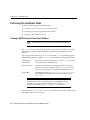
printer_driver
specifies the type of print driver used for the printer. The Toolkit
supports the PostScript, ASCII, and PCL selections for the printer
driver.
Toolkit_driver
specifies the version of the printer driver that should be used by the
Toolkit. The Toolkit supports 1 for ASCII or Level 1 PostScript, 2 for
Level 2 PostScript printers, and 5 for HP PCL printers.
printer_descr
contains a free-format description of the printer. It can show, for
example, the location and speed of the printer.
printer_descr_file specifies the printer definition file to be used with the printer. The
format of this file is dependent on the driver specified for the printer.
The Toolkit supports the Adobe PPD and the HP HPD file formats.
See "Locating and Installing PPD and AFM Files for Your Printers"
on page 4-2 for complete instructions.
Attention: The first non-commented line (line without a number
in column one) must define a valid printer. The Printing
services and Saving output to file options may not
work properly unless the uiprint.txt file is configured properly.
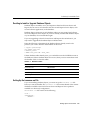
Updating the Toolkit Font Mapping File
The uifont.ali file contains alias mappings from one Toolkit font to another, and
is used to map unavailable fonts to substitutes. For example, the Arial font is found
only on Microsoft Windows and is mapped to Helvetica on Compaq Tru64 UNIX.
The uifont.ali file resides in the $ORACLE_HOME/guicommon6/tk60/admin
directory. If you want to use another directory, see the following section.
See Also: Comments in the uifont.ali file. This file is updated
for each new release.
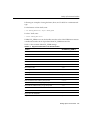
Setting TK60_FONTALIAS
Oracle Toolkit first looks for uifont.ali in the location specified by
TK60_FONTALIAS. If TK60_FONTALIAS is not set, or if uifont.ali is not in the
specified location, the Toolkit looks for uifont.ali in the
$ORACLE_HOME/guicommon6/tk60/admin directory.
Completing the Installation
4-5