1
IMPORTANT: GreatCall recommends that you only connect to known Wi-Fi
networks you trust. Connecting to unsecure Wi-Fi networks in public places may
increase your risk to security threats.
Managing your Settings 113
Managing your Settings
Turning Wi-Fi On and Off
You can turn the Wi-Fi feature off to reduce power consumption and extend your
battery life:
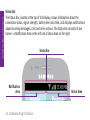
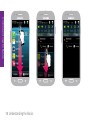
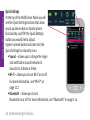
1. Expand the Notification Panel by PRESSING AND HOLDING the Status Bar and
DRAGGING down to the bottom of the screen.
2. TAP the Wi-Fi Quick Settings icon so that it is no longer green. You have turned
off the Wi-Fi feature.
3. To turn Wi-Fi on again, TAP the Wi-Fi Quick Settings icon so that it is green.