1
EUROPEAN COMMISSION
Directorate-General for Education and Culture
Lifelong Learning: policies and programme
Coordination of the "Lifelong learning" programme
Mobility Tool Guide for Beneficiaries
Version: 02 February 2012
Table of Contents
Acknowledgements ................................................................................................................................. 4
Document history ..................................................................................................................................... 5
1. General Introduction ............................................................................................................................ 6
1.1 Description .................................................................................................................................... 6
1.2 Mobility Tool users ........................................................................................................................ 6
2. How to login to the Mobility Tool? ....................................................................................................... 6
3. Project.................................................................................................................................................. 7
3.1. How to view a project’s details? ................................................................................................... 7
3.2. Changes to project details ............................................................................................................ 9
4. Participants ........................................................................................................................................ 12
4.1. How to display a list of participants? .......................................................................................... 12
4.2. How to add a new participant? ................................................................................................... 13
4.3. How to edit participant's details? ................................................................................................ 14
5. Partners ............................................................................................................................................. 16
5.1. How to display a list of partners? ............................................................................................... 16
5.2. How to add a new partner? ........................................................................................................ 17
5.3. How to edit partner’s details? ..................................................................................................... 19
5.4. How to remove a partner?.......................................................................................................... 19
5.5. How to add a beneficiary organisation contact person? ............................................................ 20
5.6 How to add a partner organisation contact person? ................................................................... 22
5.7. How to remove a beneficiary organisation contact person? ...................................................... 24
5.8. How to remove a partner organisation contact person? ............................................................ 25
5.9. How to enable or disable a beneficiary organisation contact person access to Mobility Tool? . 26
6. Mobilities ............................................................................................................................................ 28
6.1. How to create a new mobility experience? ................................................................................ 28
6.2. How to display mobility experience details? .............................................................................. 34
6.3. How to change a mobility experience? ...................................................................................... 37
6.4. How to display mobility details? ................................................................................................. 38
6.5. How to change a mobility? ......................................................................................................... 39
6.6. How to add a new mobility to an already existing mobility experience? .................................... 40
6.7. How to delete a mobility? ........................................................................................................... 44
6.8. How to delete a mobility experience? ........................................................................................ 44
7. Participant reports ............................................................................................................................. 46
7.1. How to request a participant report? .......................................................................................... 46
7.2. How to request many participant reports at once? .................................................................... 49
7.3. How to approve, reject or re-request participant reports? ......................................................... 51
7.4. How to check the status of the participant report? ..................................................................... 53
7.5. Participant forms submission deadline ...................................................................................... 54
7.6. How to print a participant report form? ....................................................................................... 56
8. Budget ............................................................................................................................................... 58
8.1. How to manage mobility budgets? ............................................................................................. 58
8.2. How to manage project budget? ................................................................................................ 60
9. Beneficiary Report ............................................................................................................................. 65
9.1. How to create and submit a beneficiary report? ........................................................................ 65
9.2. Beneficiary form submission deadline ....................................................................................... 67
10. Support and troubleshooting ........................................................................................................... 68
10.1. National Agency Helpdesk contact .......................................................................................... 68
10.2. Troubleshooting of the most common issues .......................................................................... 68
10.2.1. Issues when submitting beneficiary or participant forms using Adobe Acrobat Reader –
"NotAllowedError" ......................................................................................................................... 68
3
Acknowledgements
For security and privacy reasons most names and email addresses used in application
screenshots presented in this document have been greyed out. All names and email
addresses are fictional. BE3 agency is used for information and demonstration purposes
only. All screenshots have been taken using a special, non-production version of the Mobility
Tool, called Acceptance. Data presented in the screenshots is not a production data.
4
Document history
Date
Change description
21 June 2011
First version of the document
10 October 2011
•
Added numbered chapters
•
Fixed: MTBHD-84 – page numbering
•
Fixed: MTBHD-82 – clarification on "Changes to project details"
section
•
Added: MTBHD-80 – values for participant/beneficiary status
report in paragraph 7.2.
•
Fixed: MTBHD-79 – note text field cut
•
Changed page numbering style
•
All paragraphs reviewed and changed accordingly to changes in
the Mobility Tool application layout and functionality.
28 November 2011
•
Improved wording
•
Changed font size
•
Added screenshots
•
Changed document version accordingly to Mobility Tool version
(2011/11/28)
•
Added more information about ECAS logging process
•
Added section "7.2. How to request many participant reports at
once?"
02 February 2012
•
Modified partner registration process
•
Added "Acknowledgements" section
•
MTBHD-542 – change in ECAS domain description details
•
MTBHD-539
–
added
information
about
beneficiary
and
participant form expiration
•
MTBHD-537 – added extra information on budget updates
•
MTBHD-527 – added information on Adobe Acrobat Reader
troubleshooting of the "NotAllowedError" during form submission
•
MTBHD-477 – added information on form printing
5
1. General Introduction
1.1 Description
The Mobility Tool is a web platform tool for collaboration, management and reporting for
mobility projects under the Lifelong Learning Programme (LLP) of the European
Commission. It is developed by the European Commission to be mainly used by the
beneficiaries of mobility projects.
The users of the Mobility Tool will be able to provide all the information of the projects they
manage. They will be able to identify participants and mobilities, to complete and update
budget information, to generate participant reports and to generate their own reports to be
sent to their National Agency.
1.2 Mobility Tool users
The users of Mobility Tool are:
•
Beneficiary organisations – main users of the tool, responsible for entering mobility
project details, participants and budget information, creating reports.
•
National Agencies – generating, controlling and monitoring project information
•
DG EAC, system owner and central administrator of the tool
•
Participants of the LLP mobility projects – participants don't use Mobility Tool directly,
only the PDF reports generated by the tool
2. How to login to the Mobility Tool?
Mobility Tool can be accessed using the following URL address:
https://webgate.ec.europa.eu/eac/mobility
In order to login to the Mobility Tool you need to have 1) an ECAS account and 2) be
registered in Mobility Tool. For 1) please read the ECAS User Manual document for more
information on registration and how to obtain a login name and password. For 2) if your email
address was provided in project information, you will gain access automatically. Otherwise,
please contact your National Agency for support.
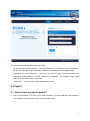
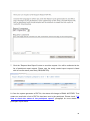
The ECAS login page is shown below.
6
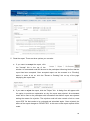
The most important fields are (selected in red):
-
"Is the selected domain correct?" – should be always set to External. If it is set otherwise,
please use "Change it" link and select " Neither an institution nor a European body".
-
"Username or e-mail address" – both can be used for login. Since usernames are
generated automatically by ECAS during the registration, we suggest using email
address as an easier way to remember.
-
"Password" – as defined during the registration process
3. Project
3.1. How to view a project’s details?
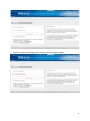
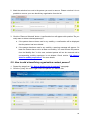
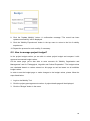
1. Login to the Mobility Tool with your ECAS username (or email address) and password.
You will see a screen similar to the one presented below.
7
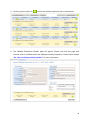
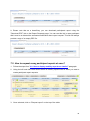
2. Click the project's grant agreement number to see the project details.
8
3.2. Changes to project details
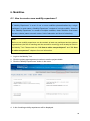
Note:
In Mobility Tool you can change partner, mobility, participant or budget information – see
further sections for details. All other project information, i.e. project title, National Agency
project ID cannot be changed in the tool.
To request changes to these project details, please contact the National Agency helpdesk.
National Agency's amendments to the projects are displayed in the "Updates and Reports"
section of the tool but the updated information will not change directly in the project. It is
beneficiary organisation's duty to look at the list of the changes displayed in the "Updates
and Reports" section and change the project data accordingly.
Any National Agency's amendments to projects are communicated by automated email sent
by the Mobility Tool to the beneficiary organisation contact persons.
To display National Agency changes to the projects, follow the steps below.
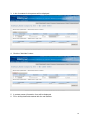
1. Login to the Mobility Tool.
2. Click the project grant agreement number to see the project details.
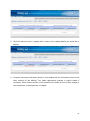
3. Click the "Updates and Reports" button in the menu, as presented below.
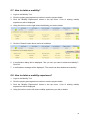
4. A list of project updates will be displayed. This list always displays at least one position –
the original data import to the tool when the project was created by a National Agency.
9
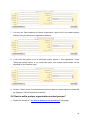
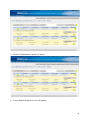
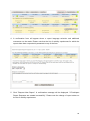
5. Click the date and time in "Update time" column of the update details you would like to
display.
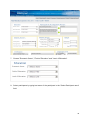
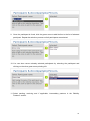
6. Compare the project information shown in this window with the information stored in the
other sections of the Mobility Tool. Make appropriate changes in project details if
necessary. Check further sections of this document for details on how to add, change or
remove partners, contact persons or budgets.
10
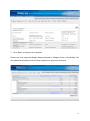
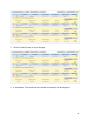
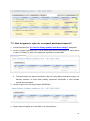
7. Click "Back" to display a list of updates.
Please note, that "Approved Budget" details displayed in "Budget" section of the Mobility Tool
are updated automatically with the latest updates from project amendments.
11
4. Participants
4.1. How to display a list of participants?
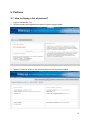
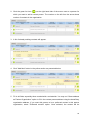
1. Login to the Mobility Tool.
2. Click the project grant agreement number to see the project details.
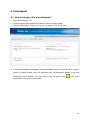
3. Click the "Participants" button in the menu, as shown on the screen shot.
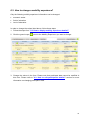
4. A list of all participants will appear. The list will display a title, first and last name, gender,
yes/no for special needs, yes/no for participant type (accompanying person or not) and
participant's email address. You may need to click the green loupe (
) next to the
participant's name to see more details.
12
4.2. How to add a new participant?
1. Repeat the steps listed in "4.1. How to display a list of participants?" paragraph.
2. Click the "Add New" button.
3. A new participant form will appear, as shown on the screen shot below.
13
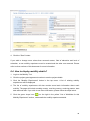
4. Fill in all required fields marked with the red asterisk.
5. Click the "Save" button. A new participant will be created and a message "Record
created successfully" will appear.
4.3. How to edit participant's details?
1. Repeat the steps from "4.1. How to display a list of participants?" paragraph.
2. Click the green loupe icon (
).
3. Make the required changes and click the "Save" button.
14
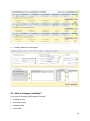
4. A confirmation "The record has been updated successfully" will be displayed.
15
5. Partners
5.1. How to display a list of partners?
1. Login to the Mobility Tool.
2. Click the project grant agreement number to see the project details.
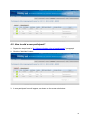
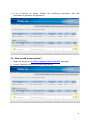
3. Click the "Partners" button in the menu as shown on the screen shot below.
16
4. A list of partners will appear. Partners are: beneficiary organisation, host and
intermediary organisation or organisations.
5.2. How to add a new partner?
1. Repeat the steps from "5.1. How to display a list of partners?" paragraph.
2. Click the "Add New" button in the lower part of the list.
17
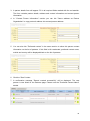
3. A partner details form will appear. Fill in all required fields marked with the red asterisk.
The form contains partner details, address and contact information and contact person
information.
4. In "Contact Person Information" section you can tick "Same address as Partner
Organisation" to copy partner's address into contact person address.
5. You can also tick "Preferred contact" in the same section to show this person contact
information on the list of partners. If this field is left unselected, preferred contact name,
mobile and country will be displayed blank on the list of partners.
6. Click the "Save" button.
7. A confirmation message "Record created successfully" will be displayed. The new
partner is now listed on the Partners page. Please note the "Preferred Contact Name"
details.
18
Note:
Partner details can be changed at any time during project lifetime.
5.3. How to edit partner’s details?
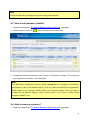
1. Repeat the steps from "5.1. How to display a list of partners?" paragraph.
2. Click the green loupe icon (
) next to the partner you want to edit.
3. Change the details and click the "Save" button. A confirmation message "The record has
been updated successfully" will be displayed.
Note:
The Beneficiary Organisation partner details should not be changed by Beneficiary
Organisations, only by the National Agency. If for any reason the Beneficiary Organisation
details needs to be changed, please inform your National Agency. Once the data is
changed by the National Agency, please follow section 3.2 in order to reflect these
changes in Mobility Tool.
5.4. How to remove a partner?
1. Repeat the steps from "5.1. How to display a list of partners?" paragraph.
19
2. Mark the selection box next to the partner you want to remove. Please note that it is not
possible to remove your own beneficiary organisation from the list.
3. Click the "Remove Selected" button. A confirmation box will appear with question "Do you
really want to delete selected partner(s)?"
a. If the partner has not been used in any mobility, a confirmation will be displayed
that the partner has been deleted.
b. If the partner has been used in any mobility, a warning message will appear: "At
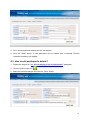
least one Partner has a role in at least one mobility. You must remove the partner
from the Mobility first." In this case, selected partner will not be removed until a
corresponding mobility experience is not deleted. Check section "6.8. How to
delete a mobility experience?" for more details.
5.5. How to add a beneficiary organisation contact person?
1. Repeat the steps from "5.1. How to display a list of partners?" paragraph.
2. Click the "[view]" link on the right next to the partner you want to edit.
20
3. A list of contacts for this partner will be displayed.
4. Click the "Add New" button.
5. A contact person information form will be displayed.
6. Fill in all required fields marked with the red asterisk.
21
7. You may use "Same address as Partner Organisation" option to fill in the contact person
address using the beneficiary organisation address.
8. If you want this person to be a preferred contact person in this organisation, select
"Preferred contact" option. If you select this option, the contact person details will be
displayed on the Partners page.
9. Click the "Save" button. A confirmation that the new partner contact has been created will
be displayed: "Record created successfully".
5.6 How to add a partner organisation contact person?
1. Repeat the steps from "5.1. How to display a list of partners?" paragraph.
22
2. Click the green list icon (
) on the right hand side of the screen next to a partner for
which you want to add a contact person. The number on the left from the arrow shows
number of contacts in the organisation.
3. A list of already existing contacts will appear.
4. Click "Add New" button in the yellow section as presented below.
5. Fill in all fields, especially those marked with a red asterisk. You may use "Same address
as Partner Organisation" option to fill in the contact person address using the beneficiary
organisation address. If you want this person to be a preferred contact in this partner
organisation, select "Preferred contact" option. Once selected, the contact will be
23
displayed on top of the list in bold (see the screen shot above). His/her details will be also
displayed on the list of all partner organisations.
6. Click the "Save" button. A confirmation "Record created successfully" will be displayed.
Notice the number of contact persons in the organisation has increased.
5.7. How to remove a beneficiary organisation contact person?
1. Repeat the steps from "5.1. How to display a list of partners?" paragraph.
2. Click the "[view]" link next to the partner. A list of contacts for the beneficiary organisation
will be displayed.
3. Check the selection box next to the partner contact name you want to remove. Please
note that you cannot remove yourself from this list – the selection box will be greyed out.
24
4. Click the "Remove Selected" button. A confirmation dialog box will appear. Click OK.
5. A confirmation message "The record has been deleted successfully" will be displayed.
5.8. How to remove a partner organisation contact person?
1. Repeat the steps from "5.1. How to display a list of partners?" paragraph.
2. Click the green list icon (
) on the right hand side of the screen next to a partner for
which you want to remove a contact person.
3. A list of contact persons will appear. Please note the number next to the green icon
represents number of existing contact persons for the partner.
4. Using the tick boxes on the right hand side select one or many contact persons you want
to remove for the partner. Please note you can select all partner contacts to be deleted.
Therefore partner organisation can have no contact persons listed.
25
5. Click the "Remove Selected" button right above the list of contacts. A confirmation dialog
box will appear. Click OK.
6. A confirmation message "The record has been deleted successfully" will be displayed.
5.9. How to enable or disable a beneficiary organisation contact
person access to Mobility Tool?
1. Repeat the steps from "5.1. How to display a list of partners?" paragraph.
2. Click the "[view]" link next to the Beneficiary Organisation in the top section of the
partners list.
26
3. You will see a list of beneficiary organisation contact persons with their status of access.
The status can have two values: "Yes" or "No" with options to [Disable] or [Enable]
access to Mobility Tool respectively.
-
If you want to enable access to the tool, click the "[Enable]" link in the rightmost
column next to the name of the person you want to enable access to project
details.
-
If you want to disable access to the tool, click the "[Disable]" link in the rightmost
column next to the name of the person you want to disable access to project
details.
4. A confirmation message "The user access to the Active Project has been enabled" will be
displayed. The person now has gained access to the tool.
-
Mobility Tool will send an automated email informing beneficiary contact person
that he/she has been granted access to the tool. The email will contain project
number, project title, link for ECAS registration, link to Mobility Tool and contact
details of National Agency.
5. In case of disabling access no confirmation message will be displayed.
6. Under the "Access to project" label the page will now display either "Yes [Disable]" or "No
[Enable]" values.
7. Please see the "2. How to login to the Mobility Tool?" paragraph for more information
on how the new user can access the project.
27
6. Mobilities
6.1. How to create a new mobility experience?
Definition:
A "Mobility Experience" is a set of one or more mobilities planned/realised by a single
participant. In most cases a “Mobility Experience” consists of a single mobility. However
for a “Mobility Experience” to consist of multiple mobilities, these mobilities must share
the same criteria (same economic sector, field of education and level of education).
Note:
Before a new mobility experience can be created, at least one participant and two partner
organisations (the first for sending and the second for receiving) must already be listed in
the Mobility Tool. Please check the "4.2. How to add a new participant?" and "5.2. How
to add a new partner?" chapters for more information.
1. Login to the Mobility Tool.
2. Click the project grant agreement number to see the project details.
3. Click the "Mobility Experiences" button in the menu.
4. A list of existing mobility experiences will be displayed.
28
5. Click the "New Mobility Experience" button.
6. A new "Mobility Experience" form will appear.
29
7. Choose "Economic Sector", "Field of Education" and "Level of Education".
8. Select participants by typing last name of the participant in the "Select Participant name"
field.
30
9. Once the participant is found, click the green arrow to add him/her to the list of selected
participant. Repeat the selection process until all participants are selected.
10. You can also remove already selected participants by selecting the participant and
clicking on the other green arrow pointing left.
11. Select sending, receiving and if applicable, intermediary partners in the "Mobility
Partners" section.
31
12. In the "Mobility Details" section change sending and receiving country if they are selected
incorrectly. The values in sending and receiving country are deducted from selection of
sending and receiving partners.
13. Choose departure and return date. "Duration in weeks" and "and days" fields will be
populated automatically once the departure and return dates are selected.
14. In the "Budget" section enter "Subsistence" and "Travel Costs" budget. The total budget
value will be calculated automatically.
32
15. If applicable, select the certifying partner and the certification type that the partner will
award to participants and click the green arrow to add the selection to the list. The
"Selected Certificates" list will display values in pairs in a format of "certifying partner" –
"certification type".
16. Finally, select the languages that will be used during this Mobility Experience. Once
selected press the green arrow to add the languages to "Selected Languages" list.
Repeat the process until all languages used in this Mobility Experience are selected.
33
17. Click the "Save" button.
18. After saving a new Mobility Experience (or Experiences) for selected participant (or
participants) a confirmation message will be displayed. The Mobility Tool will create a
mobility experience for each selected participant. All the mobility experiences created in
this process will share the same values for economic sector, field of education, level of
education, mobility partners (sending, receiving and intermediary, if selected), sending
and receiving country, dates of mobility, budget, certifying partner and certification type
as well as languages.
19. Click the "Mobility Experiences List" button to return to the main Mobility Experience
page.
Note:
It is possible that in the same mobility experience the same partner organisation can be
both a sending and a receiving partner. This situation is not possible in a single mobility,
however.
6.2. How to display mobility experience details?
1. Login to the Mobility Tool.
2. Click the project grant agreement number to see the project details.
3. Click the "Mobility Experiences" button in the top menu.
34
4. A list of existing mobility experiences will be displayed. This list will display some basic
information about mobility experiences. This list will contain: last and first name of the
participant, starting date of first mobility, returning date from the last mobility, status of
participant report request and number of mobilities. If you wish to see more details,
please follow the steps below.
35
5. Click the green loupe icon (
) next to the mobility experience you're interested in.
6. The "Mobility Experience Details" page will appear. Please note that this page also
includes a list of mobilities within the displayed mobility experience. Please check section
"6.4. How to display mobility details?" for more information.
36
6.3. How to change a mobility experience?
Only the following mobility experience information can be changed:
•
economic sector
•
field of education
•
level of education
In order to change the values listed above, follow these steps:
1. Follow the steps from "6.2. How to display mobility experience details?"
2. Click the green loupe (
) next to the Mobility Experience you want to change.
3. Change the values in the form. Please note that participant data cannot be modified in
this form. Please refer to "4.3. How to edit participant's details?" section for more
information on changing participant's data.
37
4. Click the "Save" button.
If you wish to change more values than economic sector, field of education and level of
education, a new mobility experience must be created and the other one removed. Please
refer to other sections of this document for more information.
6.4. How to display mobility details?
1. Login to the Mobility Tool.
2. Click the project grant agreement number to see the project details.
3. Click the "Mobility Experiences" button in the top menu. A list of existing mobility
experiences will be displayed.
4. The list of mobility experiences will also contain some basic information about each
mobility. The page will include: sending country, receiving country, receiving partner, start
date and end date. If you wish to see more information, please follow the steps below.
5. Click the green loupe icon (
) on the right in the yellow "List of Mobilities for this
Mobility Experience" section, underneath the mobility experience details.
38
6. A mobility details form will appear.
6.5. How to change a mobility?
If you want to change mobility details, including:
•
sending country
•
receiving country
•
departure date
•
return date
39
•
sending partner
•
receiving partner
•
intermediary partner
•
subsistence and travel costs
•
certification and certifying partners
•
languages used
Follow the steps below.
1. Repeat the steps from "6.4 How to display mobility details?" paragraph.
2. Change the values and click the "Update Mobility" button to save.
Note:
If you want to change participant's name, you need to go to “How to edit a participant’s
details?” section for more information.
6.6. How to add a new mobility to an already existing mobility
experience?
1. Login to the Mobility Tool.
2. Click the project grant agreement number to see the project details.
3. Click the "Mobility Experiences" button in the top menu.
40
4. A list of existing mobility experiences will be displayed.
5. Find the mobility experience you want to add a new mobility for on the list.
6. Click the "Add New Mobility" button underneath mobility experience details.
7. A new mobility form will appear.
41
8. Select "Sending Partner", "Receiving Partner", "Intermediary Partner" (if applicable),
change "Sending Country" and "Receiving Country" if they are different than the
countries of the partners, "Departure Date", "Return Date". "Duration in weeks" and "and
days" fields will be populated automatically.
9. Add budget values for subsistence and travel costs. The "Total" budget value will be
calculated automatically.
10. If applicable, select "Certifying Partner" and the certification type that the partner will
award to participants in this mobility and click the green arrow to add selection to the list.
The "Selected Certificates" list will display values in pairs in a format of "certifying
partner" – "certification type".
42
11. Finally, select languages that will be used during this mobility. Once selected press the
green arrow to add the languages to "Selected Languages" list. Repeat the process until
all languages used in this mobility are selected.
12. Click the "Add New Mobility" button to save. A confirmation "Record created successful"
will be displayed. Please note that the new mobility will appear on the list of mobilities
and the number of mobilities will increase.
13. It is possible to add a maximum of 6 mobilities per mobility experience.
43
6.7. How to delete a mobility?
1. Login to the Mobility Tool.
2. Click the project grant agreement number to see the project details.
3. Click the "Mobility Experiences" button in the top menu. A list of existing mobility
experiences will be displayed.
4. Using the tick-box on the right select the Mobility you wish to delete.
5. Click the "Delete" button above the list of mobilities.
6. A confirmation dialog will be displayed: "Are you sure you want to delete this Mobility?".
Click OK.
7. A confirmation message will be displayed: "The record has been deleted successfully".
6.8. How to delete a mobility experience?
1. Login to the Mobility Tool.
2. Click the project grant agreement number to see the project details.
3. Click the "Mobility Experiences" button in the top menu. A list of existing mobility
experiences will be displayed.
4. Using the tick-box on the left select mobility experience you wish to delete.
44
5. Click the "Delete" button on top of the page.
6. A confirmation "The record has been deleted successfully!" will be displayed.
45
7. Participant reports
7.1. How to request a participant report?
Note:
Participant reports are generated per Mobility Experience. Reports include questions for
all Mobilities within the Mobility Experience.
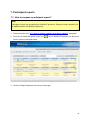
1. Follow the steps from "6.2. How to display mobility experience details?" paragraph.
2. Click the left hand side green loupe icon (
) next to Mobility Experience for which you
want to send a participant report.
3. Click the "Report Requests" tab on top of the page.
46
4. A list of participant report requests will appear.
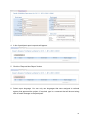
5. Click the "Request New Report" button.
6. Select report language. You can only use languages that were assigned to national
agency that approved the project. If required, type in a comment that will be sent along
with an email message to the participant.
47
7. Click the "Request New Report" button to send the request. You will be redirected to the
list of participant report request. Please note the newly created report request is listed
with its current status (most likely REQUESTED).
8. Once the system generates a PDF file, the status will change to EMAIL NOTIFIED. That
means an email with a link to PDF file has been sent to the participant. Please check "7.4.
How to check the status of the participant report?" paragraph for more details on
participant report status.
48
9. Please note that as a beneficiary you can download participants report using the
"Download PDF" link on the Report Requests page. You can use this link in case participant
didn't receive or deleted the automated notification about report request. This link will always
provide a copy of an empty PDF file.
7.2. How to request many participant reports at once?
1. Follow the steps from "6.2. How to display mobility experience details?" paragraph.
2. Using the left hand side check boxes select all mobility experiences for which you want to
create participant report requests.
3. Once selected, click on "Request report" on the top of the table.
49
4. A confirmation form will appear where a report language selection and additional
comments can be made. Please note that the list of mobility experiences for which the
reports have been requested is presented on top of the form.
5. Click "Request New Report". A confirmation message will be displayed: "2 Participant
Report Requests are created successfully". Please note the change of report status on
the list of mobility experiences.
50
7.3. How to approve, reject or re-request participant reports?
1. Follow the steps from "6.2. How to display mobility experience details?" paragraph.
2. Click the "Report Requests" tab. A list of report requests will be displayed. A report that is
in status "Pending" is ready to be approved, rejected or re-requested.
a. The latest status can also be checked on the list of all mobility experiences page. It is
advised, however, to check each mobility experience individually in case multiple
reports were requested.
3. Click the report ID or the report status (PENDING).
4. Report data will appear as it was filled in by the participant.
51
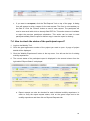
5. Read the report. There are three options you can take:
a. If you want to accept the report, click
the "Accept" link in the top of the
window. An automated email will be sent to the participant informing him/her that the
report has been accepted. Once accepted report can be reversed to a "Pending"
status. In order to do so, click the "Revert to Pending" link on top of the page
displaying the report data.
b. If you want to reject the report, click the "Reject" link. A dialog form will appear with
the option to provide an explanation on why the report was rejected. An automated
email will be sent to the participant with information that his/her report was rejected
stating the reason for rejection. The rejection email will also contain a link to a new
report PDF file that needs to be reviewed and submitted again. Once rejected, the
status of the report changes to "REJECTED". In this case a new report request will be
made.
52
c. If you want to re-request, click the "Re-Request" link on top of the page. A dialog
form will appear to write a reason for the new request. The form is not mandatory to
be filled in. Click the "Submit" button to send a new request. The participant will
receive new email with a link to already filled PDF file. This action does not invalidate
or reject the previous participant submission. This action can be used to send
participant already filled-in report for his/her copy in case the report is missing.
7.4. How to check the status of the participant report?
1. Login to the Mobility Tool.
2. Click the grant agreement number of the project you want to open. A page of project
details will be displayed.
3. Click the "Mobility Experiences" button in the top menu. You will see the list of existing
mobility experiences.
4. The current status of the participant report is displayed in the second column from the
right called "Report Status" is displayed.
a. Report request can also be checked for each individual mobility experience. In
order to verify the report request status, click on the green loupe next to the
mobility experience and then click on Reports Requests tab.
53
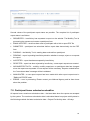
Several values of the participant report status are possible. The complete list of participant
report status is as follows:
•
REQUESTED – beneficiary has requested a report on the website. The Mobility Tool is
processing the request and creates a participant form.
•
EMAIL NOTIFIED – email has been sent to participant with a link to report PDF file
•
SUBMITTED – participant has submitted his/her report data electronically via the PDF
form
•
PARSING – the Mobility Tool is reading data received from participant
•
PENDING – report is pending beneficiary decision whether to accept, reject or re-request
the report
•
ACCEPTED – report has been accepted by beneficiary
•
REJECTED – report has been rejected by beneficiary, a new report request was created
•
INCONSISTENT DATA – mobility, mobility experience or participant data has changed
since the report was requested. A new request will be necessary. Reports created before
the "inconsistent data" message will be invalidated.
•
INVALIDATED – a new report request has been made while other report request was in
"EMAIL NOTIFIED" state
•
ERROR – error in processing. Please contact your National Agency and let them know
about the problem.
7.5. Participant forms submission deadline
All reports have a maximum submission date – the latest date when the reports are accepted
by the system. The maximum submission date is calculated based on project activity dates in
the following method: the latest submission date = Project End Activity date + 60 days
54
In case a project doesn't have activity end date specified, the following formula is used to
determine the submission deadline: the latest submission date = National Agency contract
signature date + 2 years + 60 days
The details on the project activity dates can be found in the Project Details page in Mobility
Tool. The example start and end activity dates may look similar to the image below.
The reporting start and end date can be found in Updates and Reports section of the tool. In
order to find the details, please follow the steps:
1) Login to the Mobility Tool
2) Click your project agreement number
3) Click "Updates and Reports" in the top menu bar
4) Click update time of the latest project update (the highest position on the list)
5) Report start date and Report end date values are displayed in "Submission Data" section
on top of the screen.
55
7.6. How to print a participant report form?
Participant forms can be printed by either participant himself or the beneficiary organisation.
Participant:
1) Open the form
2) Scroll to the very end of the report to "Standard Submission Procedure" section
3) Click "Print form" button. The same can be achieved by using File -> Print… in Adobe
Acrobat Reader Application.
Beneficiary:
Please note you can only print reports that are in either PENDING, APPROVED or
REJECTED status.
1) Login to the Mobility Tool
2) Click project agreement number
3) Click "Mobility Experiences" menu item on the top menu bar
4) Select participant you wish to print report for by clicking on the green loupe icon (
) on
the left hand side
5) Click "Reports Requests" tab on top of the mobility experience details section
56
6) Click PENDING, APPROVED, REJECTED status or the ID of the report
7) Print the page using your Internet browser functionality.
57
8. Budget
8.1. How to manage mobility budgets?
In the mobility budget section you are able to provide subsistence and travel cost for mobility
participants. Budget values can be entered during creation of mobility experience or
additional mobilities. However, if these values were not provided and need to be added later,
follow the steps below.
1. Login to the Mobility Tool.
2. Click the grant agreement number of the project you want to open. A page of project
details will be displayed.
3. Click the "Mobility Experiences" button in the top menu.
4. A list of existing mobility experiences along with corresponding mobilities will be
displayed.
5. Click the green loupe icon (
) at the right bottom side of the mobility for which you want
to change the budget.
58
6. You will see the mobility details form displaying the following information:
a. "Mobility Partners" – sending, receiving and intermediary partners
b. "Mobility Details" – sending, receiving country, departure and return date, duration
in weeks and days
c. "Budget" – "Subsistence" and "Travel Costs" with automatically calculated "Total"
value
7. Provide subsistence and travel cost for the mobility. All budget entries are displayed in
Euros.
59
8. Click the "Update Mobility" button. A confirmation message "The record has been
updated successfully" will be displayed.
9. Click the "Mobility Experiences" button in the top menu to return to the list of mobility
experiences.
10. Repeat the process for each mobility, if necessary.
8.2. How to manage project budget?
In the project budget section you are able to review project budget and compare it with
approved contractual budget values.
On the same page you're also able to enter amounts for "Mobility Organisation and
Management" and for "Pedagogical, Linguistic and Cultural Preparation". The budget values
are calculated based on values entered on this page as well as based on all mobilities
budget values.
In order to see the budget page or make changes to the budget values, please follow the
steps listed below.
1. Login to the Mobility Tool.
2. Click the project grant agreement number. A project details page will be displayed.
3. Click the "Budget" button in the menu.
60
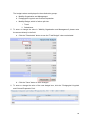
4. A project budget page will be displayed. Values in the three columns represent:
-
Number of participants or number of mobilities for each budget category that have budget
greater than zero
-
Total project budget
-
Contractual approved budget.
Items in the last column, "Approved Budget" reflect the amounts approved by the National
Agency as expressed in the Grant Agreement or in the last signed amendment. They cannot
be changed in the Mobility Tool by the beneficiary organisation. If there is any discrepancy
between these amounts and the contents of the project Grant Agreement or the last
Amendment, please contact your National Agency helpdesk.
61
The budget values are displayed in three distinctive groups:
a. Mobility Organisation and Management
b. Pedagogical Linguistic and Cultural Preparation
c. Mobility Budget, which is further split into:
i. Travel
ii. Subsistence
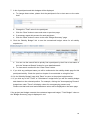
5. To enter or change the value in "Mobility Organisation and Management" please enter
the amount directly in the field.
a. Click the "Recalculate" button to see the "Total Budget" value recalculated.
b. Click the "Save" button to save changes.
6. To enter or change the value of the next budget item, click the "Pedagogical Linguistic
and Cultural Preparation" link.
62
7. A list of participants and their budgets will be displayed.
a. To change these values, please click the participant's first or last name or the value
itself.
b. Change the "Total" value for the participant.
c. Click the "Save" button to save and return to previous page.
d. If necessary repeat this process for each participant.
e. Click the "Back" button to return to the main "Budget Summary" page.
8. Click the "Mobility Budget" link to see the summarized budget values for all mobility
experiences.
a. You can use the search field to quickly find a participant by their first or last name or
click the "Advanced Search" button for more detailed search.
b. To clear search results click the "Clear Filters" button.
9. If you click any participant name you will be redirected to the mobility details page for this
participant/mobility. Check the previous chapter for more details on using this form.
10. On the "Mobility Budget" page click "Back" to return to the project budget section.
11. If you click any of the "Travel" or "Subsistence" budget items you will see mobility budget
data based on the selected position. For example, clicking the "Accompanying Persons"
budget item under "Travel" will display values for accompanying persons only.
Please note that both travel and subsistence values will be displayed on the same page.
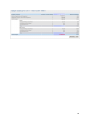
If the project total budget exceeds the contractual approved budget, "Total Budget" value on
the "Budget Summary" page is displayed in red.
63
64
9. Beneficiary Report
Note:
Beneficiary report created in the Mobility Tool will be pre-filled with the information entered
during the project lifecycle. This information cannot be changed in the report and must be
verified and, if necessary, amended in the tool before creating the report.
9.1. How to create and submit a beneficiary report?
1. Login to the Mobility Tool.
2. Click the project grant agreement number. A project details page will be displayed.
3. Click the "Updates and Reports" button in the top menu.
4. Information on number of Participant Mobility Experiences and on number of approved
Participant Reports will be displayed on top of the page for reference, so you can see at
any moment if all Participant Reports have already been submitted and approved or not.
Below, there is a table with as many lines as project updates. Beneficiary report can only
be prepared from the last update. The status of the report is shown.
65
5. Click the "Prepare New Report" link.
a. If there is no budget defined for mobilities a message "This project has Mobilities
with 0 (zero) budgets. A link to go to "Total Budget" will be displayed.
b. If a project budget goes over the contractual budget amount a warning will be
displayed. Also a link to "Total Budget" will be provided to align the budget values
with the budget agreed in the contract.
If for any reason the contractual budget values are incorrect, please contact you National
Agency.
6. Choose the language of the report. You can only select among the languages approved
by your National Agency.
7. If more than one beneficiary organisation contact person has been created in the tool, the
person who will be displayed in the report needs to be selected.
66
8. Click the "Yes" button. Confirmation "Request for a new report was sent" will be
displayed.
9. In a few minutes status of the report will change to "Requested".
10. Click the "Download PDF" link to download and save the report. To open the report
Adobe Acrobat Reader software is required. It is advisable to save the report on a
computer local hard drive.
11. Review the report and provide answers to all required questions in the form.
12. Scroll to the bottom of the report and click the "Validate" button. This action will check if
all required fields have been filled in.
13. Once completed, click the "Submit online" to send the report to your National Agency.
This action requires Internet connection.
14. If needed, print the report by clicking the "Print form" button on the bottom of the form.
9.2. Beneficiary form submission deadline
Beneficiary forms follow the same rules for submission deadlines as participant reports.
Please refer to 7.5 Participant forms submission deadline for more information.
67
10. Support and troubleshooting
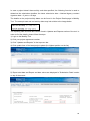
10.1. National Agency Helpdesk contact
All questions or issues with the Mobility Tool should be reported to your National Agency
helpdesk. The contact details are published on the Mobility Tool "Home" page, as shown on
the screen shot below.
10.2. Troubleshooting of the most common issues
10.2.1. Issues when submitting beneficiary or participant forms using
Adobe Acrobat Reader – "NotAllowedError"
During the form submission, it may happen that a following error is displayed in the
form: "NotAllowedError: Security settings prevent access to this property or
method".
If this happens, please follow these steps:
1. Make sure the computer is connected to Internet
2. If the computer has a proxy connection (indirect access to Internet), make sure
proxy configuration is properly saved in system settings (for Windows, it's Internet
Options in Control Panel)
3. When the error appears, there will be an additional message bar on top of the
Adobe Acrobat Reader window with the following message: "Some features
68
have been disabled to avoid potential security risks. Only enable these
features if you trust this document"
4. Select "Options" button on the message bar (on the right) and choose option
"Always trust this document"
5. A window will be shown asking to save the document and the form will re-open.
6. After re-opening submission should be successful and error-free.
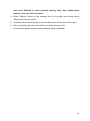
7. If the problem persist, please contact National Agency Helpdesk.
69