1
4. OPERATION
Control Panel
Operation
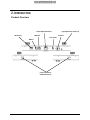
To access the control panel functions, use the four buttons located underneath the
display. See the Product Overview to see the button locations on the control panel.
Button
<MENU>
<UP>
DMX
Personalities
and Starting
Address
Page 10 of 17
Press to find an operation mode or to back out of the current menu
option
Press to scroll up the list of options or to find a higher value
<DOWN>
Press to scroll down the list of options or to find a lower value
<ENTER>
Press to activate a menu option or a selected value
Mode
Menu Map
Configuration
(DMX)
Function
Programming Steps
Description
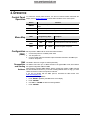
DMX Mode
512
d 1-512
Sound Active
Mode
SND
S 1-S100
Sets Sound Active mode and sensitivity
Automatic
Mode
AUTO
S 1-S100
Sets Auto Program and speed
Set
1.
2.
3.
Sets DMX starting address
the product in DMX mode to control with a DMX controller.
Connect the product to a suitable power outlet.
Turn the product on.
Connect a DMX cable from the DMX output of the DMX controller to the DMX input
socket on the product.
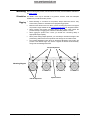
The 4BAR™ Flex has a single 15-channel personality.
The 4BAR™ Flex uses up to 15 DMX channels in its highest DMX mode, which defines
the highest configurable address to 498.
When selecting a starting DMX address, always consider the number of DMX channels
the selected DMX mode uses. If you choose a starting address that is too high, you could
restrict the access to some of the product’s channels.
If you are not familiar with the DMX protocol, download the DMX Primer from
www.chauvetlighting.com.
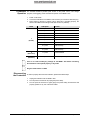
To choose your starting address:
1. Press <MENU> repeatedly until 512 shows on the display.
2. Press <ENTER>
3. Use <UP> or <DOWN> to select the starting address.
1. Press <ENTER>.
4BAR™ Flex User Manual (Rev. 3)