1
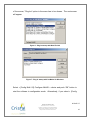
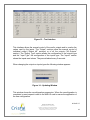
Figure 13 – Test Interface
This interface allows the manual control of the card’s outputs and to monitor the
values read by the inputs. The “Output” sections allow the manual control of
individual output (“Output #X” sections) or of all the outputs (“All Outputs”
section). The “Output Type” section allows the configuration of the outputs type
and the “Input Type” the configuration of the inputs type. The “Inputs” section
shows the inputs read values. They are refreshed every 2 seconds.
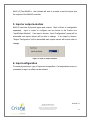
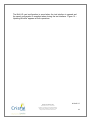
When changing the outputs or inputs types the following window appears:
Figure 14 – Updating Window
This window shows the reconfiguration progression. When the reconfiguration is
completed, a reset request is sent to the Multi IO card to ensure the application of
the new configuration.
2010-05-17
Cristal Contrôles Ltée
2025 Lavoisier, Local 135
Québec, (Québec) Canada G1N 4L6
Tél 418-681-9590 Fax 418-681-7393
http://www.cristalcontrols.com
18