1
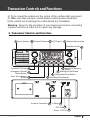
Transceiver Controls and Functions
permit this), this button allows the user to switch
between AM and FM modes by momentarily pressing this button.
Memory : Pressing and holding this button lead the user to the memorized channel which has been selected in the Menu mode.“MEM” is on
in the LCD display.
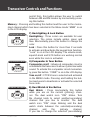
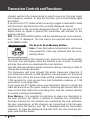
Backlighting&Lock Button
Compander&Tone Button
7) Backlighting & Lock Button
Backlighting : Three colors are available for user
selection. The colors include amber, green and
blue. Momentarily press this button to change the
color.
Lock : Press this button for more than 2 seconds
to activate and deactivate the keypad lock function.
“Lock” is on in the LCD display. The volume knob,
squelch knob and 9/19 button are working normal
even while the Lock is activated.
8) Compander & Tone Button
Compander on/off : Advanced compander circuit is
embedded in the transceiver to allow crystal clear audio
sound. To activate this compander circuit momentarily press this button. “COMP” is on in the LCD display.
Tone on/off : CTCSS tone is selected and activated
in the MENU mode. Pressing and holding the button lead users to deactivate or activate the selected
tone code.
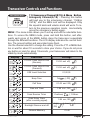
Dual Watch & Vox Button
TCB-1100
9) Dual Watch & Vox Button
Dual Watch : Press momentarily this button
while you are on the current (primary) channel. The dual watch icon “DW” blinks. Turn
the channel knob to select another(secondary)
channel that you like to monitor. The dual
watch icon “DW” stops blinking and the dual
watch starts between the selected(secondary)
channel
and
the
primary
channel.
If you like to change the selected (secodndary)
English 9