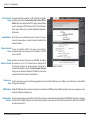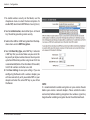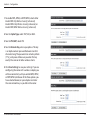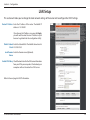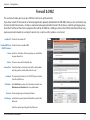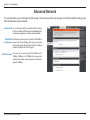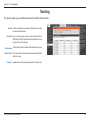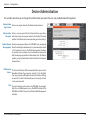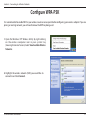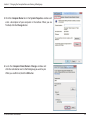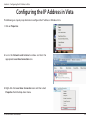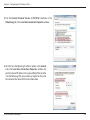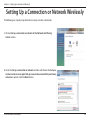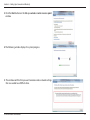
1
Version 1.0 | 09/20/2012 User Manual Wireless N 150 Cloud Router DIR-600L Preface D-Link reserves the right to revise this publication and to make changes in the content hereof without obligation to notify any person or organization of such revisions or changes. Manual Revisions Revision Date 1.0 September 20, 2012 Description • First release version Trademarks D-Link and the D-Link logo are trademarks or registered trademarks of D-Link Corporation or its subsidiaries in the United States or other countries. All other company or product names mentioned herein are trademarks or registered trademarks of their respective companies. Copyright © 2012 by D-Link Systems, Inc. All rights reserved. This publication may not be reproduced, in whole or in part, without prior expressed written permission from D-Link Systems, Inc. D-Link DIR-600L User Manual i Table of Contents Table of Contents Preface.................................................................................. i Manual Revisions............................................................................ i Trademarks....................................................................................... i Package Contents............................................................... 1 System Requirements.................................................................. 1 Features............................................................................................. 2 Hardware Overview...................................................................... 3 Connections............................................................................ 3 LEDs............................................................................................ 4 Installation.......................................................................... 5 Before you Begin............................................................................ 5 Wireless Installation Considerations....................................... 6 Connect to Cable/DSL/Satellite Modem............................... 7 Configuration...................................................................... 8 Web-based Configuration Utility............................................. 8 Internet Setup.......................................................................13 Static (assigned by ISP).................................................13 Dynamic.............................................................................14 PPPoE .................................................................................15 PPTP.....................................................................................16 L2TP.....................................................................................17 Wireless Setup.......................................................................18 D-Link DIR-600L User Manual LAN Setup...............................................................................23 DHCP Server Settings.........................................................24 Time and Date.......................................................................25 Parental Control...................................................................26 Port Forwarding...................................................................27 Application Rules.................................................................28 Access Control......................................................................29 Traffic Control........................................................................30 Setup Wizard.........................................................................31 Firewall & DMZ......................................................................32 Advanced Wireless..............................................................33 Advanced Network.............................................................34 Routing....................................................................................35 Device Administration.......................................................36 Save and Restore..................................................................37 Firmware Update.................................................................38 DDNS Setting........................................................................39 System Check........................................................................40 Schedules...............................................................................41 Log Settings...........................................................................42 Device Info.............................................................................43 Log............................................................................................44 Traffic Statistics.....................................................................45 ii Table of Contents Active Session ......................................................................45 Wireless...................................................................................46 Help..........................................................................................47 Wireless Security..............................................................48 What is WEP?.................................................................................48 Configure WEP..............................................................................49 What is WPA?.................................................................................50 Configure WPA-PSK and WPA2-PSK......................................51 Configure WPA/WPA2-PSK.......................................................52 Configure WPA, WPA2, and WPA/WPA2 (RADIUS)............53 Connect to a Wireless Network........................................54 Using Windows® XP.....................................................................54 Configure WEP..............................................................................55 Configure WPA-PSK.....................................................................57 Connecting to an Unsecured Wireless Network.............75 Troubleshooting...............................................................79 Wireless Basics..................................................................83 What is Wireless?..........................................................................84 Tips....................................................................................................86 Wireless Modes.............................................................................87 Networking Basics............................................................88 Check your IP address................................................................88 Statically Assign an IP address................................................89 Technical Specifications...................................................90 Setting Up Wi-Fi Protection.............................................59 (WCN 2.0 in Windows Vista).............................................59 Initial Router Configuration for Wi-Fi Protection..............59 Setting Up a Configured Router.............................................60 Changing the Computer Name and Joining a Workgroup...61 Configuring the IP Address in Vista.................................63 Setting Up a Connection or Network Wirelessly............66 Connecting to a Secured Wireless Network (WEP, WPAPSK & WPA2-PSK)..............................................................71 D-Link DIR-600L User Manual iii Section 1 - Product Overview Package Contents • D-Link DIR-600L Wireless N 150 Cloud Router • Power Adapter • Quick Installation Guide • Ethernet cable Note: Using a power supply with a different voltage rating than the one included with the DIR-600L will cause damage and void the warranty for this product. Note: Always attach the power cord plug to the power supply, before inserting the power cord and connected power supply to the wall outlet. System Requirements • Ethernet-based Cable or DSL Modem • Computers with Windows®, Macintosh®, or Linux-based operating systems with an installed Ethernet adapter • Internet Explorer 8 or Firefox 2.0 or above (for configuration) D-Link DIR-600L User Manual 1 Section 1 - Product Overview Features •Faster Wireless Networking - The DIR-600L provides up to 150Mbps* wireless connection with other 802.11n wireless clients. This capability allows users to participate in real-time activities online, such as video streaming, online gaming, and real-time audio. •Compatible with 802.11b and 802.11g Devices - The DIR-600L is still fully compatible with the IEEE 802.11b and IEEE 802.11g standard, so it can connect with existing 802.11b and IEEE 802.11g PCI, USB and Cardbus adapters. •Cloud Service - The DIR-600L features a new cloud service that pushes information such as firmware upgrade notifications, user activity, and intrusion alerts, to the mydlink app on android and apple mobile devices. to insure that your router is up-to-date with the latest features, mydlink will notify you when an update is available for your router. You can monitor a user’s online activity with real-time website browsing history, maintaining a safe and secure environment, especially for children at home. • Easy Setup Wizard - Through its easy-to-use Web-based user interface, the DIR-600L lets you control what information is accessible to those on the wireless network, whether from the Internet or from your company’s server. Configure your router to your specific settings within minutes. * Maximum wireless signal rate derived from IEEE Standard 802.11g and Draft 802.11n specifications. Actual data throughput will vary. Network conditions and environmental factors, including volume of network traffic, building materials and construction, and network overhead, lower actual data throughput rate. Environmental conditions will adversely affect wireless signal range. D-Link DIR-600L User Manual 2 Section 1 - Product Overview Hardware Overview Connections Pressing the Reset Button restores the router to its original factory default settings. Receptor for the Power Adapter. LAN Ports Connect Ethernet devices such as computers, switches, and hubs. D-Link DIR-600L User Manual The Auto MDI/MDIX WAN port is the connection for the Ethernet cable to the Cable or DSL modem. 3 Section 1 - Product Overview Hardware Overview LEDs INTERNET A solid light indicates connection on the WAN port. This LED blinks during data transmission. Power LED A solid light indicates a proper connection to the power supply. D-Link DIR-600L User Manual WLAN LED A solid light indicates that the wireless segment is ready. This LED blinks during wireless data transmission. Local Network LEDs A solid light indicates a connection to an Ethernet-enabled computer on ports 1-4. This LED blinks during data transmission. 4 Section 2 - Installation Installation This section will walk you through the installation process. Placement of the router is very important. Do not place the router in an enclosed area such as a closet, cabinet, or in the attic or garage. Before you Begin Please configure the router with the computer that was last connected directly to your modem. Also, you can only use the Ethernet port on your modem. If you were using the USB connection before using the router, then you must turn off your modem, disconnect the USB cable and connect an Ethernet cable to the WAN port on the router, and then turn the modem back on. In some cases, you may need to call your ISP to change connection types (USB to Ethernet). If you have DSL and are connecting via PPPoE, make sure you disable or uninstall any PPPoE software such as WinPoet, Broadjump, or Ethernet 300 from your computer or you will not be able to connect to the Internet. D-Link DIR-600L User Manual 5 Section 2 - Installation Wireless Installation Considerations The D-Link wireless router lets you access your network using a wireless connection from virtually anywhere within the operating range of your wireless network. Keep in mind, however, that the number, thickness and location of walls, ceilings, or other objects that the wireless signals must pass through, may limit the range. Typical ranges vary depending on the types of materials and background RF (radio frequency) noise in your home or business. The key to maximizing wireless range is to follow these basic guidelines: 1.Keep the number of walls and ceilings between the D-Link router and other network devices to a minimum each wall or ceiling can reduce your adapter’s range from 3-90 feet (1-30 meters.) Position your devices so that the number of walls or ceilings is minimized. 2.Be aware of the direct line between network devices. A wall that is 1.5 feet thick (.5 meters), at a 45-degree angle appears to be almost 3 feet (1 meter) thick. At a 2-degree angle it looks over 42 feet (14 meters) thick! Position devices so that the signal will travel straight through a wall or ceiling (instead of at an angle) for better reception. 3.Building Materials make a difference. A solid metal door or aluminum studs may have a negative effect on range. Try to position access points, wireless routers, and computers so that the signal passes through drywall or open doorways. Materials and objects such as glass, steel, metal, walls with insulation, water (fish tanks), mirrors, file cabinets, brick, and concrete will degrade your wireless signal. 4.Keep your product away (at least 3-6 feet or 1-2 meters) from electrical devices or appliances that generate RF noise. 5.If you are using 2.4GHz cordless phones or X-10 (wireless products such as ceiling fans, lights, and home security systems), your wireless connection may degrade dramatically or drop completely. Make sure your 2.4GHz phone base is as far away from your wireless devices as possible. The base transmits a signal even if the phone in not in use. D-Link DIR-600L User Manual 6 Section 2 - Installation Connect to Cable/DSL/Satellite Modem If you are connecting the router to a cable/DSL/satellite modem, please follow the steps below: 1. Place the router in an open and central location. Do not plug the power adapter into the router. 2. Turn the power off on your modem. If there is no on/off switch, then unplug the modem’s power adapter. Shut down your computer. 3. Unplug the Ethernet cable (that connects your computer to your modem) from your computer and place it into the WAN port on the router. 4. Plug an Ethernet cable into one of the four LAN ports on the router. Plug the other end into the Ethernet port on your computer. 5. Turn on or plug in your modem. Wait for the modem to boot (about 30 seconds). 6. Plug the power adapter to the router and connect to an outlet or power strip. Wait about 30 seconds for the router to boot. 7. Turn on your computer. 8. Verify the link lights on the router. The power light, Internet light, and the LAN light (the port that your computer is plugged into) should be lit. If not, make sure your computer, modem, and router are powered on and verify the cable connections are correct. 9. Skip to page 8 to configure your router. D-Link DIR-600L User Manual 7 Section 3 - Configuration Configuration This section will show you how to configure your new D-Link wireless router using the web-based configuration utility. Web-based Configuration Utility To access the configuration utility, open a web-browser such as Internet Explorer and enter the IP address of the router (192.168.0.1) or http://dlinkrouter. D-Link DIR-600L User Manual 8 Section 3 - Configuration Select the type of Internet connection that Easy Setup Wizard detects, type in necessary information and then click Next to continue. If you selected PPPoE, enter your PPPoE username and password. Click Next to continue. Select Static if your ISP assigned you the IP address, subnet mask, gateway, and DNS server addresses. Note: Make sure to remove your PPPoE software from your computer. The software is no longer needed and will not work through a router. If you selected PPTP, enter your PPTP username and password. Click Next to continue. D-Link DIR-600L User Manual 9 Section 3 - Configuration If you selected L2TP, enter your L2TP username and password. Click Next to continue. If you selected Static, enter your network settings supplied by your Internet provider. Click Next to continue. In the page of “CURRENT NETWORK SETTING”, you will see the INTERNET status is “connected” D-Link DIR-600L User Manual 10 Section 3 - Configuration If you have not registered a mydlink account, please click “configure” In the section “mydlink account’ and complete the registration form. Click “Register” Now you can see the hint that a verification e-mail has been sent out. Open a new browser to login your e-mail account for receiving the verification mail. Once the account verification phase is complete, click "configure" In the section "mydlink account' and login mydlink account. Click "Login" D-Link DIR-600L User Manual 11 Section 3 - Configuration Now the router has successfully connected to mydlink service. You can download the App "mydlink lite" from android market or apple store to start enjoy mydink service! D-Link DIR-600L User Manual 12 Section 3 - Configuration Internet Setup Static (assigned by ISP) Select Static IP Address if all WAN IP information is provided to you by your ISP. You will need to enter in the IP address, subnet mask, gateway address, and DNS address(es) provided to you by your ISP. Each IP address entered in the fields must be in the appropriate IP form, which are four octets separated by a dot (x.x.x.x). The Router will not accept the IP address if it is not in this format. IP Address: Enter the IP address assigned by your ISP. DIR-600L Subnet Mask: Enter the Subnet Mask assigned by your ISP. ISP Gateway: Enter the Gateway assigned by your ISP. MAC Address: The default MAC Address is set to the WAN’s physical interface MAC address on the Broadband Router. It is not recommended that you change the default MAC address unless required by your ISP. Clone MAC The default MAC address is set to the WAN’s physical interface Address: MAC address on the Broadband Router. You can use the Clone MAC Address button to copy the MAC address of the Ethernet Card installed by your ISP and replace the WAN MAC address with the MAC address of the router. It is not recommended that you change the default MAC address unless required by your ISP. Primary DNS Enter the Primary DNS server IP address assigned by your ISP. Address: Secondary DNS This is optional. Address: MTU: Maximum Transmission Unit - you may need to change the MTU for optimal performance with your specific ISP. 1492 is the default MTU. D-Link DIR-600L User Manual 13 Section 3 - Configuration Internet Setup Dynamic To manually set up the Internet connection, click the Manual Internet Connection Setup button on the Router’s opening window. Access Point Checking this box disables NAT and turns the Router into an Mode: Access Point only. DIR-600L Dynamic IP Choose Dynamic IP Address to obtain IP Address information Address: automatically from your ISP. Select this option if your ISP does not give you any IP numbers to use. This option is commonly used for Cable modem services. Host Name: The Host Name is optional but may be required by some ISPs. The default host name is the device name of the Router and may be changed. MAC Address: The default MAC Address is set to the WAN’s physical interface MAC address on the Broadband Router. It is not recommended that you change the default MAC address unless required by your ISP. Clone MAC The default MAC address is set to the WAN’s physical interface Address: MAC address on the Broadband Router. You can use the “Clone MAC Address” button to copy the MAC address of the Ethernet Card installed by your ISP and replace the WAN MAC address with the MAC address of the router. It is not recommended that you change the default MAC address unless required by your ISP. DNS Enter the DNS (Domain Name Server) server IP address assigned Addresses: by your ISP. MTU: Maximum Transmission Unit - You may need to change the MTU for optimal performance with your specific ISP. D-Link DIR-600L User Manual 14 Section 3 - Configuration Internet Setup PPPoE Choose PPPoE (Point to Point Protocol over Ethernet) if your ISP uses a PPPoE connection. Your ISP will provide you with a username and password. This option is typically used for DSL services. Make sure to remove your PPPoE software from your computer. The software is no longer needed and will not work through a router. PPPoE: Select Dynamic (most common) or Static. Select Static if your ISP assigned you the IP address, subnet mask, gateway, and DNS server addresses. DIR-600L User Name: Enter your PPPoE user name. Password: Enter your PPPoE password and then retype the password in the next box. Service Name: Enter the ISP Service Name (optional). IP Address: Enter the IP address (Static PPPoE only). DNS Addresses: Enter the Primary and Secondary DNS Server Addresses (Static PPPoE only). Maximum Idle Enter a maximum idle time during which the Internet connection Time: is maintained during inactivity. To disable this feature, enable Auto-reconnect. MTU: Maximum Transmission Unit - You may need to change the MTU for optimal performance with your specific ISP. 1492 is the default MTU. Connection Mode Select either Always-on, Manual, or Connect-on demand. Select: D-Link DIR-600L User Manual 15 Section 3 - Configuration Internet Setup PPTP Choose PPTP (Point-to-Point-Tunneling Protocol ) if your ISP uses a PPTP connection. Your ISP will provide you with a username and password. This option is typically used for DSL services. PPTP: Select Dynamic (most common) or Static. Select Static if your ISP assigned you the IP address, subnet mask, gateway, and DNS server addresses. DIR-600L IP Address: Enter the IP address (Static PPTP only). Subnet Mask: Enter the Primary and Secondary DNS Server Addresses (Static PPTP only). Gateway: Enter the Gateway IP Address provided by your ISP. DNS: The DNS server information will be supplied by your ISP (Internet Service Provider.) Server IP: Enter the Server IP provided by your ISP (optional). PPTP Account: Enter your PPTP account name. PPTP Password: Enter your PPTP password and then retype the password in the next box. Maximum Idle Enter a maximum idle time during which the Internet connection Time: is maintained during inactivity. To disable this feature, enable Auto-reconnect. MTU: Maximum Transmission Unit - You may need to change the MTU for optimal performance. Connect Mode: Select either Always-on, Manual, or Connect-on demand. D-Link DIR-600L User Manual 16 Section 3 - Configuration Internet Setup L2TP Choose L2TP (Layer 2 Tunneling Protocol) if your ISP uses a L2TP connection. Your ISP will provide you with a username and password. This option is typically used for DSL services. L2TP: Select Dynamic (most common) or Static. Select Static if your ISP assigned you the IP address, subnet mask, gateway, and DNS server addresses. DIR-600L IP Address: Enter the IP address (Static L2TP only). Subnet Mask: Enter the Primary and Secondary DNS Server Addresses (Static L2TP only). Gateway: Enter the Gateway IP Address provided by your ISP. DNS: The DNS server information will be supplied by your ISP (Internet Service Provider.) Server IP: Enter the Server IP provided by your ISP (optional). L2TP Account: Enter your L2TP account name. L2TP Password: Enter your L2TP password and then retype the password in the next box. Maximum Idle Enter a maximum idle time during which the Internet connection Time: is maintained during inactivity. To disable this feature, enable Auto-reconnect. MTU: Maximum Transmission Unit - You may need to change the MTU for optimal performance with your specific ISP. Connect Mode: Select either Always-on, Manual, or Connect-on demand. D-Link DIR-600L User Manual 17 Section 3 - Configuration Wireless Setup Wireless settings for the router may be configured manually or by using a wizard. To use the wizard, click the Wireless Connection Setup Wizard button and then follow the steps that are described below. To configure the wireless settings manually, click the Manual Wireless Connection Setup button. The parameters for this window are described later in this section. The Wireless Security section that directly follows this Configuration section provides additional explanation for how to configure the WEP, WPA, WPA2, and WPA/WPA2 wireless security mode options. DIR-600L Click Next to continue. Enter a Wireless Network Name in the textbox, which is also known as the SSID, and then click Next to continue. D-Link DIR-600L User Manual 18 Section 3 - Configuration Enter a Wireless Security Password in the textbox and then click Next to continue. This window displays a summary of your wireless security settings. Please print this out or record this information in a safe place and then click Save to continue. The Router will save your new settings and reboot. When it is finished after 1-2 minutes, the opening Wireless Setup window is displayed. D-Link DIR-600L User Manual 19 Section 3 - Configuration Wi-Fi Protected To implement Wi-Fi protection, or WCN 2.0, tick the Enable Setup: checkbox, click either Generate New PIN or Reset PIN to Default, and then configure the Wi-Fi settings below. Please see the Setting Up Wi-Fi Protection (WCN 2.0 in Windows Vista) section later in this manual for detailed configuration information. DIR-600L Enable Wireless: Check the box to enable the wireless function. If you do not want to use wireless, uncheck the box to disable all the wireless functions. Wireless Network Service Set Identifier (SSID) is the name of your wireless Name: network. Create a name using up to 32 characters. The SSID is case-sensitive. Enable Indicates the channel setting for the DIR-600L. By default Wireless Channel: the channel is set to 6. The Channel can be changed to fit the channel setting for an existing wireless network or to customize the wireless network. The Auto Channel Selection setting can be selected to allow the DIR-600L to choose the channel with the least amount of interference. Transmission Use the drop-down menu to select the appropriate Transmission Rate in Mbits per second. Many users will want to use the default Rate: setting, Best (automatic). WMM Enable: Enable Wi-Fi Multimedia to enjoy basic quality of service features. WMM prioritizes traffic according to four access categories: voice, video, best effort, and background. Enable Hidden Check this option if you would not like the SSID of your wireless network to be broadcasted by the DIR-600L. If this option is checked, Wireless: the SSID of the DIR-600L will not be seen by Site Survey utilities so your wireless clients will have to know the SSID of your DIR-600L in order to connect to it. D-Link DIR-600L User Manual 20 Section 3 - Configuration 1.To enable wireless security on the Router, use the drop-down menu to select the desired option. To enable WEP, select Enable WEP Wireless Security (basic). 2. Next to Authentication, select either Open or Shared Key. Shared Key provides greater security. 3. Select either 64Bit or 128Bit encryption from the dropdown menu next to WEP Encryption. 4. Next to Default Key Type, select WEP Key 1 and enter a WEP key that you create. Make sure you enter this key exactly on all your wireless devices. You may enter up to four different keys either using Hex or ASCII. Hex is recommended (letters A-F and numbers 0-9 are valid). In ASCII all numbers and letters are valid. 5. Click Save Settings to save your settings. If you are configuring the Router with a wireless adapter, you will lose connectivity until you enable WEP on your adapter and enter the same WEP key as you did on the Router. D-Link DIR-600L User Manual NOTE: It is recommended to enable encryption on your wireless Router before your wireless network adapters. Please establish wireless connectivity before enabling encryption. Your wireless signal may degrade when enabling encryption due to the added overhead. 21 Section 3 - Configuration 1.To enable WPA, WPA2, or WPA/WPA2, select either Enable WPA Only Wireless Security (enhanced), Enable WPA2 Only Wireless Security (enhanced), or Enable WPA/WPA2 Wireless Security (enhanced). 2. Next to Cipher Type, select TKIP, AES, or Both. 3. Next to PSK/EAP, select PSK. 4.Next to Network Key, enter a passphrase. The key is an alpha-numeric password between 8 and 63 characters long. The password can include symbols (!?*&_) and spaces. Make sure you enter this key exactly the same on all other wireless clients. 5. Click Save Settings to save your settings. If you are configuring the router with a wireless adapter, you will lose connectivity until you enable WPA, WPA2, or WPA/WPA2 (whichever of the three options you have selected above) on your adapter and enter the same network key as you did on the router. D-Link DIR-600L User Manual 22 Section 3 - Configuration LAN Setup This section will allow you to change the local network settings of the router and to configure the DHCP settings. Router IP Address: Enter the IP address of the router. The default IP address is 192.168.0.1. DIR-600L If you change the IP address, once you click Apply, you will need to enter the new IP address in your browser to get back into the configuration utility. Default Subnet Enter the Subnet Mask. The default subnet mask is Mask: 255.255.255.0. Local Domain Enter the Domain name (Optional). Name: Enable DNS Relay: Check the box to transfer the DNS server information from your ISP to your computers. If unchecked, your computers will use the router for a DNS server. Refer to the next page for DHCP information. D-Link DIR-600L User Manual 23 Section 3 - Configuration DHCP Server Settings DHCP stands for Dynamic Host Control Protocol. The DIR-600L has a built-in DHCP server. The DHCP Server will automatically assign an IP address to the computers on the LAN/private network. Be sure to set your computers to be DHCP clients by setting their TCP/IP settings to “Obtain an IP Address Automatically.” When you turn your computers on, they will automatically load the proper TCP/IP settings provided by the DIR-600L. The DHCP Server will automatically allocate an unused IP address from the IP address pool to the requesting computer. You must specify the starting and ending address of the IP address pool. Enable DHCP Check the box to enable the DHCP server on your Server: router. Uncheck to disable this function. DHCP IP Enter the starting and ending IP addresses for the Address Range: DHCP server’s IP assignment. DHCP Lease The length of time for the IP address lease. Enter Time: the Lease time in minutes. D-Link DIR-600L User Manual 24 Section 3 - Configuration Time and Date This section will allow you to configure, update, and maintain the correct time on the internal system clock. Time Zone: Select the Time Zone from the drop-down menu. DIR-600L Enable Ticking this checkbox enables Daylight Saving Daylight time. Click Sync. your computer’s time settings Saving: to copy your PC’s time settings. NTP Tick the “Automatically synchronize with D-Link’s Server Internet time server” checkbox and then use the Used: drop-down menu to select an NTP Server. NTP is short for Network Time Protocol. NTP synchronizes computer clock times in a network of computers. To manually input the time, enter the values in Manual: these fields for the Year, Month, Day, Hour, Minute, and Second. Click Save Settings. D-Link DIR-600L User Manual 25 Section 3 - Configuration Parental Control This feature allows you to create a list of websites that you want to either allow or deny users access. Configure Select Turn Parental Control OFF, Turn Parental Parental Control ON and ALLOW computers access to ONLY Control: these sites, or Turn Parental Control ON and DENY computers access to ONLY these sites. DIR-600L Website URL: Enter the keywords or URLs that you want to block (or allow). Any URL with the keyword in it will be blocked. Schedule: The schedule of time when the parental control filter will be enabled. The schedule may be set to Always, which will allow the particular service to always be enabled. You can create your own times in the Maintenance > Schedules section. D-Link DIR-600L User Manual 26 Section 3 - Configuration Port Forwarding This will allow you to open a single port or a range of ports. Rule: Check the box to enabled the rule. DIR-600L Name: Enter a name for the rule. IP Address: Enter the IP address of the computer on your local network that you want to allow the incoming service to. Start Port/ Enter the port or ports that you want to open. If you End Port: want to open one port, enter the same port in both boxes. Traffic Type: Select TCP, UDP, or Any D-Link DIR-600L User Manual 27 Section 3 - Configuration Application Rules Some applications require multiple connections, such as Internet gaming, video conferencing, Internet telephony and others. These applications have difficulties working through NAT (Network Address Translation). Special Applications makes some of these applications work with the DIR-600L. Rule: Check the box to enable the rule. DIR-600L Name: Enter a name for the rule. Trigger Port: This is the port used to trigger the application. It can be either a single port or a range of ports. Firewall Port: This is the port number on the WAN side that will be used to access the application. You may define a single port or a range of ports. You can use a comma to add multiple ports or port ranges. Traffic Type: Select TCP, UDP, or Any. D-Link DIR-600L User Manual 28 Section 3 - Configuration Access Control Use MAC (Media Access Control) Filters to allow or deny LAN (Local Area Network) computers by their MAC addresses from accessing the Network. You can either manually add a MAC address or select the MAC address from the list of clients that are currently connected to the Broadband Router. Configure MAC Select Turn MAC Filtering OFF, Turn MAC Filtering ON Filter: and ALLOW computers listed to access the network, or Turn MAC Filtering ON and DENY computers listed to access the network. DIR-600L MAC Address: Enter the MAC address you would like to filter. To find the MAC address on a computer, please refer to the Networking Basics section in this manual. DHCP Client Select a DHCP client from the drop-down menu and List: click the arrow to copy that MAC Address. Schedule: The schedule of time when the network filter will be enabled. The schedule may be set to Always, which will allow the particular service to always be enabled. You can create your own times in the Maintenance > Schedules section. D-Link DIR-600L User Manual 29 Section 3 - Configuration Traffic Control Traffic control can be used to distribute download bandwidth automatically according to the requirements of the users, and the users also can setup manually. Enable Traffic Control: Select this function to control the access bandwidth of computer in LAN. Enable Traffic Select this function to control the access bandwidth Control: of computer in LAN. DIR-600L Automatic All the computers in LAN will be distributed the Distribute bandwidth equally. Bandwidth: key in bandwidth Key in the value to setup the bandwidth manually. manually: Traffic Control When the option Automatic Distribute Bandwidth is Rules: unchecked, you can control the access bandwidth of the specific IP address. D-Link DIR-600L User Manual 30 Section 3 - Configuration Setup Wizard You may run the setup wizard from the opening quick setup window to quickly set up your router. You will be directed to the first window of the wizard automatically. D-Link DIR-600L User Manual DIR-600L 31 Section 3 - Configuration Firewall & DMZ This section will allow you to set up a DMZ host and to set up firewall rules. If you have a client PC that cannot run Internet applications properly from behind the DIR-600L, then you can set the client up for unrestricted Internet access. It allows a computer to be exposed to the Internet. This feature is useful for gaming purposes. Enter the IP address of the internal computer that will be the DMZ host. Adding a client to the DMZ (Demilitarized Zone) may expose your local network to a variety of security risks, so only use this option as a last resort. Enable SPI: Check this to enable SPI. DIR-600L Enable DMZ Host: Check this box to enable DMZ. DMZ IP Address: Name: Enter the IP address of the computer you would like to open all ports to. Action: Choose a name for the firewall rule. Source/Dest: Select to Allow or Deny transport of the data packets according to the criteria defined in the rule. Schedule: The Source/Destination is the TCP/UDP port on either the LAN or WAN side. IP Address: Click Add New to access the Schedules window. See Maintenance>Schedules for more information. Protocol: Enter a beginning and ending IP address. Port Range: Select the transport protocol that will be used for the filter rule. Enter the desired port range for the filter rule. D-Link DIR-600L User Manual 32 Section 3 - Configuration Advanced Wireless This window allows you to change the behavior of the 802.11g wireless radio from the standard settings. Please be aware that any changes to the factory default settings may adversely affect the behavior of your network. Transmit Power: Set the transmit power of the antennas. DIR-600L Beacon interval: Beacons are packets sent by an Access Point to synchronize a wireless network. Specify a value. 100 is the default setting and is recommended. RTS Threshold: This value should remain at its default setting of 2346. If inconsistent data flow is a problem, only a minor modification should be made. Fragmentation: The fragmentation threshold, which is specified in bytes, determines whether packets will be fragmented. Packets exceeding the 2346 byte setting will be fragmented before transmission. 2346 is the default setting. DTIM Interval: (Delivery Traffic Indication Message) 1 is the default setting. A DTIM is a countdown informing clients of the next window for listening to broadcast and multicast messages. Preamble Type: Select Short or Long Preamble. The Preamble defines the length of the CRC block (Cyclic Redundancy Check is a common technique for detecting data transmission errors) for communication between the wireless router and the roaming wireless network adapters. Auto is the default setting. Note: High network traffic areas should use the shorter preamble type. CTS Mode: CTS (ClearTo Send) is a function used to minimize collisions among wireless devices on a wireless local area network (LAN). CTS will make sure the wireless network is clear before a wireless client attempts to send wireless data. Enabling CTS will add overhead and may lower wireless through put. None: CTS is typically used in a pure 802.11g environment. If CTS is set to “None”in a mixed mode environment populated by 802.11b clients, wireless collisions may occur frequently. Always: CTS will always be used to make sure the wireless LAN is clear before sending data. Auto: CTS will monitor the wireless network and automatically decide whether to implement CTS based on the amount of traffic and collisions that occurs on the wireless network. 802.11 Mode: Select one of the following: Mixed 802.11g and 802.11b - Select if you are using both 802.11b and 802.11g wireless clients. 802.11n Only - Select only if all of your wireless clients are 802.11n. Mixed 802.11n, 802.11b, and 802.11g - Select if you are using a mix of 802.11n, 11g, and 11b wireless clients. Channel Width: Select the Channel Width: Auto 20/40 - Select if you are using both 802.11n and non-802.11n wireless devices. 20MHz - Select if you are not using any 802.11n wireless clients. This is the default setting. Short GI: Check this box to reduce the guard interval time therefore increasing the data capacity. However, it’s less reliable and may create higher data loss. D-Link DIR-600L User Manual 33 Section 3 - Configuration Advanced Network This window allows you to change the LAN settings. Please be aware that any changes to the factory default settings may affect the behavior of your network. Enable UPnP: To use the Universal Plug and Play (UPnP™) feature tick this checkbox. UPNP provides compatibility with networking equipment, software and peripherals. DIR-600L Enable WAN Unchecking the box will not allow the DIR-600L to Ping Respond: respond to Pings. Blocking the Ping may provide some extra security from hackers. Tick this checkbox to allow the WAN port to be “Pinged”. WAN Port Speed: You may set the port speed of the WAN port to 10Mbps, 100Mbps, or 10/100Mbps Auto. Some older cable or DSL modems may require you to set the port speed to 10Mbps. D-Link DIR-600L User Manual 34 Section 3 - Configuration Routing This option allows you to define fixed routes to defined destinations. DIR-600L Enable: Tick this checkbox to enable or disable fixed routes to defined destinations. Interface: Use the drop-down menu to choose the WAN or WAN (Physical Port) Interface the IP packet must use to transit out of the Router. Destination: The IP address of the packets that will take this route. Subnet Mask: The subnet of the IP address of the packets that will take this route. Gateway: Specifies the next hop to be taken if this route is used. D-Link DIR-600L User Manual 35 Section 3 - Configuration Device Administration This window will allow you to change the Administrator password. You can also enable Remote Management. Administrator Enter a new Login Name for the Administrator account. Login Name: DIR-600L Administrator Enter a new password for the Administrator Login Name Password: and then retype the new password in the Confirm Password textbox. The administrator can make changes to the settings. Enable Remote Remote management allows the DIR-600L to be configured Management: from the Internet by a web browser. A username and password is still required to access the Web-Management interface. In general, only a member of your network can browse the built-in web pages to perform Administrator tasks. This feature enables you to perform Administrator tasks from the remote (Internet) host. IP Allowed to The Internet IP address of the computer that has access to the Access: Broadband Router. If you input an asterisk (*) into this field, then any computer will be able to access the Router. Putting an asterisk (*) into this field would present a security risk and is not recommended. Port: The port number used to access the DIR-600L. For example: http://x.x.x.x:8080 whereas x.x.x.x is the WAN IP address of the DIR-600L and 8080 is the port used for the Web-Management interface. D-Link DIR-600L User Manual 36 Section 3 - Configuration Save and Restore This window allows you to save your configuration file to a hard drive, load configuration settings from a hard drive, and restore the Router’s factory default settings. Save Settings to Use this option to save the current router configuration Local Hard Drive: settings to a file on the hard disk of the computer you are using. First, click the Save button. You will then see a file dialog, where you can select a location and file name for the settings. DIR-600L Load Settings Use this option to load previously saved router from Local Hard configuration settings. First, use the Browse control Drive: to find a previously save file of configuration settings. Then, click the Upload Settings button to transfer those settings to the Router. Restore to This option will restore all configuration settings back Factory Default to the settings that were in effect at the time the router Settings: was shipped from the factory. Any settings that have not been saved will be lost, including any rules that you have created. If you want to save the current router configuration settings, use the Save button above. Reboots: Click the Reboots button on the left side of the window to restart the Router. D-Link DIR-600L User Manual 37 Section 3 - Configuration Firmware Update You can upgrade the firmware of the Router here. Make sure the firmware you want to use is on the local hard drive of the computer. Click on Browse to locate the firmware file to be used for the update. Please check the D-Link support site for firmware updates at http://support.dlink.com. You can download firmware upgrades to your hard drive from the D-Link support site. Firmware Click the Check Now button (or the link at the top of Upgrade: the window) to find out if there is an updated firmware; if so, download the new firmware to your hard drive. DIR-600L Browse: After you have downloaded the new firmware, click Browse in this window to locate the firmware update on your hard drive. Click Save Settings to complete the firmware upgrade. D-Link DIR-600L User Manual 38 Section 3 - Configuration DDNS Setting The router supports DDNS (Dynamic Domain Name Service). The Dynamic DNS service allows a dynamic public IP address to be associated with a static host name in any of the many domains, allowing access to a specified host from various locations on the Internet. This is enabled to allow remote access to a host by clicking a hyperlinked URL in the form “hostname.dyndns.org”. Many ISPs assign public IP addresses using DHCP, this can make it difficult to locate a specific host on the LAN using standard DNS. If for example you are running a public web server or VPN server on your LAN, this ensures that the host can be located from the Internet if the public IP address changes. DDNS requires that an account be setup with one of the supported DDNS providers. Enable DDNS: Tick the Enable DDNS checkbox to enable support for DDNS. DIR-600L Server Address: Select one of the DDNS registration organizations form those listed in the pull-down menu. Available servers include dlinkddns.com(Free), DynDns.org(Custom), Dyn. Dns.org(free), and Dyn.Dns.org(Static). Host Name: Enter the host name of the DDNS server. Username: Enter the username given to you by your DDNS server. Password: Enter the password or key given to you by your DDNS server. D-Link DIR-600L User Manual 39 Section 3 - Configuration System Check This tool is used to verify the physical connectivity on both the LAN and the WAN interfaces. The Ping Test can be used to test the status of the Internet. Virtual Cable VCT is an advanced feature that integrates a LAN cable Tester (VCT) Info: tester on every Ethernet port on the router. Through the graphical user interface (GUI), VCT can be used to remotely diagnose and report cable faults such as opens, shorts, swaps, and impedance mismatch. This feature significantly reduces service calls and returns by allowing users to easily troubleshoot their cable connections. DIR-600L Ping Test: The Ping Test is used to send Ping packets to test if a computer is on the Internet. Enter the IP Address that you wish to Ping, and click Ping. D-Link DIR-600L User Manual 40 Section 3 - Configuration Schedules The Router allows the user the ability to manage schedule rules for various firewall and parental control features on this window. Once you have finished configuring the new schedule rule, click the Save Settings button at the top of the window. Name: Enter a name for the new schedule rule. DIR-600L Day(s): Choose the desired day(s), either All Week or Select Days. If the latter is selected, please use the checkboxes directly below to specify the individual days. All Day - 24 hrs: Tick this check box if the new schedule rule applies to the full 24-hour period. Start Time/ If the new schedule rule does not apply to the full 24End Time: hour period, untick the previous checkbox and then enter a specific beginning and ending time. D-Link DIR-600L User Manual 41 Section 3 - Configuration Log Settings The system log displays chronological event log data specified by the router user. You may also save a simple text file containing the log to your computer. Click the Save button and follow the prompts to save the file. Save Log File: Click on the Save button link on this window to save the log file to your local hard drive. DIR-600L Syslog Server: click the checkbox to save the log in the log server in the LAN side. Log Type & Level: Click the checkbox(es) of the type of log information requested: “System, Firewall & Security, Router Status, Critical, Warning and Information” Send by Mail: Enter the your SNTP server name(or IP address) and enter your mail address before sending your system log by mail. D-Link DIR-600L User Manual 42 Section 3 - Configuration Device Info This window displays the current information for the DIR-600L. It will display the LAN, WAN, and Wireless information. If your WAN connection is set up for a Dynamic IP address then a DHCP Release button and a DHCP Renew button will be displayed. Use DHCP Release to disconnect from your ISP and use DHCP Renew to connect to your ISP. If your WAN connection is set up for PPPoE, a Connect button and a Disconnect button will be displayed. Use Disconnect to drop the PPPoE connection and use Connect to establish the PPPoE connection. LAN: Displays the MAC address and the private (local) IP settings for the router. DIR-600L WAN: Displays the MAC address and the public IP settings for the router. Wireless Displays the wireless MAC address and your wireless 802.11N: settings such as SSID, Channel, and Encryption status. D-Link DIR-600L User Manual 43 Section 3 - Configuration Log This window allows you to view a log of activities on the Router. This is especially helpful detecting unauthorized network usage. First Page: View the first page of the log. DIR-600L Last Page: View the last page of the log. Previous: View the previous page. Next: View the next page. Clear: Clear the log. Link to Log Click this button to go directly to the Log Settings Settings: window (Maintenance > Log Settings). D-Link DIR-600L User Manual 44 Section 3 - Configuration Traffic Statistics The window below displays the Traffic Statistics. Here you can view the amount of packets that pass through the DIR-600L on both the WAN and the LAN ports. The traffic counter will reset if the device is rebooted. DIR-600L Active Session The NAPT Active Session table displays a list of all active conversations between WAN computers and LAN computers. DIR-600L D-Link DIR-600L User Manual 45 Section 3 - Configuration Wireless The wireless client table displays a list of current connected wireless clients. This table also displays the connection time and MAC address of the connected wireless client. DIR-600L D-Link DIR-600L User Manual 46 Section 3 - Configuration Help Click the desired hyperlink to get more information about how to use the Router. DIR-600L D-Link DIR-600L User Manual 47 Section 4 - Security Wireless Security This section will show you the different levels of security you can use to protect your data from intruders. The DIR-600L offers the following types of security: • WPA2 (Wi-Fi Protected Access 2) • WPA (Wi-Fi Protected Access) • WEP (Wired Equivalent Privacy) • WPA2-PSK (Pre-Shared Key) • WPA-PSK (Pre-Shared Key) What is WEP? WEP stands for Wired Equivalent Privacy. It is based on the IEEE 802.11 standard and uses the RC4 encryption algorithm. WEP provides security by encrypting data over your wireless network so that it is protected as it is transmitted from one wireless device to another. To gain access to a WEP network, you must know the key. The key is a string of characters that you create. When using WEP, you must determine the level of encryption. The type of encryption determines the key length. 128-bit encryption requires a longer key than 64-bit encryption. Keys are defined by entering in a string in HEX (hexadecimal - using characters 0-9, A-F) or ASCII (American Standard Code for Information Interchange – alphanumeric characters) format. ASCII format is provided so you can enter a string that is easier to remember. The ASCII string is converted to HEX for use over the network. Four keys can be defined so that you can change keys easily. D-Link DIR-600L User Manual 48 Section 4 - Security Configure WEP It is recommended to enable encryption on your wireless router before your wireless network adapters. Please establish wireless connectivity before enabling encryption. Your wireless signal may degrade when enabling encryption due to the added overhead. 1.Log into the web-based configuration by opening a web browser and entering the IP address of the router (192.168.0.1). Click on Wireless Setup on the left side. 2. Next to Security Mode, select Enable WEP Wireless Security (basic). 3. Next to Authentication, select either Shared Key or Open. Shared Key is recommended as it provides greater security when WEP is enabled. 4. Select either 64Bit or 128Bit encryption from the drop-down menu next to WEP Encryption. 5. Next to Default Key Type, select WEP Key 1 and enter a WEP key that you create. Make sure you enter this key exactly on all your wireless devices. You may enter up to four different keys either using Hex or ASCII. Hex is recommended (letters A-F and numbers 0-9 are valid). In ASCII all numbers and letters are valid. 6. Click Save Settings to save your settings. If you are configuring the router with a wireless adapter, you will lose connectivity until you enable WEP on your adapter and enter the same WEP key as you did on the router. D-Link DIR-600L User Manual 49 Section 4 - Security What is WPA? WPA, or Wi-Fi Protected Access, is a Wi-Fi standard that was designed to improve the security features of WEP (Wired Equivalent Privacy). The two major improvements over WEP: • Improved data encryption through the Temporal Key Integrity Protocol (TKIP). TKIP scrambles the keys using a hashing algorithm and, by adding an integrity-checking feature, ensures that the keys haven’t been tampered with. WPA2 is based on 802.11i and uses Advanced Encryption Standard (AES) instead of TKIP. • User authentication, which is generally missing in WEP, through the extensible authentication protocol (EAP). WEP regulates access to a wireless network based on a computer’s hardware-specific MAC address, which is relatively simple to be sniffed out and stolen. EAP is built on a more secure public-key encryption system to ensure that only authorized network users can access the network. WPA-PSK/WPA2-PSK uses a passphrase or key to authenticate your wireless connection. The key is an alpha-numeric password between 8 and 63 characters long. The password can include symbols (!?*&_) and spaces. This key must be the exact same key entered on your wireless router or access point. WPA/WPA2 incorporates user authentication through the Extensible Authentication Protocol (EAP). EAP is built on a more secure public key encryption system to ensure that only authorized network users can access the network. D-Link DIR-600L User Manual 50 Section 4 - Security Configure WPA-PSK and WPA2-PSK It is recommended to enable encryption on your wireless Router before your wireless network adapters. Please establish wireless connectivity before enabling encryption. Your wireless signal may degrade when enabling encryption due to the added overhead. 1.Log into the web-based configuration by opening a web browser and entering the IP address of the router (192.168.0.1). Click on Wireless Setup on the left side. 2. Next to Security Mode, select Enable WPA Only Wireless Security (enhanced) or Enable WPA2 Only Wireless Security (enhanced). 3. Next to Cipher Mode, select TKIP, AES, or Both. 4. Next to PSK/EAP, select PSK. 5.Next to Network Key, enter a key (passphrase). The key is an alphanumeric password between 8 and 63 characters long. The password can include symbols (!?*&_) and spaces. Make sure you enter this key exactly the same on all other wireless clients. 6. Click Save Settings to save your settings. If you are configuring the Router with a wireless adapter, you will lose connectivity until you enable WPA-PSK or WPA2-PSK on your adapter and enter the same passphrase as you did on the Router. D-Link DIR-600L User Manual 51 Section 4 - Security Configure WPA/WPA2-PSK It is recommended to enable encryption on your wireless Router before your wireless network adapters. Please establish wireless connectivity before enabling encryption. Your wireless signal may degrade when enabling encryption due to the added overhead. 1.Log into the web-based configuration by opening a web browser and entering the IP address of the router (192.168.0.1). Click on Wireless Setup on the left side. 2. Next to Security Mode, select Enable WPA/WPA2 Wireless Security (enhanced). 3. Next to Cipher Mode, select TKIP, AES, or Both. 4. Next to PSK/EAP, select PSK. 5.Next to Network Key, enter a key (passphrase). The key is an alpha-numeric password between 8 and 63 characters long. The password can include symbols (!?*&_) and spaces. Make sure you enter this key exactly the same on all other wireless clients. 6. Click Save Settings to save your settings. If you are configuring the Router with a wireless adapter, you will lose connectivity until you enable WPA/WPA2-PSK on your adapter and enter the same passphrase as you did on the Router. D-Link DIR-600L User Manual 52 Section 4 - Security Configure WPA, WPA2, and WPA/WPA2 (RADIUS) It is recommended to enable encryption on your wireless router before your wireless network adapters. Please establish wireless connectivity before enabling encryption. Your wireless signal may degrade when enabling encryption due to the added overhead. 1.Log into the web-based configuration by opening a web browser and entering the IP address of the router (192.168.0.1). Click on Wireless Settings on the left side. 2. Next to Security Mode, select Enable WPA Only Wireless Security (enhanced), Enable WPA2 Only Wireless Security (enhanced), or Enable WPA/WPA2 Wireless Security (enhanced). 3. Next to Cipher Type, select TKIP, AES, or Auto. 4. Next to PSK/EAP, select EAP. 5.Next to RADIUS Server 1 enter the IP Address of your RADIUS server. 6.Next to Port, enter the port you are using with your RADIUS server. 1812 is the default port. 7.Next to Shared Secret, enter the security key. 8.If you have a secondary RADIUS server, enter its IP address, port, and secret key. 9.Click Save Settings to save your settings. D-Link DIR-600L User Manual 53 Section 5 - Connecting to a Wireless Network Connect to a Wireless Network Using Windows® XP Windows® XP users may use the built-in wireless utility (Zero Configuration Utility). The following instructions are for Service Pack 2 users. If you are using another company’s utility or Windows® 2000, please refer to the user manual of your wireless adapter for help with connecting to a wireless network. Most utilities will have a “site survey” option similar to the Windows® XP utility as seen below. If you receive the Wireless Networks Detected bubble, click on the center of the bubble to access the utility. or Right-click on the wireless computer icon in your system tray (lower-right corner next to the time). Select View Available Wireless Networks. The utility will display any available wireless networks in your area. Click on a network (displayed using the SSID) and click the Connect button. If you get a good signal but cannot access the Internet, check you TCP/IP settings for your wireless adapter. Refer to the Networking Basics section in this manual for more information. D-Link DIR-600L User Manual 54 Section 5 - Connecting to a Wireless Network Configure WEP It is recommended to enable WEP on your wireless router or access point before configuring your wireless adapter. If you are joining an existing network, you will need to know the WEP key being used. 1.Open the Windows® XP Wireless Utility by right-clicking on the wireless computer icon in your system tray (lower-right corner of screen). Select View Available Wireless Networks. 2.Highlight the wireless network (SSID) you would like to connect to and click Connect. D-Link DIR-600L User Manual 55 Section 5 - Connecting to a Wireless Network 3.The Wireless Network Connection box will appear. Enter the same WEP key that is on your router and click Connect. It may take 20-30 seconds to connect to the wireless network. If the connection fails, please verify that the WEP settings are correct. The WEP key must be exactly the same as on the wireless router. D-Link DIR-600L User Manual 56 Section 5 - Connecting to a Wireless Network Configure WPA-PSK It is recommended to enable WEP on your wireless router or access point before configuring your wireless adapter. If you are joining an existing network, you will need to know the WEP key being used. 1.Open the Windows® XP Wireless Utility by right-clicking on the wireless computer icon in your system tray (lower-right corner of screen). Select View Available Wireless Networks. 2.Highlight the wireless network (SSID) you would like to connect to and click Connect. D-Link DIR-600L User Manual 57 Section 5 - Connecting to a Wireless Network 3.The Wireless Network Connection box will appear. Enter the WPA-PSK passphrase and click Connect. It may take 20-30 seconds to connect to the wireless network. If the connection fails, please verify that the WPA-PSK settings are correct. The WPA-PSK passphrase must be exactly the same as on the wireless router. D-Link DIR-600L User Manual 58 Section 6 - Setting Up Wi-Fi Protection (WCN 2.0 in Windows Vista) Setting Up Wi-Fi Protection (WCN 2.0 in Windows Vista) The DIR-600L supports Wi-Fi protection, referred to as WCN 2.0 in Windows Vista. The instructions for setting this up depend on whether you are using Windows Vista to configure the Router or third party software. Initial Router Configuration for Wi-Fi Protection When you first set up the Router, Wi-Fi protection is disabled and unconfigured. To enjoy the benefits of Wi-Fi protection, the Router must be both enabled and configured. There are three basic methods to accomplish this: use Windows Vista’s built-in support for WCN 2.0, use software provided by a third party, or use the traditional Ethernet approach. If you are running Windows Vista, tick the Enable checkbox on the Wireless Network window. Use the Current PIN that is displayed on the Wireless Network window or choose to click the Generate New PIN button or Reset PIN to Default button. If you are using third party software to set up Wi-Fi Protection, carefully follow the directions. When you are finished, proceed to the next section to set up the newly-configured Router. D-Link DIR-600L User Manual 59 Section 6 - Setting Up Wi-Fi Protection (WCN 2.0 in Windows Vista) Setting Up a Configured Router Once the Router has been configured, you can use the push button on the Router or third party software to invite a newcomer to join your Wi-Fi protected network. For maximum security, the software method is recommended. However, the push button method is ideal if there is no access to a GUI. If you are using the Router’s Wi-Fi Security push button option, simultaneously depress the push button located on the side of the Router and the button on the client (or virtual button on the client’s GUI). Next click Finish. The Client’s software will then allow a newcomer to join your secure, Wi-Fi protected network. If you are using third party software, run the appropriate Wi-Fi Protected System utility. You will be asked to either use the push button method or to manually enter the PIN. Follow the on-screen instructions. D-Link DIR-600L User Manual 60 Section 7 - Changing the Computer Name and Joining a Workgroup Changing the Computer Name and Joining a Workgroup The following are step-by-step directions to change the computer name and join a workgroup. 1. Click on Properties. 2. Click on the Advanced system settings link. D-Link DIR-600L User Manual 61 Section 7 - Changing the Computer Name and Joining a Workgroup 3.Click the Computer Name tab in the System Properties window and enter a description of your computer in the textbox. When you are finished, click the Change button. 4.Go to the Computer Name/Domain Changes window and click the radio button next to the Workgroup you want to join. When you are finished, click the OK button. D-Link DIR-600L User Manual 62 Section 8 - Configuring the IP Address in Vista Configuring the IP Address in Vista The following are step-by-step directions to configure the IP address in Windows Vista. 1. Click on Properties. 2.Go to the Network and Internet window and click the appropriate Local Area Connection icon. 3.Right-click the Local Area Connection icon and then select Properties from the drop-down menu. D-Link DIR-600L User Manual 63 Section 8 - Configuring the IP Address in Vista 4.Tick the Internet Protocol Version 4 (TCP/IPv4) checkbox in the Networking tab in the Local Area Connection Properties window. 5.Click the “Use the following IP address” option in the General tab in the Local Area Connections Properties window and enter the desired IP address in the space offered. Then click the “Use the following DNS server addresses” option on the same tab and enter the desired DNS server information. D-Link DIR-600L User Manual 64 Section 8 - Configuring the IP Address in Vista 6.Right-click the Local Area Connection icon and then select Status from the drop-down menu. 7.Go to the Local Area Connection Status window and click the Details button. 8.Confirm your new settings on the Network Connection Status window. When you are finished, click the Done button. D-Link DIR-600L User Manual 65 Section 9 - Setting Up a Connection Wirelessly Setting Up a Connection or Network Wirelessly The following are step-by-step directions to set up a wireless connection. 1.Click on Set up a connection or network in the Network and Sharing Center section. 2.Go to the Set up a connection or network window and choose the Set up a wireless router or access point Set up a new wireless network for your home or business option. Click the Next button. D-Link DIR-600L User Manual 66 Section 9 - Setting Up a Connection Wirelessly 3.Click the Next button on the Set up a wireless router or access point window. 4.The following window displays the system progress. 5.This window confirms that you want to create wireless network settings that are savable to a USB flash drive. D-Link DIR-600L User Manual 67 Section 9 - Setting Up a Connection Wirelessly 6.Enter a network name on the Give your network a name window in the Set up a wireless router or access point wizard. Click the Next button. 7.Enter a passphrase on the Help make your network more secure with a passphrase window in the Set up a wireless router or access point wizard. Click the Show advanced network security options link. 8.Select security method on the Choose advanced network security options window in the Set up a wireless router or access point wizard. Click the Next button. D-Link DIR-600L User Manual 68 Section 9 - Setting Up a Connection Wirelessly 9.Once you have selected the desired security method on the Choose advanced network security options window in the Set up a wireless router or access point wizard, click the Next button. 10.Select the desired file and printer sharing option on the Choose file and printer sharing options window in the Set up a wireless router or access point wizard. Click the Next button. 11.Once you have saved your network settings to USB, use the pull-down menu on the Insert the USB flash drive into this computer window in the Set up a wireless router or access point wizard to select a destination for your network settings. Click the Next button. D-Link DIR-600L User Manual 69 Section 9 - Setting Up a Connection Wirelessly 12.Once you have saved your network settings to USB, the Copying settings to the USB drive window in the Set up a wireless router or access point wizard opens to indicate the system progress. 13.Once you are finished, the To add a device or computer, follow these instructions window in the Set up a wireless router or access point wizard opens. When you are finished, click the Close button. D-Link DIR-600L User Manual 70 Section 10 - Connecting to a Secured Wireless Network (WEP, WPA-PSK & WPA2-PSK) Connecting to a Secured Wireless Network (WEP, WPA-PSK & WPA2-PSK) The following are step-by-step directions to set up a wireless connection. 1. Click on Properties. 2.Click the Manage network connections link in the Network and Sharing Center window. D-Link DIR-600L User Manual 71 Section 10 - Connecting to a Secured Wireless Network (WEP, WPA-PSK & WPA2-PSK) 3.Right-click the Wireless Network Connection entry and then select Connect/Disconnect from the drop-down menu. 4.Select a network to connect to in the Select a network to connect to window in the Connect to a network wizard and then click the Connect button. 5.The following Connect to a network wizard window displays the system progress. D-Link DIR-600L User Manual 72 Section 10 - Connecting to a Secured Wireless Network (WEP, WPA-PSK & WPA2-PSK) 6.Enter the network security key or passphrase for the Router in the textbox provided in the Type the network security key or passphrase for dlink300 window in the Connect a network wizard. When you are finished, click the Connect button. 7.The following Successfully connected to dlink300 window in the Connect to a network wizard is displayed. Choose to save to the network and/or start the new connection automatically. When you are finished, click the Close button. 8.The successful connection is displayed at the bottom of the Windows start up menu. D-Link DIR-600L User Manual 73 Section 10 - Connecting to a Secured Wireless Network (WEP, WPA-PSK & WPA2-PSK) 9.Confirm your new settings by calling up the command prompt and then entering the ipconfig command. 10.To test the new IP address, use the Ping feature of the command prompt. D-Link DIR-600L User Manual 74 Section 11 - Connecting to an Unsecured Wireless Network Connecting to an Unsecured Wireless Network The following are step-by-step directions to set up an unsecured wireless connection. 1. Click on Properties. 2.Go to the Network and Sharing Center window and click the Manage Network Connections link. D-Link DIR-600L User Manual 75 Section 11 - Connecting to an Unsecured Wireless Network 3.Right-click the Wireless Network Connection entry and then select Connect/Disconnect from the drop-down menu. 4.Select a network to connect to in the Select a network to connect to window in the Connect to a network wizard and then click the Connect button. 5.Confirm your desire to connect anyway on the following Network Connection Status window. D-Link DIR-600L User Manual 76 Section 11 - Connecting to an Unsecured Wireless Network 6.The following Connect to a network wizard window displays the system progress. 7.The following Successfully connected to dlink300 window in the Connect to a network wizard is displayed. Choose to save to the network and/or start the new connection automatically. When you are finished, click the Close button. 8.The successful connection is displayed at the bottom of the Windows start up menu. D-Link DIR-600L User Manual 77 Section 11 - Connecting to an Unsecured Wireless Network 9.Confirm your new settings by calling up the command prompt and then entering the ipconfig command. 10.To test the new IP address, use the Ping feature of the command prompt. D-Link DIR-600L User Manual 78 Section 12 - Troubleshooting Troubleshooting This chapter provides solutions to problems that can occur during the installation and operation of the DIR-600L. Read the following descriptions if you are having problems. (The examples below are illustrated in Windows® XP. If you have a different operating system, the screenshots on your computer will look similar to the following examples.) 1. Why can’t I access the web-based configuration utility? When entering the IP address of the D-Link router (192.168.0.1 for example), you are not connecting to a website on the Internet or have to be connected to the Internet. The device has the utility built-in to a ROM chip in the device itself. Your computer must be on the same IP subnet to connect to the web-based utility. • Make sure you have an updated Java-enabled web browser. We recommend the following: • Internet Explorer 6.0 or higher • Netscape 8 or higher • Mozilla 1.7.12 (5.0) or higher • Opera 8.5 or higher • Safari 1.2 or higher (with Java 1.3.1 or higher) • Camino 0.8.4 or higher • Firefox 1.5 or higher • Verify physical connectivity by checking for solid link lights on the device. If you do not get a solid link light, try using a different cable or connect to a different port on the device if possible. If the computer is turned off, the link light may not be on. • Disable any internet security software running on the computer. Software firewalls such as Zone Alarm, Black Ice, Sygate, Norton Personal Firewall, and Windows® XP firewall may block access to the configuration pages. Check the help files included with your firewall software for more information on disabling or configuring it. D-Link DIR-600L User Manual 79 Section 12 - Troubleshooting • Configure your Internet settings: • Go to Start > Settings > Control Panel. Double-click the Internet Options Icon. From the Security tab, click the button to restore the settings to their defaults. • Click the Connection tab and set the dial-up option to Never Dial a Connection. Click the LAN Settings button. Make sure nothing is checked. Click OK. • Go to the Advanced tab and click the button to restore these settings to their defaults. Click OK three times. • Close your web browser (if open) and open it. • Access the web management. Open your web browser and enter the IP address of your D-Link router in the address bar. This should open the login page for your the web management. • If you still cannot access the configuration, unplug the power to the router for 10 seconds and plug back in. Wait about 30 seconds and try accessing the configuration. If you have multiple computers, try connecting using a different computer. 2. What can I do if I forgot my password? If you forgot your password, you must reset your router. Unfortunately this process will change all your settings back to the factory defaults. To reset the router, locate the reset button (hole) on the rear panel of the unit. With the router powered on, use a paperclip to hold the button down for 10 seconds. Release the button and the router will go through its reboot process. Wait about 30 seconds to access the router. The default IP address is 192.168.0.1. When logging in, the username is admin and leave the password box empty. D-Link DIR-600L User Manual 80 Section 12 - Troubleshooting 3. Why can’t I connect to certain sites or send and receive emails when connecting through my router? If you are having a problem sending or receiving email, or connecting to secure sites such as eBay, banking sites, and Hotmail, we suggest lowering the MTU in increments of ten (Ex. 1492, 1482, 1472, etc). Note: AOL DSL+ users must use MTU of 1400. To find the proper MTU Size, you’ll have to do a special ping of the destination you’re trying to go to. A destination could be another computer, or a URL. • Click on Start and then click Run. • Windows® 95, 98, and Me users type in command (Windows® NT, 2000, and XP users type in cmd) and press Enter (or click OK). • Once the window opens, you’ll need to do a special ping. Use the following syntax: ping [url] [-f] [-l] [MTU value] Example: ping yahoo.com -f -l 1472 D-Link DIR-600L User Manual 81 Section 12 - Troubleshooting You should start at 1472 and work your way down by 10 each time. Once you get a reply, go up by 2 until you get a fragmented packet. Take that value and add 28 to the value to account for the various TCP/IP headers. For example, let’s say that 1452 was the proper value, the actual MTU size would be 1480, which is the optimum for the network we’re working with (1452+28=1480). Once you find your MTU, you can now configure your router with the proper MTU size. To change the MTU rate on your router follow the steps below: • Open your browser, enter the IP address of your router (192.168.0.1) and click OK. • Enter your username (admin) and password (blank by default). Click OK to enter the web configuration page for the device. • Click on Setup and then click Manual Configure. • To change the MTU enter the number in the MTU field and click the Save Settings button to save your settings. • Test your email. If changing the MTU does not resolve the problem, continue changing the MTU in increments of ten. D-Link DIR-600L User Manual 82 Appendix A - Wireless Basics Wireless Basics D-Link wireless products are based on industry standards to provide easy-to-use and compatible high-speed wireless connectivity within your home, business or public access wireless networks. Strictly adhering to the IEEE standard, the D-Link wireless family of products will allow you to securely access the data you want, when and where you want it. You will be able to enjoy the freedom that wireless networking delivers. A wireless local area network (WLAN) is a cellular computer network that transmits and receives data with radio signals instead of wires. Wireless LANs are used increasingly in both home and office environments, and public areas such as airports, coffee shops and universities. Innovative ways to utilize WLAN technology are helping people to work and communicate more efficiently. Increased mobility and the absence of cabling and other fixed infrastructure have proven to be beneficial for many users. Wireless users can use the same applications they use on a wired network. Wireless adapter cards used on laptop and desktop systems support the same protocols as Ethernet adapter cards. Under many circumstances, it may be desirable for mobile network devices to link to a conventional Ethernet LAN in order to use servers, printers or an Internet connection supplied through the wired LAN. A Wireless Router is a device used to provide this link. D-Link DIR-600L User Manual 83 Appendix A - Wireless Basics What is Wireless? Wireless or Wi-Fi technology is another way of connecting your computer to the network without using wires. Wi-Fi uses radio frequency to connect wirelessly, so you have the freedom to connect computers anywhere in your home or office network. Why D-Link Wireless? D-Link is the worldwide leader and award winning designer, developer, and manufacturer of networking products. D-Link delivers the performance you need at a price you can afford. D-Link has all the products you need to build your network. How does wireless work? Wireless works similar to how cordless phone work, through radio signals to transmit data from one point A to point B. But wireless technology has restrictions as to how you can access the network. You must be within the wireless network range area to be able to connect your computer. There are two different types of wireless networks Wireless Local Area Network (WLAN), and Wireless Personal Area Network (WPAN). Wireless Local Area Network (WLAN) In a wireless local area network, a device called an Access Point (AP) connects computers to the network. The access point has a small antenna attached to it, which allows it to transmit data back and forth over radio signals. With an indoor access point as seen in the picture, the signal can travel up to 300 feet. With an outdoor access point the signal can reach out up to 30 miles to serve places like manufacturing plants, industrial locations, college and high school campuses, airports, golf courses, and many other outdoor venues. D-Link DIR-600L User Manual 84 Appendix A - Wireless Basics Wireless Personal Area Network (WPAN) Bluetooth is the industry standard wireless technology used for WPAN. Bluetooth devices in WPAN operate in a range up to 30 feet away. Compared to WLAN the speed and wireless operation range are both less than WLAN, but in return it doesn’t use nearly as much power which makes it ideal for personal devices, such as mobile phones, PDAs, headphones, laptops, speakers, and other devices that operate on batteries. Who uses wireless? Wireless technology has become so popular in recent years that almost everyone is using it, whether it’s for home, office, business, D-Link has a wireless solution for it. Home • Gives everyone at home broadband access • Surf the web, check email, instant message, and etc • Gets rid of the cables around the house • Simple and easy to use Small Office and Home Office • Stay on top of everything at home as you would at office • Remotely access your office network from home • Share Internet connection and printer with multiple computers • No need to dedicate office space D-Link DIR-600L User Manual 85 Appendix A - Wireless Basics Where is wireless used? Wireless technology is expanding everywhere not just at home or office. People like the freedom of mobility and it’s becoming so popular that more and more public facilities now provide wireless access to attract people. The wireless connection in public places is usually called “hotspots”. Using a D-Link Cardbus Adapter with your laptop, you can access the hotspot to connect to Internet from remote locations like airports, hotels, coffee shops, libraries, restaurants, and convention centers. Wireless network is easy to setup, but if you’re installing it for the first time it could be quite a task not knowing where to start. That’s why we’ve put together a few setup steps and tips to help you through the process of setting up a wireless network. Tips Here are a few things to keep in mind, when you install a wireless network. Centralize your router or Access Point Make sure you place the router/access point in a centralized location within your network for the best performance. Try to place the router/access point as high as possible in the room, so the signal gets dispersed throughout your home. If you have a two-story home, you may need a repeater to boost the signal to extend the range. For the wireless repeater, there are two types of repeater in D-Link for user to select: Universal repeater: It acts as an AP and a wireless STA at the same time. It can support all AP and wireless STA if they work in the same wireless channel. AP-repeater (AP with WDS): only repeat same model or limited models which base on the same proprietary protocol. Please choose a universal repeater to boost the signal to extend the range. D-Link DIR-600L User Manual 86 Appendix A - Wireless Basics Eliminate Interference Place home appliances such as cordless telephones, microwaves, and televisions as far away as possible from the router/access point. This would significantly reduce any interference that the appliances might cause since they operate on same frequency. Security Don’t let your next-door neighbors or intruders connect to your wireless network. Secure your wireless network by turning on the WPA or WEP security feature on the router. Refer to product manual for detail information on how to set it up. Wireless Modes There are basically two modes of networking: • Infrastructure – All wireless clients will connect to an access point or wireless router. • Ad-Hoc – Directly connecting to another computer, for peer-to-peer communication, using wireless network adapters on each computer, such as two or more WNA-2330 wireless network Cardbus adapters. An Infrastructure network contains an Access Point or wireless router. All the wireless devices, or clients, will connect to the wireless router or access point. An Ad-Hoc network contains only clients, such as laptops with wireless Cardbus adapters. All the adapters must be in Ad-Hoc mode to communicate. D-Link DIR-600L User Manual 87 Appendix B - Networking Basics Networking Basics Check your IP address After you install your new D-Link adapter, by default, the TCP/IP settings should be set to obtain an IP address from a DHCP server (i.e. wireless router) automatically. To verify your IP address, please follow the steps below. Click on Start > Run. In the run box type cmd and click OK. At the prompt, type ipconfig and press Enter. This will display the IP address, subnet mask, and the default gateway of your adapter. If the address is 0.0.0.0, check your adapter installation, security settings, and the settings on your router. Some firewall software programs may block a DHCP request on newly installed adapters. If you are connecting to a wireless network at a hotspot (e.g. hotel, coffee shop, airport), please contact an employee or administrator to verify their wireless network settings. D-Link DIR-600L User Manual 88 Appendix B - Networking Basics Statically Assign an IP address If you are not using a DHCP capable gateway/router, or you need to assign a static IP address, please follow the steps below: Step 1 Windows® XP - Click on Start > Control Panel > Network Connections. Windows® 2000 - From the desktop, right-click My Network Places > Properties. Step 2 Right-click on the Local Area Connection which represents your D-Link network adapter and select Properties. Step 3 Highlight Internet Protocol (TCP/IP) and click Properties. Step 4 Click Use the following IP address and enter an IP address that is on the same subnet as your network or the LAN IP address on your router. Example: If the router´s LAN IP address is 192.168.0.1, make your IP address 192.168.0.X where X is a number between 2 and 99. Make sure that the number you choose is not in use on the network. Set Default Gateway the same as the LAN IP address of your router (192.168.0.1). Set Primary DNS the same as the LAN IP address of your router (192.168.0.1). The Secondary DNS is not needed or you may enter a DNS server from your ISP. Step 5 Click OK twice to save your settings. D-Link DIR-600L User Manual 89 Appendix C - Technical Specifications Technical Specifications Standards • IEEE 802.11g • IEEE 802.11b • IEEE 802.11n • IEEE 802.3 • IEEE 802.3u • IEEE 802.3x Wireless Signal Rates* • 150Mbps • 54Mbps • 48Mbps • 36Mbps • 24Mbps • 18Mbps • 12Mbps • 11Mbps • 9Mbps • 6Mbps • 5.5Mbps • 2Mbps • 1Mbps Security • WPA - Wi-Fi Protected Access (TKIP, MIC, IV Expansion, Shared Key Authentication) • 64/128-bit WEP Modulation Technology 802.11 b : DSSS / DBPSK / DQPSK / CCK 802.11 g : 16QAM / 64QAM / BPSK / QPSK with OFDM 802.11 n : 16QAM / 64QAM / BPSK / QPSK with OFDM D-Link DIR-600L User Manual VPN Pass Through/ Multi-Sessions • PPTP • IPSec Device Management • Web-based Internet Explorer 8 or later; Netscape Navigator v6 or later; or other Java-enabled browsers • DHCP Server and Client Wireless Frequency Range 2.4GHz to 2.497GHz (802.11b) 2.4GHz to 2.4835GHZ (802.11g and 802.11n) Wireless Operating Range2 • Indoors - up to 328 ft. (100 meters) • Outdoors- up to 1312 ft. (400 meters) Wireless Transmit Power (AVG Power) 11b:17dBm(Max) 11g:16dBm(Max) 11n:13dBm(Max) External Antenna Type One fixed 5dbi antenna Advanced Firewall Features • NAT with VPN Pass-through (Network Address Translation) • MAC Filtering • IP Filtering • URL Filtering • Scheduling 90 Appendix C - Technical Specifications Operating Temperature 32°F to 129 °F ( 0°C to 40°C) Humidity 95% maximum (non-condensing) Safety and Emissions FCC Part 15B/ 15C/ MPE CE C-tick NCC CCC LEDs • Power • Status • Internet • WLAN (Wireless Connection) • LAN (10/100) Dimensions • L = 135mm • W = 99.8mm • H = 31.5mm Weight 0.246kg * Maximum wireless signal rate derived from IEEE Standard 802.11b, 802.11g and 802.11n specifications. Actual data throughput will vary. Network conditions and environmental factors, including volume of network traffic, building materials and construction, and network overhead, lower actual data throughput rate. Environmental factors will adversely affect wireless signal range. D-Link DIR-600L User Manual 91 Appendix E - Warranty CE Mark Warning: This is a Class B product. In a domestic environment, this product may cause radio interference, in which case the user may be required to take adequate measures. FCC Statement: This equipment has been tested and found to comply with the limits for a Class B digital device, pursuant to Part 15 of the FCC Rules. These limits are designed to provide reasonable protection against harmful interference in a residential installation. This equipment generates, uses and can radiate radio frequency energy and, if not installed and used in accordance with the instructions, may cause harmful interference to radio communications. However, there is no guarantee that interference will not occur in a particular installation. If this equipment does cause harmful interference to radio or television reception, which can be determined by turning the equipment off and on, the user is encouraged to try to correct the interference by one of the following measures: • Reorient or relocate the receiving antenna. • Increase the separation between the equipment and receiver. • Connect the equipment into an outlet on a circuit different from that to which the receiver is connected. • Consult the dealer or an experienced radio/TV technician for help. This device complies with Part 15 of the FCC Rules. Operation is subject to the following two conditions: (1) This device may not cause harmful interference, and (2) this device must accept any interference received, including interference that may cause undesired operation. FCC Caution: Any changes or modifications not expressly approved by the party responsible for compliance could void the user’s authority to operate this equipment. IMPORTANT NOTICE: FCC Radiation Exposure Statement: This equipment complies with FCC radiation exposure limits set forth for an uncontrolled environment. This equipment should be installed and operated with minimum distance 20 cm between the radiator & your body. To maintain compliance with FCC RF exposure compliance requirements, please avoid direct contact to the transmitting antenna during transmitting. If this device is going to be operated in 5.15 ~ 5.25 GHz frequency range, then it is restricted in indoor environment only. This transmitter must not be colocated or operating in conjunction with any other antenna or transmitter. The availability of some specific channels and/or operational frequency bands are country dependent and are firmware programmed at the factory to match the intended destination. The firmware setting is not accessible by the end user. D-Link DIR-600L User Manual 92 Appendix E - Warranty ICC Notice: Operation is subject to the following two conditions: (1) This device may not cause interference and (2) This device must accept any interference, including interference that may cause undesired operation of the device. IMPORTANT NOTE: IC Radiation Exposure Statement: This equipment complies with IC radiation exposure limits set forth for an uncontrolled environment. End users must follow the specific operating instructions for satisfying RF exposure compliance. This equipment should be installed and operated with minimum distance 20cm between the radiator & your body. This transmitter must not be co-located or operating in conjunction with any other antenna or transmitter. (i) (ii) The device for the band 5150-5250 MHz is only for indoor usage to reduce potential for harmful interference to co-channel mobile satellite systems; The maximum antenna gain (2 dBi) permitted (for devices in the band 5725-5825 MHz) to comply with the e.i.r.p. limits specified for point-to-point and non point-to-point operation as appropriate, as stated in section A9.2(3). In addition, users should also be cautioned to take note that high-power radars are allocated as primary users (meaning they have priority) of the bands 5250-5350 MHz and 5650-5850 MHz and these radars could cause interference and/or damage to LE-LAN devices. Règlement d’Industry Canada Les conditions de fonctionnement sont sujettes à deux conditions: (1) Ce périphérique ne doit pas causer d’interférence et. (2) Ce périphérique doit accepter toute interférence, y compris les interférences pouvant perturber le bon fonctionnement de ce périphérique. C-Tick Warning: In order to use the product safely, it is recommended that you stay at least 1 cm away from the device when using it to limit exposure to electromagnetic radiation emitted during operation. D-Link DIR-600L User Manual 93