1
FlexPak-SSII Specifications
B.2
Appendix B
Development Kit
The SUPERSTAR II Development Kit allows you to easily evaluate the SUPERSTAR II receiver. The
Development Kit implements the receiver control operation and I/O functions of the receiver using a PC, a
serial cable, an external GPS antenna, and a power cable with a 120 V AC to 12 V DC power adapter. The
SUPERSTAR II is contained in the FlexPak-SSII unit, with I/O connectors and status LEDs.
StarView is a Windows application running on a PC that allows communication with the receiver. Commands
and data requests can be sent through this application and received data is decoded and displayed in specific
windows. A data logging facility is also provided within this tool. Details on the use of StarView is provided in
the StarView User Manual (see Reference [5] on Page 13).
This section explains how to configure the Development Kit receiver, and how to interconnect the equipment.
B.2.1
Description
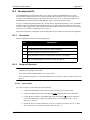
The Development Kit contains the following equipment:
QTY
B.2.2
DESCRIPTION
1
FlexPak-SSII unit with built in SUPERSTAR II receiver card
1
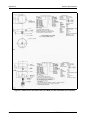
+12 dB active GPS antenna with 20 ft. cable, see Page 56
1
StarView software and receiver user manuals on CD
1
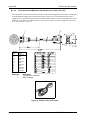
Serial cable (DB9 connector to 13-pin Deutsch connector), see Page 50
1
Automotive power cable (12 V DC power connector to 3-pin Deutsch connector)
and power supply adapter 120 V AC to 12 V DC, see Page 49
Setup and Operation
The default data transfer rate is 9600 bps unless your receiver model has Carrier Phase Output (CP)
capability with 19200 bps as the default.
Your receiver must be a BASE model to act as a base station.
A list of models is in Appendix A of the SUPERSTAR II Firmware Reference Manual, see Reference [6] on
Page 13.
B.2.2.1
Normal Setup
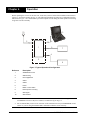
See Figure 6 on Page 27 when following these instructions:
1. Connect the FlexPak-SSII COM1 serial port to a PC using the serial cable provided.
2. Connect the GPS antenna to the RF port (labelled
) on the FlexPak using coaxial cable.
3. Connect the power supply to the FlexPak-SSII power port (labelled
) using the automotive
power cable. When power is applied, the LED should be red. See also Section B.1.1, Status
Indicators on Page 48.
4. Launch the StarView software application, see StarView Software Installation on Page 53. Refer
also to the StarView User Manual, see Reference [5] on Page 13.
SUPERSTAR II User Manual Rev 6
51