1
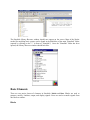
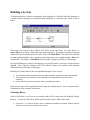
The Simulink Library Browser window should now appear on the screen. Most of the blocks
needed for modeling basic systems can be found in the subfolders of the main "Simulink" folder
(opened by clicking on the "+" in front of "Simulink"). Once the "Simulink" folder has been
opened, the Library Browser window should look like:
Basic Elements
There are two major classes of elements in Simulink: blocks and lines. Blocks are used to
generate, modify, combine, output, and display signals. Lines are used to transfer signals from
one block to another.
Blocks