1
'Mal:liac: 'Mal:l.SioJ:l"' 4:
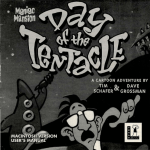
"Day
the 're:ntac:le~
o.f
· IBM.$ E.efere:qce Card
C..ON'I'£N'I'S
Your Maniac Mansion 2: Day of the Tentacle package should contain
the following:
t/ One Compact Disc or
t/ This Reference Card
t/ Six game disks
t/ One User's Manual
Cl.E:'rrrNa S'I'.AE.'I'£D (C..D-,E.OM: '\]'£ESIO:Nl
1b play the game from your Compact Disc, use these commands:
Switch to the correct drive (for .example, types: and press
ENTER).
Type dott and press ENTER (to start the game).
Cl.E:'rriNa S-r.Ais-r.eo fPC.. 3.$" DISK '\leESIONl
Nate: We recommend that you fust make backup copies of all disks
and put the originals in a safe place. The disks'are not copy-protected, so
to copy them, just follow the ~!;lions that came with your computer.
'lb install Day of the Tentacle to your hard disk from the floppies
included in the package, boot your computer, then insert Disk 1 in
drive A, type a: and press ENTER. (This utility will also work from
drive B.)
When you see the A:\> prompt, type the word install and press
ENTER.
Follow the on-screen instructions to install Day of the Tentacle on
your hard drive.
'lb play the game from your hard disk use these commands:
Switch to the correct drive_(for example, type c: and press ENTER).
'IYPe cd \dott and press ENTER
(to change to the correc~ directory).
'IYPe dott·and press ENTER (to start the game).
Se'I"''Wa ?R.£:re.:R.£NG.£s
When loaded, the program will check to see if you have a mouse driver or joystick installed, or a AdLib;" or SoundBlaster~ sound board,
and will set up the game appropriately. If you are using a Roland~ or
General MIDI sound board you must tell the computer by typing dott
r or dott g. If you wish to override these default settings, you may do
so by adding the following letters (separated by spaces) after typing
dott when you start the game:
a
AdLib I SoundBlaster music
r
Roland music
g
General MIDI music
m
Use mouse control
j
Use joystick control
k
Use keyboard control
t
Text mode (this will turn off all digitised sound & speech)
s220n/8 Set SoundBlaster address/intlk bufsize
For example, to start the game with AdLib sounds and using a joystick, type:
dottaj
'K£Y.BO.I\.RD/GU&SO.& GO:N'r.&OLS
Meuo.&Y. .A.L£.&-r
You can use a mouse for cursor control if you have installed a compatible mouse driver. Use the left mouse button to select objects on
the screen for use in the sentence line, as well as to select a line of
dialogue in a converSation. Press the right mouse button to use a
highlighted verb with the object to which the cursor is pointing. lf you
have both a mouse and a joystick installed, you may select one as
your controller by holding down the CTRL key and pressing m for
mouse or j for joystick. You may also recalibrate your joystick if the
cursor is drifting across the screen by centring the joystick and pressingCTRLj.
For keyboard cursor control, use either the arrow keys or the keypad
The ENTER (or 5) key corresponds to the left mouse button; the TAB key
corresponds to the right mouse button.
All of the verbs used in the game can also be selected by using keyboard commands. Each key corresponds to one verb. Pressing the
appropriate key once is equivalent to moving the cursor over the verb
and pressing the controller button. The keys are mapped as follows:
The CD-ROM version requires 2 megs. free EMS RAM.to run smoothly.
The PC 3.5" version requires about 570k of free memory (with 2 megs
EMS RAM, it'll work with as low as 530k but more is always better). If
your computer does not have sufficient memory to run Day of the Thntacle,
the game will alert you after starting. You can still play the game, but
your hard drive will be accessed more frequently. This activity could cause
certain parts of the game to slow down noticeably. If this happens, quit the
game (save game first!) and try to free up more memory by removing any
terminate-and-stay-resident programs you have installed.
·
Maniac Mansion (the old one)
Day of the Tentacle
p
G
u
Give Pick up Use
Q
w
Push
Open
0
L
s
Open Look at Push
A
Pull
s
(Siwue)
c
T
Close Talk to
y
z
Pull
(Yank)
Give
R
E
Walk
New
T
Turn
to
kid
·on
D
F
G
Close Pick up Unlock Turn
off
X
c
Read What is
v
Use
B
Fix
Other keyboard commands:
Day of the Tentacle:
1- Switch to Hoagie
2 - Switch to Bernard
3 - Switch to Laverne
Note:" When talking with a
character, keys 1-6 will select
the different dialogue choices,
1 being the top choice and
6 being the bottom choice.
Maniac Mansion •
(the old one):
U Scroll inventory list up,
I Select upper left inventory
item, 0 Select upper right
inventory ~tern,
J Scroll inventory list down,
K Select lower left inventory
item, L Select lower right
inventory item.
Fl, F2, & F3 - Switch kids
FU:NC.'I'IO:N .AND
GouM.AFD Krts
Save or Load a Game F1 or F5
Bypass a Cut-Scene
ESC
or press both mouseljoystick
buttons at once.
Restart the Game
F8
Pause the Game SPACE BAR
Sound Control (music only):
[ softer
] louder
Message Line Speed:
Faster +
Slower Clear dialogue line
• (period)
CTRL m
Mouse On
CTRLj
Joystick On
(Be sure to centre joystick first.)
'lbggle text on/off
CTRL t
Exit Game (without saving)
ALT x or CTRL c
Version Number
CTRL v
SA.:Ve/LOA.D ws-r.&uc.-rio:Ns
Press F1 or F5 when you want to save or load a game. CD-ROM version
saved games are stored to a directory on your hard drive called
DOTr.CD. Once the save/load screen is displayed, you can move the cursor and click on SAVE, LOAD, PLAY (to return to the game as it was
before you pressed F1) or QUIT (to quit the game).
To SAVE: Click on the SAVE option. The current list of saved games
will be displayed in slots along the left side of the screen. Click on the up
and down arrows to scroll through the list; right-click on the up or down
arrow to shortcut to the first or last save game slot. Select a slot by-pointing the cursor to it and clicking. Now you will be able to type a new name
for that slot or use the backspace key to change the existing name and
save over a previously saved game. Press ENTER or click on OK to save
the game. Click on CANCEL if you have changed your mind and do not
wish to save it.
To LOAD: Click on the LOAD option. The current list of saved games
will be displayed in slots along the left side of the screen. Click on the up
and dowri arrows to scroll through the list; right-click on the up or down
arro,w to shortcut to the first or last save game slot. Select a slot by pointing the cursor to it and clicking. Click the cursor on OK to load the game,
or CANCEL if you have changed your mind and do not wish to load it.
Warning: Loading a previously saved game will cause you to lose the game
you are currently playing. Ifyou think you will want to return to the game as it
was before you pressed F1, be sure to SAVE the game before WADing a different one.
'I'.&Ol.JBL£Sif00'rl:Na
· This section will provide you with some solutions to garners' most
common technical problems. If you are having difficulty getting Day of
the Tentacle up and running, please refer to this section and the
game's README file before contacting technical support. Chances are
they will help you out.
Memory Concerns The CD-ROM version ofthis game requires at
least 2 megs. free RAM in order to run. Please be sure you have
installed your EMS Drivers correctly. Day of the Tentacle will only
utilise expanded memory (EMS). The PC 3.5" version requires at least
570k free base RAM in order to run. It will recognise up to 2 megs EMS
RAM, but does not require it. With EMS properly configured, Day of the
Tentacle can run with as little as 530k free base RAM.
If you are using DOS 5.0, you may utilise its ability to load certain
RAM resident programs "high" to free up base memory. Refer to the
original Microsoft documentation for further information. You may
also make a boot disk with DOS 5.0 that will set up the optimal configuration for running this game. To make a boot disk, please follow
the instructions below, using the underscore ("_") to denote a space:
1. Insert a brand new unformatted high density floppy disk into the A: drive.
2. At the C: prompt, type: format_a:_/s
<enter>
<enter>
3. At the C: prompt, type: copy_command.com_a:
4. At the C: prompt, type: a: <enter>
5. At the A: prompt, type: copy_con_coirlig.sys
<enter>
files=20
<enter>
buffers=20
<enter>
<enter>
6. Press the "control" and "z" key at the same time.
<enter>
7. At the A: prompt, type: copy_con_autoexec.bat
<enter>
prompt=$p$g
<enter>
path=c: \ ;c: \dos
8. Press the "Control" and "z" key at the same time.
<enter>
You should add to the.boot disk relevant files for your particular
sound card, mouse, (CD-ROM driver, and EMS driver- CD-ROM version) to ensure you will receive full support from these peripherals.
Please note that the instructions above are meant for uncompressed
hard drives. Boot your machine with this disk in the A: drive and it will
come up with the maximum amount of memory possible.
DOS 6.0 includes a memory management utility called MemMaker.
It will assist you in freeing up as much free RAM as possible. Please
refer to your original Microsoft documentation for further information
and instructions.
Compression Programs This game was designed to run optimally
on an uncompressed hard drive. If you do choose to compress your
hard ·d rive, the game's performance could be affected in various ways.
These effects may vary depending upon which compression program
you choose to run.
Sound Cards If you are experiencing problems with your sound
card, try running the diagnostic software that came with your card.
Most sound card problems are due to configuration errors. If you are
using a sound card that is not listed on the system sticker on the outside of the box, or are running a sound card in emulation mode, your
sound may not perform optimally. Sound card performance will also
be affected if you do not have enough free memory. Please be certain
that you meet the minimum requirement for free RAM.
Mouse Setup If you are having difficulty with your·mouse, please
be certain that its device driver has been installed and loaded properly. Windows and other software packages often have built-in mouse
drivers that will not function outside of their own environment. Most
mouse drivers can be loaded by typing "mouse" or a similar command
at the C: prompt. Please consult the original documentation that
came with your mouse to find more information about enabling commands.
Erratic behaviour in a mouse may also be due to a hardware conflict
or incompatible mouse driver. Please check with your mouse's manufacturer to be certain you are using the most recent mouse driver version.
'I'eca[:NIG.Al.
.ASSIS'I'.A:NG£
Please be certain you have read and checked each section of the
troubleshooting guide before calling Technical Support. Although we
are more than happy to assist you, we often find that many problems
can be solved by simply checking the above section and the game's
READ ME file. Please also be aware that due to the millions of software and hardware configurations possible, you may still have to
refer to your computer dealer, hardware manufacturer, or software
publisher to properly configure their product to run with our game.
When you call, please be either sitting in front of your computer or
have a complete and detailed list of your machine's current software
and hardware configuration so that we may more readily assist you.
Our technicians may be reached on (0171) 368-2226, and are on
duty from I O:OOam to 1:00pm and 2:00pm to 5:00pm Monday to
Friday. You may also fax olir Technical Support Department on (0171)
468-2006, or write to us at: LucasArts Entertainment, rio Virgin
Interactive Entertainment (Europe) Limited, Technical Support,
2 Kensington Square, London W8 5RB.
ABSOLUTELY NO HINTS WILL BE GIVEN ON THE
TECHNICAL ASSISTANCE LINE.
Day of the 'Thntacle TW and 10 1993 LucasArts Entertainment Company. Used under authorisation. All
rights reserved. Maniac Mansion is a registered trademark ofLucasfilm Ltd. The LucasArt.s logo is a registered service mark ofLucasArt.s Entertainment Company. LucasArts is a trademark ofLucasArts Entertainment Company. Used under authorisation. IDM is a registered trademark of International Business
Maclrines.LucasAr!B Entertainment Coll!pany, P.O. Box 10307, San Rafael, CA 94912.
Distributed by:
Vrrgin Interactive Entertainment (Europe) Limited,
2 Kensington Square
London wa 5RB