1
HydroSoft 2.8
Software for HOBI Labs Optical
Oceanographic Instruments
User’s Manual
Revision G
H
Hyyddrroo--O
Oppttiiccss,, B
Biioollooggyy &
& IInnssttrruum
meennttaattiioonn
LLaabboorraattoorriieess
Lighting the Way in Aquatic Science
www.hobilabs.com [email protected]
Revisions:
G— May 24, 2010: Minor changes reflecting to HydroSoft update from 2.7 to 2.8,
especially addition of Abyss transmissometer.
F — February 19, 2010: Formatting
E — June 6, 2007: Corrected the formula for sigma correction in section 7.4
D — October 22, 2004: Many changes to support version 2.7. Major changes: add
Processing menu (10.3), Compare Calibrations command (10.3.4); change handling
of Sigma calculation (7.4); changes to main data windows (4.1), command line
processing (9.2); full formatting control of Spectral Plot windows (6.6)
C — June 27,2002: Many changes to support version 2.5. Major changes: spectral
plot windows (section 6.6), calibration functions (section 10.2.11, and separate
Backscattering Calibration Manual), support for multiple instrument connections
(section 4.1.6).
B — February 20, 2002: Update address
A — February 22, 2001—Current version 2.02; Update formatting, Remove Draft
designation; add references in section 7.4.3
October 30, 2000—describes version 2.01
ii
TABLE OF CONTENTS
1
INTRODUCTION ................................................................................................................................ 1
1.1
1.2
2
SYSTEM REQUIREMENTS ................................................................................................................... 1
INSTRUMENT FIRMWARE REQUIREMENTS ......................................................................................... 1
INSTALLATION ................................................................................................................................. 3
2.1
2.2
2.3
BASIC INSTALLATION ........................................................................................................................ 3
INSTALLATION NOTES ....................................................................................................................... 3
REMOVING HYDROSOFT.................................................................................................................... 4
3
QUICK START .................................................................................................................................... 5
4
WINDOWS ........................................................................................................................................... 7
4.1
4.2
4.3
5
MAIN DATA WINDOW ....................................................................................................................... 7
SPECTRAL PLOT WINDOWS ............................................................................................................. 10
TERMINAL WINDOWS ...................................................................................................................... 10
COMMUNICATING WITH INSTRUMENTS ............................................................................... 11
5.1
5.2
5.3
5.4
5.5
5.6
5.7
6
CONNECTING ................................................................................................................................... 11
COLLECTING REAL-TIME DATA ...................................................................................................... 13
SETTING SAMPLING OPTIONS .......................................................................................................... 13
RETRIEVING LOGGED DATA ............................................................................................................ 15
SETTING INSTRUMENT DATE AND TIME .......................................................................................... 17
CHANGING BAUD RATE ................................................................................................................... 18
SPECIAL MESSAGES FROM INSTRUMENTS ....................................................................................... 18
PLOTTING DATA............................................................................................................................. 19
6.1
6.2
6.3
6.4
6.5
6.6
6.7
7
GRAPH PROPERTIES DIALOG BOX ................................................................................................... 19
DEFAULT PROPERTIES ..................................................................................................................... 19
AXIS SCALES .................................................................................................................................. 19
DATA MARKERS .............................................................................................................................. 21
GRAPH & GRID SETTINGS................................................................................................................ 22
SPECTRAL PLOTS ............................................................................................................................. 22
PRINTING AND EXPORTING GRAPHS ................................................................................................ 24
CALIBRATION DATA ..................................................................................................................... 25
7.1
7.2
7.3
7.4
8
LOADING CALIBRATIONS................................................................................................................. 25
VIEWING AND EDITING CALIBRATION DATA ................................................................................... 25
BACKSCATTERING COEFFICIENT CALCULATION ............................................................................. 26
SIGMA CORRECTIONS ...................................................................................................................... 27
DATA FILES ...................................................................................................................................... 31
8.1
8.2
8.3
9
RAW DATA ...................................................................................................................................... 31
CALIBRATED DATA ......................................................................................................................... 31
RAW DECIMAL DATA ...................................................................................................................... 33
PROCESSING RAW DATA FILES................................................................................................. 35
9.1
9.2
10
THE PROCESS RAW FILES COMMAND .............................................................................................. 35
COMMAND LINE PROCESSING ......................................................................................................... 37
MENU COMMAND REFERENCE ................................................................................................ 39
10.1
10.2
10.3
FILE MENU .................................................................................................................................... 39
INSTRUMENT MENU....................................................................................................................... 42
PROCESSING MENU ....................................................................................................................... 44
iii
10.4
10.5
GRAPH MENU ................................................................................................................................ 45
WINDOW MENU ............................................................................................................................. 46
iv
1 INTRODUCTION
HydroSoft supports HOBI Labs’ HydroScat-6, HydroScat-4, HydroScat-2,
a-Beta, c-Beta and Abyss-2 instruments by:
•
collecting live data received through an RS232 port,
•
applying instrument-specific calibrations to incoming data,
•
storing raw and calibrated data in files,
•
plotting live and stored data as a function of depth or time,
•
controlling sampling rate and other instrument parameters
•
retrieving logged data from instruments’ internal memory,
•
providing an ASCII terminal interface for direct communication
with instruments, and
•
collecting and processing data for calibrating backscattering sensors.
1.1 System Requirements
HydroSoft requires Windows 95, 98, 2000, NT 4.0, XP, Vista or 7.
HydroSoft and the files required to support it occupy a maximum of about 10M of
hard disk space.
Communicating with instruments requires an RS232 port, which may be
implemented with a USB-Serial adapter.
1.2 Instrument Firmware Requirements
Some HydroSoft functions require that instruments have a certain level of
firmware (internal operating software) installed. It is always possible to connect
an instrument and communicate to it through the terminal window, in the same
manner as with a simple terminal program; however some functions may not be
available with some instrument firmware versions.
You can determine the firmware version of your instrument by connecting
it through a terminal emulator program, or through HydroSoft’s terminal window,
and sending the ‘VER’ command.
1.2.1
a-Beta and c-Beta
Firmware versions earlier than 1.39 do not support downloading of
calibration data, and the raw data will be in decimal format.
1
1.2.2
HydroScats
HydroScat instruments with firmware earlier than version 1.60 may not be
identified correctly, or provide downloading of data.
1.2.3
Abyss-2
Not all sampling options are available in firmware version 1.00
2
2 INSTALLATION
You must be logged on as a user with administrator privileges in order for
HydroSoft to install all the necessary files on Windows XP or later systems. If
not, the installation program will present an error message, and you must log on
using a different account with the necessary privileges.
HydroSoft versions 2.5 and later install some files differently from previous
versions. If you have an earlier version installed on your machine, we recommend
uninstalling it before installing version 2.5 or later.
2.1 Basic Installation
HydroSoft is delivered as a self-installing executable, either on a CD-ROM
It has the name
or as a download from http://www.hobilabs.com.
“InstallHydroSoftXXX.exe”, where XXX is the version number, e.g. 280. This
program operates similarly to most other Windows installers.
1. Run the installer program.
2. Decide whether you would like the HydroSoft application stored in the
default directory shown. If not, select a different directory.
3. Click “Next” to start the installation.
4. When the installation is complete, click “Finish” to exit.
2.2 Installation Notes
You need not reboot your computer after installation, unless the installer
program specifically instructs you to do so.
A “HydroSoft” item will be added to your start menu, and the directory you
selected during installation will contain
•
HydroSoft.exe—the HydroSoft program,
•
astar.csv and aw.csv—files used by the sigma correction algorithm
in HydroSoft (not required for all instruments, and aw.csv is no
longer required but is included for backward compatibility),
•
a “Help Files” folder including HTML and related files, and
•
Unins000.exe and Unins000.dat—a program and supporting data for
uninstalling HydroSoft.
3
2.3 Removing HydroSoft
1. From the Start menu, select “Settings”, then “Control Panel”.
2. Double-click on the “Add/Remove Programs” icon.
3. Select HydroSoft from the list of programs.
4. Click the “Add/remove” button.
OR
1. Open the directory into which you installed HydroSoft.
2. Double-click on the “unins000.exe” icon, which runs the un-installer.
For HydroSoft versions before 2.10, the uninstaller was named
“unwise.exe.”
4
3 QUICK START
1. If necessary, install HydroSoft as described in section 2.
2. Connect an instrument to a serial port on your computer.
3. Select HydroSoft from the Windows Start Menu.
4. Click
(or select Show Terminal from the Instrument menu).
5. Click
(or select Connect from the Instrument Menu—details in
section 5.1).
6. Click the Search button.
7. After a short time HydroSoft should identify the instrument, load its
calibration, and close the Connect dialog box.
8. In the main data window, select Plot Vs. Time from the Graph menu.
9. Click
(or select Start from the Instrument menu).
10. If no data are visible after a short time, click
as needed to show all data.
, and the plot will zoom
11. Double-click on the graph (or select Properties… from the Graph menu)
to open the Graph Properties dialog box (details in section 6.1)
12. Adjust the display parameters according to your preferences.
5
4 WINDOWS
4.1 Main Data Window
Main data windows (of which you may open several simultaneously)
contain controls for connecting to and controlling instruments, as well as complete
graphical display of live data or data retrieved from files.
4.1.1
Data Plot
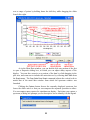
A data plot appears whenever a data file is open. You can select whether
the data are displayed as a function of depth, or of time, with commands on the
Graph menu. For full details on data plots, see section 6.
7
4.1.2
Mouse Pointer Coordinates
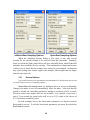
Whenever the mouse pointer is within the plot area of a data window, a
small window that shows the data coordinates of the pointer appears in the upper
left corner. This allows you to determine the exact value of a particular data point
simply by pointing at it. This display reflects whatever units are shown on the
graph axes. If the plot contains two Y axes (as for an a-Beta or c-Beta), both Y
values will be shown.
4.1.3
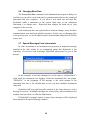
“Channels” Panel
The Channels Panel on the right
side of the data window lists the
parameters displayed in the current graph.
Normally these are the parameters of the
current instrument, but they may be
different if you open a stored data file
with different parameters. If the panel is
not visible, click on the
button to open it.
You can choose which channels
are displayed in the graph by clicking the
check boxes to the left of each channel
name. You can also change the color
used to display each channel by clicking
on the colored box to the right of the
check box. Note however that colors you
select this way only apply to the currently displayed graph. To change the default
colors used to display data in new graphs you must use the Graph Properties
dialog (section 6.1).
The Channels panel may also include controls to select display options.
For backscattering sensors, a pair of radio buttons enables you to select whether
“Sigma” correction is applied to the current data (see section 7.3 for more about
sigma correction).
4.1.4
Status Display
A text field at the top of the data window indicates whether an instrument is
connected, and if so whether it is currently sampling, stopped, or sleeping.
Various other messages may appear in the status field when appropriate.
8
If an instrument is connected, four more fields appear at the bottom of the
window. These show
•
time elapsed since the first point in the current graph was received,
•
depth of the instrument,
•
voltage of the sensor’s batteries or external supply, and
•
internal temperature of the sensor.
Note that the status parameters are only updated when an instrument is
actively transmitting data. If the instrument has been stopped or sleeping for some
time the values may be invalid.
4.1.5
Toolbar buttons
Toolbar buttons in the data window provide shortcuts to commands that
also appear in the menus, as listed below.
File | Save As… (section 10.1.4)
File | Open… (section 10.1.2)
File | Print Graph… (section 10.1.7)
Graph | Zoom In (section 6.3.2)
Graph | Zoom Out (section 6.3.2)
Graph | Previous Zoom (section 6.3.2)
Graph |Auto Scale (section 6.3.2)
Instrument | Connect… (section 5.1)
Instrument | Open Terminal (section 4.3)
Instrument | Start/Stop (section 10.2.6)
4.1.6
Multiple Data Windows
If you open a data file while a data file is already open in the current
window, the file will be opened in a new data window. You can also open a new,
empty window with the New Window command on the File menu. Unlike in
previous versions of HydroSoft, all data windows are functionally identical, and
each window can support its own connection to an instrument.
9
Each new data window adopts the currently selected calibration file as its
default for displaying raw data. However you can subsequently select a different
calibration file, or even a different instrument type, in a particular window without
affecting other open windows. For more about calibration files, see section 7.
New data windows also adopt the graph settings of the current window.
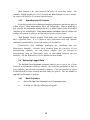
4.2 Spectral Plot Windows
When viewing data from a HydroScat, you can select Plot Vs Wavelength
from the Graph menu to open a window that shows the spectrum of data at specific
points, or ranges of points, in the data shown in a main window’s graph. For
details, see section 6.6.
4.3 Terminal Windows
Each data window has a corresponding terminal window that allows
communicating directly to a connected instrument, and viewing, in raw form, the
same data that are displayed graphically in the main data window. It contains the
same Instrument menu, status display, and instrument-control buttons as the main
data window. These controls produce the same results whether you use them in
the terminal window or in the main data window.
Terminal windows contain Command, Response and Data areas that
display information sent to and from the instrument. Characters you type while
the Terminal window is active appear in the Command area, and are
simultaneously sent to the connected instrument. Command responses and other
informational transmissions from the instrument appear in the Response area.
Data transmissions appear in the Data area.
10
5 COMMUNICATING WITH INSTRUMENTS
5.1 Connecting
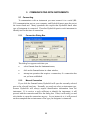
To communicate with an instrument you must connect it to a serial (RS232) communication port on your computer, and HydroSoft must open the port at
the correct baud rate. Many operations also require that HydroSoft know what
type of instrument is connected. Therefore HydroSoft queries each instrument to
identify itself at the time of connection.
5.1.1
Connection Dialog Box
This dialog box appears each time you
•
select Connect from the Instrument menu,
•
click on the Connect button in a data window,
•
attempt an operation that requires a connection, if a connection has
not yet been established.
5.1.2
Manual Connection
If you click the Connect button, HydroSoft will open the currently selected
port at the selected baud rate. Normally you need not select an instrument type,
because HydroSoft will always request identification information from the
instrument. If it receives a reply sufficient to identify the instrument, it will
proceed with the connection and close the dialog box. If not, it will notify you and
ask whether to open the connection anyway. In you instruct it to, it will proceed
on the assumption that an instrument of the type you designate is connected.
11
5.1.3
Search Connection
If you click Search, HydroSoft will ignore the selected port and baud rate,
and attempt a connection to each port, at each baud rate (from 4800 to 57600),
until it receives valid identifying information from an instrument. The dialog box
will automatically close if a valid connection is found.
5.1.4
Load Calibration From Instrument Option
If Load Calibration From Instrument is checked at the time an instrument is
connected, HydroSoft will prompt the instrument to transmit the calibration
information stored in the instrument’s memory. This will override the currently
selected calibration file, if any. See section 5.4 for more information about
calibration files.
5.1.5
Open Port with Identifying Instrument
If this option is checked when you connect, HydroSoft will simply open the
serial port at the baud rate you specify, without communicating with the
instrument in any way. This allows you to use HydroSoft as a “dumb terminal”
for troubleshooting, or for communicating with devices HydroSoft cannot identify.
5.1.6
Connection Options at Program Start
The Preferences command under the File menu provides three options that
select whether, and how, a connection is established when HydroSoft first starts:
•
Do Not Connect—HydroSoft makes no connection at startup;
•
Restore Previous Connection—HydroSoft will open the Connect dialog
and attempt to connect using the port and baud rate of the last
successful connection;
•
Search For Instruments—HydroSoft will open the Connect dialog and
click the Auto Search button.
For applications in which you regularly connect using the same port and
baud rate, the Restore Previous Connection option is usually the most convenient.
5.1.7
Connecting to a Sleeping Instrument
In some cases HydroSoft may not detect the presence of an instrument that
is in its low-power “sleep” mode. If you have difficulty connecting to a sleeping
instrument, we recommend you use the instrument’s magnetic switch to wake it
before connecting.
12
5.2 Collecting Real-Time Data
To start collecting data from a connected instrument, click
or select
Start from the Instrument menu. If no graph is visible when you start collection,
HydroSoft will open one, and will prompt you to name it if the Request user to
name files when they are created preference is selected (also see 10.1.6).
Note that it is the instrument, not HydroSoft, that determines the pace of
data collection once it has been started. Therefore there may be a delay before
data actually appear. If set for burst mode, the instrument may even put itself to
sleep periodically. See section 5.3 for information about sampling options.
When HydroSoft detects incoming data, it makes the
and changes the title of the Start menu option to Stop.
button visible,
5.3 Setting Sampling Options
To set the sampling rate and other parameters of a connected instrument,
select Sampling Options from the Instrument menu. The Sampling Options dialog
presents parameters that vary somewhat depending on the type of instrument, and
on the instrument’s configuration. The example at left below shows the options
for an a-Beta or c-Beta; the example at right corresponds to a HydroScat-2 or
HydroScat-4. HydroScat-6’s have additional settings relating to their time-shared
fluorescence channels. Further items may appear if your instrument is equipped
with an anti-fouling shutter or other optional equipment.
13
a-Beta/c-Beta Sampling Options
HydroScat Sampling Options
When the Sampling Options dialog is first open, it may take several
seconds for the current settings to be retrieved from the instrument. Similarly,
when you click the Apply button there will be a noticeable delay while HydroSoft
transmits, then confirms, the new settings. This confirmation is important because
it allows you to check that the settings were entered as you intended. Instruments
may reject settings they cannot support (for example, burst lengths that are longer
than the burst interval).
5.3.1
General Options
You should consult your instrument’s documentation for details that may not be
covered in this overview of sampling options.
Sample Rate and Sample Period, by definition, have an inverse relationship.
Changes you make to one will automatically affect the other. Also note that the
period is actually the controlling parameter, and has a resolution of 0.01 seconds.
Therefore some exact sample rates are not available. For example, if you enter a
rate of 3 per second, the actual value will be set to 3.03, which is the inverse of
0.33, the nearest available period.
In both examples above, the burst-mode parameters are inactive because
burst mode is not on. To edit the burst-mode parameters you must first check the
Burst Mode On option.
14
Burst Interval is the time between the starts of successive bursts. For
example, if Burst Length is set to 10 seconds and Burst Interval is set to 1 minute,
the sensor will sleep for 50 seconds between bursts.
5.3.2
HydroScat-specific Options
HydroScat sensors have additional sampling parameters that do not apply to
x-Beta sensors. Sleep when memory fills is self-explanatory. Start on power-up is
only relevant for instruments without batteries, or whose batteries may be disabled
(whether or not intentionally). Make these settings nonvolatile controls whether the
settings will remain in effect even if the sensor is reset or loses power.
Total Duration controls whether burst-mode casts will automatically halt
after a specified time. If it is blank or zero, burst-mode casts will continue
indefinitely until halted by a user, full memory, or low battery.
HydroScat-6s have additional parameters for controlling their two
fluorescence channels. Because these channels share the receivers of two
backscattering channels, you can choose whether they are devoted to
backscattering only, to fluorescence only, or time-shared between the two
functions. See the HydroScat-6 User’s Manual for more details.
5.4 Retrieving Logged Data
The Get Data From Instrument command enables you to view a list of casts
stored in an instrument’s memory, transfer casts from the instrument to files on
your computer, and erase the instrument’s memory. Casts you transfer are stored
in individual files whose location and base name you specify. The cast number is
appended to the name of each file.
5.4.1
Basic Procedure
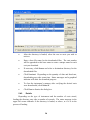
•
Select Get Data From Instrument on the Instrument menu.
•
A dialog box like the following will appear.
15
•
After the directory is loaded, select the cast or casts you wish to
retrieve.
•
Enter a base file name for the downloaded files. The cast number
will be appended to this base name to create a unique name for each
cast you download.
•
If necessary, click Browse and select a destination directory for the
downloaded files.
•
Click Download. Depending on the quantity of data and baud rate,
downloading may take some time. Status messages and a graphical
indicator will show the download progress.
•
To clear the instrument’s memory after verifying the desired casts
were downloaded, click Delete All.
•
Click Close to dismiss the dialog box.
5.4.2
Details
Depending on the type of instrument and the number of casts stored,
loading the directory may take a number of seconds. The status message in the
upper left corner indicates if the directory is loaded, as above, or if it is in the
process of loading.
16
The memory status line indicates how much of the instrument’s memory is
presently used.
You can select arbitrary groups of casts for downloading. To select a
contiguous group of casts, click on the first item in the group, then shift-click on
the last item; or hold down the shift key while using the arrow keys. To select or
unselect non-contiguous casts, control-click on them; or hold down the control key
while using the arrow keys to move through the directory, and press the space bar
to select or unselect casts.
Data are always collected in raw form. If the Create calibrated data (.dat)
files option is checked, a calibrated file will also be created for each downloaded
cast. The calibration currently in effect for the main data window will be applied
to these data (see section 7 for more information about calibrations).
Because of the way HydroScat and x-Beta instruments handle their
memory, it is not possible to delete individual casts—you can only erase the
instrument’s entire memory. Abyss transmissometers, however, do permit
deleting individual casts.
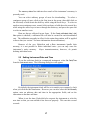
5.5 Setting Instrument Date and Time
To set the real-time clock in a connected instrument, select Set Date/Time
from the Instrument menu. The following dialog box will appear.
By default, the instrument clock will be set to match your computer’s clock
when you click the Set Time button. However you can also select the Set Manually
option, enter an arbitrary date and time in the appropriate fields, and set the
instrument to that date and time.
When it sets the time, HydroSoft also requests the instrument to echo the
new time so that you can confirm it has been set properly. This can take several
seconds.
17
5.6 Changing Baud Rate
The Change Baud Rate command on the Instrument menu opens a dialog box
in which you can select a new baud rate for communication between the connected
instrument and your computer. If you select a new baud rate and click OK,
HydroSoft sends a command (at the current baud rate) to the instrument
instructing it to change rates. HydroSoft then changes the baud rate of your
computer to the new rate.
It the instrument does not respond after a baud rate change, it may be that a
communication error interfered with the transition. In this case, try changing back
to the previous rate, or use the Search option in the Connect dialog box to find the
correct rate.
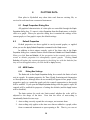
5.7 Special Messages From Instruments
In some circumstances an instrument may generate an important message
(marked in the data stream by an exclamation point) that HydroSoft is not
expecting. If it receives such a message, HydroSoft will present it to you in this
manner:
In this example, a user has attempted to set the time of a HydroScat-2’s
clock while the instrument was logging, which the instrument does not permit.
“H2000326:” at the beginning of the message is the serial number of the
instrument that sent it, for identification in case you have multiple instruments
connected.
HydroSoft will beep and bring this window to the front whenever such a
message is received. If multiple messages are received they will accumulate in the
window until you close it or click the Clear button.
If HydroSoft’s terminal window is open, these messages will be displayed
there instead of the special Message window.
18
6
PLOTTING DATA
Data plots in HydroSoft may show data read from an existing file, or
received in real time from a connected instrument.
6.1 Graph Properties Dialog Box
All graphical characteristics of a data plot are controlled through the Graph
Properties dialog box. To open it, select Properties from the Graph menu, or doubleclick on a graph. When you open the dialog box it contains the settings of the
current graph, or if no graph is open, the default settings.
6.2
Default Properties
Default properties are those applied to newly-created graphs, or applied
when you use the Apply Default Properties command in the Graph menu.
In addition to their unique controls, each of the three tabs in the Graph
Properties dialog box contains buttons labeled Save as Defaults and Recall Defaults.
When you click Save as Defaults, all the properties in the currently active tab are
stored as default properties for subsequently opened graphs. Clicking Recall
Defaults will replace the current properties in the dialog box with the defaults (but
they will not be applied unless you click the OK or Apply button).
6.3 AXIS Scales
6.3.1
Dialog Box Settings
The Scales tab in the Graph Properties dialog box controls the limits of each
axis in a graph. It contains properties for Time, Depth, Scattering and Attenuation
or Absorption axes, although these do not normally all appear in one graph. If the
properties apply to a particular graph only the controls appropriate to that graph
will be enabled. If you open the Graph Properties dialog when no graph is open, all
controls will be enabled for purposes of setting the defaults (and the Apply button
will be disabled).
The Auto options for each axis limit control whether the scale will be
adjusted to the range of the data. Note that the effect of auto-scaling is
intentionally limited in two ways:
1. Auto-scaling can only expand the axis ranges, not contract them.
2. Auto-scaling only applies at the time new data are added to a graph, either
from a connected instrument or upon opening a file. That is, you can set
19
the axis limits to values that would exclude some existing data points,
regardless of whether auto-scaling is on. But auto-scaling will expand the
limits if new data that exceed the current limits are subsequently added.
These characteristics are especially useful when collecting data in real time from
an instrument. In real data it is not unusual for an outlying point to skew the autoscaling. If this happens while you are collecting data you can re-adjust the axis
settings to exclude the outlying point, but leave auto-scaling on so that it will still
accommodate new data.
6.3.2
Other Scaling and Zooming Options
While you can enter exact numeric limits for each axis via the Graph
Properties dialog box, HydroSoft provides several more rapid options. The Zoom
In and Zoom Out commands, and their toolbar equivalents, contract or expand the
axis limits by a factor of 2.
The Auto Scale command and button adjusts the scales to exactly fit the
entire data set. This is not subject to the limitations imposed on axis auto-scaling,
described under 6.3.1.
At any time you can “drag-zoom,” that is, click and drag the mouse pointer
in the graph area to define a rectangle. When you release the mouse, the axis
20
limits will be set to the boundaries of that rectangle. One of the quickest ways to
navigate in a dataset is to first use Auto Scale to show all the data, then drag-zoom
to expand the subset of interest.
After changing the scaling using one of the zoom commands, or dragzoom, you can use the Previous Zoom command or button to undo the changes.
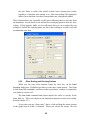
6.4 Data Markers
The properties in this tab control the color, marker style and marker size of
each data series (up to 8) in the graph.
•
To change the color, click on the color block and select a color from
the subsequent dialog. If you select “Auto”, the color will
automatically be set to match the wavelength of the corresponding
instrument channel.
•
To change the marker style, select a style from the Marker Style
combo box
•
To change the marker size, type a new size into the Marker Size text
box. If you set the size to 0 (zero), no markers will appear.
21
•
To change the width of lines between points, type a new number into
the Line Width text box. If you enter 0 (zero), no lines will appear.
Note that if you set both Marker Size and Line Width to zero, your data
will be invisible!
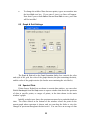
6.5 Graph & Grid Settings
The Graph & Grid tab in the Graph Properties dialog box controls the color
and style of the grid, the color of the graph interior (the part containing the data),
and the color of the graph exterior (the border area containing the axis labels).
6.6 Spectral Plots
If data from a HydroScat are shown in a main data window, you can select
Plot Vs Wavelength from the Graph menu to open a window that shows the spectrum
of data at specific points, or ranges of points, in the data shown in the main
window’s graph.
Initially a single trace shows the spectrum measured at a particular depth or
time. The slider control at the bottom of the window selects the point on the
parent graph whose spectrum is shown, and you can drag the slider to view the
changes in spectrum throughout the data series. You can view an average of data
22
over a range of points by holding down the shift key while dragging the slider
from left to right.
As in the Main Data window, you can double-click any portion of the plot
to open a Properties dialog box, in which you can adjust many aspects of the
display. You can also zoom in on a portion of the data by click-dragging in the
plot area, and zoom out to include the entire data set by selecting Auto Scale from
the Graph menu. The Copy Scale From Parent command adjusts the vertical scale to
match that of the main data window from which the spectrum window was
launched.
Clicking the Capture button freezes the currently displayed spectrum, but
leaves the slider active so that you can compare the captured spectrum to others.
You can capture many spectra for simultaneous display. Each time you capture a
spectrum, a dialog box prompts you for descriptive text to identify it in the legend.
23
By default this text is set to indicate the depth or range of depths the spectrum
represents. If the parent window shows data versus time rather than depth, time
values will be shown.
Clicking the Clear button removes all captured spectra from the plot.
If the parent window is receiving data from a connected instrument, and the
Live Update option is checked, the spectrum display will update each time a new
sample is received. Live Update does not affect captured spectra.
The scale of the backscattering axis is the same as that of the graph in the
parent window. If you change the scale in the parent window while a spectrum
window is open, the spectrum window’s scale will also change when you next
bring it to the front.
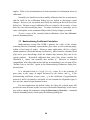
6.7 Printing and Exporting Graphs
You can print the graph from a main data window by selecting Print Graph…
from the File menu. For details, see section 10.1.7. In a spectral plot window, this
command appears on the window’s Graph menu. You can also export a plot to a
graphics file with the Export Graph… command. For details of exporting see
section 10.1.8.
24
7 CALIBRATION DATA
In general, data are received from instruments in raw form, and must be
converted to calibrated units. The coefficients required for this conversion are
unique to each instrument, and may be revised from time to time when the
instrument is recalibrated. HydroSoft requires an appropriate calibration to be
loaded before it can plot or store calibrated data from an instrument or raw data
file.
In addition to the instrument’s calibration parameters, the calibrated results
from backscattering measurements depend on values controlled with File menu
commands Backscattering Parameters… (section 7.3) and Sigma Correction
Parameters… (section 7.4).
7.1 Loading Calibrations
Calibrations can be loaded either directly from a connected instrument, or
from a file on the host computer. To load an instrument’s calibration, check the
Load Calibration From Instrument option while connecting to the instrument (see
section 5.1). To load a calibration from a file, choose Select Calibration File from
the Processing menu.
If you select a new calibration file while an instrument is connected, or
while a raw data file is open, HydroSoft will only load it if it is of a matching type.
HydroSoft will inform you if the type does not match. It will also warn you if the
serial number of the instrument does not match that contained in the calibration
file, but it will offer you the option of loading it even if the serial numbers do not
match.
Once a calibration file is loaded, it remains in effect until a different one is
loaded. When you exit HydroSoft, it stores the name of the current calibration
file. If the Automatically recall last selected calibration file option is selected in the
Preferences dialog box, the file will be reloaded the next time HydroSoft starts up.
If you have more than one data window open in HydroSoft, you can select a
different calibration file for each one. The most recently selected file in any
window will be saved as the default.
7.2 Viewing and Editing Calibration Data
You can see the details of the current calibration by selecting View
Calibration from the Processing Menu. This opens a dialog box whose format and
behavior depend somewhat on the type of instrument to which the calibration
25
applies. Refer to the documentation of each instrument for information about its
calibration.
Normally you should not need to modify calibration data for an instrument,
and the fields in the Calibration dialog box are locked to discourage casual
changes. However you can unlock most fields by clicking on the lock icon in the
dialog box. Because correct calibration files are critical to the accuracy of your
data, use care when modifying them. To reduce confusion we encourage you to
enter a description, in the comment field provided, of any changes you make.
To save a copy of the currently loaded calibration, select Save Calibration
from the Processing menu.
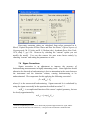
7.3 Backscattering Coefficient Calculation
Backscattering sensors like HOBI’s measure the value of the volume
scattering function, commonly represented as ( ) where is the scattering angle,
within a fixed range of angles. However many applications call for a closely
related parameter, the backscattering coefficient bb, which must be calculated from
( ) and a priori knowledge about the relation ship between ( ) and bb for
typical particles. HydroSoft calibrated data (.dat) files always include the
calculated bb values, and normally also include . However to maintain
compatibility with older software that did not accommodate , you can turn off the
“Include beta in .dat files” option in the Backscattering Parameters dialog box,
shown below.
bb is calculated from bb = 2 (
w is the scattering of
w ) + bbw , where
pure water in the range of angles measured by the sensor, and bbw is the
backscattering coefficient of pure water.
is the coefficient of proportionality
between and bb for particles, and while it is not constant for all particle types, it
does not vary much in typical natural waters.
For most applications the default values for either salt or fresh water will
provide the most accurate results, but users with detailed knowledge of the issues
may wish to change the parameters using the Backscattering Parameters… command
from the Processing menu, which opens the following dialog box:
26
Pure-water scattering values are calculated from values presented in A.
Morel, “Optical Properties of Pure Water and Pure Sea Water,” Optical Aspects of
Oceanography, M. G. Jerlov and E. S. Nielsen (eds.), Academic Press, New York,
1974, chap. 1, pp 1-24. However by selecting the “custom” option you can
modify the model. You can also remove the pure water factor entirely by
choosing “custom” and setting the parameters to zero.
7.4 Sigma Corrections
Sigma correction is an adjustment to improve the accuracy of
backscattering measurements in highly-attenuating water. Some light that would
otherwise be detected as backscattering is lost to attenuation in the water between
the instrument and the detection volume, causing backscattering to be
underestimated. We compensate for this applying the following correction1:
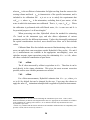
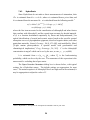
= ( K bb )
u
where u is the uncorrected backscattering. Sigma-corrected bb is calculated by
using the sigma-corrected in the equation described in section 7.3.
( Kbb ) is a complicated function of the sensor’s optical geometry, but can
be closely approximated by
( Kbb ) = k1 exp(kexp Kbb )
1
Versions of HydroSoft prior to 2.5 used a third-order polynomial approximation for sigma, and the
current version still uses this if the constant kexp is not present in an instrument’s calibration data.
27
where K bb is the coefficient of attenuation for light traveling from the sensor to the
sensing volume and back. kexp is characteristic of the specific instrument, and is
included in its calibration file.
k1 is set so as to satisfy the requirement that
( Kbbw ) = 1 , where K bbw is the attenuation, excluding that of pure water2, of the
water in which the instrument was calibrated. That is, k1 = exp( kexp Kbbw ) . When
the calibration is performed with well-filtered water, K bbw is near zero and k1 is
for practical purposes 1 at all wavelengths.3
When processing raw data, HydroSoft selects the method for estimating
K bb based on the instrument type, and also allows adjustment of various
parameters used for the different instruments. Unless they thoroughly understand
the optical considerations involved, users should leave these set to their default
values.
Calibrated data files also include uncorrected backscattering values, so that
users can apply their own corrections outside HydroSoft if they prefer. If a and b
(or c) measurements are available at the appropriate wavelength(s), users can
calculate accurate sigma corrections using the relationship K bb = a + 0.4b , where
all values exclude the contribution of pure water.
7.4.1
a-Beta
The K value measured by a-Beta is equivalent to K bb . Therefore it can be
used directly in the sigma calculation. This gives the most accurate correction
possible, and no user-variable parameters are needed.
7.4.2
c-Beta
For c-Beta measurements, HydroSoft estimates that K bb = pc , where p is
set to 0.6 by default, but can be changed by the user. Users may also choose to
apply the same K bb estimation technique that is applied to HydroScat instruments.
2
Prior to HydroSoft 2.7, Kbb was reckoned including the contribution of pure water. Thus it, and k1,
differed considerably at different wavelengths and the value of k1 appropriate to each channel was included
in the calibration file. Starting with version 2.7, Kbb is defined to include only attenuation above and
beyond that of pure water.
3
Values of k1 calculated with the former method are still included in calibration files for compatibility with
previous versions, but are not used by version 2.7.
28
7.4.3
K bb
HydroScats
Since HydroScats do not make a direct measurements of attenuation, their
is estimated from K bb = a + 0.4b , where a is estimated from a priori data, and
b is estimated from the measured bb. a is calculated from the following model: 4
a ( ) = 0.06a* ( )C 0.65 1 + 0.2 exp(
+ ad (400) exp(
d(
y(
440))
400))
where the first term accounts for the contribution of chlorophyll and other factors
that correlate with chlorophyll, and the second term accounts for detrital material.
a*( ) is a function determined empirically by Prieur and Sathyendranath [“An
optical classification of coastal and oceanic waters based on the specific spectral
absorption curves of phytoplankton pigments, dissolved organic matter, and other
particulate materials, Limnol. Oceangr., 26(4), 671-689], and modified by Morel
[“Light marine photosynthesis: a spectral model with geochemical and
climatological implications,” Prog. Oceanogr., 26, 263]. C is the chlorophyll
concentration in mg/m3 which can be set by the user, as can y , d , ad(400).
~
b is estimated from b = ( bbu bbw ) b%b , where bb is the backscattering
probability, which can be set by the user. The numerator of this expression is the
uncorrected bb excluding that of pure water.
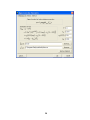
The Sigma Correction Parameters dialog box is shown below, with typical
settings for a HydroScat sensor. The default settings are appropriate for most
cases. The main exception is if chlorophyll levels are high and can be estimated, it
may be appropriate to adjust the value of C.
4
Prior to HydroSoft 2.7, the equation for absorption also included a term for pure water.
29
30
8 DATA FILES
For information about retrieving internally logged data from an instrument,
see section 5.4.
Data may be stored in raw form, that is in the form they are transmitted
from an instrument, or in calibrated form, or both. We strongly recommend you
save your raw data files, for two main reasons. First, under some circumstances
you may wish to apply a revised calibration to existing data. Second, raw files
contain some housekeeping information that can be useful for troubleshooting in
the event of a problem. Therefore when collecting data from an instrument,
HydroSoft always saves raw data, and gives you the choice of whether to save
calibrated data simultaneously.
HydroSoft stores data directly to disk whenever a data file is open, even if
it is a new, untitled file. Therefore the size of the files you collect is limited by
your disk space, rather than your RAM, and you are less likely to lose data in the
event of a computer crash. The number of data points you can display in a plot is
limited by RAM, but this limit does not affect the corresponding data files.
8.1 Raw Data
Raw data files contain a literal record of every byte received from an
instrument during the time the file is open. Depending on the instrument type and
its configuration this may consist of hexadecimal numbers, decimal numbers, text
messages, binary data, or a mixture thereof. HydroSoft adds a header at the
beginning of the file with some information about its origin and history, but
applies no formatting whatsoever to the main data. HydroSoft normally names
raw data files with the extension “.RAW”.
8.2 Calibrated Data
HydroSoft normally names calibrated data files with the extension “.DAT”.
Calibrated data files start with a header identifying the origin and type of the data,
followed by lines of comma-separated values. Below is a sample from a
HydroScat-2 data file.
The heading [SigmaParams] signals the start of parameters relating to the
sigma correction, which is described in section 7.4. The parameters after the
heading [bbParams] are those described in section 7.3.
31
The strings under the heading of [Channels] are the labels that appear in the
Channels panel of HydroSoft data windows (see section 4.1.2). The line marked
as [ColumnHeadings] contains a comma-separated list including identifiers for
each parameter in the data lines.
32
[Header]
HydroSoftVersion=2.7
CreationDate=05/14/04 22:14:06
FileType=dat
DeviceType=HydroScat-2
DataSource=d:\HSoft\Test Files\4-5-00.raw
CalSource=d:\Instrument Calibration Files\hs2\H2000324 000405.cal
Serial=H2000324
Config=W1B3R1S0I2
[SigmaParams]
ad400=.01
aStarFile=C:\Program Files\HOBI Labs\aStar.csv
awFile=C:\Program Files\HOBI Labs\aw.csv
bbTildeValue=.015
C=.1
gammad=.011
gammay=.014
ExponentialFit=False
[bbParams]
PureWaterModel=Custom
bb0=0
beta0=0
lambda0=525
gammaLambda=4.32
chi=FromCalFile
[Channels]
"bb470"
"bb676"
"fl676"
[ColumnHeadings]
Time,Depth,bb470,bb676,fl676,bb470uncorr,bb676uncorr,fl676uncorr
[Data]
36622.0810034722,5.349999,2.200723E-02,.0173337,5.193215E04,.0188008,.0160407,5.193215E-04,
Regardless of instrument type, time and depth appear as the first two
parameters in the data lines. Times are stored as double-precision real numbers
corresponding to the number of days since midnight, January 1, 1900. This is the
native format of dates and times in Microsoft Excel.
8.3 Raw Decimal Data
Raw decimal data may be needed for troubleshooting, or to review
housekeeping data such as supply voltages and instrument temperature.
HydroSoft generates decimal data files from raw files, but cannot read or graph
them.
33
9 PROCESSING RAW DATA FILES
Processing in HydroSoft consists of applying the appropriate calibration
data and user-selectable parameters as described in section 7. This happens
automatically whenever you view or download data from an instrument, or open a
raw data file for viewing. However you can also process files in batches, without
displaying them, in two ways:
1) With the Process Raw Files command on the Processing menu
2) By calling HydroSoft from the Windows command line
9.1 The Process Raw Files Command
The Process Raw Files command on the Processing menu allows rapid
processing of multiple raw files, converting them either to “.dat” files containing
fully-calibrated data, or “.dec” files containing raw data in decimal (rather than
hexadecimal) form. These processes are controlled by the following dialog box:
35
9.1.1
Making Calibrated Data Files
When Make Calibrated Files is selected, you need to specify a calibration file
to be used. You can type the path and name of the file directly, or use the Browse…
button to open an Open File dialog box. You must also select the file or files you
wish to process, using the familiar drive and directory list controls. The list in the
center right of the dialog box shows those files that are contained in the drive and
directory you specify, and whose names match the File name filter you specify. If
Show only files matching calibration file is checked, as it is by default, HydroSoft will
check the contents of the files and list only those that contain data from the
instrument type and serial number specified by the selected calibration file.
You can select a single file or an arbitrary group of files from the list.
Select a contiguous group of files by shift-clicking, and select or deselect
individual files by Ctrl-clicking. Once you start processing, all the selected files
will be processed.
The processed files will use the same base names as the source files, with
their extensions set to “.dat”. They will be saved in the directory you specify. If
36
you wish to save them in the same directory as the raw files from which they are
generated, you can avoid having to select that directory manually by checking the
Same location as raw files option.
9.1.2
Making Raw Decimal Files
The process for making raw decimal files from hexadecimal files is
identical to that described above, except that there is no need for a calibration file.
Controls relating to the calibration file will thus be disabled.
Depending on the instrument you are using, and its current configuration,
its files may not contain hexadecimal data. If you select files without hexadecimal
data, they may appear to be converted but the resulting “.dec” files will be empty.
However the original file are always preserved.
When you select the Make Raw Decimal Files option, an additional Include
Housekeeping checkbox will appear, allowing you to control whether housekeeping
data will be included in the file in addition to the primary optical data.
9.2 Command Line Processing
You can call HydroSoft from the Windows command line, or from a batch
file, with the syntax:
HydroSoft datafile;calfile
where datafile is the full path and name of a single data file to process, and calfile
is the full path and name of the calibration file to apply. Note that the file names
are separated from each other by a semicolon. HydroSoft will process the given
file according to the most recent settings in the Backscattering Parameters and
Sigma Parameters dialogs, then exit. If successful, it will create a “.dat” file with
the same name and in the same directory as the source data file.
37
10 MENU COMMAND REFERENCE
10.1 File Menu
10.1.1
New
New causes the currently open data file, if any, to be closed, and a new
empty file to be created. Because new HydroSoft data originate only from
instruments, new files can be created only when an instrument is connected to the
data window. If you select this command when no instrument is connected, it will
first present the Connection dialog box (also see 5.1.1). If you have selected the
Request user to name files when the are created option in the Preferences dialog box
(see 10.1.6), you will be prompted to enter a name and location for the new file,
and to specify whether a calibrated data file will be saved. If not, or if you click
the Save Later button in the File Name dialog box, the data will be saved in an
untitled file and you will be prompted for this information at the time the file is
closed.
10.1.2
New Window
Opens a new, empty data window (section 4.1).
10.1.3
Open
Allows you to display an existing raw or calibrated data file. It presents a
dialog box with familiar controls for selecting the drive and directory in which to
browse, and the type of files to list. Although HydroSoft by convention saves raw
and calibrated files with the “.raw” and “.dat” extensions, respectively, it does not
require these extensions in order to read files correctly.
In order to open a raw data file, HydroSoft requires that an appropriate
calibration file be loaded. If the currently loaded calibration does not match the
data in the file you select, HydroSoft will offer the opportunity to select a different
calibration, or to cancel the operation.
10.1.4
Save As
Opens a dialog box through which you specify the name and location for a
file containing the currently displayed data.
If the current data are from a connected instrument, both the current data
and subsequently received data will be automatically saved into the file you
specify. If the data are from an existing file, a new copy of the data will be
created.
39
Depending on the origin of the data you may have the option of saving
either a raw file, calibrated file, or both:
•
Data from a raw file can be saved as raw, calibrated or both.
•
Data from a calibrated file can only be saved as calibrated.
•
Date from an instrument must be saved as raw, but may also be
saved as calibrated.
10.1.5
Close
Closes the currently displayed graph and corresponding file. If the data in
the graph are from a connected instrument, and have not yet been saved, you will
be prompted to do so.
10.1.6
General Preferences
Opens the following dialog box.
The Connect when program starts options control whether HydroSoft will
automatically attempt to connect to an instrument when it starts up. For a
complete description, see 5.1.6.
HydroSoft keeps a record of the calibration file you most recently selected.
If Automatically recall last selected calibration file is checked, HydroSoft will load this
40
file each time you restart the program. If not, no calibration will be loaded until
you explicitly select it. For more about loading calibrations, see 7.1.
If Request user to name files when they are created is checked, HydroSoft
will present the Save As dialog box whenever you create a file with the New
command. In some deployment circumstances it is preferable to name a file and
designate its location when it is first opened rather than when it is closed, as is
more conventional. Once a file is named, HydroSoft continuously saves its data
so that it is not necessary for the user to save it again before closing.
The number of data points graphs in HydroSoft can hold is limited to avoid
excessive use of system memory. The Maximum samples in a graph setting controls
this limit. Normally it can be set quite high, but if HydroSoft strains the memory
capacity of your computer you may choose to reduce it. Note that the limit on
points in a graph does not limit the number of data lines saved in files. The only
limit on how large data files may grow is available space on the disk on which
they are saved.
Finally, the Preferences dialog provides space to enter comments that will
be saved in the header of every data file you create. For example, you may wish
all files associated with a particular deployment to include the same identifying
information.
10.1.7
Print Graph
Prints the current window’s graph after presenting the following dialog
box.
41
10.1.8
Export Graph
Saves an image of the current graph into a graphics file, in one of the
following formats:
•
bitmap (.bmp)
•
Windows metafile (.wmf)
•
Enhanced metafile (.emf)
•
JPEG (.jpg)
JPEG format is not particularly well suited to line graphics, but is offered
since it is widely used and can produce a high degree of compression. HydroSoft
offers three levels of JPEG compression. The most compact files have the lowest
quality, but are generally still quite legible.
10.1.9
Close Window
Closes the current data window and any accessory windows associated with
it.
10.1.10 Exit
Closes all HydroSoft windows (first prompting you to save any unsaved
data) and quits the program.
10.2 Instrument Menu
When an instrument is connected to a data window, the title of this menu
changes to the instrument type, for example HydroScat-6. The menu title is
Instrument when no instrument, or one of unknown type, is connected.
10.2.1
Connect
Opens a dialog box in which you specify how to connect to an instrument
through the computer’s COM port. See section 5.1.1 for details. HydroSoft must
go through the connection process before it can communicate with an instrument,
although it may be set to do this automatically when it starts up (see section
10.1.6).
10.2.2
Change Baud Rate
Opens a window in which you can select a new baud rate for
communication between the currently connected instrument and your computer.
Also see section 5.6
42
10.2.3
Show Terminal
Opens a terminal window that displays the raw output from a connected
instrument. In the terminal window you can also type commands to the instrument
and view its responses. This is not required for routine operation. Each data
window to which an instrument is connected can have its own terminal window.
See section 4.3 for details.
10.2.4
Disconnect
Severs communication with a connected instrument, and closes the
computer’s COM port. Before disconnecting, offers the opportunity to put the
instrument to sleep.
10.2.5
Reset
You should only need to use Reset in the unusual case of an instrument that
will not wake up or communicate normally. After asking you to confirm the
command, it sends a signal intended to reboot the controller in a connected
instrument. Specifically, it asserts a continuous logical high on the RS232
transmit line for a period you specify. The default period is 90 seconds, which is
sufficient to reset most HOBI Labs instruments. Note, however, that the COM
ports of some computers, especially laptops, do not produce enough voltage to
activate this function on some a-Beta and c-Beta instruments. If the reset
command fails, you may need to apply a voltage directly to the instrument’s
connector.
After a reset, you may need to use the Connect command to re-establish
communications at the instrument’s default baud rate, and you may also need to
allow the instrument some time to initialize itself before it will respond to
connection attempts. The longest time, about two minutes, is required by a c-Beta
or a-Beta with full memory. In most cases the required time will be much shorter.
10.2.6
Start/Stop
The name of this command changes depending on whether the connected
instrument is currently sending data. Start instructs the instrument to begin
sending data in accordance with its own sampling schedule (see 5.3), and Stop
instructs it to cease. If no instrument is connected when you select Start,
HydroSoft will open the Connect dialog box (section 5.1.1).
10.2.7
Sleep/Wake
The name of this command changes depending on the current state of the
instrument. Sleep puts the connected instrument into its low-power sleep state,
43
from which it must be woken with the Wake command before further
communication is possible (unless you Connect to the instrument, which also
wakes it).
10.2.8
Sampling Options
Opens a dialog box that allows you to set the parameters governing the
sampling schedule of the connected instruments. See section 5.3 for details.
10.2.9
Set Date/Time
Opens a dialog box that allows setting the date and time of a connected
instrument’s real-time clock. See section 5.5 for details.
10.2.10 Get Data From Instrument
Opens a dialog box that displays a directory of casts stored in the connected
instrument’s memory, and allows downloading data into computer files. See
section 5.4 for details.
10.2.11 Calibrate
Opens a window with controls for collecting and processing backscattering
calibration data. Details are contained in a separate Backscattering Calibration
Manual, available from HOBI Labs.
10.2.12 About Instrument
Opens a window showing the type, serial number and other attributes of the
currently connected instrument (if any).
10.3 Processing Menu
10.3.1
View Calibration
Opens a dialog box that displays all settings of the current calibration file.
You can also edit the values in this dialog box. For more information see section
7.2.
10.3.2
Select Calibration
Opens a standard file-selection dialog in which you can designate which
calibration file will be used in the current window. See section 7 for details about
calibration files.
Once you select a calibration file using this command, that file becomes the
default for subsequently opened windows. If the current window shows data from
44
a raw file, the data will be recalculated using the newly-selected calibration file.
This does not effect windows other than the one from which the command was
executed.
10.3.3
Save Calibration File
Opens a Save As dialog box with which you can select the name and
location for a copy of the current calibration file to be saved.
10.3.4
Compare Calibrations
Opens a dialog box that displays two calibrations side by side, and their
differences. The first calibration is the one that is in effect in the current window.
You select the second by clicking the Select Cal 2… button.
10.3.5
Process Raw Files
Opens a dialog box through which you can convert raw data files, in batch
fashion, to calibrated or raw decimal files. See section 9.1 for complete details.
10.3.6
Backscattering Parameters
Opens a dialog box in which you can set the parameters used to calculate
the backscattering coefficient, bb. For details see section 7.3.
10.3.7
Sigma Correction Parameters
Opens a dialog box in which you can set the parameters used to adjust
backscattering measurements to compensate for attenuation in the water. See
section 7.4 for complete details.
10.4 Graph Menu
10.4.1
Plot Vs. Depth
Sets the graph in the current window to display data as a depth profile.
That is, the measured parameters will be displayed with reference to the horizontal
axis, and the vertical axis will indicate depth.
10.4.2
Plot Vs. Time
Sets the graph in the current window to display a time series. That is, the
measured parameters will be displayed with reference to the vertical axis, and the
horizontal axis will indicate time.
45
10.4.3
Plot Vs. Wavelength
Opens a spectral plot window as described in section 6.6.
10.4.4
Zoom In
Adjusts the axes of the graph in the current window to expand the center
portion of the graph by a factor of 2.
10.4.5
Zoom Out
Adjusts the axes of the graph in the current window to double the displayed
data range (reducing the apparent extent of the data by a factor of 2).
10.4.6
Previous Zoom
Sets the axes of the graph in the current window to the settings they had
before the last command that adjusted the zoom.
10.4.7
Auto Scale
Sets the axes of the graph in the current window to encompass the entire
current data set.
10.4.8
Apply Default Properties
Sets all colors, markers and axis settings in the current graph to their default
values. Default values are set through the Graph Properties dialog box. See section
6.2 for details.
10.4.9
Properties
Opens the Graph Properties dialog box, allowing adjustment of axis settings,
display colors, and other aspects of graph appearance. See section 6.1 for
complete details.
10.5 Window Menu
The Window menu lists currently open Data windows, and also any
Terminal, Spectral Plot, and Calibration windows associated with each Data
window. Selecting a window from this menu brings it to the front. The menu also
includes items for arranging multiple windows in a stack, or tiling them side-byside or one above the other.
46