1
T H E P R O F E S S I O N A L E Q U I P M E N T - - - - - - - - - - - - - - - - - - | U S E R ’S M A N U A L |
T H E P R O F E S S I O N A L E Q U I P M E N T - - - - - - - - - - - - - - - - - - | U S E R ’S M A N U A L |
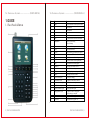
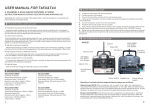
1.GUIDE
NO.
Name
Function
1.1Face Panel & Button
1
MENU
To show main menu or return to previous menu
2
F1
Function Button
3
F2
Function Button
4
F3
Function Button
5
F4
Function Button
6
EXIT
7
▲▼
8
Mute
S ound On/Off Switching
9
SCAN
Quick search for DVB-S
10
M.INFO
S how 5 channe ls signal information for DVB-T
11
TV/Radio
S witch between TV Channel and Radio Channel
12
B.Light
For LCD Screen on or off switching
13
+/-
To turn on or off the sound for signal quality
14
INFO
S how information of curr ent program
15
Antenna IN
Connecting to the antenna for DVB-T
16
Power Switch
P ower Switch for machine power
17
USB P ort
P ort for Upgrading or connecting to multimedia
18
LNB IN
Connecting to the dish for DVB-S
19
Power Connection port
P ort for power charging
20
Power Indicator Light
The light is on when meter is turned on
21
22K Switch Indicator Light
22K Switch is on when it lights
22
13/18V Indicator Light
To show H/V switch output
23
Signal Lock Indicator Light
Locked signal when it lights
24
Charging Indicator Light
The light is on when it’s charging and
25
0-9 Numerical Button
To input numer for setting par ameters
26
LCD Screen
S how menu and TV program…etc
To cancel se lection or exit from current menu
OK
Arrow for Cursor Moving
OK for Confirming
off when charging is completed.
z
2 | DVB T&S COMBO METER
DVB T&S COMBO METER | 3