1
ManWinWin – User’s Manual
2. ManWinWin interface
2.1. Installation and Start up
Installation with MS Access database is made by download from www.manwinwin.com. No MS Access
license is required. Just follow the instructions. For SQL Server version you require Navaltik Management
assistance or IT expertise.
If you start ManWinWin with Access database it is easy to convert it later for SQL Server should you
prefer to operate in this platform. Starting with Access is, in fact, a good methodology to start up.
On installation some folders are automatically created in order to facilitate your day-to-day work,
technical assistance by Navaltik and data safety procedures. We recommend that you do not change these
locations: In the <My Documents> folder a <ManWinWin Software> folder is created and, inside it, the
<ManWinWin> folder with the sub-folders:
-
<Database> - to contain your database (one or more .mdb files) ;
<Reports> - contains all the software printing reports. It takes 3 to 4 Mb of disk space.
(Remember that it may contain also your tailor made reports);
<Images> - for the User to place pictures associated to equipments, WOs, etc;
<Documents> - for the User to place documents associated to equipments, WOs, etc. such as
manuals, drawings, certificates, etc.).
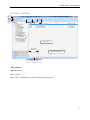
Start up the application in the Icon created at installation in your Desktop or in the folder ManWinWin
Software of the Start menu. Introduce User: DEMO and Password: demo
For the safety of the information you should regularly copy all the contents of the <ManWinWin
Software> folder to another PC or data storage device in another location.
To operate in multi-user environment you should copy the folder <ManWinWin Software> to the Server
PC and redirect the path to the database in each PC accessing the database in the option File /
Database.
The application runs in different languages. Select preferred language in File / Preferences.
4