1
ManWinWin – User’s Manual
2.3. Symbols and Icons
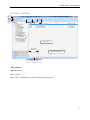
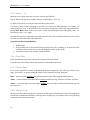
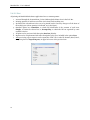
Along the application you will find the following symbols and icons in tool bars and menus.
Icon
6
Function
Description
New
To add a new record to the database.
Maintenance Item
Maintenance object individually considered for maintenance.
WO
Work Order: Document specifying the planned or performed
maintenance work.
Stock Item
Item in the Materials Master File that can be used in WOs and
related to maintenance items.
Cost Document
Document containing cost information, either an official
accounting document or an internal one. Each line is a cost item.
Cost Item
A line in a Cost Document allocated to a Maintenance Item, WO,
Cost Centre or Client.
Fuel Supply
Fuel Supply Record to a maintenance item (Vehicle).
Man Hours
MH Record in a WO; Item; Cost Centre or Client.
Stock Item Record
Stock Item Record in a WO; Item; Cost Centre or Client.
Other
Other Costs in a WO; Item; Cost Centre or Client.
Database
Change the database in use.
Print
Print Records exhibited in the Main Screen.
Open
Open a Record in the Main Screen and Edit, if necessary.
Repeat
Copy a complete Record in the Main Screen, if necessary Edit, to
generate a New identical Record.
Delete
Delete a Record in the Main Screen.
Go To
After selecting a given Record transfers the Record to the
working area.
Close
Closes a form a returns to the previous form.