1
9. ADVANCEDSOFTWAREFEATURES
1. ScanTools
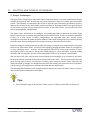
The Smart Tether software can show a representation of the area scanned by
various imaging hardware you may be using underwater, such as a camera or
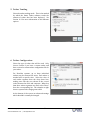
SONAR held by a diver or mounted to an ROV. The scan tools buttons toggle
betweenshowingonlythetether,showingthecurrentCameraorSONARfieldof
view, or showing the Camera or SONAR scan history. A mode is selected by
pressing either the Camera or SONAR button multiple times to toggle through
eachoption.
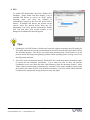
a. FieldofView
A single cone shape indicates field of view mode. In field of view mode, the Smart
Tethersoftwarewillshowyouthecurrentfieldofview.
b. ScanHistory:
Multipleconeshapesindicatescanhistorymode.Inscanhistorymode,theSmart
Tether software will show you all the area that has been covered by either device
duringthecurrentscan.Thiscanbehelpfulinensuringyouhavecoveredanentire
scan area. The scan history colored area gets darker the longer you remain in an area, so an
area that is lightly colored may have only been briefly scanned, while a darkly‐colored area
indicates a more thorough inspection. The scan history will be cleared whenever the tether
operationisstoppedandrestarted.
KCF Technologies, Inc. | 814.867.4097
www.smarttether.com | [email protected]
21














![Intergraph Geomedia [6.1-2013] User manual](http://vs1.manualzilla.com/store/data/005689587_1-58c82d14f3ba8ebe92b5c45af00d079c-150x150.png)