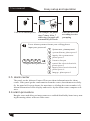
1
User manual
System setting
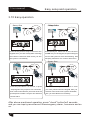
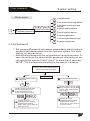
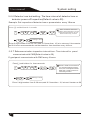
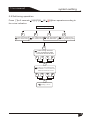
5.8 Set zone attribution
Press [*]3seconds
indication.
[9][8][7][6]
[#]
[6]then operate follow the voice
Zone attribution setting
2
1
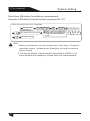
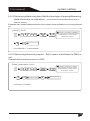
Two, set zone siren type
One ,set zone attribution
#
#
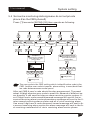
enter one to forty zone number
to modify, press back key to exit,
press confirm key to confirm.
3
enter one to forty zone number
to modify, [00] for emergency button
press back key to exit,
press confirm key to confirm.
2
3
#
#
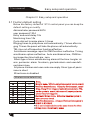
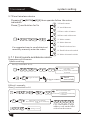
Chose zone type: 0, disable the zone.1, delay zone.
2,perimeter alarm zone.3, burglar alarm zone.4,
emergency alarm zone.5, fire alarm zone;
6, gas leak alarm;7,keyzone;8,door bell zone
zone.press back key to exit,
press confirm key to confirm.
5
Burglar alarm zone
emergency alarm zone
fire alarm zone
#
6
7
8
Door bell zone
4
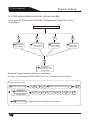
Chose zone type siren: one, pedal
point, two pulse tone; three, mute.
Press back key to exit,
press confirm key to confirm.
Key zone
3
gas zone
2
perimeter zone
permanent bypass
1
delay zone
0
2
1
2
#
3
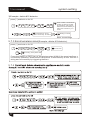
Setting is saved
Note:00 is only for emergency button
of the panel or remote
Setting is saved
Key zones: only for wired zones(33-40), used for access control. when set as
key zones, the burglar function will be disable.
Doorbell zones: only for wireless zones(1-32), when the system is armed,
doorbell zones type is perimeter.
32