1
Get started
Get to grips with the basics, and have your phone up and running in no time.
Keys and parts
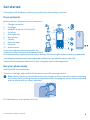
Explore the keys and parts of your new phone.
1
2
3
4
5
6
7
8
9
10
Charger connector
Flashlight
Headset connector (3.5 mm AHJ)
Scroll key
End/Power key
Microphone
Call key
Selection keys
Earpiece
Antenna area
Avoid touching the antenna area while the
antenna is in use. Contact with antennas affects
the communication quality and may reduce battery life due to higher power level during operation.
The following headsets have been approved by Nokia for use with this device: WH-108.
Some of the accessories mentioned in this user guide may be sold separately.
Get your phone ready
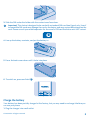
Insert the SIM card and battery.
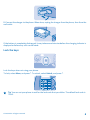
1. Press on the logo, and carefully lift the back cover off by the top corners.
Note: Switch the device off and disconnect the charger and any other device before removing
any covers. Avoid touching electronic components while changing any covers. Always store and
use the device with any covers attached.
2. If the battery is in the phone, lift it out.
© 2013 Nokia. All rights reserved.
4