1
30
CHAPTER 5. FEATURES
5.11
Windows List
DForD TEXCoding supports multi-document user interface, users may open several
documents and each document takes a tab. But as you can see, the foreground
frame may not display all tabs if the user opens many documents, it is not very
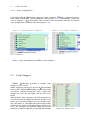
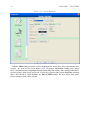
convenience to locate the specific tab directly. DForD TEXCoding provides Windows List to resolve this issue. Users may open the Windows List by selecting menu
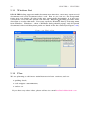
item Window - Windows..., then a Windows dialog should popup, and all opened
documents’ titles and filesystem paths are listed in the list control(see Figure 5.20).
Figure 5.20: Window List
5.12
Plan
We are planning to add more useful features in later versions, such as:
• spelling check;
• code snippet customization;
• and so on.
If you have any other ideas, please tell us via e-mail [email protected].