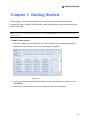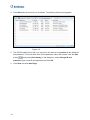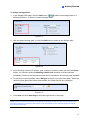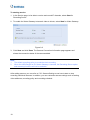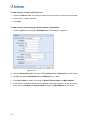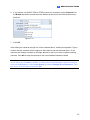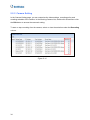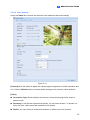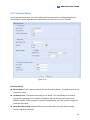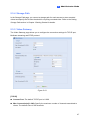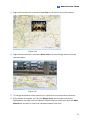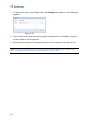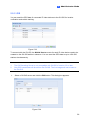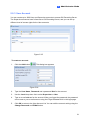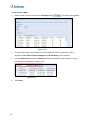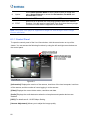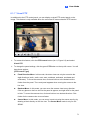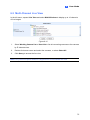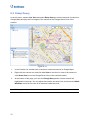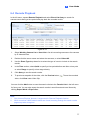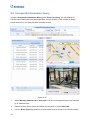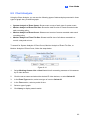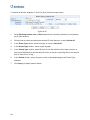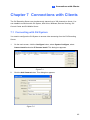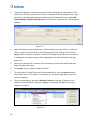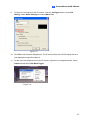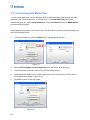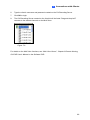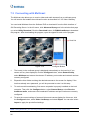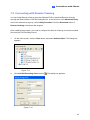
1
GV-Recording Server User's Manual V1.2.0.0 RSV12-A-EN © 2013 GeoVision, Inc. All rights reserved. Under the copyright laws, this manual may not be copied, in whole or in part, without the written consent of GeoVision. Every effort has been made to ensure that the information in this manual is accurate. GeoVision, Inc. makes no expressed or implied warranty of any kind and assumes no responsibility for errors or omissions. No liability is assumed for incidental or consequential damages arising from the use of the information or products contained herein. Features and specifications are subject to change without notice. GeoVision, Inc. 9F, No. 246, Sec. 1, Neihu Rd., Neihu District, Taipei, Taiwan Tel: +886-2-8797-8377 Fax: +886-2-8797-8335 http://www.geovision.com.tw Trademarks used in this manual: GeoVision, the GeoVision logo and GV series products are trademarks of GeoVision, Inc. Windows and Windows XP are registered trademarks of Microsoft Corporation. February 2013 Preface Welcome to the GV-Recording Server User’s Manual. This Manual is designed for the following version: Product Version GV-Recording Server V1.2.0.0 i Contents Preface........................................................................... i Naming and Definition..................................................v Chapter 1 Introduction ............................................... 1 1.1 System Requirements ............................................................................................. 4 1.1.1 Minimum System Requirements.................................................................... 4 1.1.2 Optimal System Requirements...................................................................... 5 1.1.3 Recommended Hard Disk Requirements ...................................................... 7 1.1.4 Network Requirements.................................................................................. 8 1.1.5 GV-USB Dongle .......................................................................................... 10 1.1.6 Compatible Versions of GeoVision Applications .......................................... 10 Chapter 2 Installation ................................................11 2.1 Installing the GV-Recording Server ........................................................................11 2.2 Starting the GV-Recording Server ..........................................................................12 Chapter 3 Getting Started .........................................15 Chapter 4 Active and Passive Mode ........................19 4.1 Active Connection ..................................................................................................20 4.2 Passive Connection................................................................................................20 Chapter 5 Administrator Mode .................................23 5.1 Information .............................................................................................................25 5.1.1 Camera Connection Information.................................................................. 25 5.1.2 Storage Information..................................................................................... 27 5.1.3 Client Connection Information ..................................................................... 28 5.1.4 Server Information....................................................................................... 29 5.2 Camera ..................................................................................................................30 5.2.1 Install Camera............................................................................................. 30 5.2.2 Camera Setting ........................................................................................... 34 5.2.3 Motion Detection ......................................................................................... 42 5.3 Server.....................................................................................................................44 ii 5.3.1 Service ........................................................................................................ 44 5.3.2 Install Wizard .............................................................................................. 44 5.3.3 General Setup............................................................................................. 45 5.3.4 Storage Path ............................................................................................... 47 5.3.5 Video Gateway............................................................................................ 47 5.3.6 Notification .................................................................................................. 49 5.4 Network ..................................................................................................................50 5.4.1 Network....................................................................................................... 50 5.4.2 Port Setting ................................................................................................. 52 5.4.3 Mail Service ................................................................................................ 53 5.4.4 Remote ViewLog......................................................................................... 55 5.5 Advanced Management..........................................................................................56 5.5.1 E-map ......................................................................................................... 56 5.5.2 GIS.............................................................................................................. 59 5.5.3 User Account .............................................................................................. 61 5.5.4 Advanced Query ......................................................................................... 63 Chapter 6 User Mode.................................................64 6.1 Single Live View .....................................................................................................65 6.1.1 Control Panel ............................................................................................... 66 6.1.2 Snapshot of a Live Video ............................................................................ 67 6.1.3 Video Recording.......................................................................................... 67 6.1.4 Picture-in-Picture and Picture-and-Picture View .......................................... 67 6.1.5 Video and Audio Configuration.................................................................... 70 6.1.6 PTZ Control................................................................................................. 70 6.1.7 Visual PTZ .................................................................................................. 71 6.1.8 Camera Name Display ................................................................................ 72 6.1.9 Image Enhancement ................................................................................... 72 6.1.10 GPS Tracking............................................................................................ 73 6.2 Multi-Channel Live View .........................................................................................75 6.3 Emap Query ...........................................................................................................76 6.4 Remote Playback ...................................................................................................77 6.5 Composite Information Query.................................................................................78 6.6 System Log Query..................................................................................................80 6.7 Behavior Log Query................................................................................................81 6.8 Login / Logout Query ..............................................................................................82 6.9 Chart Analysis ........................................................................................................83 iii Chapter 7 Connections with Clients ........................85 7.1 Connecting with GV-System...................................................................................85 7.2 Connecting with Multi View.....................................................................................88 7.3 Connecting with Multicast .......................................................................................90 7.4 Connecting with Remote ViewLog ..........................................................................91 7.5 Connecting with the GV-Control Center..................................................................93 7.6 Connecting with the GV-Mobile Server ...................................................................94 Specifications .............................................................96 Appendix .....................................................................97 A. Settings for Internet Explore 8...................................................................................97 B. RTSP Protocol Support.............................................................................................98 C. Supported IP Devices ...............................................................................................99 D. Installing the Internal USB Dongle ..........................................................................100 E. How to Avoid Network Bottleneck ...........................................................................102 iv Naming and Definition GV-Video Gateway GeoVision video streaming server capable of receiving up to 128 channels from various IP video devices and distributing up to 300 channels to clients. GV-System GeoVision Analog and Digital Video Recording Software. The GVSystem also refers to Multicam System, GV-NVR System and GVHybrid DVR System at the same time. GV-GIS GeoVision Geographic Information System. It is designed for vehicle tracking and location verification. GV-Control Center GeoVision Central Monitoring Station. Remote ViewLog Geovision viewing software that allows you to play back recorded files. Multi View Geovision viewing software. A multi-channel viewer that allows you to view up to 36 channels through network. v 1 Introduction Chapter 1 Introduction The GV-Recording Server is a video streaming server designed for large-scale video surveillance deployments. It can receive and record up to 128 channels from various IP video devices. Through an intuitive Web interface, each IP camera can be configured to record video continuously, upon motion detection, upon I/O trigger or according to a schedule. In addition, it can simultaneously distribute up to 300 channels to its clients which include GV-System (DVR/NVR system), GV-GIS (geographic information system), GV-Mobile Server, GV-Control Center (central monitoring system), and Multi View (viewing software). Using the GV-Recording Server, the desired frame rates can be reached while the CPU loading and the bandwidth usage of IP video devices are significantly reduced. Note: The arrows in the diagram indicate the direction of the connections. Figure 1-1 1 In some areas or countries, you may like to install 3G wireless Internet module (e.g. GPRS/UMTS) on the GV-Video Server or GV-Compact DVR but have the problem to obtain a public IP address from ISP. The Passive connection method of GV-Recording Server can solve the public IP issue by accepting the connection request from the GV-Video Server or GV-Compact DVR, and then distribute the video streaming to clients. 2 1 Introduction Features z Video gateway between IP devices and receiving clients (GV-System, GV-Control Center, GV-GIS, GV-Mobile Server, and Multi View) z Simultaneously receiving and recording up to 128 IP channels z Video distribution for clients up to 300 IP channels z Different recording policies to set each channel to record continuously, upon motion detection, upon I/O trigger or by schedule (recording upon I/O trigger are only for GV-IP devices) z Video playback using Remote ViewLog z Web interface to remotely configure and monitor GV-Recording Server using Internet Explorer, Firefox, Google Chrome and Safari z Support for third-party IP video devices (Sony, Axis, VIVOTEK, Panasonic, HikVision, Arecont Vision) z Support for ONVIF, PSIA and RTSP protocols z Passive and active connection methods with IP video devices (Passive connection only supported by GV-IP devices) z Solution for Mobile DVR (GV-Video Server, GV-Compact DVR) to obtain a public IP address z Bandwidth monitoring z Two-way audio communication (only for GV-IP devices through active connection) For the supported third-party IP video devices, see Appendix C. Supported Third-Party IP Devices. 3 1.1 System Requirements The following is system requirements to run the GV-Recording Server. 1.1.1 Minimum System Requirements Servers meeting the following minimum system requirements have the capacity to receive up to 128 channels and transmit up to 300 channels with the image settings of 1280 x 1024 resolution, 30 fps and H.264 / MPEG4 codec for each channel. OS 64-bit Windows 7 / Server 2008 R2 CPU Core i5 2500, 3.3 GHz Memory 6 GB Dual Channels (without recording) 8 GB Dual Channels (with recording) 16 GB Dual Channels (with motion recording for 3rd party IP devices) Hard Disk 1 GB (for installation) Browser • Internet Explorer 8.0.7600.16385 • Internet Explorer 9.00.7930.16406 • Firefox 3.6.13 • Google Chrome 9.0.597.94 • Safari 5.33.19.4 LAN Gigabit Ethernet X 1 Software .Net Framework 3.5 Hardware • GV-Video Gateway: Internal or external GV-USB Dongle • GV-Recording Server: Internal GV-USB Dongle Note: 1. Memory required varies depending on the number of channels and resolution of videos received. 2. The 1 GB hard disk requirement is for installation of GV-Recording Server only. To see hard disk requirements for recording, please see 1.1.3 Recommended Hard Disk Requirements for more detail. 3. In order to receive 128 channels and transmit up to 300 channels with the image settings of 1280 x 1024 resolution, 30 fps and JPEG codec for each channel, Gigabit Ethernet x 6 is required. 4. For users of Firefox, Google Chrome and Safari, you can only access single live view by using Quick Time player, and you cannot play back recorded files. 5. To see how to install the internal GV-USB Dongle, refer to Appendix D. Install the Internal USB Dongle. 4 1 Introduction 1.1.2 Optimal System Requirements Servers meeting the optimal system requirements have the capacity to perform one of the following: z Receive up to 128 channels and transmit up to 300 channels with the image settings of 1280 x 1024 resolution, 30 fps and JPEG codec for each channel. OR z Receive up to 128 channels and transmit up to 128 channels with the image settings of 1920 x 1080 resolution, 30 fps and JPEG codec for each channel. OR z Receive up to 128 channels and transmit up to 128 channels with the image settings of 2048 x 1536 resolution, 20 fps and JPEG codec for each channel. OR z Receive up to 128 channels and transmit up to 300 channels with the image settings of 1280 x 1024 or 1920 x 1080 resolution, 30 fps and H.264/MPEG4 codec for each channel. OR z Receive up to 128 channels and transmit up to 300 channels with the image settings of 2048 x 1536 resolution, 20 fps and H.264 codec for each channel. OS 64-bit Windows 7 / Server 2008 R2 CPU Core i7 2600, 3.4 GHz Memory 6 GB Dual Channels (without recording) 8 GB Dual Channels (with recording) 16 GB Dual Channels (with motion recording for 3rd party IP devices) Hard Disk 1 GB (for installation) Browser • Internet Explorer 8.0.7600.16385 • Internet Explorer 9.00.7930.16406 • Firefox 3.6.13 • Google Chrome 9.0.597.94 • Safari 5.33.19.4 LAN Gigabit Ethernet X 6 Software .Net Framework 3.5 Hardware • GV-Video Gateway: Internal or external GV-USB Dongle • GV-Recording Server: Internal GV-USB Dongle 5 Note: 1. Memory required varies depending on the number of channels and resolution of videos received. 2. The 1 GB hard disk requirement is for installation of GV-Recording Server only. To see hard disk requirements for recording, please see 1.1.3 Recommended Hard Disk Requirements for more details. For users of Firefox, Google Chrome and Safari, you can only access single live view by using Quick Time player, and you cannot play back recorded files. 3. 4. 6 To see how to install the internal GV-USB Dongle, refer to Appendix D. Install the Internal USB Dongle. 1 Introduction 1.1.3 Recommended Hard Disk Requirements The maximum channels per hard disk for motion recording and the recommended hard disk requirements for 24 hours of round-the-clock recording are listed as below. Motion Res. 1.3 M FPS 30 fps Codec H.264 / MPEG4 Max. channel per HDD Max. channel per HDD and required HDD size Required HDD size (recording 128 ch, 24 hr) Recommended HDD requirements 10 ch 32 ch / 2.5 TB 10 TB 3 TB 7200RPM HDD x 4 (SATA3) 8 ch / 2.7 TB 43.2 TB 3 TB 7200RPM HDD x 16 (SATA3) 21 ch / 2.2 TB 13.5 TB 3 TB 7200RPM HDD x 7 (SATA3) 5 ch / 2.5 TB 64 TB 3 TB 7200RPM HDD x 26 (SATA3) 32 ch / 3 TB 12 TB 3 TB 7200RPM HDD x 4 (SATA3) 4 ch / 2 TB 64 TB 3 TB 7200RPM HDD x 32 (SATA3) JPEG H.264 2.0 M 7 ch 30 fps JPEG H.264 3.0 M Round-the-Clock 10 ch 20 fps JPEG Note: The number of hard drive required varies depending on the write speed of the hard drive and the hard disk size required varies depending on the recorded file size. The recommended hard disk requirement is just for your reference. 7 1.1.4 Network Requirements The server's transmitting capacity varies depending on the number of Gigabit connections. The numbers of Gigabit network cards required to receive 128 channels and transmit 300 channels are listed below according to the resolution of the source video. Resolution FPS Codec 1.3 MP 30 fps H.264 2.0 MP 30 fps H.264 3.0 MP 20 fps H.264 Gigabit Network Cards Required Receiving 128 ch Transmitting 300 ch Gigabit network card x 1 Gigabit network card x 2 (up to 128 ch per card) (up to 150 ch per card) Gigabit network card x 2 Gigabit network card x 4 (up to 64 ch per card) (up to 75 ch per card) Gigabit network card x 1 (up to 128 ch per card) Gigabit network card x 2 (up to 150 ch per card) Note: The data above was determined with a bit rate of 5.2 Mbps for 1.3 MP resolution, 7.5 Mbps for 2 MP resolution and 6.8 Mbps for 3 MP resolution. The network requirements may vary depending on the bit rate of the streams. 8 1 Introduction The deployment of Gigabit connections for transmitting and receiving is suggested as illustrated below. Ensure to run every Gigabit connection on a different network in order to reduce the lag on any network connection. 1 MP / 3 MP Source Video 2 MP Source Video Receiving Transmitting GigaLAN 3, 75 CH IP Video Devices GigaLAN 1, 64 CH GigaLAN 4, 75 CH GigaLAN 2, 64 CH GigaLAN 5, 75 CH Clients GigaLAN 6, 75 CH GV-Recording Server + 6 Network Cards assigned on different networks Note: To avoid network bottleneck, each network card must be assigned a different IP address and subnet mask. Refer to Appendix E. How to Avoid Network Bottleneck for more details. 9 1.1.5 GV-USB Dongle It is required to insert the GV-USB Dongle to the server, so that the GV-Recording Server software can be enabled. The GV-USB Dongle supports connection with up to 128 IP channels. You can select a dongle with GV-Video Gateway functions only or a GV-Recording Server dongle to access all functions. GV-Video Gateway dongle supports both third-party IP devices and GV-IP devices, and comes in two types, internal and external dongles. For GV-Recording Server, you can select an internal dongle to enable GV-IP video devices only or a dongle to include both third-party IP devices and GV-IP devices. GV-Video Gateway Only (without recording functions): Internal or external USB dongle z Third-party IP devices (Includes GV-IP video devices): 128 IP channels. GV-Recording Server (full functions available): Internal USB dongle z GV-IP video devices only: 32, 36, 40, 44, 48, 52, 56, 60, 64, 68, 72, 76, 80, 84, 88, 92, 96, 100, 104, 108, 112, 116, 120, 124, 128 IP channels. z Third-party IP devices (Includes GV-IP video devices): 32, 36, 40, 44, 48, 52, 56, 60, 64, 68, 72, 76, 80, 84, 88, 92, 96, 100, 104, 108, 112, 116, 120, 124, 128 IP channels. Note: The internal type of USB dongle can provide the Hardware Watchdog function to the GV-Recording Server by restarting the computer when Windows crashes. To see how to install the internal GV-USB Dongle, refer to Appendix D. Install the Internal USB Dongle. 1.1.6 Compatible Versions of GeoVision Applications The GV-Recording Server is only compatible with the following version: z GV-System, GV-Control Center, Multi View, Multicast: version 8.5.6 or later. z GV-GIS: version 3.0 or later. z GV-Mobile Server: version 1.3 or later 10 2 Installation Chapter 2 Installation 2.1 Installing the GV-Recording Server It is recommended to install the GV-Recording Server on a dedicated computer or server. Before installing the GV-Recording Server, you need to plug the GV-USB Dongle to the computer, and then install the dongle driver. Follow the steps below to install the driver and the GV-Recording Server. 1. Insert Software DVD to the computer. It runs automatically and a window appears. 2. To install USB driver, select Install or Remove GeoVision GV-Series Driver and click Install GeoVision USB Devices Driver to start. 3. To install GV-Recording Server, select Install GeoVision GV-Recording Server and then select GeoVision GV-Recording Server. Figure 2-1 11 2.2 Starting the GV-Recording Server After installing GV-Recording Server, the GV-Recording Server icon will appear in the system tray. Follow the steps below to access the Web interface of GVRecording Server. 1. Right-click the GV-Recording Server icon, select Login, and type the login name and password. The default login name and password for the administrator account are admin. 2. The default HTTP port is 80 and the command port is 20000. To customize the port number, right-click the GV-Recording Server icon and select Configure. This dialog box appears. Figure 2-2 3. Customize the port number if needed and click OK. 4. Right-click the GV-Recording Server icon and select Start Service. 12 2 Installation 5. After the GV-Recording Server icon turns green, right-click the icon again and select Access Web Interface. You can also access the Web interface from a remote computer by typing the IP address of GV-Recording Server in the Internet browser. The Web interface login page appears. Figure 2-3 6. Type the ID and Password. The default login name and password for the Administrator are admin. 7. Type the verification number shown in the image. 8. Click Login. The GV-Recording Server Web interface is now displayed. 13 To access the Web interface from a remote computer, start the Internet browser and type the IP address or the domain name of the GV-Recording Server in the Location/Address field. If the default HTTP port has been changed, type a colon and the port number after the IP address, for example, Http://192.168.3.199:81/. After the login page appears, follow steps 6 to 8 to log in the Web interface. Note: 1. To enable the updating of images in Microsoft Internet Explorer, you must set your browser to allow ActiveX Controls and perform a one-time installation of GeoVision’s ActiveX component onto your computer. 2. If the GV-Recording Server is installed behind a firewall or router, you may need to open these default ports: HTTP port 80, server connection port (Active connection port) 11000 and Passive connection port 50000, remote playback (Remote ViewLog) port 5552. 3. The Command port is used for running the recording server. By default, 11 ports are reserved, ranging from 20000 to 200010, for the program use. If other program is using the default ports, you may need to change the Command port value. The GV-Recording Server icon in the system tray also allows you to change the database storage path, back up settings and restore settings. 1. To change the location of the database path, right-click the GV-Recording Server icon to select Configure, select a new location and click Move Database. 2. To back up settings, right-click the GV-Recording Server icon and select Backup Settings. Select to back up Basic, Host List, E-Map and/or Password settings and click OK. 3. To restore settings, right-click the GV-Recording Server icon and select Restore Settings. Select the backed up file and click OK to begin restoring settings. Note: You can only access the Configure and Restore Settings button when GVRecording Server service is stopped. To stop service, you will be required to log in using the Administrator account. 14 3 Getting Started Chapter 3 Getting Started When logging in the GV-Recording Server for the first time, the Install Wizard will be prompted to help you add IP video devices, assign storage path to store recorded files and start connections. Note: To start the Install Wizard manually, click Install Wizard under the Server section in the left menu. To add IP video devices: 1. When the Install Wizard is launched, the GV-Recording Server automatically detects available IP video devices under LAN. This dialog box appears. Figure 3-1 2. If you have multiple network interface cards, use the drop-down list to select one and click Search. 3. Select the IP video devices you want to establish active connection with. 15 4. Click Add and map the device to a channel. The Working Camera List appears. Figure 3-2 5. The GV-Recording Server will try to connect to the devices using admin as the default ID and password. To connect with other ID and password, select the camera, click the Edit button and select Host Setting. In the dialog box, select Change ID and Password, type a new ID and password and click OK. 6. Click Save and click Next Page. 16 3 Getting Started To assign storage paths: 1. In the Storage Path page, click the Add button to add a new storage folder in a different disk drive, or select an existing storage folder. Figure 3-3 2. Use the default storage path, or click the Add button to select a new storage path. Figure 3-4 3. In the Working Camera List section, type a range of camera number and click the Select button. You can also select the Working Camera List checkbox to select cameras individually. Videos of the cameras selected will be recorded to the storage path indicated. 4. To specify a recycle threshold, select Recycle and type a minimum free space. When the remaining free space falls below the threshold, the oldest files will be overwritten. Figure 3-5 5. Click Save and click Next Page at the lower-right corner of the page. Note: When multiple hard disks are added to a storage group, recycling of the oldest files will begin when the remaining free space of all hard disks in the storage group fall below the recycle threshold. 17 To starting service: 1. In the Service page, to be able to receive and record IP channels, select Start for Recording Server. 2. To enable the Video Gateway to transmit video to clients, select Start for Video Gateway. Figure 3-6 3. Click Save and click Done. The Camera Connection Information page appears and shows the connection status of the camera added. Note: 1. The default recording policy is round-the-clock recording. 2. When the USB Dongle for GV-Video Gateway is inserted, the Recording Server option and recording functions will not be available. After adding camera, you can refer to 5.2.2 Camera Setting to see how to start or stop recording individual cameras. In addition, you can customize camera settings such as setting video attributes, recording policy and recording schedule. 18 4 Active and Passive Mode Chapter 4 Active and Passive Mode The GV-Recording Server is a proxy server on a network that can receive and record up to 128 IP video channels as well as transmit up to 300 IP video channels to clients simultaneously. There are two ways to establish connection with IP video devices, active connection where GV-Recording Server initiates the connection and passive connection where the GV-IP video device initiates the connection. Figure 4-1 Note: Passive connection is only supported for GV-IP devices. 19 4.1 Active Connection There are multiple ways to actively connect to IP video devices from GV-Recording Server. You can refer to Chapter 3 Getting Started and simply follow the steps in Installation Wizard to actively add IP video devices. For other ways to actively add IP video devices or to customize camera settings, refer to 5.2.1 Install Camera and 5.2.2 Camera Setting. 4.2 Passive Connection To create passive connection, the GV-Recording Server must be configured to allow connections from GV-IP video devices. Passive connection to GV-Recording Server is only supported for GV-IP devices. To allow passive connection on GV-Recording Server: 1. In left menu, select General Setup. 2. Select Allow Geo IP Device Login. The default ID and Password to log onto the GVRecording Server is admin, and the default port value is 50000. If you change the ID and Password, they must match the same settings configured on the GV-IP device (See Figure 4-3). Figure 4-2 3. Click Save. 20 4 Active and Passive Mode To access GV-Recording Server on GV-IP devices: The GV-IP device must also be configured to access the GV-Recording Server. 1. Access the Video Gateway / Recording Server setting page on the Web interface of the GV-IP device. Figure 4-3 2. Select Activate Link. 3. Type IP address or domain name of the GV-Recording Server. 4. Keep default port number as 50000. Otherwise modify the port number to match the connect port specified in General Setup page on the GV-Recording Server (See Figure 42). 5. Type User Name and Password to log onto the GV-Recording Server. These user name and password must match the settings configured on the GV-Recording Server. The default values for both login username and password are admin. 6. Click Apply to start connection. When the connection is established, the following message will be displayed at the bottom of the Web interface. Figure 4-4 21 To start passive connection on GV-Recording Server: 1. On the GV-Recording Server, select Install Camera in the left menu. This dialog box appears. Figure 4-5 2. Click the IP Device List button on the Working Camera List. The passive connection is listed as Passive Mode under the Connection Type. Figure 4-6 3. Click Add and select a channel. The IP device will be added to the Working Camera List. 4. Click Save. 5. In the left menu, click Service and select Start to enable the Recording Server and Video Gateway services. 6. Click Save to start services. 22 5 Administrator Mode Chapter 5 Administrator Mode The Administrator has access to all configurations in GV-Recording Server. On the left side of the Web interface, five categories of configurations are listed in a tree menu: Information, Camera, Server, Network and Advanced Management. Figure 5-1 23 List of Menu Options Find the topic of interest by referring to the sections below. 5.1 Information 5.1.1 5.1.2 5.1.3 5.1.4 5.2 Camera 5.2.1 Install Camera 5.2.2 Camera Setting 5.2.3 Motion Detect 5.3 Server 5.3.1 5.3.2 5.3.3 5.3.4 5.3.5 5.3.6 Service Install Wizard General Setup Storage Path Video Gateway Notification 5.4 Network 5.4.1 5.4.2 5.4.3 5.4.4 Network Port Setting Mail Service Remote ViewLog 5.5 Advanced Management 5.5.1 5.5.2 5.5.3 5.5.4 Emap GIS User Account Advanced Query 24 Camera Connection Information Storage Information Client Connection Information Server Information 5 Administrator Mode 5.1 Information This section introduces how to look up camera connection information, storage information, client connection information and server information. 5.1.1 Camera Connection Information The Camera Connection Information page shows the connection status of all the IP cameras added to the Working Camera List and allows you to watch the live video of the connected camera. Figure 5-2 The controls in the window: No. Name Description 1 Preview Shows the live view of the selected camera. 2 Multi Windows Shows the live view of multiple cameras in the list. 3 Display Name The device will be identified by the display name when accessed by clients. 4 IP Address Click to access the Web interface of the camera. 5 Status : The camera is recording. Click to access the live view. : The camera is connected. Click to access the live view. : Connecting to the camera. : Unable to connect to the camera. : Service has been stopped. : Unable to obtain video from the device. : Incorrect ID or password. : Unable to record video. 25 To watch the live view: 1. To watch the live view of an individual camera, select a connected camera and click the Preview button or the icon. The live view, video codec, resolution and the frame rate of the camera are displayed. Figure 5-3 2. To watch the live view of multiple cameras, click the Multi Windows button. This window appears. Figure 5-4 3. To specify the number of camera live view per page, click the 2x2, 4x4 or 6x6 button. 4. Use the left and right arrows 26 to see other pages. 5 Administrator Mode 5.1.2 Storage Information The Storage Information page shows the storage paths designated to store recorded videos. For each storage path, you can see the disk’s used size, free space, write speed and the time when the disk became full. Figure 5-5 27 5.1.3 Client Connection Information The Client Connection Information page shows the clients currently logged into the GVRecording Server. The platform, IP address, camera number, stream number, bandwidth occupied, FPS and login time of each client are listed. Figure 5-6 28 5 Administrator Mode 5.1.4 Server Information The Server Information page shows server information such as version information, CPU loading, transfer speed of network interface card and service status. Figure 5-7 29 5.2 Camera The Camera section allows you to add camera, configure camera settings and set up motion detection. 5.2.1 Install Camera The Install Camera page helps you add IP devices to the Working Camera List. Figure 5-8 The controls in the window: No. Name Description 1 Add Add camera by manually typing the camera’s connection information or by selecting from IP Device List. 2 IP Device List Shows connection information of cameras that were and are being connected no matter through active or passive mode. You can select one or multiple cameras to add to Working Camera List or delete from IP Device List. 3 Search Searches for available IP devices in the LAN. 4 Edit Select a camera and click Edit to change host settings or camera display name. 5 Delete Select one or multiple cameras and click Delete to delete from Working Camera List. 30 5 Administrator Mode 6 Move Select a camera and click Move to move the camera to another channel. 7 Max Camera Number Use the drop-down list to select the maximum number of camera to be displayed in a page. 8 Information Shows the number of GV-IP Camera and third-party camera supported by the USB dongle inserted. 9 Working Camera List Shows the cameras to be connected and recorded when the GV-Recording Server is enabled. 10 Export Exports the camera connection information to an .hlt file. 11 Import Locate a previously exported .hlt file and import the camera connection information. 12 Save Saves the current settings. 13 Reload Reloads the page. There are three ways to add cameras to the Working Camera List: To add cameras using the Search function: 1. Click the Search button. 2. In the dialog box, select a network interface card if you have more than one and click the Search button again. IP devices in the LAN will be detected. Figure 5-9 3. Select IP devices and click Add to add the cameras to the Working Camera List. 31 To add cameras using the IP Device List: 1. Click the IP Device List. The cameras that were and are being connected are all listed. 2. Select one or multiple cameras. 3. Click Add. To add cameras by manually typing the camera’s information: 1. Click the Add button and select Add New Host. This dialog box appears. Figure 5-10 2. Select a Connection Type and type the IP Address, ID and Password of the IP device. 3. Change the default Command Port and Web Port if you wish. 4. Click Auto Detect to detect the camera’s Brand, Device Name and Mac Address. 5. If the device information cannot be automatically detected, manually use the drop-down list to select the Brand and Device Name and type the Mac Address of the device. 32 5 Administrator Mode 6. If you want to use ONVIF, PSIA or RTSP protocol for connection, select Protocol from the Brand drop-down list and select the desired protocol from the Device Name dropdown list. Figure 5-11 7. Click OK. After adding the cameras through one of the methods above, a dialog box appears. Type a number and the cameras will be mapped to that channel and the channels after it. If the channels are already occupied, a message appears to ask if you want to replace existing cameras. Click NO to map the cameras to the next available channels instead. Hint: When adding devices through the Search function, the ID and Password of the device will be set to admin by default. To change the ID and Password, select the camera and click the Edit button. Select Host Setting and select Change ID and Password. Type the correct ID and Password and click OK. 33 5.2.2 Camera Setting In the Camera Setting page, you can customize the video settings, recording policy and recoding schedule of the camera. In the Working Camera List, double-click a camera or click the Edit button to access the camera’s setting. To start or stop recording from the camera, select or clear the selection under the Recording column. Figure 5-12 34 5 Administrator Mode 5.2.2.A Video Settings Select the Video tab to access the camera’s video attributes and audio settings. Figure 5-13 [Preview] Move the sliders to adjust the camera image’s brightness, contrast, saturation and hue. Click the Default button to load the default settings of the camera’s video attributes. [Video] Connection Type: Shows whether the camera is connected through active mode or passive mode. Streaming: If the camera supports dual stream, you can select stream 1 or stream 2 to set up the ratio, video codec and resolution of the stream. Enable: You can choose to enable both streams or disable one of the streams. 35 Ratio: Select a display ratio for the stream selected. Video Codec: Select a type of video compression method. Resolution: Select a resolution for live view and recorded video. [Audio] Audio: Enables audio of live view. Two-Way Audio: Enables two-way audio for the camera. Note: 1. Two-way audio is only supported for GV-IP devices connected through active mode. 2. The adjustment of video attributes may not be available for some IP video devices. 36 5 Administrator Mode 5.2.2.B Record Setting Select the Record Setting tab to customize the general setup, recording policy and I/O device setting for each IP video device. Figure 5-14 [General Setup] Apply this setting to all cameras: Apply settings in General Setup to all cameras. Only Record Key Frame: Select to record key frames only. Record GPS Data: Records the video with GPS data. Save Audio: Include sounds when recording videos. 37 Video Clip Time (1~5min.): Specify the maximum time length of each recorded file. For example, if you set the Video Clip Time to be 5 minutes, a 20-minute video will be divided into four 5-minute clips. Maximum FPS (1~30): Limit the frame rate per second to the number specified. This option only applies to JPEG. Keep Days (1~30): Specify the number of days to keep the recorded files. Never Recycle: Select to never recycle videos recorded by this camera. Recording: If the camera supports dual stream, you can select to use stream 1 or stream 2 for recording. The other stream will be used for preview. [I/O Device Setting] Use the drop-down list to select an input device. When the selected input device is triggered, recording will start or e-mail alarm will be sent if the options are selected. Rec. Video: Start recording upon input trigger for the Video Clip Time length specified above. E-mail Alarm: The administrator can receive an e-mail alert after input trigger. To use this function, you must also set up the mail server. See 5.4.3 Mail Service. [Recording Policy] In the Record Policy section, use the Record Policy drop-down list to select one of the following record policies. Round-the-Clock: Records continuously. Motion Detect: Starts recording upon motion detection. I/O Trigger: Starts recording upon input device triggered. Schedule: Records according to the schedule specified. Note: 1. Recording upon I/O trigger is only supported on GV-IP devices. 2. After a camera is added to the Working Camera List, the default recording policy is Round-the-Clock. To customize the recording policy: 1. The Post-Rec and Pre-Rec options are available when Motion Detect, I/O Trigger or Schedule is selected. If Motion Detect or I/O Trigger is selected, type a time period between 1 and 5 seconds 38 5 Administrator Mode in the Post-Rec field to continue recording for the number of seconds specified after the motion detection or I/O trigger event. Use the Pre-Rec field to specify the number of seconds to start recording before motion is detected or before I/O device is triggered. 2. If Schedule is selected, refer to 5.2.2.C Schedule to see how to set up a recording schedule. 3. If I/O Trigger is selected, you need to set up the related settings in the I/O Device Setting above. 4. To apply the settings to all cameras in the Working Camera List, select Apply this setting to all cameras. 5. Click Save. [Storage Path] Shows the designated storage path for videos recorded from the camera. To see how to assign storage path, refer to Setting Storage Path section in Chapter 3 Getting Started for details. 39 5.2.2.C Schedule In the Schedule tab, you can create a recording schedule by setting different recording policies during different time periods. First create a daily recording schedule and then assign the daily schedule to a date or a day of the week in the calendar. Figure 5-15 1. In the Plans section, click the Add button The schedule plan appears in the Plans list. and type a name for the schedule plan. 2. Double-click the schedule plan. This dialog box appears. Figure 5-16 40 5 Administrator Mode 3. Use the Type drop-down list to select whether to record video round-the-clock, upon motion detection or upon I/O trigger. 4. Select a Start Time and an End Time to apply the recording policy specified above. 5. Click the Add button. 6. Repeat steps 3 to 5 to set different recording policies during other time periods. Click OK. 7. Under Calendar, click Add Schedule. This dialog box appears. Figure 5-17 8. To apply the schedule plan created above to a particular day of the week continuously, select Weekly Schedule. In the dialog box that appears, select a schedule plan and select a day of the week to apply. Figure 5-18 9. To apply the schedule plan to a particular day only, select Special Day Schedule. In the dialog box that appears, select a schedule plan and select a date to apply. Figure 5-19 10. Click Save. 41 5.2.3 Motion Detection Set up motion detection to generate a notification or to begin recording whenever movement occurs in the video image. You can set up to 8 areas with different sensitivity values for motion detection. Figure 5-20 1. In the Working Camera List, select a camera. 2. The default sensitivity value is 8 for the entire area. To define a different sensitivity value, right-click the camera view and click Delete. 3. Select the sensitivity by moving the slider. The higher the value, the more sensitive the camera is to motion. 4. Drag an area on the image. Click Add when you are prompted to confirm the setting. 5. To create several areas with different sensitivity values, repeat steps 3 and 4. 6. Set a time Interval in milliseconds to specify the frequency of motion detection. A smaller interval will make motion detection more precise. 7. To detect motion from only key frames, select Only Key Frame. 8. To reduce server loading by using the motion detection function on the camera, select Use camera motion detection to reduce the server load. 9. To overwrite the motion detection settings set on the Web interface of the camera with the settings on GV-Recording Server, select Update settings to IP device. 10. Click Save. 42 5 Administrator Mode You can now set up e-mail notifications to be sent or to start recording upon motion detection. Refer to 5.3.6 Notification and 5.2.2 Camera Setting to see how to set up notifications and record policy. Suggested Time Interval for Motion Detection The number of channels GV-Recording Server can receive and transmit may vary depending on the frequency of motion detection you set. When the time interval between each motion detection is small, motion detection is more sensitive, but more CPU resource is required. Below is the suggested time interval for motion detection and the number of channels supported at that time interval. Resolution 1.0 M (1280 x 1024) 2.0 M (1920 x 1080) 3.0 M (2048 x 1536) 5.0 M (2560 x 1920) Time Interval for Motion Detection 500 milliseconds 250 milliseconds Receiving Transmitting 128 ch 240 ch 90 ch 180 ch 55 ch 111 ch 45 ch 90 ch 43 5.3 Server In the Server section, you can start services, configure general setup, specify storage path, modify Video Gateway ports, and set up e-mail notifications. 5.3.1 Service The Recording Server service must be started to record videos from connected IP devices and the Video Gateway service must be started to receive and stream videos. Figure 5-21 5.3.2 Install Wizard When logging in GV-Recording Server for the first time, the Install Wizard will be prompted to help you add IP video devices, assign storage path to store recorded videos and start connections. Refer to Chapter 3 Getting Started for details. 44 5 Administrator Mode 5.3.3 General Setup In the General Setup page, you can configure the command port of GV-Recording Server and configure system log settings to allow passive connection from GV-IP Devices. Figure 5-22 [General Setup] Server Name: Type a name to identify the GV-Recording Server. The default value is the computer’s name. Command Port: The default command port is 20000. The command port is used for running the recording server program. By default, 9 ports are reserved ranging from 20000 to 20009. If other program is using the default ports, you may need to change the command port value. Auto Start Recording: Automatically start recording video once the GV-Recording Server program is activated. 45 [System Log] Keep days (1~60): Specify the number of days to keep system log before deleting. Recycle: Enables recycling of system log. Backup Settings: Select to assign a storage path and time to back up system log. The default path is :\ERS\SystemLog. [Allow Geo IP Device Login] Select this option to allow GV-IP devices to connect to GVRecording Server. Type a user name, password and connect port for the IP device to connect. Refer to 4.2 Passive Connection for more details. 46 5 Administrator Mode 5.3.4 Storage Path In the Storage Path page, you can set a storage path for each camera to store recorded videos and specify the file size threshold for recycling recorded video. Refer to the Setting Storage Path section in Chapter 3 Getting Started for details. 5.3.5 Video Gateway The Video Gateway page allows you to configure the connection settings for TCP/IP port, Multicast streaming and RTSP protocol. Figure 5-23 [TCP/IP] Connect Port: The default TCP/IP port is 11000. Max. Connection(s)(1~300): Specify the maximum number of channels transmitted to clients. The default value is 300 channels. 47 Auto Start: Automatically starts connections with IP devices after GV-Recording Server is started. [Multicast] The multicast provides a mechanism for sending a single video and audio stream to a group of hosts. Network Interface Card: Select a Network Card to run multicast on a different network. Since the multicast can take a lot of bandwidth when enabled, separating it from the main network is advised whenever possible. Multicast: Select this option to enable the multicast settings and send video and audio streams to the multicast group. • Update Period: Specify the time length in second between each update of multicast streams. • IP Address: Type the IP address used for multicasting. Only the hosts with the same multicast IP can receive the multicast streams. The default IP address is 224.1.1.2. • Port: Type the port number used for multicasting. The default port number is 8300. • Password: Select this option and type a password to secure multicast streams. The hosts in the multicast group will need to enter the password before accessing video and audio streams. To see how to connect to GV-Recording Server using Multicast, see 7.3 Connecting with Multicast. [RTSP] You can connect to IP devices through RTSP protocol if the protocol is supported by the IP device. RTSP/TCP Port: The default port number is 554. RTP/RTCP/UDP Port: The default port range is 17300 to 17380. Max. Connection(s)(1~20): Specify the maximum number of RTSP connections. The default value is 20 channels. Note: Only VLC media player and QuickTime Player are supported for streaming H.264 video via RTSP protocol. For more details on how to connect to IP devices through RTSP, see Appendix B. RTSP Protocol Support. 48 5 Administrator Mode 5.3.6 Notification You can receive e-mail notification for the following conditions: • Active connection lost • USB protection key removed • Passive connection lost • Recycling of recorded video • Start keep days operation • Motion detection • Disk full • Disk error • Disk Removed • Recording Failure To receive e-mail alerts, select the type of condition and select Send E-mail Alerts. For Disk Full, Disk Error, Disk Removed and Recording Failure, you can set a minimum time interval in minutes between e-mail alerts. If the mail server has not been set up, click the E-Mail button to go to the Mail Service page. Figure 5-24 For details on the Mail Service settings, see 5.4.3 Mail Service. Note: You can also receive e-mail notification for I/O Trigger alert by enabling E-mail Alarm in the Recording Setting page (Camera Setting page < Recording Setting tab < E-mail Alarm). See 5.2.2.B Record Setting. 49 5.4 Network The Network section includes setting up basic network configurations, communication ports, mail service for e-mail notifications and Remote ViewLog for remote playback. 5.4.1 Network In the Network page, you can configure basic network settings as well as set up SSL protocol and Dynamic DNS. Figure 5-25 50 5 Administrator Mode [Information] Network Interface Card: Select a Network Interface Card to connect to the Internet. [Setup] HTTP Port: The default HTTP port is 80. SSL: Enable the Secure Sockets Layer (SSL) protocol for a more secure Internet connection. To use your own Certificate File, Certificate Key File and Certificate Chain File, click the Browse buttons and select the files stored at your computer. The encryption strength depends on your SSL certificate. [DDNS] Dynamic DNS allows you to register a domain name to easily access your GVRecording Server when using a dynamic IP address. Enable: Select to enable DDNS. Service Provider: Select a DDNS service provider. If you select GeoVision DDNS Server, click the link on the right for service registration. Host Name: Type the host name used to connect to the GV-Recording Server. The host name registered on GeoVision DDNS Server is created by adding “.dipmap.com” to the username. ID: Type the username used to enable the service from the DDNS. Password: Type the password used to enable the service from the DDNS. 51 5.4.2 Port Setting You can see all communication ports used by the GV-Recording Server. If your server is installed with a router or firewall, make sure the related communication ports are open. To modify any port number, click the field and click Save after the modification. Figure 5-26 Note: 1. If the GV-Recording Server is installed behind a firewall or router, you may need to open these default ports: HTTP port 80, server connection port (Active connection port) 11000, Passive connection port 50000, remote playback (Remote ViewLog) port 5552. 2. The Command port is used for running the recording server. By default, 11 ports are reserved, ranging from 20000 to 200010, for the program use. If other program is using the default ports, you may need to change the Command port value. 52 5 Administrator Mode 5.4.3 Mail Service When any of the following conditions occur, the administrator can receive alert by an e-mail: • Active connection lost • Passive connection lost • USB protection key removed • Recycling of recorded video • Start keep days operation • Motion detection • Disk full • Disk error • Disk Removed • Recording Failure To send e-mail alerts, you have to configure the following mail server settings and specify the e-mail address to receive alert messages. Figure 5-27 53 [SMTP Setting] Port: The default port for most SMTP servers is 25. However webmail Yahoo and Hotmail generally use different SMTP port. In this case, check your e-mail provider for the SMTP port number. Connection Type: For a more secure connection, use the drop-down list to select SSL or TLS/STARTTLS. Authentication: If your mail server needs login authentication, select Allow and type your login account name and password. [Mail Setup] SMTP Server: Type your mail server’s URL address or IP address. E-Mail From: Type the sender’s e-mail address. E-Mail To: Type the recipient’s e-mail address. For multiple recipients, add a semicolon between each e-mail address. Subject: Type a subject that comes with the alert message. Text Content: Type the content of the alert message. Test Mail Account: Click this button to send a test e-mail to the assigned account. 54 5 Administrator Mode 5.4.4 Remote ViewLog Through the network, you can remotely retrieve the files recorded by GV-Recording Server and play back video. To see how to connect to GV-Recording Server using Remote ViewLog, see 7.4 Connecting with Remote ViewLog. Figure 5-28 Port: Keep the default port 5552 or modify to match the setting on Remote ViewLog. Max. Connection (s): Type a number to limit the maximum number of connections. Maximum idle time (min.): Users connecting from Remote ViewLog will be disconnected after being idle longer than the time period specified. 55 5.5 Advanced Management The Advanced Management section allows you to set up E-map, connection to GV-GIS, user accounts and advanced query. 5.5.1 E-map E-Map displays the area being monitored on Google Maps, which allows the operator to easily locate the IP video devices. To set up E-Map: 1. Click E-Map Editor at the bottom of the E-map page. This window appears. Figure 5-29 2. Drag the camera from the Camera List and drop in the Google map to indicate the location of the camera. 56 5 Administrator Mode 3. Right-click the camera icon and click Live View to see the live view of the camera. Figure 5-30 4. Right-click the camera icon and click Street View to see the Google street view of the camera location. Figure 5-31 5. To change the direction of the camera icon, right-click the icon and select a direction. 6. At the bottom of the page, you can click Range Query and a circular area will be highlighted on the map. You can adjust the location and size of the circle and click Multi Windows to see the live view of all cameras included in the circle. 57 7. To insert a floor plan on the Google map, click Add Map under Map List. This dialog box appears. Figure 5-32 8. Type a name for the map and select the path of the graphic file. Click Save. A map icon will be created on the Google map. 9. Double-click the map icon and drag the cameras onto the map from the Camera List. Note: To view Google street view, you need to install Adobe Flash Player version 10 or later. The Google street view may not be available in your location. 58 5 Administrator Mode 5.5.2 GIS You can send the GPS data of connected IP video devices to the GV-GIS for location verification and vehicle tracking. Figure 5-33 To connect with the GV-GIS, the Mobile Host accounts for each IP video device need to be created on the GV-GIS station in advance. You can send the GPS data to up to 4 GV-GIS stations simultaneously. Note: 1. 2. The GV-Recording Server is only compatible with GV-GIS of version 3.0 or later. Only GPS coordinates will be sent to the GV-GIS. The live images will not be sent to the GV-GIS. 1. Select a GV-GIS server and click the Edit button. This dialog box appears. Figure 5-34 59 2. Type the IP Address of the GV-GIS. Keep the default port 3356 or modify to match the settings on GV-GIS. 3. Select the cameras. 4. Click on the fields under ID and Password to type the individual ID and Password created in GV-GIS for cameras. 5. Click Save and return to GIS Server List. The total number of to-be-connected IP cameras is displayed in the Connection (s) column in the GIS Server List. 6. Click the GV-GIS server and click the Start button. 7. After the GV-GIS server is started, you can click the Information button to see the connection status of the GV-GIS server. 60 5 Administrator Mode 5.5.3 User Account You can create up to 1000 User and Supervisor accounts to access GV-Recording Server. The Supervisor accounts have full access to GV-Recording Server, and you can set up different level of access rights for the User accounts. Figure 5-35 To create an account: 1. Click the Add button . This dialog box appears. Figure 5-36 2. Type the User Name, Password and a password Hint for the account. 3. Use the Level drop-down list to select Supervisor or User. 4. Type an e-mail address for the account. When you forget the password, the password can be sent to your e-mail account using the Forget Password link in the login page. 5. Click OK to return to the User Account List. You can edit the account setting using the Change Password and E-Mail button. 61 To set access rights: 1. Select a user account and click the Privilege button . This dialog box appears. Figure 5-37 2. The cameras listed in the IP Device List are displayed. Select to allow the user to access the Live View, Remote Playback and Event Query of the camera. 3. You can Select All cameras or Clear All selected cameras for each function by using the drop-down list above the camera list. Figure 5-38 4. 62 Click Save. 5 Administrator Mode 5.5.4 Advanced Query Using Advanced Query, you can see the live view of the cameras in Working Camera List, as well as search for events to remotely play back recorded videos. In addition, you can query GV-Recording Server system logs and look up graphical charts of event analysis. The Advanced Query interface is the same as the Web interface when logging in GVRecording Server through client user account. For more details on Advanced Query, refer to Chapter 6 User Mode. 63 Chapter 6 User Mode The GV-Recording Server administrator can create client user accounts with different access rights to its Web interface. Refer to 5.5.3 User Account to see how to create user accounts for clients. After the client account is created, follow the steps below to access the Web interface in User Mode. 1. In the Location/Address field of Internet Explore, type the IP address or the domain name of the GV-Recording Server. Figure 6-1 2. In the login page of the GV-Recording Server Web interface, type the ID and the Password of the client account. 3. Type the verification number shown in the image. 4. Click Login. The GV-Recording Server Web interface is now displayed. Note: The GV-Recording Server supports several browsers to access its Web interface. However, if you are the user of Firefox, Google Chrome and Safari, you can only access single live view by using Quick Time player, and you cannot play back recorded files. 64 6 User Mode 6.1 Single Live View In the left menu, expand Live View and select One Channel to display the Single Live View. Use the Working Camera List drop-down list to select a camera. Figure 6-2 No. Name Description 1 Play Plays live video. 2 Stop Stops playing video. 3 Microphone Talks to the surveillance area from the local computer. 4 Speaker Listens to the audio around the camera. 5 Snapshot Takes a snapshot of live video. 6 Download Records live video to the local computer. 7 Full Screen Switches to full screen view. Right-click the image to have these options: Snapshot, Resolution, PIP, PAP, Geo Fisheye, IMV1 Panomorph, Google Maps, Zoom In and Zoom Out. 65 8 Option Select Show Camera Name to show camera name on image and select Image Enhance to access the De-interlace, De-block and DirectDraw functions. 9 PTZ Control Starts the PTZ control Panel and the Virtual PTZ. 10 RTSP Select RTSP to access live view using browsers other than Internet Explorer. You will need to install Quick Time first. Note that only single live view in H.264 codec is supported in this mode. Note: Only Quick Time player is supported for single live view through Firefox, Google Chrome and Safari. 6.1.1 Control Panel To open the control panel of the Live View window, click the arrow button on top of the viewer. You can access the following functions by using the left and right arrow buttons on the control panel. Figure 6-3 [Information] Displays the version of the camera, local time of the local computer, host time of the camera, and the number of users logging in to the camera. [Video] Displays the current video codec, resolution and data. [Audio] Displays the audio data rates when the microphone and speaker devices are enabled. [GPS] For details see 6.1.8 GPS Maps Setting. [Camera Adjustment] Allows you to adjust the image quality. 66 6 User Mode 6.1.2 Snapshot of a Live Video To take a snapshot of live video, follow these steps: 1. Click the Snapshot button (No. 5, Figure 6-2). The Save As dialog box appears. 2. Specify Save in, type the File name, and select JPEG or BMP as Save as Type. You may also choose whether to display the name and date stamps on the image. 3. Click the Save button to save the image in the local computer. 6.1.3 Video Recording You can record live images for a certain period of time to your local computer. 1. Click the Download button (No. 6, Figure 6-2). The Save As dialog box appears. 2. Specify Save in, type the File name, and move the Time Period scroll bar to specify the time length of the video clip from 1 to 5 minutes. 3. Click the Save button to start recording. 4. To stop recording, click the Stop button (No. 2, Figure 6-2). 6.1.4 Picture-in-Picture and Picture-and-Picture View The full screen mode provides two types of close-up views: Picture-in-Picture (PIP) and Picture-and Picture (PAP). The two views are useful in providing clear and detailed images of the surveillance area. To access this feature: • Click the Full Screen button (No. 7, Figure 6-2). Right-click the full screen to select PIP or PAP. • Right-click the live view to select PIP or PAP. 67 Picture-in-Picture View With the Picture in Picture (PIP) view, you can crop the video to get a close-up view or zoom in on the video. Navigation box Inset window Figure 6-4 1. Select PIP. An inset window appears. 2. Click the insert window. A navigation box appears. 3. Move the navigation box around in the inset window to have a close-up view of the selected area. 4. To adjust the navigation box size, move the cursor to any of the box corners, and enlarge or diminish the box. 5. To exit the PIP view, right-click the image and click PIP again. 68 6 User Mode Picture-and-Picture View With the Picture and Picture (PAP) view, you can create a split video effect with multiple close-up views on the image. A total of 7 close-up views can be defined. Figure 6-5 1. Select PAP. A row of three inset windows appears at the bottom. 2. Draw a navigation box on the image, and this selected area is immediately reflected in one inset window. Up to seven navigation boxes can be drawn on the image. 3. To adjust a navigation box size, move the cursor to any of the box corners, and enlarge or diminish the box. 4. To move a navigation box to another area on the image, drag it to that area. 5. To change the frame color of the navigation box or hide the box, right-click the image, select Mega Pixel Setting and click one of these options: Display Focus Area of PAP Mode: Displays or hides the navigation boxes on the image. 6. Set Color of Focus Area: Changes the color of the box frames. To delete a navigation box, right-click the desired box, select Focus Area of PAP Mode and click Delete. 7. To exit the PAP view, right-click the image and click PAP again. 69 6.1.5 Video and Audio Configuration You can enable the microphone and speaker for two-way audio communication, and adjust the audio volume. To access this feature, click the Microphone button (No. 3, Figure 6-2) or the Speaker button (No. 4, Figure 6-2). Note: 1. To listen to the audio, the Audio function (Figure 5-11) must be enabled on the GVRecording Server in advance. 2. The two-way audio communication only works for GV-IP device connected through active mode. 6.1.6 PTZ Control To open the PTZ control panel, click the PTZ Control button (No. 8, Figure 6-2) and select PTZ Control Panel. Different PTZ devices have different functions, so the features included in the Option button may vary. This feature is only available when the connected IP camera has the PTZ function. Exit Pan / Tilt Control Zoom Focus Iris Option (Settings for Auto Mode, Preset, Port, Speed and etc.) Preset Switch Panel Figure 6-6 70 6 User Mode 6.1.7 Visual PTZ In additional to the PTZ control panel, you can display a visual PTZ control panel on the image. This feature is only available when the connected IP camera has the PTZ function. Figure 6-7 ¾ To access this feature, click the PTZ Control button (No. 8, Figure 6-2) and select Visual PTZ. ¾ To change the panel settings, click the green PTZ button on the top left corner. You will have these options: [PTZ Control Type] Fixed Direction Move: In this mode, the dome view can only be moved to the eight directions (north, south, east, west, northeast, northwest, southeast and southwest). To move the camera view, click and hold on to the dotted red line further from the panel. The round panel appears when moving the mouse to the live view. Random Move: In this mode, you can move the camera view to any direction. Click any place on the live view for the panel to appear, and right-click for the panel to hide. To move the camera view, click and hold on to a desired direction. Click further for the camera view to move faster. Center Move: In this mode, you can zoom in and out using the mouse scroll or by drawing a block directly on the live view. The Center Move mode is only for GVSD220. 71 [Configure] Set Color: Changes the color of the panel. Three kinds of colors are available: Red, Green and Blue. Transparent Degree: Adjusts the transparency level of the panel. Ten levels range from 10% (fully transparent) to 100% (fully opaque). 6.1.8 Camera Name Display To display the camera name on the image, click the Options button (No. 8, Figure 6-2), and select Show Camera Name. 6.1.9 Image Enhancement To enhance the image quality of live video, click the Options button (No. 8, Figure 6-2), and select Image Enhance. This dialog box appears. Figure 6-8 De-Interlace: Coverts the interlaced video into non-interlaced video. De-Block: Removes the block-like artifacts from low-quality and highly compressed video. 72 Enable DirectDraw: Activates the DirectDraw function. 6 User Mode 6.1.10 GPS Tracking The GPS page allows you to see the location of the connected IP video device on Google maps. The GPS location can only be displayed when the connected IP video device is installed with the GPS equipment and the GPS function is enabled on the device. Figure 6-9 To track the location of the connected IP video device: 1. Click Start to activate GPS tracking. The longitude, latitude and host name of the connected IP video device will be displayed. 2. To save the location information to your local computer, select Save message and click […] to assign the storage path. 3. Click Open. A dialog box appears. 4. Enter the Google Maps API key. Refer to 5.5.1 E-map to see how to obtain a Google Maps API Key. 73 5. Click OK. A warning message appears. Figure 6-10 6. Right-click the warning message and select Allow Blocked Content. The map will be displayed. The icon indicates the location of the IP video device. At the upper right corner you have options to view different map formats, such as Satellite and Hybrid. Figure 6-11 74 6 User Mode 6.2 Multi-Channel Live View In the left menu, expand Live View and select Multi Windows to display up to 16 channels of live images. Figure 6-12 1. Select Working Camera List or Host List to list all connecting cameras or list cameras by IP video devices. 2. Double-click server name and select the cameras, or select Select All. 3. Click Query to access the live view. Note: Only Internet Explorer browser is supported for multi-channel live view. 75 6.3 Emap Query In the left menu, expand Live View and select Emap Query to see the cameras’ locations on Google Maps and play the live images of the camera or the Google Street View of the location. Figure 6-13 1. In the Camera List, double-click a camera to locate the camera on Google Maps. 2. Right-click the camera icon and click Live View to see the live view of the camera or click Street View to see the Google Street View of the camera location. 3. At the bottom of the page, you can click Range Query and a circular area will be highlighted on the map. You can adjust the location and size of the circle and click Multi Windows to see the live view of all cameras inside the circle. Note: This page is only available when at least one camera is added to Emap. 76 6 User Mode 6.4 Remote Playback In the left menu, expand Remote Playback and select Event List Query to search for camera events during a time period and play back the recorded events. Figure 6-14 1. Select Working Camera List or Host List to list all connecting cameras or list cameras by IP video devices. 2. Double-click the server name and select the cameras, or select Select All. 3. Use the Event Type drop-down list to select the type of event to include in the search results. 4. In the Time section, select Quick to specify a time period before and after a time point or select Range to specify a time range directly. 5. Click Query to see the search results. 6. To preview a snapshot of the video, click the Preview button . To see the recorded video, click View under Video Clip. You can click the Add button to save the search criteria to the Favorite List in the left menu for future use. You can also export the search results in word format and excel format by clicking Export Word or Export Csv. Note: 1. Only Internet Explorer browser is supported for Remote Playback function. 2. When more than 10000 search results are found, browsing through the search results pages may take a long time. 77 6.5 Composite Information Query Using the Composite Information Query under Event List Query, you can search for camera events during the time period specified, see the location of the camera on Emap, watch camera live view and play back recorded events. Figure 6-15 1. Select Working Camera List or Host List to list all connecting cameras or list cameras by IP video devices. 2. Double-click the server name and select the cameras, or select Select All. 3. Use the Event Type drop-down list to select the events to include in the search results. 78 6 4. User Mode In the Time section, select Quick to specify a time period before and after a time point or select Range to specify a time range directly. 5. Click Query to see the search results. To see the live view of a camera, select the camera and click the play button in the map. Note: 1. This page is only available when at least one camera is added to Emap. 2. When more than 10000 search results are found, browsing through the search results pages may take a long time. 79 6.6 System Log Query Using the System Log Query, you can search the system events of GV-Recording Server, such as camera connection, HTTP server activation, video recycling, and USB Protection Key status etc. To access this query, expand Event List Query and select System Log Query. Figure 6-16 1. Select Working Camera List or Host List to list all connecting cameras or list cameras by IP video devices. 2. Double-click the server name and select the cameras, or select Select All. 3. Use the Event Type drop-down list to select the type of event to include in the search results. 4. In the Time section, select a period of time. 5. Click Query to see the search results. You can click the Add button to save the search criteria to the Favorite List in the left menu for future use. You can also export the search results in word format and excel format by clicking Export Word or Export Csv. 80 6 User Mode 6.7 Behavior Log Query Using the Behavior Log Event Query, you can search the events of Supervisor’s activities, such as adding a host, adding a user, modifying port, previewing video images and etc. To access this query, expand Event List Query and select Behavior Log Query. Figure 6-17 1. In the Host section, click the server name and select the cameras, or select Select All. 2. In the User Name section, type the Supervisor’s or a client’s name. You can also leave the field blank to search all users that have logged into and out the GV-Recording Server. 3. Click the server name and select the cameras, or select Select All. 4. Use the Behavior Type drop-down list to select the type of event to include in the search results. 5. In the Time section, select a period of time. 6. In the Active List section, select Active List to search the connecting hosts, Inactive List to search the disconnected hosts, or click Select All. 7. Click Query to see the search results. You can click the Add button to save the search criteria to the Favorite List in the left menu for future use. You can also export the search results in word format and excel format by clicking Export Word or Export Csv. 81 6.8 Login / Logout Query Using the Login and Logout Query, you can search the login and logout information of Supervisor and clients. To access this query, expand Event List Query in the left menu and select Login/Logout Query. Figure 6-18 1. In the Device Name section, click the server name and select the cameras, or select Select All. 2. In the User Name section, type the Supervisor’s or a client’s name. You can also leave the field blank to search all users that have logged in and out the GV-Recording Server. 3. In the Login/Logout section, select one type of event or Select All. 4. In the Time section, select a period of time. 5. In the Status section, select login Fail or Success. 6. In the Mode section, select Video Gateway. 7. In the DST section, select Select All to search all events including DST (Daylight Saving Time) events, Y to only search DST events or N not to search DST events. 8. Click Query to see the search results. You can click the Add button to save the search criteria to the Favorite List in the left menu for future use. You can also export the search results in word format and excel format by clicking Export Word or Export Csv. 82 6 User Mode 6.9 Chart Analysis Using the Chart Analysis, you can see the following types of data analysis presented in three types of graph: bar, pie and line graph. • System Analysis of Event Count: Shows event counts of each type of system event. • Monitor Analysis of Event File Size: Shows the total file size of events recorded under each recording policy. • Monitor Analysis of Event Count: Shows event counts of events recorded under each recording policy. • Monitor Analysis of Time File Size: Shows total file size of all videos recorded in a month, a day and an hour. To search for System Analysis of Event Count, Monitor Analysis of Event File Size, or Monitor Analysis of Event Count, follow the steps below: Figure 6-19 1. Select Working Camera List or Host List to list all connecting cameras or list cameras by IP video devices. 2. Click the server name and select the desired IP video devices, or select Select All. 3. In the Event Type section, select one type of event or Select All. 4. In the Time section, select a period of time. 5. Select a type of graph. 6. Click Query to display search results. 83 To search for Monitor Analysis of Time File Size, follow the steps below: Figure 6-20 1. Select Working Camera List or Host List to list all connecting cameras or list cameras by IP video devices. 2. Click the server name and select the desired IP video devices, or select Select All. 3. In the Event Type section, select one type of event or Select All. 4. In the Graph Type section, select a type of graph. 5. In the Period Type section, select By Year to see the total file size of each month in a year, select By Month to see the daily file size in a month or select By Day to see the file size of each hour in a day. 6. In the Period section, select the year, month or date depending on the Period Type selected. 7. 84 Click Query to display search results. 7 Connections with Clients Chapter 7 Connections with Clients The GV-Recording Server can simultaneously transmit up to 300 channels to clients. You can establish connection with GV-System, Multi View, Multicast, Remote ViewLog, GVControl Center and GV-Mobile Server. 7.1 Connecting with GV-System You need to configure the GV-System to access video streaming from the GV-Recording Server. 1. On the main screen, click the Configure button, select System Configure, select Camera Install and select IP Camera Install. This dialog box appears. Figure 7-1 2. Click the Add Camera button. This dialog box appears. Figure 7-2 85 3. Type the IP address or domain name of the GV-Recording Server. Keep default HTTP port as 80 or change to match the HTTP port configured in GV-Recording Server. Type the client’s username and password created on the GV-Recording Server. Select GVVideo Gateway / GV-Recording Server from the Device drop-down list. This dialog box appears. Figure 7-3 4. Keep the default communication port of GV-Recording Server as 11000, or modify the value to match the TCP/IP port on the GV-Recording Server (Figure 5-21). Click the Query button to attempt connection to the GV-Recording Server. When the connection is established, the camera options will be displayed in the Preview and Record dropdown lists. 5. Select one camera to be connected. The selections in the Preview and Record dropdown lists will be the same. 6. Click Apply. The IP camera is added to the list. 7. To add another IP camera from the GV-Recording Server, click the Add button and follow steps 2 to 6. The number of IP cameras you can add is depended on your GVSystem’s capacity. 8. Click the listed camera, and select Display Position to map the IP camera to any channel on the GV-System. After the mapping is completed, the Status column will display “Connected”. Figure 7-4 86 7 9. Connections with Clients To listen to live audio from the IP camera, click the Configure button, select A/V Setting, select Audio Settings and select Wave Out. Figure 7-5 10. Click OK to exit all open dialog boxes. The IP camera from the GV-Recording Server is now displayed at specified channel. 11. To talk to the surveillance area of the IP camera, right-click its mapped channel, select Camera x and select Talk Back Toggle. Figure 7-6 87 7.2 Connecting with Multi View You can install MultiView from the Software DVD or download Multi View through the Web interface of GV-Recording Server. In the left menu, click Advanced Query and in the window that pops up, select Utility Download. Click the Download button of DMMultiView to download the program. After installing the program, you need to log in the Multi View to access video streaming from the GV-Recording Server. 1. In the login dialog box, click the Edit button. This dialog box appears. Figure 7-7 2. Select Video Gateway / Recording Server from the Device drop-down list. 3. Type IP address or domain name of the GV-Recording Server. 4. Keep the default VSS Port as 11000; otherwise modify it to match the TCP/IP port on the GV-Recording Server (Figure 5-21). 5. Click OK to return to the login page. Figure 7-8 88 7 Connections with Clients 6. Type the client’s username and password created on the GV-Recording Server. 7. Click OK to login. 8. The GV-Recording Server created on the Host list will be listed. Drag and drop its IP cameras to the desired channels on the Multi View. Figure 7-9 For details on the Multi View functions, see “Multi View Viewer”, Chapter 8 Remote Viewing, GV-DVR User’s Manual on the Software DVD. 89 7.3 Connecting with Multicast The Multicast view allows you to receive video and audio streams from a multicast group. You will need to first enable the multicast function as described in 5.3.5 Video Gateway. You can install Multicast from the Software DVD or download it from the Web interface of GV-Recording Server. In the left menu, click Advanced Query and in the window that pops up, select Utility Download. Click the Download button of GVMulticastSetup to download the program. After downloading the program, open the zipped file and run the program. Host List Figure 7-10 1. Configure Button The host(s) in the multicast group is displayed automatically on the host list. If you cannot see any host displayed, click the Configure button, select General Setup, select Multicast and ensure the relevant IP address, port number and network card are correctly configured. 2. Expand the Host folder and drag the desired cameras to the screen for display. If the host has already set a password, you will be promoted to enter it at this step. 3. To receive audio broadcasting, first ensure a speaker is properly installed on the local computer. Then click the Configure button, select General Setup, select Receive broadcast audio, and ensure the broadcast IP address and port number are correctly configured. 4. To save the current settings of screen division and camera display for future use, click the Configure button, select Video List Setup, and select Export. You can also select Import to apply the pre-defined settings. Note: Using Multicast, you can only connect to GV-Recording Server under LAN. 90 7 Connections with Clients 7.4 Connecting with Remote ViewLog You can install Remote ViewLog from the Software DVD or download Remote ViewLog through the Web interface of GV-Recording Server. In the left menu, click Advanced Query and in the window that pops up, select Utility Download. Click the Download button of Remote ViewLog to download the program. After installing the program, you need to configure the Remote ViewLog to access recorded files from the GV-Recording Server. 1. On the main screen, click the Tools button and select Address Book. This dialog box appears. Figure 7-11 2. Click Add GV-Recording Server button . This dialog box appears. Figure 7-12 91 3. Type the IP address of the GV-Recording Server. Use the default connection port 5552 or modify to match the settings on GV-Recording Server. 4. Type the ID and Password of a GV-Recording Server user account. 5. To add the GV-Recording Server to address book under a group, select a Group Name or type a new name. 6. Click OK and the GV-Recording Server is now added to the address book. Figure 7-13 7. Select an IP video device listed under the GV-Recording Server and click the Connect button . The ViewLog video player appears and recorded events will be listed for playback. For details on the playback functions, see Chapter 4 Video Playback, GV-DVR User’s Manual on the Software DVD. 92 7 Connections with Clients 7.5 Connecting with the GV-Control Center You need to configure the GV-Control Center to access video streaming from the GVRecording Server. Note: The GV-Recording Server is only compatible with the GV-Control Center of version 8.5.6.0 or later. 1. On the Host List, right-click Recording Server List and select Add Recording Server. The Host Settings dialog box appears. Figure 7-14 2. Name the host of GV-Recording Server. 3. Type the IP address or domain name of the GV-Recording Server. 4. Type the client’s username and password created on the GV-Recording Server. 5. Keep the communication ports as default settings; otherwise modify them to match the HTTP (default value: 80) and TCP/IP (default value: 11000) ports on the GV-Recording Server (Figure 5-25). 6. Click the Update Information button to request the number of cameras from the GVRecording Server. When the update is complete, the message “Update system information successfully” will appear. 7. Click OK. The host is created under the Recording Server List. 93 7.6 Connecting with the GV-Mobile Server You need to configure the GV-Mobile Server to access video streaming from the GVRecording Server. Note: The GV-Recording Server is only compatible with GV-Mobile Server of version 1.3 or later. 1. Select a camera from the left menu and click the Stream Source tab. This window appears. Figure 7-15 2. Type a name to describe the camera in the Camera Name field (Max. 31 characters). 3. Configure the connection settings. A. Select GV-Recording Server for Brand. B. Type the Command Port, IP Address, User Name and Password of the GVRecording Server. The default command port for GV-Recording Server is 11000. C. Type the camera number for live viewing in Source Camera. The default setting is 1. 4. If your GV-IP device supports dual streams, GV-Mobile Server connects to stream 1 by default. To connect to stream 2, select Connect to stream 2. 94 7 5. Connections with Clients To decode key frames for IP source, select Only decode key frame when source is IP device. To decode all frames when a motion is detected and decode key frames when there is no motion, select Decode all frames upon motion detection. 6. If the camera is a fisheye camera, select Enable fisheye dewarping, and click to open the FisheyeConfig window. To configure dewarping settings, right-click the image in the window. . 7. To show the camera name specified in Step 2 on the live view, select Show camera name. 8. Click Apply. 95 Specifications Number of IP Video Device Connections 128 channels Number of Remote Client Connections 300 channels Active Connections Yes Passive Connections Yes (only for GV-IP devices) 3rd Party IP Cameras Support Yes Live Viewing Single live view, multi-channel live view Recording Yes (up to 128 channels) Protocol HTTP, HTTPS, TCP, UDP, SMTP, UPnP, DynDNS, RTSP, PSIA, ONVIF E-mail Notification Yes (for Active connection lost, passive connection lost, USB protection key removed, recycling of recorded video, start keep days operation, motion detection, disk full, disk error, I/O trigger, disk removed, recording failure) SMS Notification No 2-Way Audio Yes (only for GV-IP devices through active connection) GPS support Yes (only for GV-IP cameras) Number of Accounts Up to 1000 accounts Mobile Phone Support No Bandwidth Control No IE Live View Yes (up to 36 channels) IE Event Query Yes IE I/O Control No Languages Arabic / Bulgarian / Czech / Danish / Dutch / English / Finnish / French / German / Greek / Hebrew / Hungarian / Indonesian / Italian /Japanese / Lithuanian / Norwegian / Persian / Polish / Portuguese / Romanian / Russian / Serbian / Simplified Chinese / Slovakian / Slovenian / Spanish / Swedish / Thai / Traditional Chinese / Turkish 96 Appendix Appendix A. Settings for Internet Explore 8 If you use Internet Explorer 8, it is required to complete the following setting. 1. Set the Security to Medium-high (default). 2. Enable Allow previously unused ActiveX controls to run without prompt. 3. Disable Only allow approved domains to use ActiveX without prompt. 97 B. RTSP Protocol Support The GV-Recording Server can support RTSP protocol for video streaming. To connect using TCP port, use the following RTSP command. The default port is 554. rtsp://<Recording Server IP>/<camNo.>_<streamNo.> For example, rtsp://192.168.3.111/cam1_stream1 To connect using UDP port, use the following RTSP command. The default port range is 17300 to 17380. rtsp://<Recording Server IP>:<port>/<camNo.>_<streamNo.> For example, rtsp://192.168.3.111:17300/cam1_stream1 Note: 1. 2. The RTSP server must be enabled on the Web interface. See Figure 5-21. H.264 is the only codec supported by RTSP streaming. 3. Only VLC media player and QuickTime Player are supported for streaming H.264 video via RTSP protocol. 98 Appendix C. Supported IP Devices The GV-Recording Server is compatible with GeoVision IP devices and the following thirdparty IP device brands. To see the supported models for each brand, refer to the Supported IP Camera List on GeoVision’s website by clicking the links below. • Arecont Vision: http://www.geovision.com.tw/english/product/SupportIPCAM_Arecont.htm • AXIS: http://www.geovision.com.tw/english/product/SupportIPCAM_AXIS.htm • HikVision: http://www.geovision.com.tw/english/product/SupportIPCAM_hikvision.htm • GeoVision: http://www.geovision.com.tw/english/product/SupportIPCAM_Geovision.asp • Panasonic: http://www.geovision.com.tw/english/product/SupportIPCAM_Panasonic.htm • Sony: http://www.geovision.com.tw/english/product/SupportIPCAM_SONY.htm • VIVOTEK: http://www.geovision.com.tw/english/product/SupportIPCAM_VIVOTEK.htm Note: GV-Recording Server V1.2 only supports IP devices with V8.5.6.0 or earlier versions listed under the GV S/W column in the support list. 99 D. Installing the Internal USB Dongle Follow the instructions below to install the internal USB dongle for the GV-Recording Server. 1. Turn off the computer, and open the case. 2. Connect the GV-Internal USB Dongle to the USB headers on the motherboard. 3. Remove the wire of the computer’s reset switch from the motherboard, and connect it to the GV-Internal USB Dongle. Use the supplied Jumper Wire to connect the pins on the GV-Internal USB Dongle and the reset pins on the motherboard. 100 Appendix 4. For some motherboards, the internal USB headers are integrated with an extra connector, making it unfit for the GV-Internal USB Dongle to plug in. In this case, it is required to use a connector supplied with the motherboard to connect the GV-Internal USB Dongle to the motherboard. Note: Ensure not to remove the GV-Internal USB Dongle when the computer is powered on; otherwise it would cause the computer to restart or the GV-Internal USB Dongle to be damaged. 101 E. How to Avoid Network Bottleneck To increase network bandwidth and avoid network bottleneck, you need to set up multiple networks and divide networks into different multiple subnets or segments. Next, organize IP channels received and clients transmitted into different networks. 1. To set up multiple networks on GV-Recording Server, you need to install multiple network cards. Each network card is assigned a different IP address and subnet mask. 2. Organize IP channels and clients into groups and then assign each group to different network cards using the IP addresses you have set up. The GV-Recording Server can receive from up to 128 IP channels and transmit up to 300 channels. In the example above, the incoming 128 channels are divided among two network cards and the outgoing 300 channels are divided among four network cards to relieve network congestion. 102